ChatGPT Search lets ChatGPT look up information from the web and may return an answer with source links. Use it to investigate a question, then open the source behind any claim that will determine your next action.
A useful search ends with something you can do: confirm a feature, narrow a shortlist, find the original document, or identify the fact you still need. The decision depends on what its sources support.
What Is ChatGPT Search?
ChatGPT Search combines a conversational question with web information. You can ask follow-up questions, add a constraint, and inspect linked sources while staying in the conversation. SearchGPT was the earlier search prototype; OpenAI incorporated that experience into ChatGPT Search in 2024. OpenAI’s introduction
Search is available to free and paid users; people who are not signed in can also use it. Usage limits and workspace controls apply. Access guidance
Access to web information also differs from an answer based on a model’s existing knowledge. In some restricted Enterprise and Edu configurations, search uses cached results or is disabled. A request for current information therefore deserves a check of the sources and their dates. Enterprise and Edu search guidance
Search can help with current or unfamiliar information. It cannot ensure that an answer is accurate, complete, or suitable for your situation. OpenAI’s accuracy guidance describes errors, invented references, access limitations, and oversimplification. Treat a cited answer as the beginning of your evidence check.
How to Start a Web Search in ChatGPT
In the current documented ChatGPT interface, open a conversation, select View all tools, choose Search, and send your question. You can also type / and choose Search. ChatGPT may search automatically when a question would benefit from current information. Labels and controls can vary by surface.
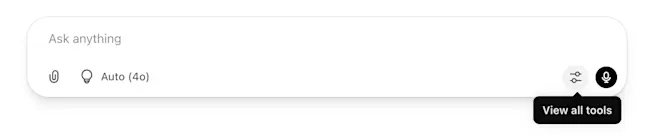
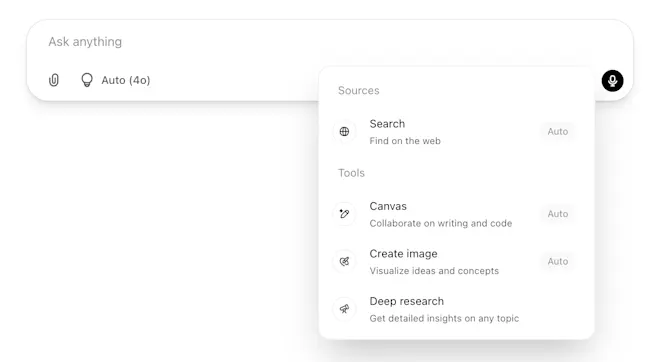
Publisher-provided interface illustrations in the current OpenAI guide, checked October 11, 2026. The source image filenames date to April 2025; they illustrate the controls and do not verify today’s model or every account’s interface. Current search instructions
Use this short sequence:
- 1Name the question you need answered.
- 2Request web search when current information matters.
- 3Review the response for source links and missing conditions.
- 4Open the source supporting the claim you will use.
Search the Web or Find a Saved Chat?
Web search looks for information outside your conversation. Sidebar search helps you find saved account content, including chats, projects, and files. Finding an old conversation does not update the facts inside it. If you need today’s answer, request a fresh source check in the conversation. Search overview
Give the Search a Decision to Support
A useful question tells ChatGPT what the information is for. Consider a team deciding whether to pilot web research in ChatGPT. A broad request for features may produce a product summary. The team needs access requirements, a starting procedure, and a way to check the answer before using it.
Our suggested prompt makes that job explicit:
A Public-Information Research Prompt
Search current official OpenAI documentation. We are evaluating ChatGPT web search for a small US business team. What access requirements and workspace restrictions should we check before a pilot? Explain how to start a search, cite the page supporting each material claim, and flag anything the documentation does not establish. State the date you checked.
We have provided this prompt for reuse. We did not run it or observe a team’s results. Replace the task and constraints with your own. An account’s actual settings still require an account-level check.
Three details make the request easier to evaluate:
- Decision: what you will choose or change after reading the answer.
- Scope: the country, product, version, plan, or time period that matters.
- Evidence: which sources should support the claims, and what should remain unresolved.
Source preferences guide the request; inspect the links returned to see whether they were followed. For a product capability, current vendor documentation is a useful starting point. For a comparison, you may also need independent evidence and the terms attached to each option.
Check the Claim Behind the Citation
A citation gives you a route to a source. Your next job is to see whether that source supports the claim you are about to use. Select an inline citation; the Sources control, when available, can show cited pages and other relevant links. Reviewing sources
Use this check on the consequential claim, rather than trying to investigate every sentence equally:
- 1Open the original page. Confirm that the link reaches the named publisher and document.
- 2Find the relevant passage. Look for the feature, figure, date, or requirement in the answer.
- 3Match its conditions. Check the product, audience, location, and any limits attached to it.
- 4Check its timing. Separate the document’s original publication, later updates, and the period the statement describes.
- 5Choose the next action. Use the supported claim, preserve its qualification, or seek evidence for what remains unknown.
The last step keeps verification useful. If the source establishes that your team can request access, you can begin that check. If it leaves a required feature or eligibility condition unresolved, obtain confirmation before committing to it.
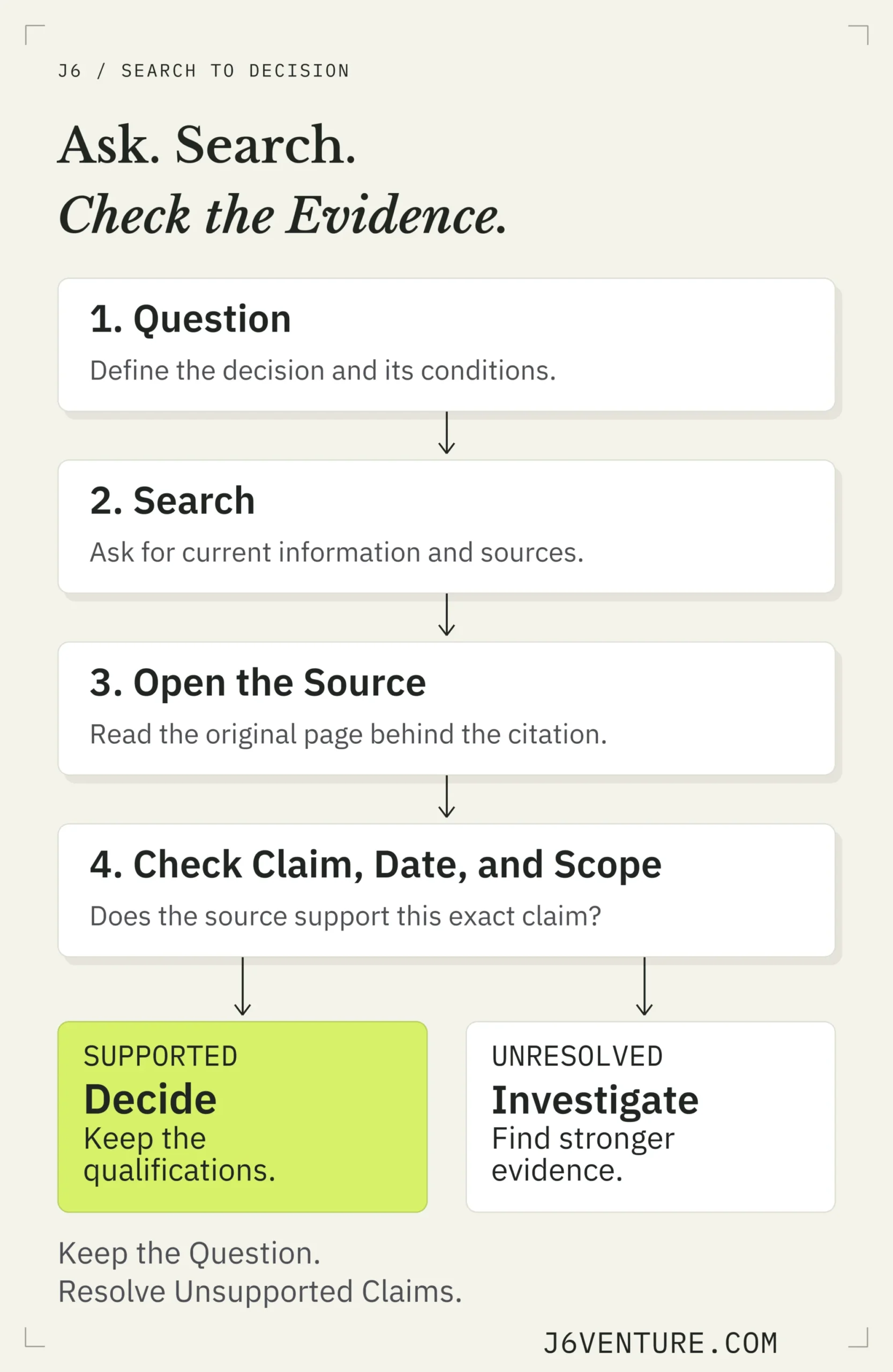
Our suggested sequence for checking a search answer. Investigating an unresolved claim can mean finding another source or asking the provider directly.
A Worked Example: What a Launch Page Can Establish Today
We checked a Google AI Overview for ChatGPT search on October 11, 2026, using US English desktop settings. It described the technology as a fine-tuned GPT-4o model and cited OpenAI’s 2024 launch article. The observation concerns Google’s answer on that date. We did not test ChatGPT’s own search accuracy.
The cited article does describe that model at launch. It also identifies itself as the 2024 introduction and directs readers to current product information. The historical statement is supported. Using it to identify today’s search model requires current evidence that the launch passage does not supply. The original launch page
That distinction changes the business decision. A team evaluating a pilot can check documented access and activation now. It should leave an assertion about today’s underlying model unresolved unless another current source establishes it.
| Question for the Pilot | Source and Relevant Passage | Scope and Decision |
|---|---|---|
| Can free users access search? | Search guidance, checked October 11, 2026; its Availability section includes Free and signed-out access, then qualifies usage limits. | Supported With Conditions: verify workspace permission and remaining usage before the pilot. |
| How do we request a search? | The same guide’s Search the web section lists View all tools → Search, and gives the slash-menu alternative. Checked October 11, 2026; exact update date unavailable. | Supported: follow this route; confirm the control appears in your interface. |
| Which model powers search today? | OpenAI introduction, October 31, 2024; How it works describes a fine-tuned GPT-4o model. Its notice identifies the page as the 2024 introduction. | Unresolved Today: the launch statement is historical. These inspected sources do not confirm today’s model. |
A source can be genuine and still answer a different question. Here, “what powered the launch?” and “what powers it today?” require different evidence.
Use a Small Evidence Table
Keep a short record when several people will rely on the answer. Our suggested format makes an unsupported assumption visible before it becomes a requirement in a brief or purchase decision.
| Claim | Source and Passage | Condition | Verdict | Next Action |
|---|---|---|---|---|
| Our intended users can access search. | Search guidance, Availability; checked October 11, 2026. It lists plans and signed-out access. | Search limits apply; managed access can be disabled. | Documented availability; our workspace is unconfirmed. | Verify the account and permission before the pilot. |
| The launch used GPT-4o. | OpenAI introduction, How it works; October 31, 2024. It names fine-tuned GPT-4o. | This describes the launch. | Supported as history; current model unresolved. | Exclude it from a current technical requirement. |
Copy these five fields for your next question: claim, source URL and passage, conditions, verdict, next action. Record when you checked the source, separately from its publication date. If you cannot locate a supporting passage, write what is missing and choose a next check. Repeating the answer in a more confident tone adds no evidence.
Choose ChatGPT Search, Google, or Deep Research
Choose the route that fits the question and the output you need. These are our suggested starting routes for each task. We have not benchmarked their accuracy or established an overall winner.
| Your Task | Useful Starting Route | What to Check Before Acting |
|---|---|---|
| Understand a bounded question using current public information. | ChatGPT Search. | Open the source behind the material claim. |
| Locate a named document or inspect an exact passage. | Google search or the publisher’s own site. | Confirm you reached the correct version and issuer. |
| Investigate a multi-step question across several sources. | Deep research, when available. | Review its plan, scope, report, and supporting sources. |
| Rewrite wording using information you already supplied. | Standard chat. | Preserve the facts and qualifications in your input. |
OpenAI describes deep research as a multi-source investigation that produces a documented report. It allows you to review a proposed plan and adjust the focus. Availability depends on your plan, country or territory, account, and workspace. Choosing it does not remove the need to inspect the report’s evidence.
For the pilot question, Search can help establish the documented access route. A broader procurement evaluation involving multiple tools, policies, and team requirements calls for a larger investigation.
Understand Location and Information Shared With Search Providers
OpenAI says search may rewrite a prompt into targeted queries and send them to search providers. Approximate location can influence results; optional device location and relevant saved memories may also affect a search. Include the city or market explicitly when it matters. Search and location guidance
The provider question needs scope, too. The Enterprise and Edu guide describes disassociated queries sent to Bing in those workspaces and identifies exceptions. That supports a scoped statement about those documented configurations. It does not establish a single exclusive search backend for every ChatGPT user and feature.
For a work question, use the account and tools your organization has approved. A public-information prompt can usually describe the business decision without including customer identities, private records, or confidential plans. Review applicable workspace policies before bringing those details into research. We recommend this way of handling work information; it provides no privacy guarantee.
What to Check When Search Is Missing or Results Look Wrong
Separate an access problem from an evidence problem. A missing control requires an account or interface check. A weak answer requires better source support.
| What You See | Next Check | When to Move On |
|---|---|---|
| Search is missing. | Try a new conversation or current app/browser; check account, usage limits, and workspace permissions. | If access remains unavailable, contact support or use an approved research route. |
| An answer cites an old page. | Check whether the claim is historical or about current conditions. Request a current source when needed. | Keep supported history within its original period; verify current applicability before acting. |
| A cited link is broken or lacks the claim. | Locate the original publisher’s document and inspect the passage. | Leave the claim unresolved if you cannot find support. |
| Sources disagree. | Compare scope, dates, definitions, and conditions. | Preserve the disagreement or seek direct confirmation if it affects the decision. |
| Local results show the wrong area. | State the city or postal code in the question. | Verify the selected business’s own current details. |
For a follow-up, name the repair you need: “Search the provider’s current documentation for this feature. Does it apply to this plan? Link the passage, including any conditions.” Treat the new answer as another candidate to check.
Set a stopping point: if an essential fact remains unsupported, take it to the original issuer or a qualified person responsible for the decision. More prompts should not become a substitute for missing evidence.
Can You Make ChatGPT Your Default Search Engine?
OpenAI documents a Chrome extension that sends address-bar searches into ChatGPT. With that extension set as your default, type !g followed by your query in Chrome’s address bar to search Google instead. For example, !g best CRM for small businesses sends that query to Google. Use the extension link in the current official guide if this fits your workflow.
Changing the starting point changes how you reach information. You still need to open the relevant source when a claim affects your decision. No extension installation is required to use ChatGPT Search in a conversation.
Finish With a Supported Next Step
Close the search by recording what you can do and what still needs checking. For the pilot example: “The documentation describes access and a search route. Check the intended workspace, run a public-information question, and open the supporting sources before extending the pilot.”
If your task is to make your own website eligible for retrieval and citation, use our separate guide to ranking in ChatGPT Search. It addresses the publisher’s job. For a reader using Search, start with one decision and carry the source supporting it into your next action.