
Microdata describes items and their properties through attributes in your HTML. It can tell a search engine which name, price, or rating belongs to which item. Google supports it, although JSON-LD is usually easier to maintain. When reviewing existing Microdata, trace a value to its owning item before changing the markup.
A page can look exactly the same after a template edit while describing something different to a machine. That is the maintenance risk worth understanding.
We tested it using MDN’s public Microdata example. Removing two attributes left the text unchanged but moved the price and currency onto the wrong item in the validator’s output. Restoring the boundary repaired that defect.
What Is Microdata in SEO?
Microdata is a way to express structured data inside HTML elements. An item represents something, such as an application or an offer; properties describe it. The HTML defines the boundaries that connect those properties to their item. WHATWG specifies this item-and-property model.
Three terms describe different parts of the setup:
- Microdata is the HTML syntax used to express the data.
- Schema.org supplies type and property names, such as
SoftwareApplication,Offer, andprice. - A Google rich result is a search feature with its own requirements. Using a Schema.org term does not automatically qualify a page for that feature.
This article uses Microdata in its HTML meaning. Statistical microdata refers to individual records in a dataset and serves a different purpose. For the wider vocabulary, see our SEO terms glossary.
Does Google Still Support Microdata?
Yes. Google supports Microdata, JSON-LD, and RDFa. It recommends choosing a format that is easy to implement and maintain, which is usually JSON-LD. Google describes all three as equally acceptable when valid and properly implemented. Existing, accurate Microdata therefore needs an implementation review before a migration decision. Google’s supported formats.
The SEO benefit is a clearer structured description and, for applicable content, eligibility for supported search features. Google says correct markup does not guarantee that a rich result will appear. A format change alone supplies no forecast of better rankings, traffic, or AI citations. Google’s structured data guidelines.
How Do the Five Microdata Attributes Work?
Read these attributes as instructions about ownership and meaning:
| Attribute | What It Does | What to Check |
|---|---|---|
itemscope |
Creates an item | Where the item starts and which properties fall within its scope |
itemtype |
Identifies the item’s type | A specific type URL, such as https://schema.org/Offer |
itemprop |
Names a property | Which item owns the property and how its value is read |
itemid |
Supplies a global identifier for an item | Whether that identifier represents the intended item |
itemref |
Adds property-bearing elements elsewhere in the document | The referenced HTML element IDs and their properties |
itemref refers to HTML element IDs, rather than itemid values. It can associate properties outside an item’s descendants, so inspecting indentation alone will not reveal every relationship. These attribute definitions come from MDN’s Microdata guide.
The three attributes you will use to follow the example are itemscope, itemtype, and itemprop. An element can be both a property of an outer item and the start of a nested item. That is how an application’s offers property can contain an Offer with its own price.
A Public Example: The Same Text, a Different Meaning
MDN’s documentation example describes an Angry Birds SoftwareApplication, an aggregate rating, and an offer. Its price, currency, and rating are historical teaching values. They are not verified current facts about the game.
On October 11, 2026, we submitted MDN’s HTML to the Schema Markup Validator, changed only the Offer boundary, and then restored it. This was a controlled test of public documentation code. We did not change MDN’s website or measure search performance.
The important relationship is:
SoftwareApplication → offers → Offer → price / priceCurrency
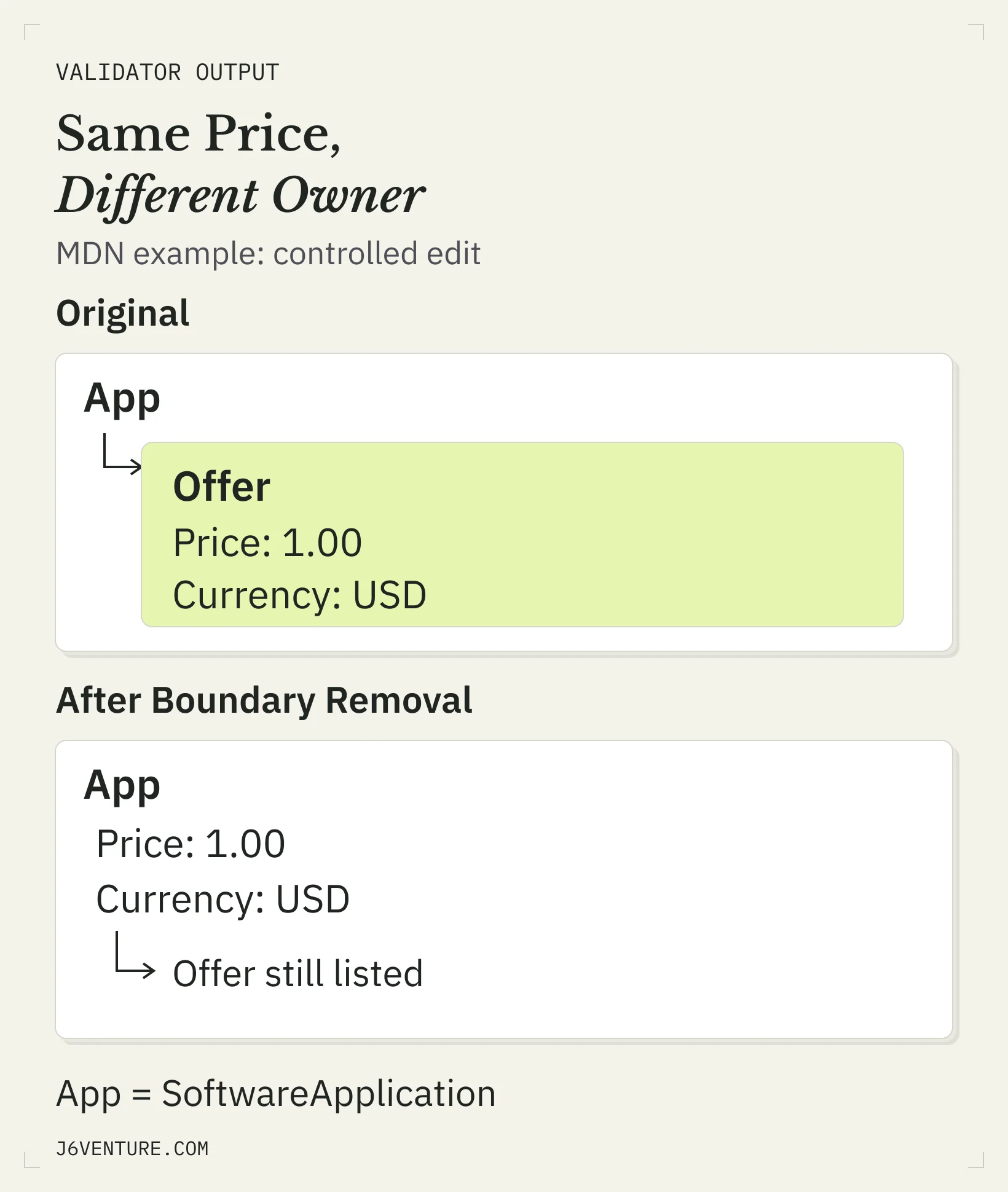
The relationship being checked is which item owns the price and currency. The surrounding page text can remain unchanged.
Trace the Original Offer
Relevant MDN excerpt, reformatted onto shorter lines:
<div itemprop="offers"
     itemscope
     itemtype="https://schema.org/Offer">
  Price: $<span itemprop="price">1.00</span>
  <meta itemprop="priceCurrency" content="USD" />
</div>
itemprop="offers" connects this element to the application. itemscope creates a nested item, and itemtype identifies that item as an Offer. The price and currency inside it belong to that Offer.
The original test returned zero errors and zero warnings. Its detected Offer contained price: 1.00 and priceCurrency: USD.
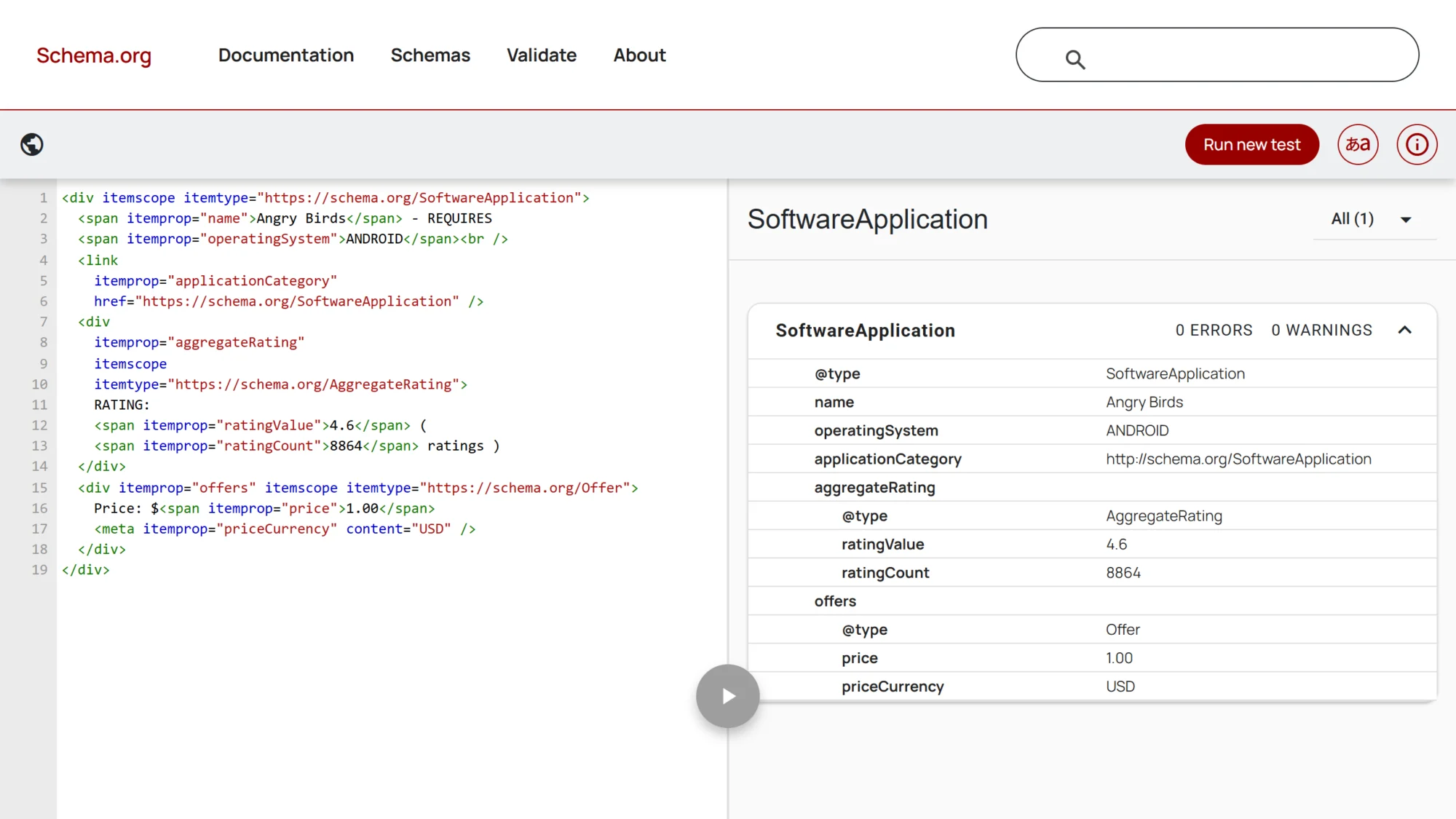
Original MDN documentation code, tested October 11, 2026. The detected Offer contains the price and currency. This result checks the example’s schema output; it establishes no Google search outcome.
Remove the Item Boundary
We removed itemscope and itemtype from the Offer’s opening tag, leaving:
<div itemprop="offers">The price, currency, and surrounding text stayed the same. The nested item boundary was gone, so the price and currency were now properties of the outer SoftwareApplication.
The validator returned zero errors and two warnings. Both warnings concerned those moved properties: price and priceCurrency were unrecognized for SoftwareApplication.
| Check | Original Example | Controlled Change |
|---|---|---|
| Visible price text | Price: $1.00 |
Price: $1.00 |
Owner of price |
Nested Offer |
SoftwareApplication |
Owner of priceCurrency |
Nested Offer |
SoftwareApplication |
| Validator result | 0 errors, 0 warnings | 0 errors, 2 warnings |
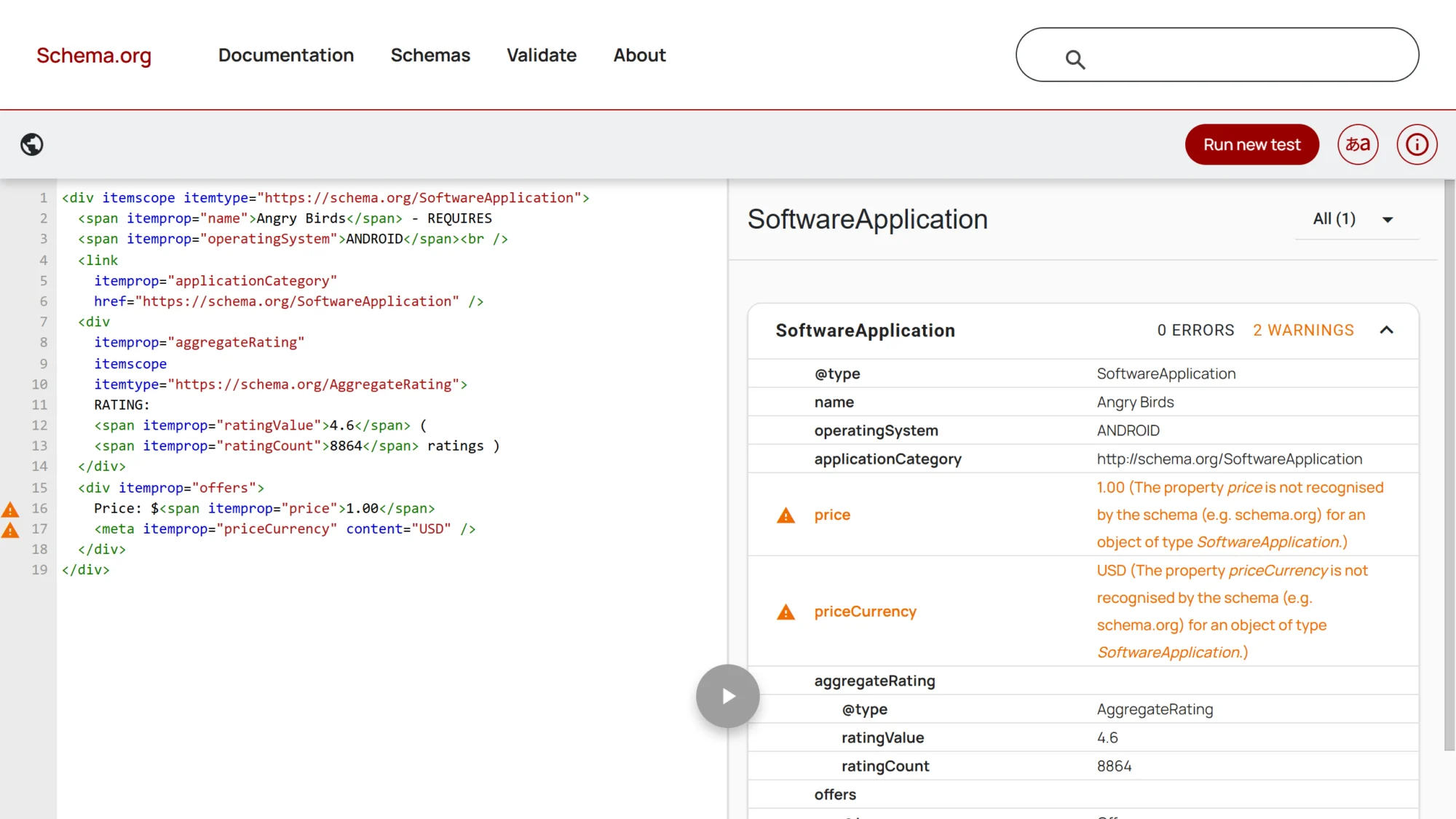
Our deliberate change to the documentation example. The warning rows show price and currency on SoftwareApplication. A zero-error count alone misses the two warnings.
The validator still displayed an Offer under offers, with name: Price: $1.00. That displayed Offer did not contain the intended price and currency properties. Looking only for an Offer in the result would therefore miss the changed ownership. Read its actual properties.
Restore the Boundary and Recheck
We restored the original itemscope and itemtype attributes and submitted the code again. The price and currency returned to the nested Offer, and the validator returned to zero errors and zero warnings.
For this defect, the repair was restoring the intended item boundary. Changing the serialization format was unnecessary to demonstrate the fix.
The lesson is a release check: verify the item that owns a value, even when the page still looks right. The same markup principle can guide inspection of other templates; their actual properties and requirements need their own checks.
Where Does a Microdata Property Get Its Value?
A Microdata property’s value depends on the element carrying itemprop. Ordinary text elements supply text, but some elements supply an attribute value. An element with itemscope supplies a nested item. This makes the HTML element and its attributes part of the data you are publishing. WHATWG’s value rules.
Common cases worth recognizing:
- A
spanwithitemprop: normally supplies its descendant text. MDN’s price span supplies1.00. - A
metaelement: supplies itscontentattribute. MDN’s currency element suppliesUSD. - An
aorlinkelement: supplies the URL fromhref, resolved against the document URL. - An
imgelement: supplies the URL fromsrc, rather than its alt text. - A
timeelement: supplies its datetime value; adatetimeattribute can provide a machine-readable representation of the displayed date. - An element with both
itempropanditemscope: supplies the nested item, as the original Offer does.
This explains why changing a tag or attribute can change the extracted value without changing the words a reader sees. Inspect the value source as well as the item’s boundary.
A machine-readable currency code or date can accurately represent a visible fact. That differs from inventing ratings, reviews, or other substantive claims hidden from readers. Google’s policies require structured data to represent the page accurately and satisfy applicable content requirements. A syntactically usable attribute is only one part of that check.
Should You Keep, Fix, or Migrate Your Microdata?
Keep accurate Microdata that has an accountable owner and survives the template changes you make. Fix a boundary or value defect when the existing implementation is maintainable. Consider JSON-LD migration when the inline structure repeatedly breaks or the publishing setup is difficult to control. These are maintenance decisions based on your implementation.
Our suggested decision table connects the observation to work you can verify:
| Observation | Next Action | Completion Check |
|---|---|---|
| Intended items and values are accurate; the template has an owner | Keep the Microdata and include it in release checks | Important property paths remain correct after a change |
| A nested boundary is missing, as in our controlled test | Repair that boundary | Intended owner and values return; relevant warnings are resolved |
| An attribute publishes a stale or wrong value | Fix the value’s source or mapping | Extracted value matches the current page fact |
| Theme, plugin, or custom code publishes contradictory versions | Identify and reconcile the producers | Output describes consistent facts, with clear implementation ownership |
| Repeated template edits break inline relationships | Assess a planned JSON-LD migration | Intended items and relationships are preserved in maintained output |
JSON-LD makes nested data easier to express without interleaving attributes through visible HTML. It still needs accurate inputs and synchronization with the page. Moving an outdated price into JSON-LD preserves an outdated price.
Before migrating, record the intended items, identifiers, relationships, and important values. Compare that meaning with the replacement output and reconcile the old producer. Adding another script while leaving contradictory inline markup creates more output to maintain.
For a wider review of which schema belongs on which page, use our schema markup decision guide. For an article-specific implementation, our Article and Blog Schema guide owns that separate task.
How Do You Check a Microdata Template Change?
Use three checks together: read the detected item relationships, check the applicable Google feature requirements, and verify the deployed page. Each answers a different question. The workflow ends when the intended meaning is present in the actual output and any relevant eligibility issues have been addressed.
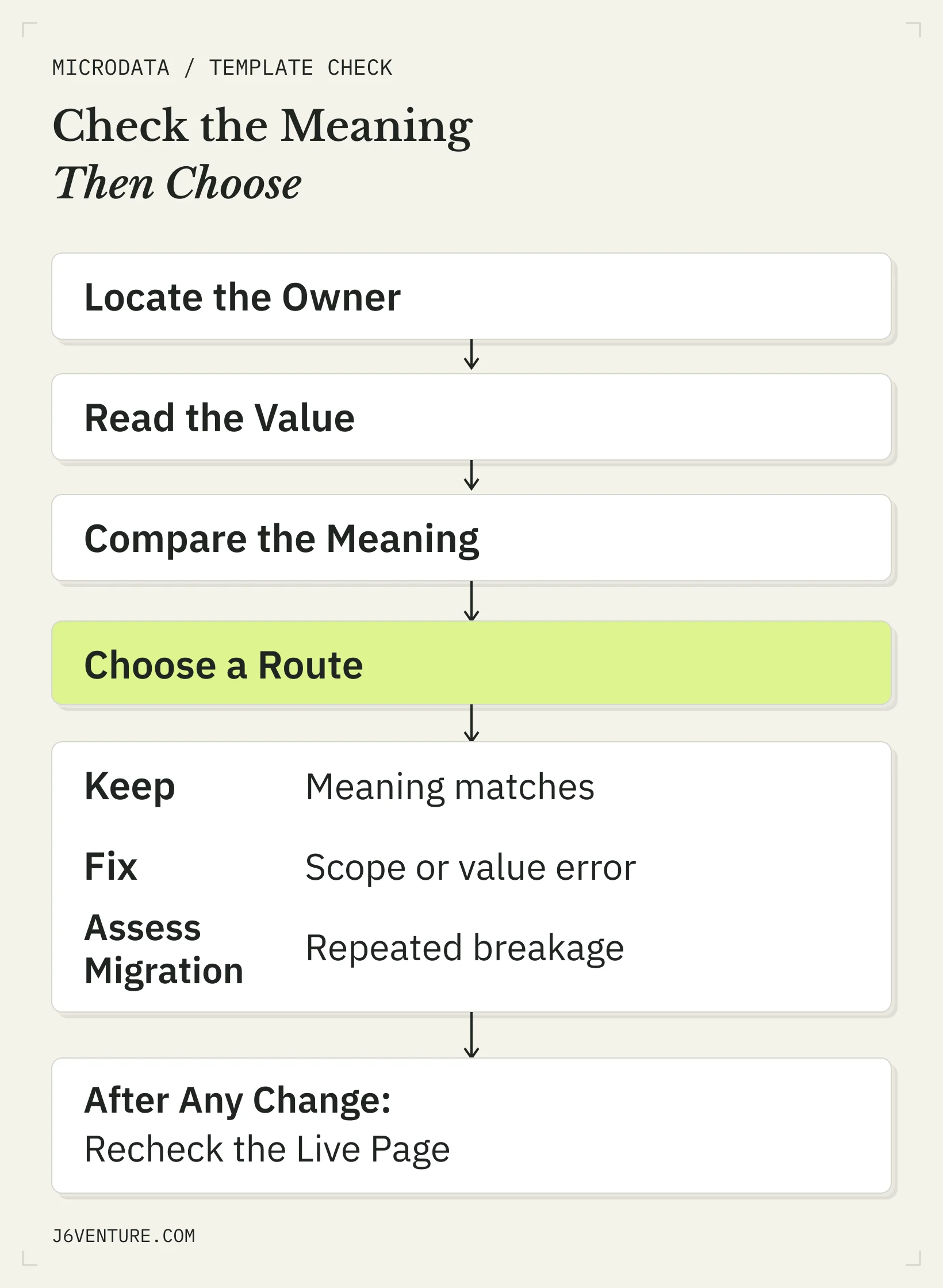
Choose the action from the observed implementation. A planned migration needs an equivalent-meaning comparison; a boundary defect needs a specific repair.
Read the Detected Items and Values
Ask your developer to locate itemscope, itemtype, and itemprop in the page’s delivered or rendered HTML and identify the producing template or plugin. If the page publishes only JSON-LD, the inline-boundary check in this example does not apply.
Start with one property, such as the price in the public example. Locate its item, read the extracted value, and compare both with the intended meaning. Inspect the relevant nested properties and warnings in the Schema Markup Validator.
The acceptance statement should name the relationship: “The Offer owns price and currency.” A count of detected items or errors leaves that relationship unstated.
Check the Intended Google Feature
If the page targets a supported Google rich-result feature, consult that feature’s current documentation and use the Rich Results Test. Its checks address Google’s supported features. The Schema Markup Validator addresses Schema.org markup more broadly.
A type can have a valid Schema.org description without a corresponding Google rich-result feature. Even eligible markup can remain undisplayed. Keep the feature requirement, the tool result, and actual search appearance separate in your report.
Verify the Deployed Page
After the approved change goes live, test the actual URL and inspect the HTML available to the relevant tool. A correct code snippet does not establish that the theme or plugin deployed it correctly.
Check that:
- The intended item boundaries and property values survived deployment.
- The page’s visible facts agree with the structured description.
- Another producer has not left conflicting markup in the output.
- Google’s access and feature requirements are met where a Google search feature is the goal.
For a shared template, include representative pages that exercise different branches, such as an optional rating or offer. Choose those pages from the template’s actual behavior. A successful test of one branch leaves the others untested.
What Should You Send Your Developer?
Send a property-level finding with a completion condition. The controlled example gives a short model:
| Field | Finding From Our Test |
|---|---|
| Artifact | MDN documentation HTML, deliberately modified for this test |
| Intended relationship | SoftwareApplication → offers → Offer → price / priceCurrency |
| Change location | Opening tag of the div carrying itemprop="offers" |
| Example values | price: 1.00; priceCurrency: USD, historical teaching values |
| Observed defect | Price and currency attached to SoftwareApplication; two warnings |
| Repair | Restore the Offer’s itemscope and specific itemtype |
| Completion evidence | Correct property ownership and zero warnings after restoration |
| Production owner | Identify the person responsible for your theme, plugin, or template |
For your page, add its URL, the affected template or component location, the current value, the fact it should match, the source that maintains that fact, and the planned recheck. This makes the requested change small enough to implement and test.
Start With One Important Value
Choose one page and one value that matters to its meaning. Find the owning item, check how the value is read, and compare the detected output with the page’s facts.
In our public-example test, that meant restoring the Offer boundary and rechecking price and currency. Your next action should follow the defect you observe. Correct, maintained meaning is the immediate deliverable; search outcomes need separate evidence.