A new keyword can send a team straight into commissioning another article. Check the pages you already have first. A pricing page, a product overview, and a setup guide might all mention the same software while helping people do different things.
An intent map makes that choice explicit. It gives the editor a reason for assigning a query to a page and gives the writer a defined job. Below, you will learn the method, then apply it to real public Slack pages, including a broad query that needs another check before choosing a destination.
An intent map is a record of a content decision: for this search task, this page is the proposed destination, for these reasons. The useful output includes a URL or proposed asset, the task it serves, and the action the team should take.
Consider the difference between someone checking what a subscription costs and someone trying to connect two products. Both searches may contain the same brand name. One task needs a clear plan and billing explanation; the other needs instructions for a specific setup. A general article about the brand could leave either person searching again.
The map can point to an existing page, recommend a supported change, propose a missing asset, or leave the choice open. Choosing an existing page may require no new writing. Proposing an asset requires an unmet task and a useful role for that page, not simply an unused keyword.
Keep the Task, Intent Label, and Page Type Separate
These three fields answer different questions:
| Field | Question It Answers | Illustrative Entry |
|---|---|---|
| Search task | What is the person trying to accomplish? | Understand the steps for a particular product connection |
| Intent label | What broad kind of search is this? | Informational, possibly navigational when seeking a known help page |
| Page type and format | What asset could deliver the help? | A support article organized as a setup tutorial |
The common labels are informational for learning, commercial for evaluating options, transactional for completing an action, and navigational for reaching a particular site or page. They are useful shorthand. Ahrefs' guide to search intent also explains that categories can overlap.
A label leaves much of the assignment unfinished. Two informational searches could need an explanation and a calculator. A pricing search could come from a prospective buyer or an existing customer checking a bill. Learning a setup process can happen after purchase. Record buying or customer context when you have evidence for it; the label alone cannot tell you who the searcher is or where they are in a sales funnel.
Keyword clustering groups related queries. Intent mapping asks which destination can complete their tasks. A content brief then tells someone what to create or change on a selected page. These decisions connect, but a cluster name or a brief does not settle the destination by itself.
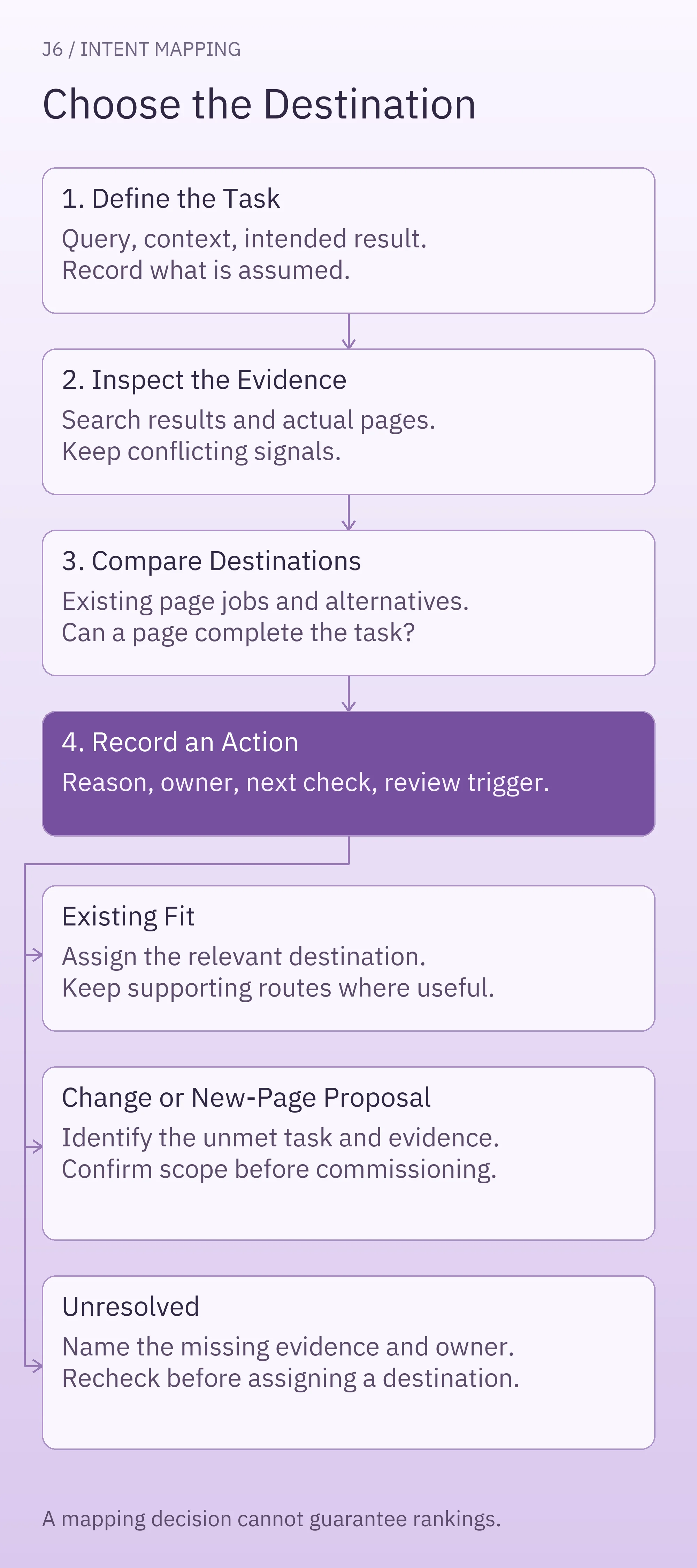
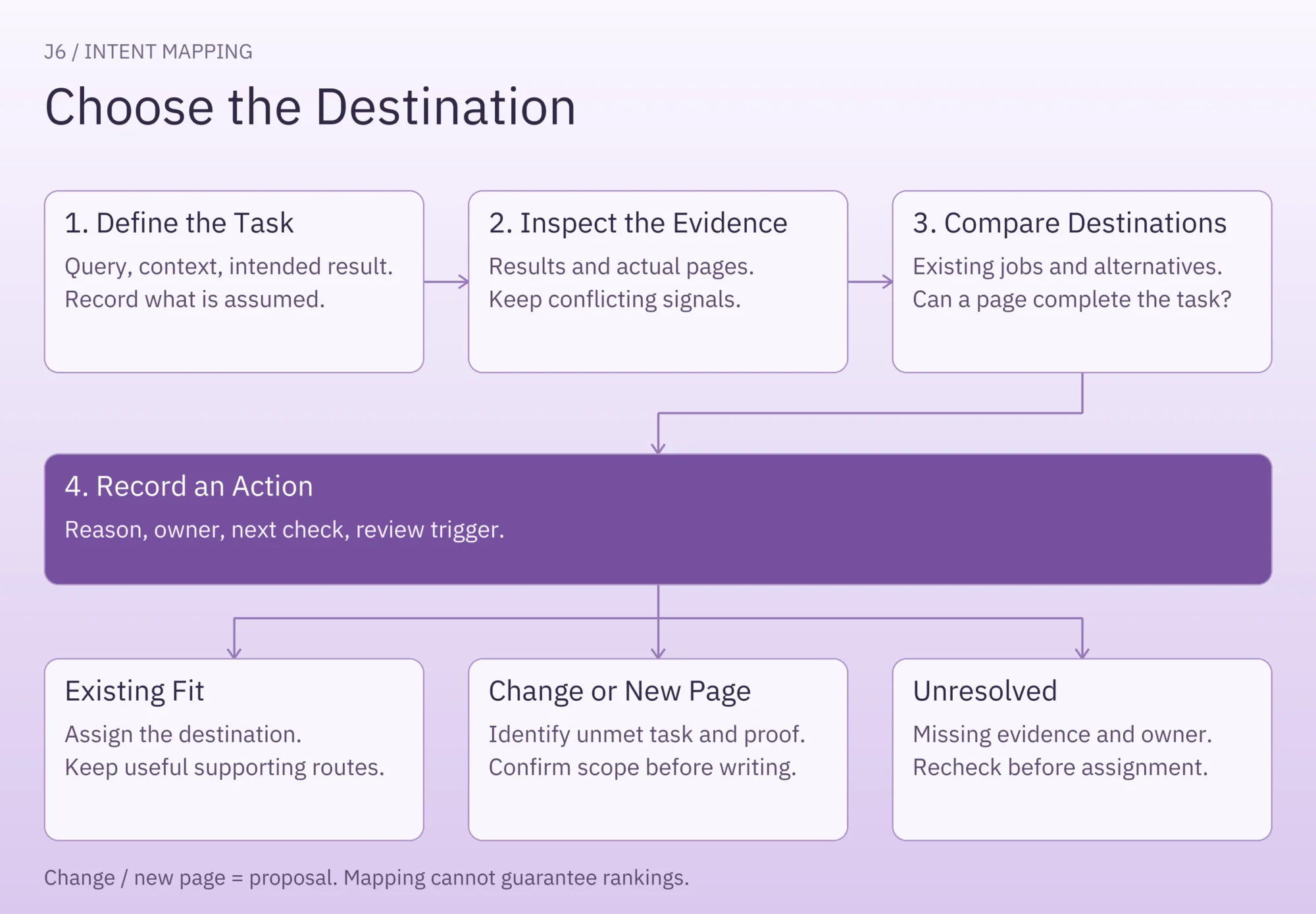
How to Map Search Intent Step by Step
Start with a small group of related queries and the relevant pages your organization already has. A spreadsheet is enough for the decision record. Use search results to investigate the task, and use the actual page content to judge the destination.
Step 1: Define the Query and the Task You Are Testing
Write down the exact query, target market, language, and research date. Include the device or other search context when known. Then write a provisional task as something a person can accomplish: compare costs, choose an option, diagnose an error, or complete a setup.
Keep your assumption visible. For “Slack pricing,” you might test the task “inspect the vendor's plan costs and billing basis.” That is a useful editorial starting point; it does not establish every searcher's motivation.
Also define whether the task is relevant to the audience your organization serves. If a query refers to a different product or a need you cannot help with, record that reason for leaving it outside the content plan. An attractive keyword does not create a useful page assignment.
Step 2: Inspect the Results and the Pages Behind Them
Search in the market and language you intend to serve. Record the search engine or provider, date, requested location, and any localization uncertainty. Results can vary with context; Google describes several ranking considerations, including query meaning, relevance, quality, usability, location, and settings.
Inspect enough of the result set to understand the plausible tasks and any conflicting patterns. Open the relevant pages. A title that says “integration” could lead to a product overview, an installation guide, or a directory listing. The body reveals which job it actually performs.
For each useful result, retain a URL and a short observation:
- Page type: product, pricing, help article, tool, comparison, or another asset.
- Format: a tutorial, list, comparison table, video, or another presentation.
- Focus: the specific audience, problem, product version, or scope it addresses.
- Useful delivery and limits: what the person can do there, plus relevant prerequisites or missing answers.
Ahrefs calls content type, format, and angle the three Cs. It is a practitioner framework for inspecting results, not an official Google classification. Use it to organize observations without treating the most common format as a guaranteed ranking recipe.
Keep observations separate from conclusions. “This page contains an administrator setup sequence” is an observation. “It is a plausible destination for this specified setup task” is your interpretation. A keyword tool's intent label can help sort a list, but a disagreement with inspected pages is a reason to investigate, not to discard the conflicting evidence.
Step 3: Compare Existing Destinations Before Proposing a Page
List the existing pages that could serve the task. You can use your CMS inventory to find candidates, then inspect their actual content. Compare what each lets a visitor complete, including important eligibility, version, or access conditions.
Choose the narrowest useful action supported by that comparison:
- Use an existing page when it already completes the task. Record the assignment and any supporting route the visitor may need.
- Revise an existing page when its core job fits but a specific, evidenced gap prevents completion. Name the gap and the change required.
- Propose a new asset when the relevant inventory has no suitable destination and a distinct useful task justifies one. Confirm its scope before commissioning it.
- Leave the assignment unresolved when the task or page fit remains uncertain. Record the next check and who will do it.
Several queries can share a destination when the same page can complete their tasks coherently. Compare the required answer, format, scope, and next action. Similar wording or the same broad intent label is insufficient. If one query needs an overview and another needs detailed setup instructions, those jobs may be served by separate linked pages.
Overlapping results are useful evidence to examine, but they do not prove that one URL must own every query or that existing pages are harming each other. Preserve the actual task differences before recommending a new page, consolidation, or redirect. Those larger changes need their own support.
Step 4: Record the Decision, Next Action, and Remaining Questions
A usable row explains both the assignment and the work that follows. Name the query, task, observed evidence, candidate destinations, proposed owner page, reason, status, and responsible person.
Make the next action specific. “Improve content” leaves the editor to repeat the diagnosis. “Add the missing billing explanation to the existing pricing page, after the product owner confirms the terms” identifies a change and a dependency. This is an illustrative instruction, not a finding about Slack's pricing page.
For an unresolved row, specify what would let you decide: the intended workflow, an unknown prerequisite, more appropriate query evidence, or the content of a candidate page. Give that check an owner. If several tasks remain valid, conditional routes may be the honest output.
Record a review trigger as well: a product change, a revised page, a changed result pattern, or a scheduled editorial review. After implementation, check that the page delivers the agreed task. Rankings, visits, and business outcomes require separate measurement; the completed map alone does not establish them.
A Worked Search Intent Map Using Slack Pages
This is an illustrative editor's assignment using public pages inspected on October 25, 2026. It demonstrates our reasoning about page fit, not Slack's internal SEO decisions or results.
We requested US English web results through Firecrawl for three queries and inspected the relevant official pages. Device and physical localization were not verified. Each supplemental search returned three URLs in provider order, not verified Google positions. The small samples help compare candidate page jobs; they do not establish search demand or every possible interpretation.
Map a Pricing Task to the Pricing Page
1. Define the task. Query: “Slack pricing.” For this assignment, the task is to inspect the vendor's plan costs, billing bases, and plan differences. Actual searcher identity and buying stage remain unknown.
2. Inspect the evidence. Slack's pricing page presents plan pricing, billing information, a feature comparison, and billing FAQs. Its plans and features help page compares feature availability and links to pricing.
3. Compare destinations. Select the existing pricing page for the specified cost-and-plan task. The help page is a credible alternative for a question about which features a plan includes, but the pricing page presents the cost and billing information more directly.
4. Record the action. In this illustrative map, assign the task to the pricing page and retain the help page as a supporting resource. No new article or page change follows from this evidence. If the actual assignment concerns an existing customer's specific billing problem, revisit the task and the relevant support destination.
This example does not recommend a plan or adopt any captured price as a current quote.
The roles and follow-up rules in these records are illustrative editorial assignments, not Slack staffing or calendar information.
Recorded Map Decision
- Query and task: “Slack pricing”; inspect plan costs, billing bases, and plan differences.
- Destination and status: Existing pricing page selected for this narrowed task. Plans/features Help remains a supporting route for feature questions.
- Reason: The pricing page directly presents the cost and billing information. The alternative concentrates on feature availability.
- Action and owner: The assigning editor or SEO lead saves this illustrative assignment. No page edit is proposed.
- Complete when: The record identifies the cost-and-plan task, pricing destination, comparison evidence, and supporting help route.
- Recheck when: The pricing page, plans, or intended task changes.
Map a Setup Task to the Relevant Help Page
1. Define the task. Query: “how to connect Salesforce and Slack.” Narrow the assignment to following the connection workflow described in Slack's current help article. A real editor must confirm that this is the product route the intended audience needs.
2. Inspect the evidence. Connect Salesforce and Slack supplies a sequence for requesting, approving, and activating a connection, plus account mapping. It identifies roles and conditions that affect setup. The Salesforce integration overview explains capabilities and offers several product and resource routes; it does not provide the same complete setup sequence.
A second help result needs particular care. Salesforce's app setup article explicitly identifies its Salesforce for Slack app as legacy. Its instructions belong to a different route. Similar titles do not make those instructions interchangeable.
3. Compare destinations. For the narrowed current-workflow task, select the Slack connection help page conditionally. An overview can help someone understand the offering before setup. The legacy article could serve a legacy-specific task, which this assignment has not selected.
4. Record the action. The assigning editor confirms the workflow, intended audience, permissions, and applicable conditions before releasing the page assignment. Keep the authoritative help page as the destination; this intent-mapping exercise supplies no reason to publish another setup tutorial or combine instructions from different routes.
No authenticated installation was performed for this example.
Recorded Map Decision
- Query and task: “how to connect Salesforce and Slack”; follow the current connection workflow described in Slack Help.
- Destination and status: Conditional existing-page assignment to the current Slack connection help article.
- Reason: It supplies the relevant setup sequence and conditions. The overview serves a broader explanation; the legacy article concerns another route.
- Action and owner: The assigning editor confirms the intended workflow, audience, roles, permissions, and applicable conditions with the relevant product or support owner.
- Complete when: Those checks confirm that this help article applies to the chosen task. If they do not, keep the destination open and investigate the appropriate route.
- Recheck when: The product workflow, audience requirements, or source instructions change.
Keep a Broad Integration Query Open
1. Define the task. Query: “Slack Salesforce integration.” The intended task is unspecified. It might involve understanding capabilities or finding setup instructions; the wording alone leaves that open.
2. Inspect the evidence. The returned official candidates included the Salesforce integration overview, Slack's connection help page, and Slack's CRM feature page. Their bodies serve overview, setup, and broader CRM-use-case jobs. The CRM page also links to the connection help article, showing an existing route from overview to setup.
3. Compare destinations. Keep the assignment to one main destination undecided. Selecting an overview would be defensible after choosing an overview task; selecting help would require a setup task and the appropriate product conditions. These three pages do not establish one inherently correct destination for everyone issuing the broad query.
4. Record the next check. Assign the unresolved row to the editor or SEO lead. They must first decide whether the audience needs an overview or setup instructions and which product connection applies. Then search again for that task and check the relevant pages. Choose a destination when they can explain why it fits, what role the other useful pages serve, and what remains uncertain.
If several tasks remain valid, keep conditional routes or the unresolved status. The small overlapping result sets do not justify inventing a new page, merging existing pages, or declaring a cannibalization problem.
Recorded Map Decision
- Query and task: “Slack Salesforce integration”; the intended task is still unspecified.
- Destination and status: Unresolved. Retain the overview, current setup, and CRM overview candidates.
- Reason: The observed pages serve different useful jobs, and the query alone does not choose between them.
- Action and owner: The editor or SEO lead defines the intended task and product route, then checks task-specific results and candidate pages.
- Complete when: The record can explain the task, supporting evidence, destination, role of the other useful routes, and remaining uncertainty. Conditional routes or an unresolved status remain valid if the check cannot justify one main destination.
- Recheck when: The intended task is clarified or relevant new query/page evidence becomes available. Assign a follow-up date when assigning the investigation.
A Reusable Search Intent Mapping Template
Use one record per query or supported query group. Copy the fields below into a spreadsheet or document. Keep the sources beside the decision so another editor can check your reasoning.
| Field | What to Record |
|---|---|
| Query and scope | Exact query or evidenced group; market, language, date, provider, and known device/localization limits |
| Task and context | Intended accomplishment; what is observed, assumed, or still unknown about the audience and product route |
| Observed evidence | Relevant result/page URLs, actual page jobs, useful content, conditions, and conflicting signals |
| Candidate destinations | Existing URLs considered, or the distinct unmet task behind a new-asset proposal |
| Decision and reason | Status: selected, conditional, or unresolved; destination and reason; why plausible alternatives serve another role or the choice remains open |
| Action, owner, and completion | Use, revise, propose, investigate, or exclude; responsible person; required change or next check and what completes it. An unresolved row records an investigation, not a page edit |
| Review trigger | Scheduled review date or the product, page, or search change that should reopen the decision |
A keyword group needs a reason for sharing a destination. An unresolved assignment needs a next check. Neither field should acquire certainty simply because a spreadsheet requires a value.
Check the Map Before You Commission Content
Choose one query you are about to assign. Can another person follow the evidence from its task to the proposed page, see why the alternatives were treated differently, and identify the next action? If so, the map is usable for that decision. If an essential fact remains unknown, give the check an owner before commissioning work that depends on it.
When the chosen action is to write or revise an article, carry its reader task, scope, sources, and conditions into an SEO content brief. A pricing-page assignment may instead need a product owner; a setup page may need support or engineering review. Give each destination the handoff its job requires.
Start with that one defensible assignment. The next page in your plan should have a clear reason to exist and a clear job to complete.