You can write a useful service page and still leave it difficult to discover. You can make a page accessible and still leave visitors unsure what you offer. The component labels help you separate those problems and bring the right work together.
What Are the Main Components of SEO?
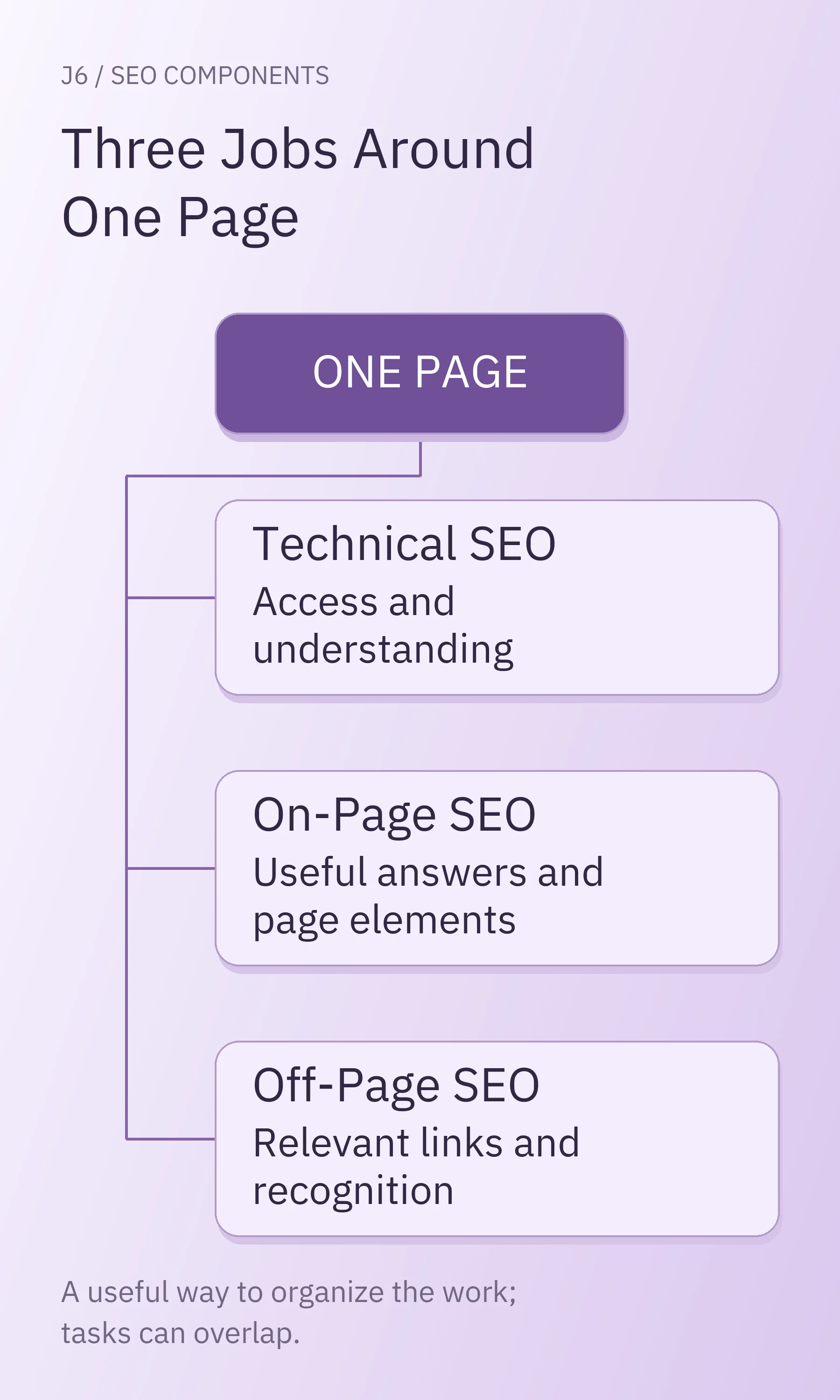
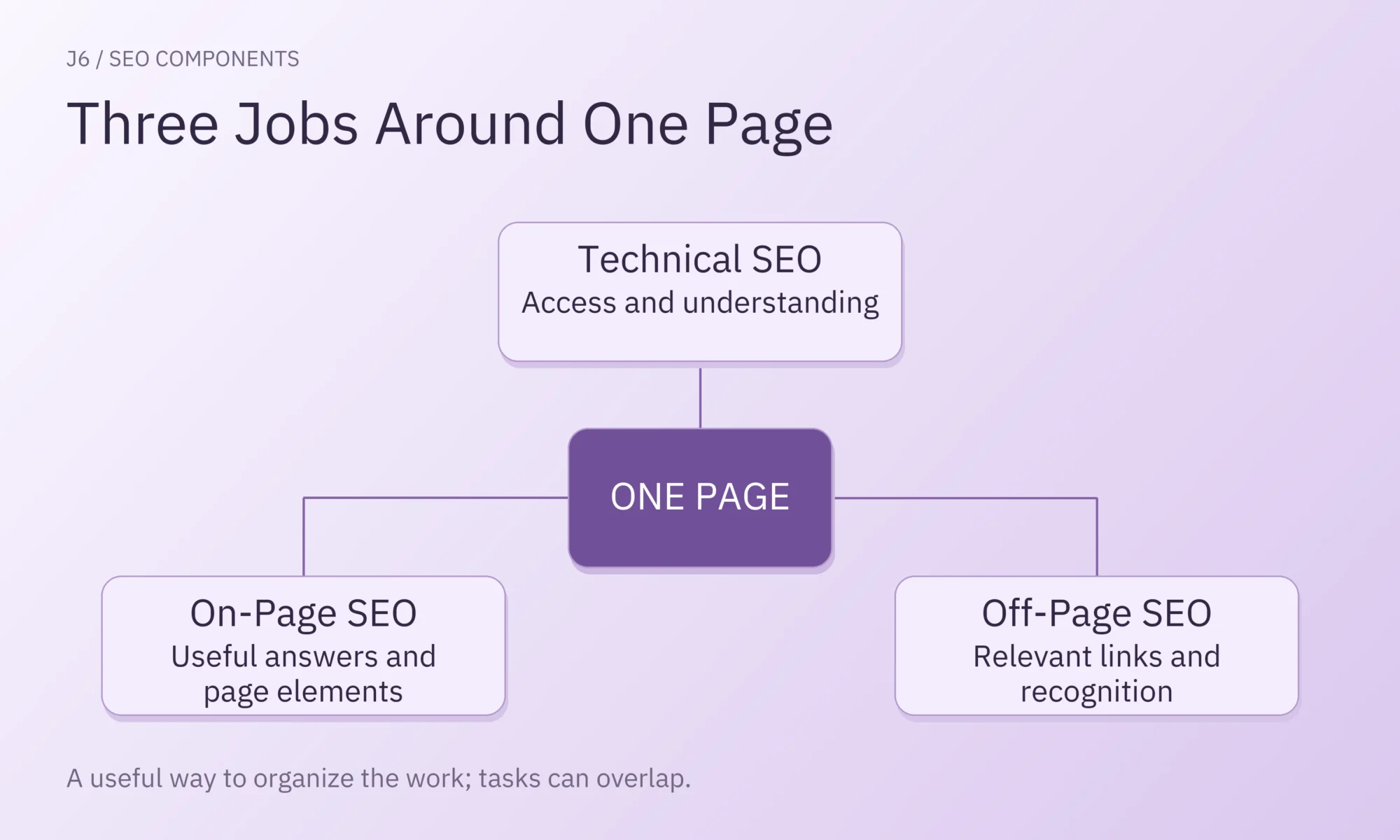
SEO means search engine optimization. Technical, on-page, and off-page SEO are broad categories for organizing work that supports a website in unpaid search. They describe different contributions to the same page. They are not three settings you switch on, three equally weighted ranking factors, or three departments every business must hire.
| Component | The Job It Helps With | Familiar Work |
|---|---|---|
| Technical SEO | Make intended public pages accessible and understandable to search engines | Crawl and indexing settings, site structure, rendering, and performance |
| On-Page SEO | Give the reader a useful answer and make the page's purpose clear | Search intent, content, titles, headings, images, and relevant internal links |
| Off-Page SEO | Help people discover and recognize the work through other sites and channels | Earning relevant backlinks, sharing the page with an appropriate audience, and mentions by other publishers |
The boundaries overlap. A link from your services page to a detailed service page can help a visitor find the answer and help Google discover that URL. You could discuss it under on-page SEO or technical site structure. The work is the same whichever heading appears in your plan.
Google's SEO Starter Guide explains SEO through helping search engines understand content and helping people decide whether to visit. Use that purpose to evaluate the work behind the labels.
Why Do Some Guides List More SEO Components?
Guides count components differently because they separate related activities at different levels. A three-part model can include content within on-page SEO. A longer model can give content, keyword research, or user experience its own category. Compare the underlying work before concluding that one list is missing something.
For example, SUSO groups SEO into technical work, content, and links. Timmermann Group's six-part explanation separates keyword research, on-page SEO, content, off-page SEO, technical SEO, and user experience.
Neither count tells you how much effort your website needs. This map makes the overlap easier to recognize:
| A Label You May See Separately | Where It Fits in the Three-Part Model |
|---|---|
| Keyword Research | Helps define the questions, language, and page purpose behind on-page work |
| Content | The substance of the answer, grouped here within on-page SEO |
| User Experience | Crosses content, navigation, design, and technical performance |
| Link Building | An off-page activity when another website links to yours; internal linking is different |
| Local SEO | Applies several components to searches with a local business or place context |
The “three Cs” is another shorthand: content, code, and credibility. Kent Lewis uses that grouping in Anvil Media's explanation. That older article is evidence of the grouping, rather than a source for current implementation advice. The grouping does not define a separate set of Google requirements. The labels alone also leave out distinctions: credibility can depend on the evidence and authorship on your page as well as recognition elsewhere.
Technical SEO Helps Search Engines Reach and Process Your Pages
Technical SEO addresses how a site delivers and organizes its content for search engines. For a page intended to appear in search, the relevant questions include whether Google can fetch it, process its content, and consider it for indexing. A technically accessible page still needs a useful answer.
Crawling, Rendering, and Indexing Do Different Jobs
Crawling is fetching a page. Rendering processes the page's code to understand what it presents. Indexing involves analyzing content and potentially storing information about it for search. When someone searches, Google selects results relevant to that query from its index.
Google's explanation of how Search works distinguishes crawling, indexing, and serving results. A discovered address has not necessarily been crawled; a crawled page has not necessarily been indexed; an indexed page will not necessarily appear for the search you care about.
Controls also do different jobs. A robots.txt rule can restrict crawling. A noindex instruction tells Google not to include a page in Search, and Google must be able to crawl the page to see that instruction. Noindex can appear in the page's HTML code or in an HTTP response header, which is information the server sends with the page. Google's noindex documentation explains those locations.
A public service page accidentally excluded from search needs a different response from a confirmation page intentionally excluded. Private information needs proper access controls; noindex does not make a URL confidential. Establish what the page is meant to do before changing its settings.
Site Structure and Page Experience Support Access and Use
Site structure describes how pages are organized and connected. Useful navigation and crawlable internal links give readers and search engines routes to important material. A sitemap is a file that lists pages and other resources on your site. It can help search engines discover them, but it does not replace those routes or guarantee indexing.
Performance and mobile usability affect whether people can use the answer when they reach it. A service page whose quote form shifts while someone is typing creates a practical problem even if its text is clear. Measure the difficulty before choosing a repair.
Google's page-experience guidance says its ranking systems use Core Web Vitals, which concern loading, responsiveness, and visual stability. Good scores do not guarantee top rankings. Improving an observed usability problem is worthwhile on its own terms; it does not establish that the problem caused a ranking change.
On-Page SEO Helps Your Page Answer the Right Search
On-page SEO connects what someone needs with what a particular page explains and presents. It includes choosing a useful page purpose, supplying an accurate answer, and making the answer easy to understand. Adding the same keyword to several elements cannot substitute for that substance.
Search Intent and Content Give the Page Its Purpose
Search intent is the task behind the search. Someone investigating how office cleaning contracts work needs an explanation. Someone comparing providers may need service areas, types of buildings served, scope, constraints, and a way to request a quote. Those needs can justify different pages.
Keyword research helps you learn the language people use and investigate the results they encounter. It informs the page decision. It does not establish that every phrase needs a separate URL or that repeating a phrase will make an answer useful.
A page should contain the information its reader needs to move forward. For a service, that may include what is included, who it suits, what is excluded, and what the provider needs to assess a request. For an instructional article, it may include a method, example, and limitations.
Google's helpful-content guidance encourages original, useful information that serves people. Its experience, expertise, authoritativeness, and trustworthiness concepts, known as E-E-A-T, concern the quality and credibility of content. E-E-A-T is not itself a specific ranking factor or a score you can complete by adding an author box.
Titles, Headings, Images, and Links Make That Purpose Clear
The HTML title is supplied in the page's code and often appears in the browser tab. The main heading tells visitors what they are reading. Subheadings organize the explanation. A meta description supplies a page summary that Google may use in a search snippet.
Google generates title links and snippets from available sources. Google may display different wording from the title and description you supply. Write them to represent the actual page accurately.
Use images when they explain the service, show a relevant example, or help a reader understand the answer. Alternative text should convey the image's relevant meaning; it is not a place to repeat keywords indiscriminately. Oversized image files can also create a technical performance issue.
Links need a clear direction:
- Internal link: connects pages on your own website.
- Outbound link: leads from your page to another website.
- Backlink: leads from another website to yours.
An internal link such as “office cleaning services” can help a reader anticipate the destination. A generic “click here” gives less context. The link should lead to a relevant, usable page. Google's crawlable-link guidance also explains how link elements help discovery and understanding.
Off-Page SEO Helps People Discover and Recognize Your Work
Off-page SEO includes work beyond your website, especially earning relevant links from other publishers. Those links can bring people to a resource and help search engines discover and understand it. You can create something worth referencing and introduce it to an appropriate audience; another publisher decides whether to link.
A useful resource might answer a question already being discussed in an industry newsletter or professional community. Sharing it there can make it discoverable to the people it helps. That does not make social likes, shares, or unlinked mentions guaranteed ranking signals.
Relevance and editorial purpose matter. A genuine reference from an appropriate industry resource serves a different purpose from purchasing links to manipulate rankings. Avoid treating a backlink count or a third-party “authority” score as a formula for how well a page will rank. Our guide to link-building mistakes develops the placement decisions further.
Off-page work cannot supply a missing answer on your page or make an inaccessible URL accessible. On-page work cannot require another website to endorse it. The components are connected, but their contributions are different.
How the Components Work Together on One Page
Apply the component model by defining one page's reader and purpose, identifying the work needed to support it, and checking each task's own result. Keep the page's technical access, usefulness, and external discovery separate enough to see what one change can and cannot accomplish.
This teaching illustration uses assumed page details. It is not a real company audit or a measured result.
Give a Commercial Cleaning Quote Page a Clear Job
Imagine a US commercial cleaning company serving a defined local area. Its public quote page is meant to help an office manager decide whether the company could clean their office and submit enough information for an initial assessment.
For this illustration, assume the page opens correctly, is intended for indexing, and has no conflicting indexing instruction. Its heading says “Professional Solutions.” The copy describes a commitment to quality but omits service area, types of buildings served, and what a quote request should contain.
The first task is to have the service owner supply those missing facts. A clearer proposed title might be “Request an Office Cleaning Quote.” The body could explain the actual service area, types of buildings it cleans, services offered, and details needed to assess a request, such as location and approximate square footage. Publish only what the company can substantiate.
That change makes the page easier to evaluate. There is also no evidence in the illustration that the site needs a technical rebuild.
Connect the Work Without Claiming a Search Result
The suggested roles below can be combined in a small business.
| Work on This Page | Suggested Owner and Completion Check | What It Cannot Establish |
|---|---|---|
| Confirm intended public access and indexing instructions | Website or technical owner checks the exact URL's current response, crawl access, and HTML/header rules | A successful current check does not prove Google has indexed or ranked the page |
| Replace vague copy with accurate service-fit information and a clear title | Content owner gets service facts approved and checks the published page | Clearer copy does not create demand or guarantee the displayed search title |
| Link from the relevant service overview to the quote page | Content/site owner checks that the link is usable, crawlable, and appropriate in context | A working internal link does not prove rankings improved |
| Consider an accurate listing in an appropriate industry or local resource | Marketing owner checks relevance and eligibility; the external publisher decides on inclusion | An outreach request is not a live backlink, and a listing is not a ranking guarantee |
The internal-link task crosses categories: it improves the reader's route and supports discovery. The content task depends on genuine service knowledge, even if an SEO specialist proposes the wording. The external opportunity remains optional and pending until the publisher accepts it; inventing an endorsement would undermine the page's credibility.
This company can improve its incomplete answer while checking the existing access setup. If a later check reveals an accidental indexing block, that becomes a separate task for the technical owner. The component headings help coordinate those conversations without prescribing equal budgets or a rigid sequence.
Where Should a Beginner Start?
Start with one important page and establish what it should help someone do. Check whether its current access supports that purpose, whether the answer is useful, and whether relevant routes lead to it. Choose your first piece of work from what you learn about that page.
A confirmed accidental block on a page intended for public search needs the technical owner's attention. A page that is accessible but says little about the service needs better information. A useful, accessible resource may benefit from being shared with a relevant audience. Low traffic alone does not identify which explanation applies.
You do not need to rebuild the whole site to begin learning. Ask for the evidence behind a recommendation and the check that would show the task is complete. For a broader inspection, use the guide to doing an SEO audit. For a particular warning, the guide to common SEO issues explains how to judge whether it needs action.
Keep later outcomes separate. Search Console's Performance report reports appearances in search and clicks to the site under Google's counting rules. Those are different from qualified inquiries or customers. A completed edit, later indexing, later search visibility, and a business result need different evidence; timing alone does not establish cause.
Local and Other SEO Specialties Build on the Same Components
Local, ecommerce, and international SEO apply the core work to particular kinds of businesses and searches. They add requirements and context. They do not make content, technical access, or relevant links disappear.
For a business serving local customers, accurate business information and an appropriate Google Business Profile, the business listing that can appear in Google Search and Maps, can be relevant alongside its website. Google's local-ranking guidance describes relevance, distance, and prominence, or how well known the business is.
A website targeting people in several countries has different language and market questions; an online store has product and category-page questions. These are reasons to adapt the work to the business.
Write down one page, the person it serves, and the information that person needs. Then name the next justified task, who can complete it, and what you will inspect afterward. Bring that page and proposed task to your team or an SEO service provider so you can discuss a clear piece of work and the purpose it serves.