Treat the audit as triage. For an existing site, start in Search Console and sort every finding into fix now, review, or leave: fix what blocks your priority pages, leave what Google describes as working as intended, and name an owner and a check for each fix. Work through Performance, Page indexing, URL Inspection, crawl and index controls, field Core Web Vitals, and content, then verify every fix.
An audit should reduce noise, not create more of it. A crawler can return hundreds of warnings, and some flag things Google’s documentation calls normal, such as redirected or duplicate URLs left out of the index. A useful audit decides four things: what matters, what to fix, what to leave alone, and how you will know each fix worked.
This guide covers a Search Console-first technical and content audit. Backlinks and competitor analysis are a separate audit: a well-indexed site can still lose ground to competitors, a shift in search intent, lost link equity, or a changed results page. The running example is j6venture.com’s own Search Console, captured on October 6, 2026; live checks we ran that day are dated where they appear.
What a Good SEO Audit Decides
An SEO audit checks whether Google can crawl, index, and understand the pages that matter to your business, and whether those pages match what people search for. Its output is a short list of decisions, each with an owner and a way to confirm it worked.
| Decision | What it means | Example from this guide |
|---|---|---|
| Fix now | Something blocks a page you need in search | A broken redirect on a URL you control |
| Review | The data raises a question only a person can answer | A page Google crawled but chose not to index |
| Leave | The report describes Google working as intended | Old URLs that redirect to new ones |
| Prove | A fix is done only when the result is verified | Search Console validation passes |
For an existing site with Search Console history, start there. It reports what Google crawled, indexed, and showed. Start elsewhere in four cases: before a migration (crawl the old and new sites and map every URL), on a new site with no history, on a staging site Google can’t see, and on very large sites where server logs and crawl architecture are the real question.
When audit findings affect shared systems and several implementing teams, use an enterprise SEO strategy to decide which intervention deserves capacity first.
Can you do your own SEO audit? For most small and mid-sized sites, yes. Google’s guide on whether you need an SEO says that if you run a small local business, “you can probably do much of the work yourself.” Every step below uses free tools, most of them Google’s.
Before You Start: Your Priority Pages and an Audit Sheet
List the pages that make you money before you open a report. Every finding gets judged against that list, which is what keeps the audit from turning into a warning count. On a site with a few hundred URLs, expect the Search Console steps to take a few hours.
- Priority pages. For a B2B company: pricing, demo or contact, product, integration, and comparison pages, plus the articles that bring in leads.
- A baseline. Export Performance data (queries and pages) before you change anything.
- One audit sheet. Each row is a decision with evidence, an owner, and a validation date.
Set up the sheet with these columns; one row from our own audit shows how it reads:
| URL | Priority | Finding | Evidence | Decision | Owner | Fixed on | Validated on |
|---|---|---|---|---|---|---|---|
| /stripe-vs-paypal/ | Support | Redirects to the homepage with a 302 | Page indexing: Redirect error, Oct 6, 2026 | Fix now | Site admin |
Already holding a crawler report with hundreds of rows? Use J6’s 5-area guide to reading any tool report to sort it, then come back to the Search Console checks.
Step 1: Find What’s Losing in the Performance Report
A traffic decline is a symptom. Separate demand loss, ranking loss, click-through rate (CTR) loss, and indexing loss before you edit a page, because each one has a different fix. Compare the last three months with the previous period and with the same months last year, then work page by page.
| What you see | Likely cause | What to check before editing |
|---|---|---|
| Impressions fell, position held | Demand fell (seasonality, a market shift, an ended campaign) | Same period last year; Google Trends for the main queries |
| Impressions fell, position fell | Ranking loss | Dates of core updates, site changes, or a migration; who now ranks above you |
| Impressions steady, clicks fell | CTR loss | Your title and snippet; new features or competitors above your result |
| Impressions near zero on a priority page | Indexing or discovery | Steps 2 and 3 |
Google’s guide to debugging traffic drops lists the same families of causes: algorithmic updates, technical issues, security or spam issues, seasonality, changing interests, and reporting glitches.
Don’t read much into the site-wide average position. It blends every query the site appears for, and the same Google guide advises that “you shouldn’t focus too much on your absolute position.” Page-level impressions, coverage of your priority pages, and movement on the queries you target say more.
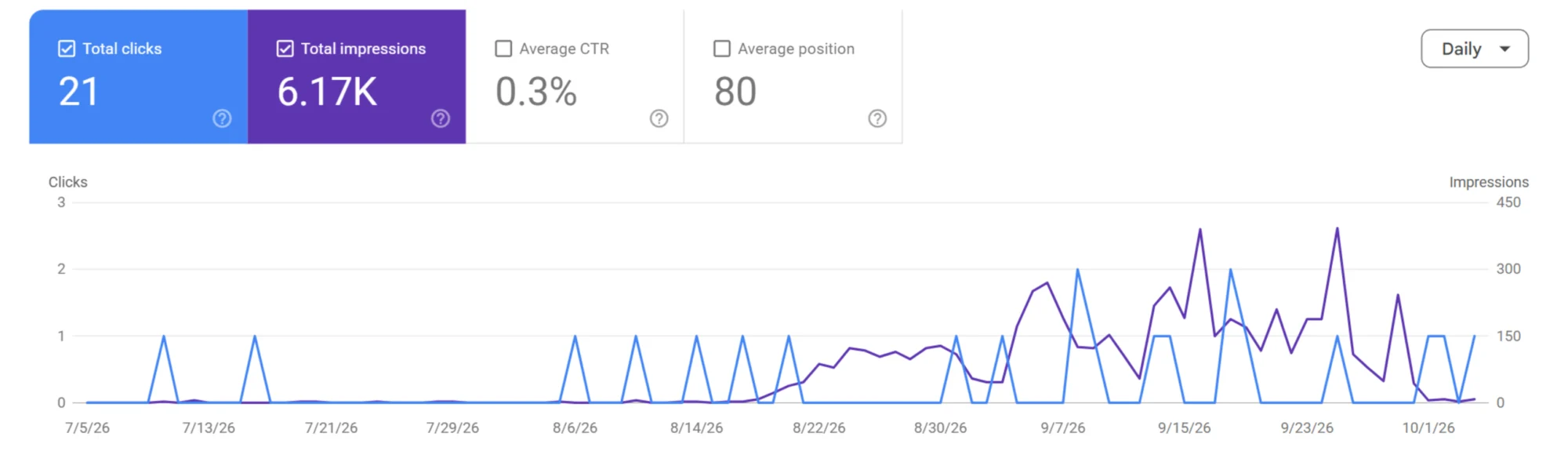
j6venture.com, last three months (captured October 7, 2026): 21 clicks and 6.17k impressions, with impressions climbing from the second half of August.
On j6venture.com, impressions began rising in the same weeks the Page indexing report shows the indexed count growing (from mid-August). That suggests indexing, not CTR, is this site’s constraint, so the next step carries the weight. Google’s documentation updates note that AI Overviews and, since June 2025, AI Mode are counted in these Performance totals.
Step 2: Sort Page Indexing Statuses Into Fix Now, Review, or Leave
The Page indexing report lists every URL Google knows about and why each is or isn’t indexed. Google sets the bar: “You should not expect all URLs on your site to be indexed, only the canonical pages.” Most of the triage happens here.
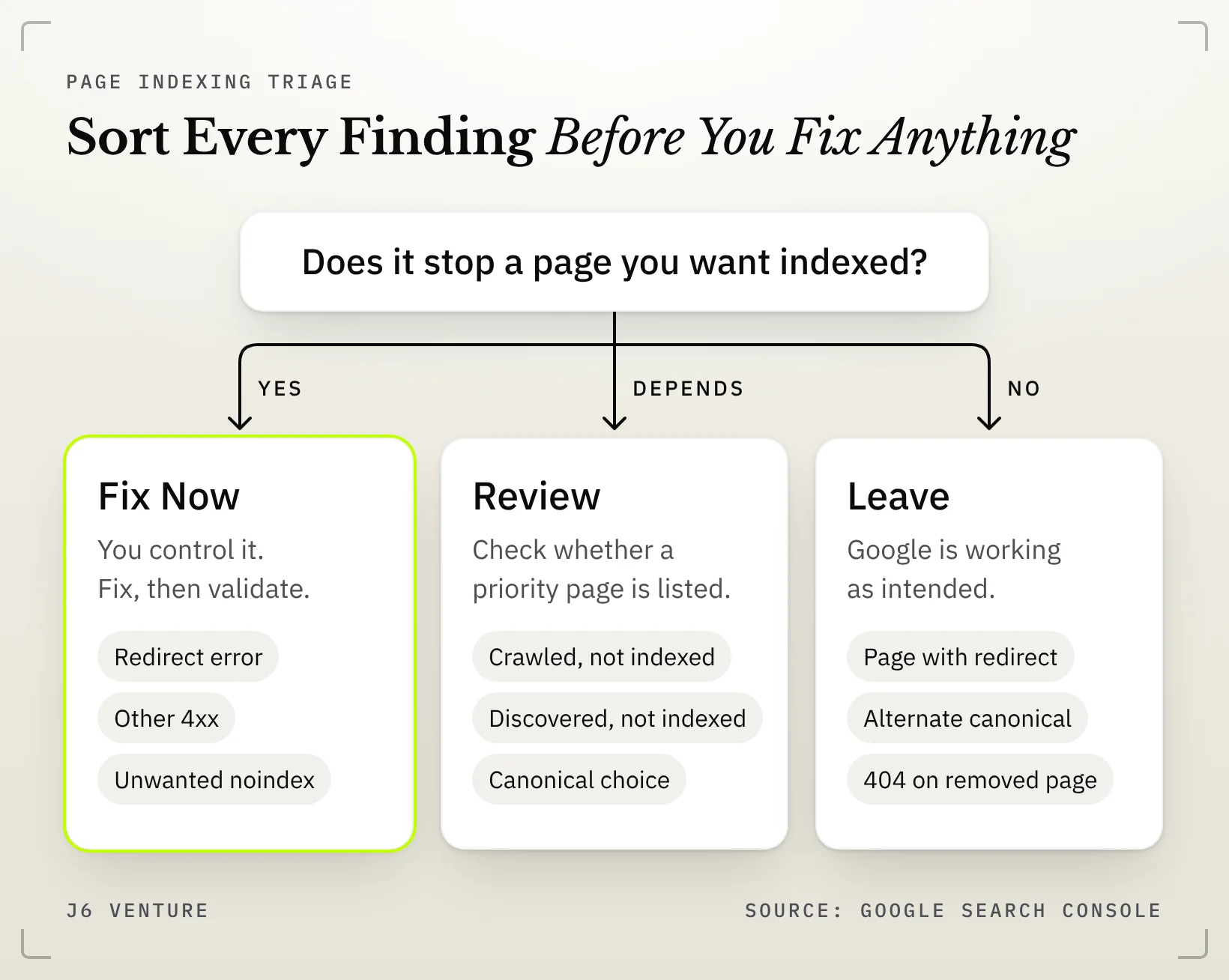
Fix now (the page should be indexed, and something you control stops it):
- Redirect error, Soft 404, Server error (5xx), Blocked due to other 4xx issue, Page indexed without content
- URL marked ‘noindex’ or blocked by robots.txt, when the page is one you want found
- Not found (404) on a page that moved and needs a 301
- Indexed, though blocked by robots.txt, when you want the page out of the index
Review (a person has to judge):
- Crawled – currently not indexed, and Discovered – currently not indexed, when a priority page appears in the list
- Duplicate, Google chose different canonical than user
Usually leave (Google is working as intended):
- Page with redirect, Alternate page with proper canonical tag, Duplicate without user-selected canonical
- 404 on pages removed with no replacement, and noindex, robots.txt, 401, or 403 on pages meant to stay private
Two columns set the order within “Fix now.” Google’s Page indexing report help says “In general, you can fix only issues where the source is listed as ‘Website’,” and advises prioritizing issues in validation state “failed” or “not started.” It also says fixing and validating “might not always make sense,” which is why the leave group exists.
Google adds that a site with fewer than 500 pages “probably” doesn’t need this report and can check key pages with site: searches and URL Inspection. Read that as advice on effort, not a safety threshold: a 100-page site can still have a template that keeps its pricing page out of the index.
“Crawled – currently not indexed” is a review queue, not proof of thin content. Google says only that the page “may or may not be indexed in the future; no need to resubmit this URL for crawling.” Google doesn’t say why; common candidates are duplication, low perceived value, timing, and canonical choice. Review the priority pages in it; leave the rest.
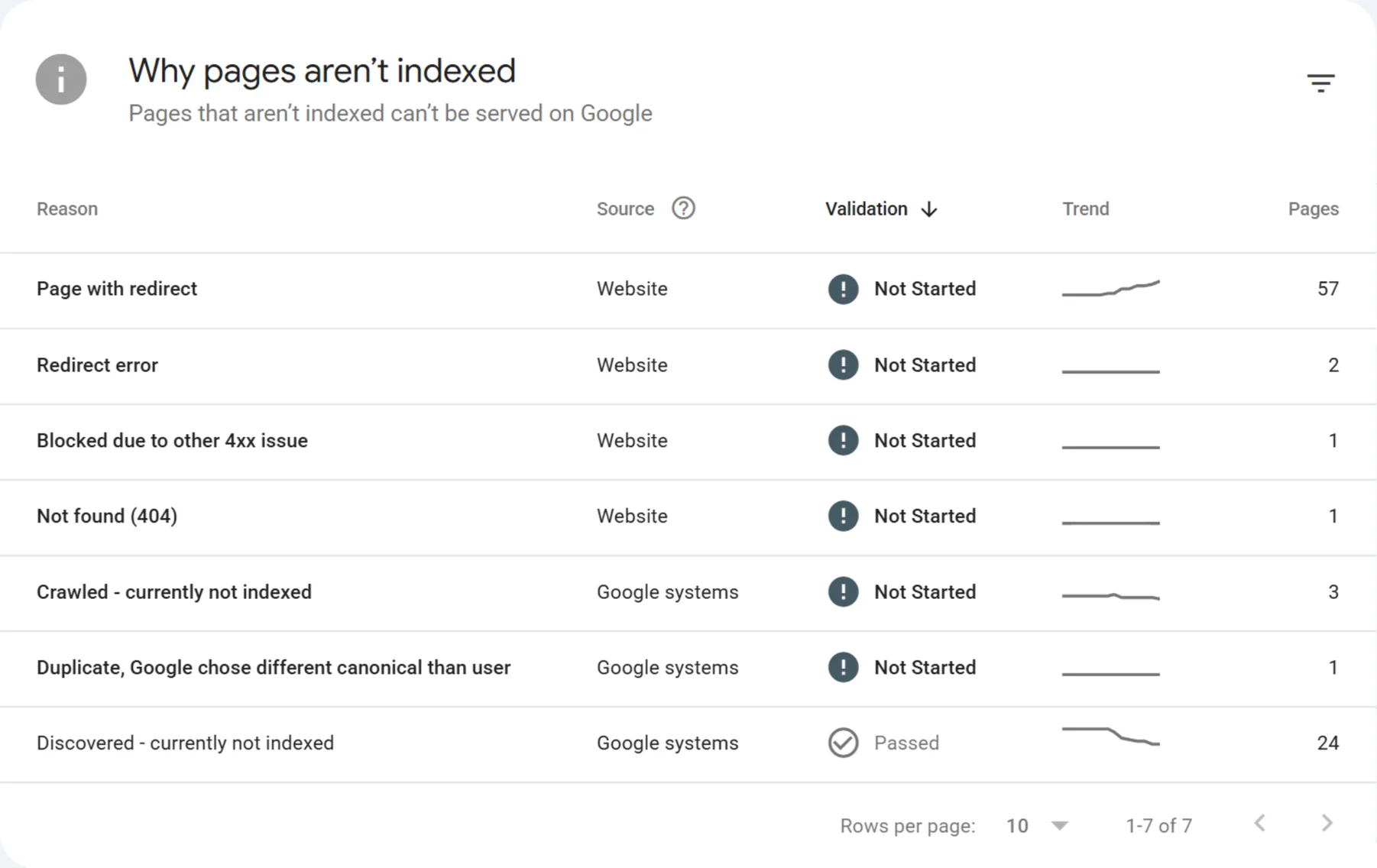
The seven reasons on j6venture.com, October 7, 2026: the top four list “Website” as the source, the bottom three “Google systems.”
How the triage sorted j6venture.com
Leave: Page with redirect (57). Old URLs redirecting to new ones is what redirects are for. The only follow-up is to keep them out of sitemaps and internal links. The one Not found (404) is Cloudflare’s /cdn-cgi/l/email-protection path, not a page we publish, so it stays too.
Fix now: Redirect error (2) and Blocked due to other 4xx issue (1). Both are Website issues on URLs we control.
Review: Crawled – currently not indexed (3), Discovered – currently not indexed (24), and one URL where Google chose a different canonical. The question is whether any priority page sits in these lists; resubmitting them is not the fix.
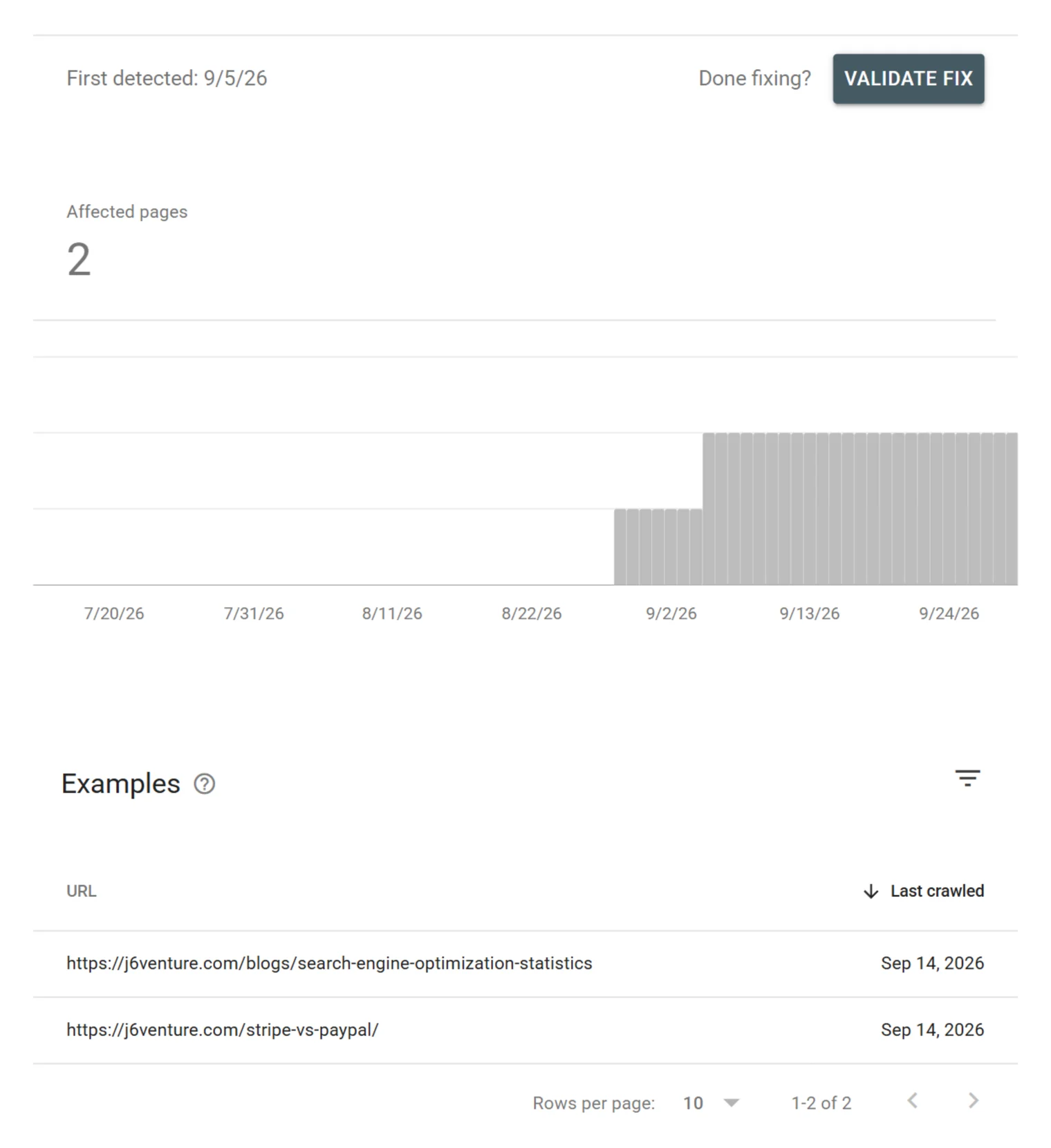
Redirect error detail: two affected pages, /blogs/search-engine-optimization-statistics and /stripe-vs-paypal/, both last crawled Sep 14, 2026.
When we requested both URLs on October 6, each returned a 302 redirect to the homepage, and the statistics post existed only as an unpublished draft. There are three clean options: publish the page at that address, 301 it to a real replacement, or let it return a 404, which Google says is “not necessarily a problem” for a page removed without replacement. A redirect to the homepage offers no replacement, so any of the three is a clearer signal.
Reference: All 16 Statuses in Google’s Words
Descriptions are quoted or closely paraphrased from the Page indexing help (accessed October 6, 2026). The call is J6’s recommendation based on that wording. “Indexed, though blocked by robots.txt” and “Page indexed without content” are warnings from the report’s Improve page experience table.
| Status | What Google says | Call |
|---|---|---|
| Page with redirect | “a non-canonical URL that redirects to another page. As such, this URL will not be indexed.” | Leave, unless a sitemap or internal link still points to the old URL |
| Redirect error | A chain “that was too long,” “a redirect loop,” a URL that exceeded the max length, or “a bad or empty URL in the redirect chain” | Fix the redirect, then validate |
| Not found (404) | “404 responses are not necessarily a problem, if the page has been removed without any replacement. If your page has moved, use a 301 redirect to the new location.” | Leave removed pages; fix moved ones with a 301 |
| Soft 404 | A “not found” message without a 404 response code | Fix: return a real 404, or add the missing content |
| Server error (5xx) | “Your server returned a 500-level error” | Fix if it repeats; server errors can be transient |
| Blocked due to other 4xx issue | “a 4xx error not covered by any other issue type” | Fix: inspect the URL to find the code |
| Blocked due to unauthorized request (401) or access forbidden (403) | Googlebot was asked for credentials or refused access | Leave pages meant to be private; fix if the page should be public |
| URL marked ‘noindex’ | “If you do not want this page indexed, congratulations!” | Leave if intended; fix if it is a page you want found |
| URL blocked by robots.txt | “does not guarantee that the page won’t be indexed through some other means” | Leave if intended (Google: these are “probably intentionally blocked”) |
| Indexed, though blocked by robots.txt | “robots.txt is not the correct mechanism to avoid being indexed” | Fix if you want it out: remove the block, add noindex |
| Page indexed without content | Google “could not read the content”; causes include cloaking or a format Google can’t index | Fix: inspect the URL to see what Google fetched |
| Crawled – currently not indexed | “It may or may not be indexed in the future; no need to resubmit this URL for crawling.” | Review priority pages; don’t resubmit |
| Discovered – currently not indexed | “The page was found by Google, but not crawled yet. Typically, Google wanted to crawl the URL but this was expected to overload the site; therefore Google rescheduled the crawl.” | Review internal links and sitemaps if important pages sit here |
| Alternate page with proper canonical tag | “there is nothing you need to do” | Leave |
| Duplicate without user-selected canonical | “not an error, but is working as intended” | Leave, unless Google picked the wrong page |
| Duplicate, Google chose different canonical than user | “Google thinks another URL makes a better canonical” | Review in URL Inspection; fix if Google’s choice is wrong |
Step 3: URL Inspection on Priority Pages
URL Inspection reports Google’s indexed version of one URL: whether it is on Google, how Google found it, when it was last crawled, and which canonical Google selected. Run it on every priority page and on a sample from any status you plan to fix.
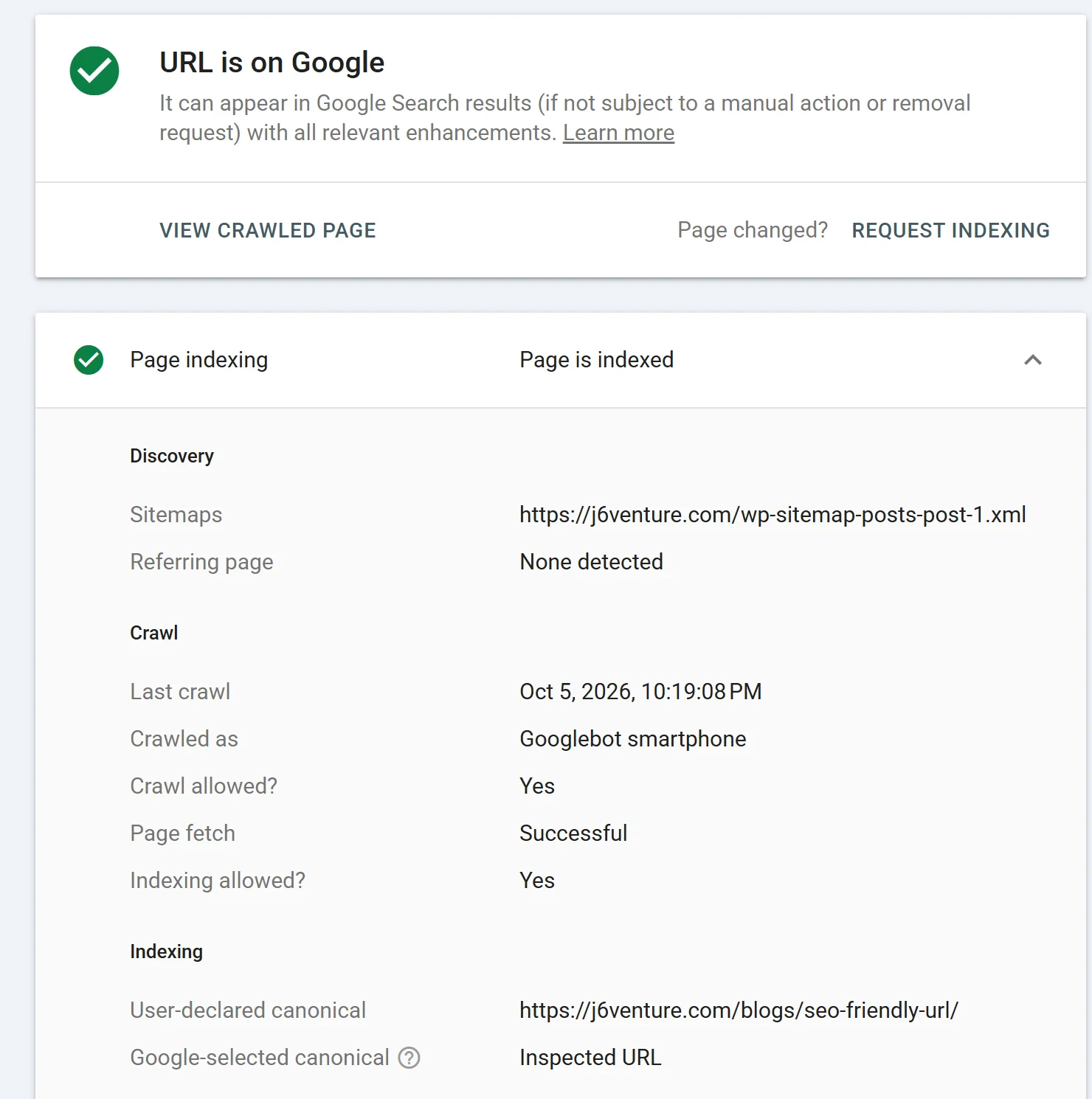
URL Inspection for /blogs/seo-friendly-url/: “URL is on Google,” page indexed; Referring page “None detected.”
Read three fields:
- Discovery. For J6’s SEO-friendly URLs guide, the referring page reads “None detected.” Google’s URL Inspection help says an absent value “doesn’t mean that no referring page exists,” so treat it as a prompt. Our search of the site’s posts on October 6 found no other article linking to this one in its body text: a cheap fix with a clear owner.
- Crawl. “Crawl allowed?”, “Page fetch,” and “Indexing allowed?” should read Yes or Successful for any page you want indexed.
- Indexing. Compare the user-declared and Google-selected canonicals. A mismatch on a priority page goes to Review.
Know the tool’s limits. Google says “‘URL is on Google’ doesn’t actually guarantee that your page will appear in Search results,” and the live test “only confirms if Google-InspectionTool can access your page for indexing.” Canonical choice can’t be live-tested: “the live test cannot predict whether or not the tested version will be considered canonical.”
Step 4: Robots.txt, Noindex, Canonicals, and Sitemaps
These controls do different jobs, and audits go wrong when they are mixed up. robots.txt manages crawling, noindex manages indexing, a canonical tag states which duplicate you prefer, and a sitemap lists the URLs you want considered.
- robots.txt “is not a mechanism for keeping a web page out of Google,” per Google’s robots.txt introduction. Use it to keep crawlers out of areas such as admin paths.
- noindex removes a page from results, but only if Google can crawl it. Google’s noindex documentation says that if the page is blocked by robots.txt, “the crawler will never see the noindex rule.”
- Canonical tags are “a hint, not a rule” (canonicalization). If Google picks a different canonical, check that the two pages are near-duplicates.
- Sitemaps should list only URLs you want indexed. Before you submit or resubmit one, keep private post types, staging URLs, and duplicates out; a sitemap generated by your content management system (CMS) can include content types you never meant for search.
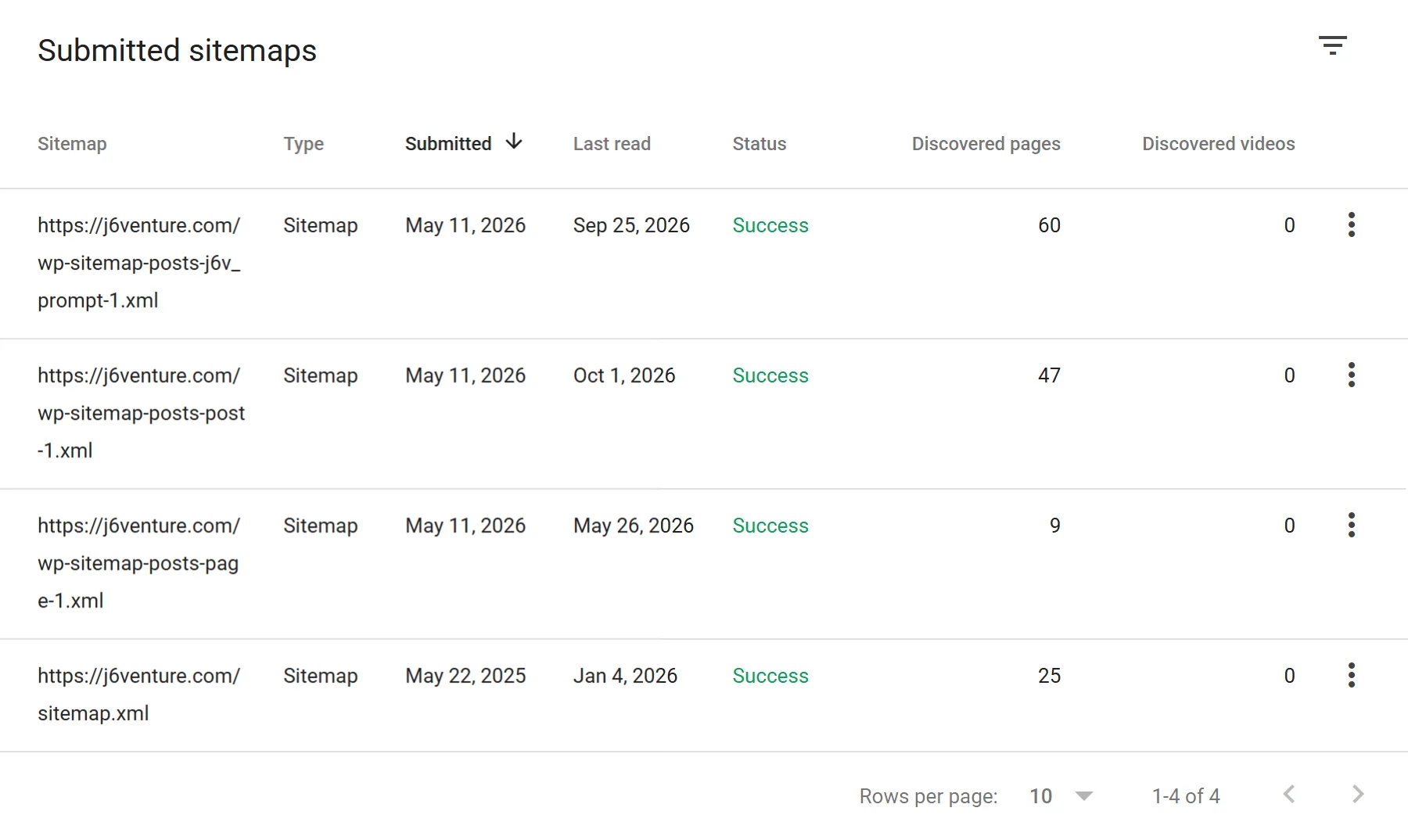
Submitted sitemaps on j6venture.com: the page sitemap was last read May 26, 2026 with 9 discovered pages.
On j6venture.com, the Sitemaps report surfaced a real gap. On October 6, the page sitemap listed 70 URLs, including case-study copies published the day before, but Google last read it in May, when it held 9. The implication is that Google isn’t using this sitemap to find any page added since May. The fix starts with cleanup (remove the copies and anything else that shouldn’t be indexed), then resubmits the current sitemap index and removes the stale entry.
Step 5: Core Web Vitals From Field Data
The Core Web Vitals report uses “real world usage data (sometimes called field data)” from the Chrome UX Report. It groups similar URLs and rates each group by its worst metric: Largest Contentful Paint (LCP), Interaction to Next Paint (INP), or Cumulative Layout Shift (CLS). INP replaced First Input Delay on March 12, 2024.
| Metric | Good | Needs improvement | Poor |
|---|---|---|---|
| LCP | ≤ 2.5 s | ≤ 4 s | > 4 s |
| INP | ≤ 200 ms | ≤ 500 ms | > 500 ms |
| CLS | ≤ 0.1 | ≤ 0.25 | > 0.25 |
Thresholds from the Core Web Vitals report help; a group’s value is the level that 75% of page requests met or beat over the last 28 days.
Fix templates rated Poor in field data first. Google’s page experience guidance says Core Web Vitals “are used by our ranking systems,” and that getting good results in reports such as Search Console’s “doesn’t guarantee that your pages will rank at the top.” A lab score on its own is a weaker reason to act.
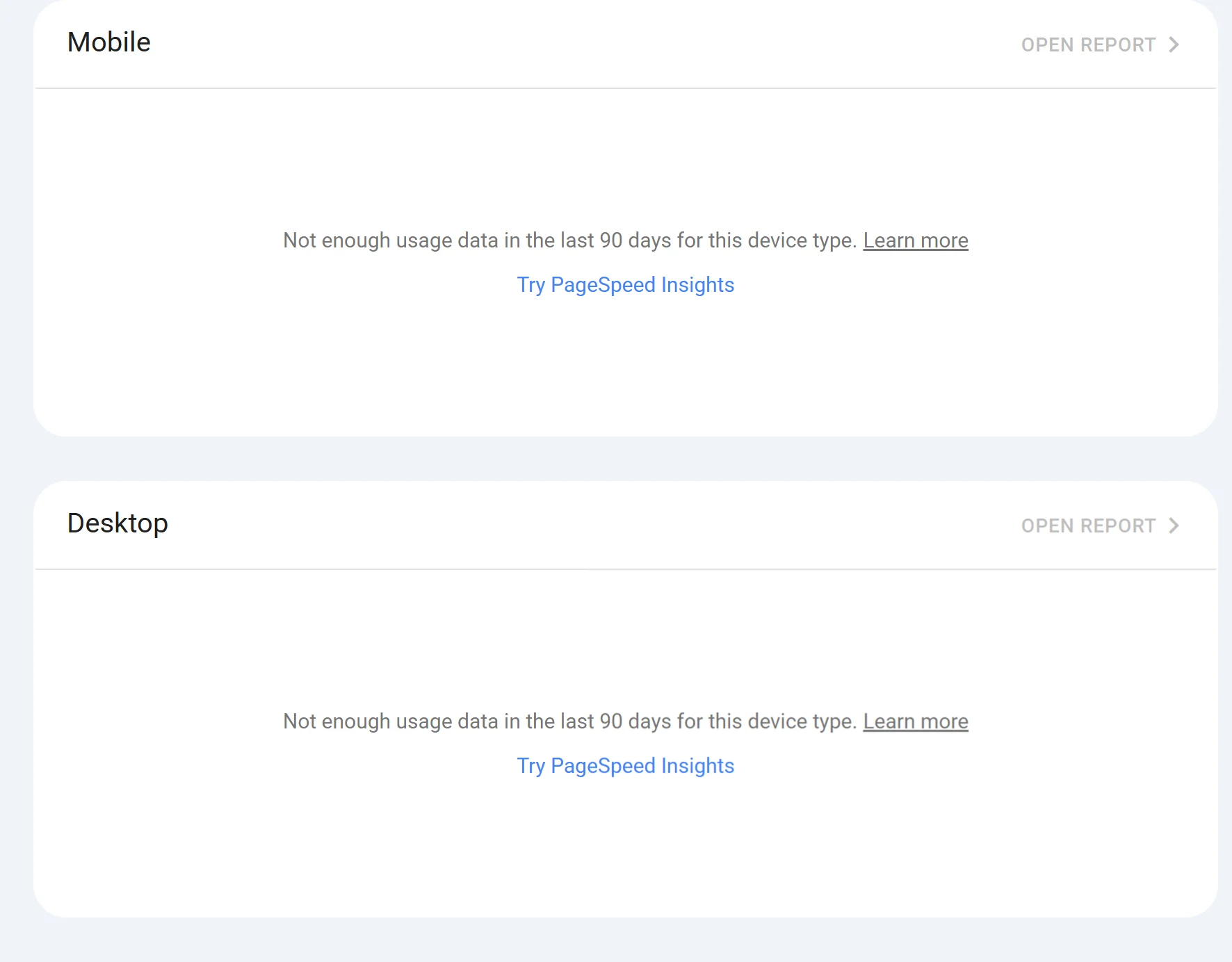
j6venture.com’s Core Web Vitals report: “Not enough usage data in the last 90 days” on mobile and desktop.
A low-traffic site often has no field data, as here. Run PageSpeed Insights on priority templates instead and read its lab section as a debugging aid: Google calls lab data “useful for debugging issues” and notes “it may not capture real-world bottlenecks.”
Step 6: Diagnose Content Problems
Content problems show up in Search Console as indexed pages that underperform for the queries they should own. Start from the signal, name the likely cause, then choose the action.
| Signal in Search Console | Likely cause | Action |
|---|---|---|
| Two of your URLs trade impressions for one query | Cannibalization (duplicate intent) | Pick one page to own the intent; merge, redirect, or refocus the other |
| A page ranks for queries it wasn’t written for | Intent mismatch, or ranking for the wrong query | Rewrite to the intent you want, or let it serve the query it found |
| Commercial page earns informational queries | The page reads as a guide, not an offer | Move the explanation to an article; keep the page on the decision |
| High impressions, low CTR at a decent position | Title and snippet don’t match the query | Rewrite the title and opening for that query |
| Clicks fading over months, no site change | Content decay | Update facts, examples, and screenshots; check what now outranks you |
| Indexed, few impressions, nothing new to say | Weak information gain | Add what the top results lack, or consolidate |
| Priority page with few internal links | Poor internal linking | Link to it from related pages, with descriptive anchors |
Check facts that expire, including your own markup advice: Google stopped showing FAQ rich results starting May 7, 2026, and How-to rich results ended in 2023.
J6’s own cannibalization call
While planning this article, we found that an existing J6 post, titled “Use This 5-Area SEO Audit to Read Any Tool Report Better,” overlapped the audit keyword. We kept it and are narrowing it to reading tool reports, so this article owns “how to do an SEO audit.” Two pages, two jobs, and this article links to the older one once.
AI search extension (optional)
Google’s AI Overviews and AI Mode draw on Google Search. To appear as a supporting link, Google says a page must be “indexed and eligible to be shown in Google Search with a snippet,” and robots.txt rules for Googlebot are the control (AI features and your website). Steps 2 to 4 already cover them.
Other AI search tools use their own crawlers. OpenAI’s crawler documentation separates OAI-SearchBot, used “to surface websites in search results in ChatGPT’s search features,” from GPTBot, used for content “that may be used in training.” Decide each bot’s robots.txt rule on purpose, and if key content appears only after JavaScript runs, compare raw and rendered HTML. J6’s free SEO Inspector extension fetches a page as GPTBot, ClaudeBot, Google-Extended, or PerplexityBot and shows that gap.
Audit Rules That Sound Precise but Aren’t Supported by Google
Tool checklists and AI answers repeat thresholds that Google’s documentation doesn’t set. On October 6, 2026, Google’s AI Mode answer for “how to do seo audit” told readers to use only one H1, keep pages under four clicks from the homepage, and keep images below 100 KB. Google’s hiring advice says to check a tool audit’s recommendations “against official guidance from Google Search” before making significant changes.
| Rule | What Google says | Check instead |
|---|---|---|
| Use only one H1 | “Our systems don’t have a problem when it comes to multiple H1 headings on a page” (John Mueller, Google Search Central, 2019) | Headings describe their sections |
| Keep pages under 4 clicks deep | No click count; “Every page you care about should have a link from at least one other page on your site” (link best practices) | Priority pages have contextual internal links |
| Images under 100 KB | No per-image limit in Google’s image guidance, which notes images “are often the largest contributor to overall page size” | LCP in field data on image-heavy templates |
| Text-to-HTML ratio | “It makes absolutely no sense at all for SEO” (Mueller on Reddit, 2023, reported by Search Engine Roundtable) | The main content is in the HTML Google renders |
| Titles of 50 to 60 characters, metas of 150 to 160 | “There’s no limit on how long a meta description can be” (snippets); the title link “is truncated in Google Search results as needed, typically to fit the device width” (title links) | Key words come first |
| Disavow links as routine cleanup | “most sites will not need to use this tool”; only for many spammy, artificial, or low-quality links that have caused, or likely will cause, a manual action (disavow links) | Manual actions report |
Some of these rules point at real issues: an unlinked page is hard to find, and heavy images can slow LCP. Measure the effect instead of enforcing the number. Google’s closest figure covers the whole page: its Core Web Vitals help calls “less than 500KB for a page and all its resources” best practice.
Validate Fixes and Recheck
A fix is complete only when you verify the intended result. For indexing issues, that often means Search Console validation: open the issue, fix every instance, then click Validate fix. Google’s help says validation “typically takes up to about two weeks, but in some cases can take much longer,” and “if you missed a fix, validation will stop when Google finds a single remaining instance of that issue.”
- 1Fix all instances first. One missed URL stops the validation.
- 2Validate by sitemap where you can. Google suggests a sitemap “containing only your most important pages,” filtered in the report, because a smaller set “can complete faster.”
- 3Request indexing sparingly. URL Inspection has “a daily limit to how many index requests you can submit”; for many pages, submit a sitemap.
- 4Recheck Performance after a few weeks. Google’s SEO Starter Guide says “some changes might take effect in a few hours, others could take several months.”
For non-indexing fixes, write the check into the audit sheet when you log the fix: field LCP for a template, impressions for a refocused page, CTR for a rewritten title.
When to Bring in a Specialist
Do it yourself when the problem is observable and reversible. Bring in a specialist when the change can damage indexation, traffic, URLs, or site architecture at scale. Google’s guide notes that “a great time to hire is when you’re considering a site redesign (the earlier, the better), or planning to launch a new site,” and that if someone else audits your site, you should “only grant read access to Search Console” at that stage.
Get help when:
- A migration or redesign is planned, including domain, CMS, or URL structure changes
- Important pages render content only through JavaScript
- Priority pages stay out of the index after you’ve worked through Steps 2 to 4
- The site has thousands of URLs and statuses you can’t explain from samples
- A manual action appears in Search Console
An audit is done when the noise is gone: every finding is a decision, every fix has an owner, and every fix has proof. If you’d rather have a specialist run it, J6’s technical SEO service works through these checks.
FAQ
Can ChatGPT Do an SEO Audit?
It can do parts of one. ChatGPT can analyze spreadsheets such as .csv files (OpenAI data analysis help), so it can group a crawler export or cluster queries from a Performance export. Unless you give it your Search Console data, it can’t tell you why Google excluded a URL or which canonical Google chose, and it can’t measure field Core Web Vitals; take those from Search Console and PageSpeed Insights.
How Often Should You Audit?
J6’s working cadence, not a Google rule: check the Page indexing report and your priority pages in URL Inspection monthly. Run a full audit after a migration, redesign, CMS or template change, or an unexplained traffic drop, and at least once a year otherwise.