Changing a URL can create more work than improving the page itself. A clearer headline, a better explanation, or an updated offer may leave the address perfectly accurate. Changing that address introduces another job: getting people and search engines from the old location to the correct new one.
What Makes a URL SEO-Friendly?
An address such as https://example.com/guides/lead-handoff-checklist/ gives someone a useful clue before they open it. It suggests a guide containing a lead-handoff checklist. An address ending in article-final-v3-48201 tells the reader much less.
That is a readability comparison, not a ranking experiment. A number or query parameter does not automatically stop a page being found in search. The page’s content, links, and search-access settings still matter. Crawling is a search engine fetching a page; indexing is its inclusion in the engine’s searchable collection.
Google’s URL-structure guidance recommends readable words, useful word separation, and a simple structure. It separates requirements for addresses a search engine can fetch from recommendations that make them easier to understand. Treat a naming convention and a functional defect as different things.
Which Part of the URL Are You Choosing?
Consider this illustrative address:
https://example.com/guides/lead-handoff-checklist/?source=newsletter#checklist
| Part | Meaning | What to Decide |
|---|---|---|
https:// |
The scheme used to access the resource. | Use the site’s established secure setup. A protocol change is infrastructure work, not a slug edit. |
example.com |
The host: the website address. | Keep domain or subdomain decisions separate from naming one page. |
/guides/ |
A path segment organizing this address. | Follow a useful, stable site convention. A written path need not represent a physical folder. |
lead-handoff-checklist |
The final named path segment, commonly called the slug in a publishing system, or CMS. | Choose words that describe this page. Your CMS may expose a different portion of the path, so check the field you are editing. |
The final / |
A trailing slash. | Follow the site’s routing convention, meaning how it matches an address to a page; slash and no-slash addresses are not automatically interchangeable. |
?source=newsletter |
A query string containing a parameter and value. | Establish what it does. In this example, assume it records the source of a visit without changing the page content. |
#checklist |
A fragment identifying a location within the page. | Use it to reach a section; it is not another article address to optimize separately. |
The page title and slug have different jobs. A title can explain the current article in detail; the slug can remain a stable description across ordinary updates. Inspect the actual address field before saving, because publishing systems handle changes differently.
For creating a section destination and its matching link, use the separate website anchors guide.
How to Choose a URL for a New Page
Start with the page’s purpose, choose wording that will remain accurate, and check the complete address before and after publication.
Step 1: Describe the Page’s Purpose
Write one sentence saying what someone will find or do on the page. For example: “This guide gives a B2B team a checklist for handing a qualified lead to sales.”
Use that purpose to choose the address. The page needs enough meaning to distinguish it from a general sales guide. A phrase such as lead-handoff-checklist is more informative than sales-tips for this particular task.
You do not need to add every related keyword or turn the slug into the full headline.
Step 2: Choose Words That Will Still Fit Later
Use descriptive words separated by hyphens, following the site’s existing path convention. Keep qualifications that change the meaning. A guide for enterprise teams, a version-specific manual, and a dated event page may need details that a generic evergreen guide does not.
For an evergreen checklist, leave out draft labels and a year that merely records when you published it. A later wording update can then leave the address accurate. For a specific annual event or product version, the year or version may be essential.
Keep the address concise enough to understand. Google’s cited URL guidance supplies no universal 60-character or three-word SEO cutoff. Removing useful meaning to meet someone else’s character target is a poor trade.
Step 3: Check How the Address Works
Before publishing, inspect the complete proposed URL, including any category prefix your CMS adds. Check that the slug is available and that the page will occupy the intended location. If the address contains a system-generated identifier, ask the developer whether it is required before removing it.
When the page is published, open the full address and confirm it serves the intended content. Ask the developer or SEO owner to confirm that relevant internal links use the chosen full URL. The page’s canonical link, a signal naming its preferred URL, should identify that same address. Google may choose a different URL when similar versions exist.
Successful loading is one implementation check. It does not establish that Google indexed the page or that the chosen wording improved rankings.
Which URL Rules Need Context?
| Detail | Useful Choice | Context to Preserve |
|---|---|---|
| Word separators | Use hyphens between words in new descriptive paths. | Google recommends hyphens over underscores. That does not establish a reason to move every working underscore URL. |
| Capitalization | Use a consistent path convention; lowercase is straightforward for many new pages. | Paths can be case-sensitive. Do not automatically lowercase existing paths, identifiers, or parameter values. Check how the server handles them. |
| Dates and numbers | Remove unnecessary draft numbers or dates from a new evergreen address. | An event date, product version, or required record ID may identify the resource. Keep meaningful information. |
| Categories and folders | Use organization that helps explain the page and remains maintainable. | The cited Google guidance gives no universal one-to-three-folder ranking rule. A shorter-looking path alone does not prove easier discovery. |
| Query parameters | Retain what the page needs; investigate unnecessary variations. | A tracking value, a useful filter, and a required resource ID do different jobs. A question mark is not itself an SEO defect. |
| Trailing slashes | Keep the established convention and a consistent preferred address. | /guide and /guide/ can behave differently. Changing the spelling without checking routing can change the destination. |
| Language and encoding | Use words your audience understands, with links encoded correctly by the CMS or developer. | A non-English word is not inherently unfriendly. Percent encoding represents characters in a URL; it does not require replacing meaningful words with English. |
For /shoes?color=blue&size=8, assume the page lists shoes filtered to blue pairs in size 8. Check what content the combination actually produces before choosing an indexing or duplication rule. Rewriting it as a neat path does not answer that question.
For a value used to record where a visit came from, find out whether it creates another content version or records the visit. Broader filter and duplicate-content controls need technical review.
Google’s guide itself includes query parameters in its recommended syntax examples. Syntax support does not mean every generated combination deserves an indexed page.
Google’s Recommended Parameter Syntax
https://example.com/category?category=dresses&sort=low-to-high&sid=789
Should You Keep, Investigate, or Change a Live URL?
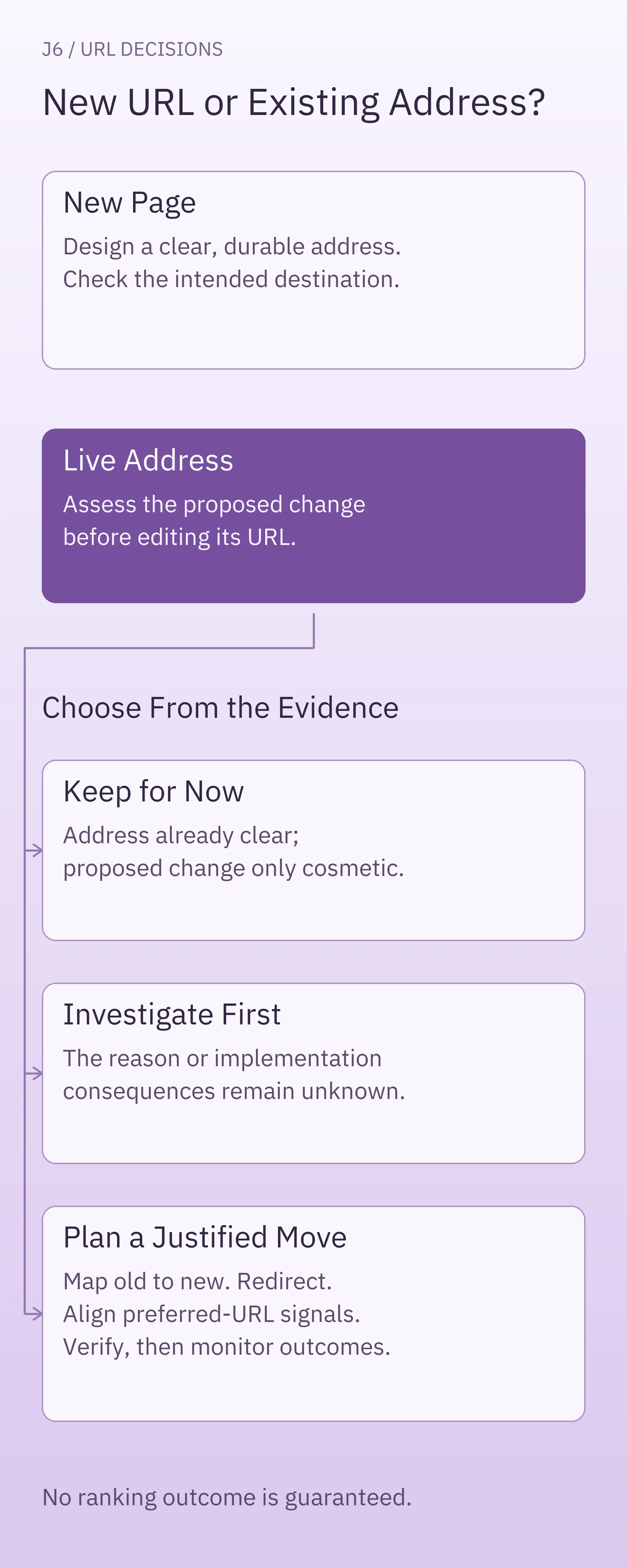
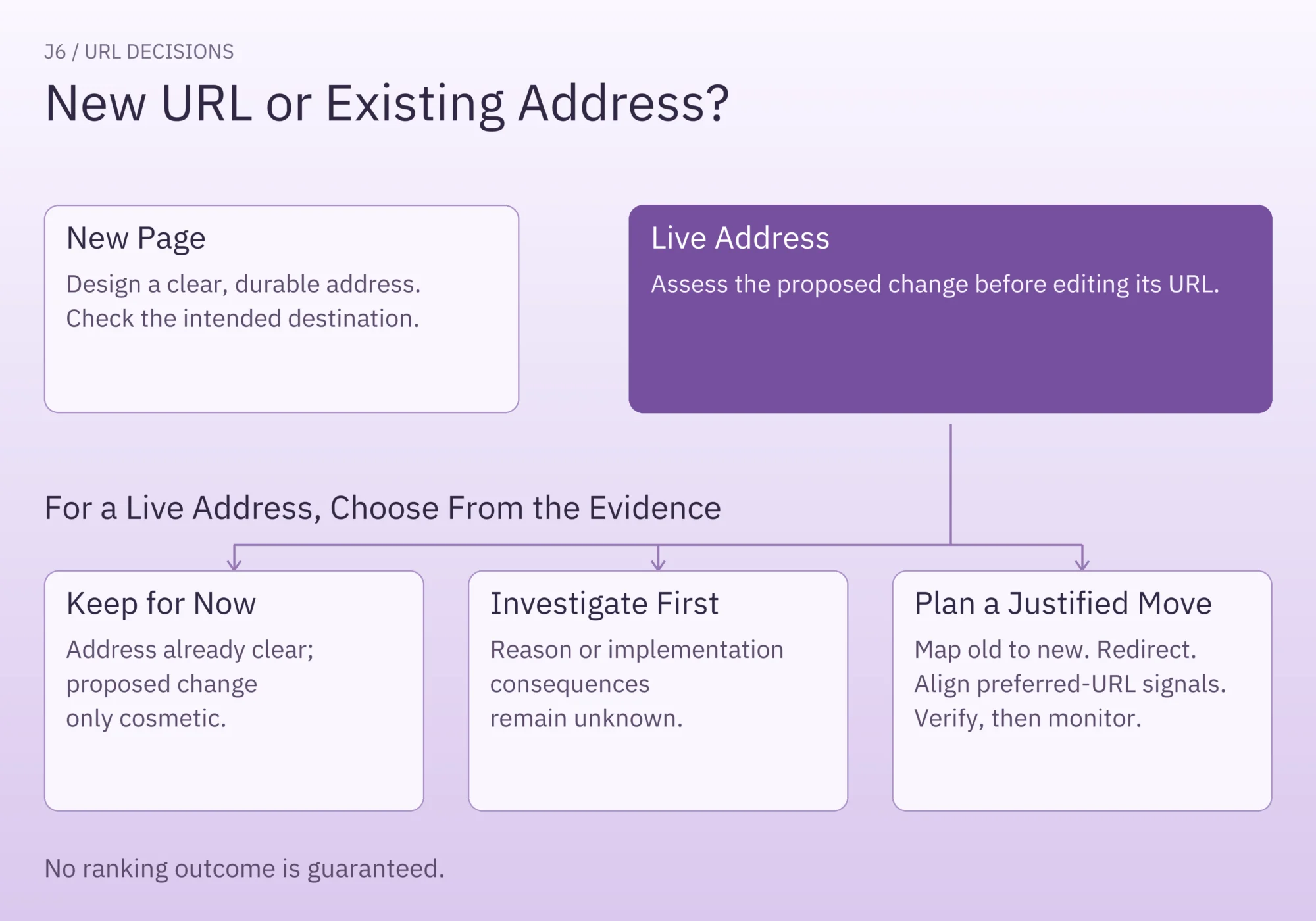
First, decide whether you are changing the content or the address. Updating a title or improving a page does not, by itself, require changing its URL. If the existing address still describes the page accurately, it may continue to serve its job.
- Keep for now: The address works, remains accurate, and the proposed change is cosmetic, such as trimming a readable phrase solely to meet an arbitrary length target.
- Investigate first: The reason for changing it, its routing dependencies, or the effect on existing links is unclear. Record the question and who can answer it before editing the slug.
- Plan a justified move: A concrete need requires an address change, and the owner can arrange the corresponding destination, redirects, and checks.
Google’s guidance on moves involving URL changes includes path changes and the work that accompanies them. Use it to plan the work when an address change is justified.
What Must Be Checked Before a URL Change?
For a justified move, give the developer the exact old and new addresses and identify the corresponding content. Agree who will implement and check the following:
- The old address reaches the intended new one. For a permanent move, use an appropriate permanent server-side redirect, usually 301 or 308. Point it directly to the final destination where possible, and test the actual response and destination; saving a new slug does not prove a redirect was created.
- The destination works. It serves the correct content. Ask the developer or SEO owner to check for leftover development restrictions, such as a login requirement or a setting telling search engines not to index the page.
- Preferred-address signals agree. Update relevant internal links, canonical links, and sitemap entries so they identify the intended preferred URL. A sitemap helps communicate URLs; it does not force indexing.
- The change can be monitored. Retain the mapping, test results, owner, and a review point. Check errors and search behavior after release. Google recommends retaining redirects generally for at least a year and considering them indefinitely for users.
Redirect guidance explains permanent and temporary signals. Canonicalization guidance explains preferences among duplicate or similar pages. A canonical link and a redirect are different controls; neither should be applied as a blanket cure for every parameter or unusual address.
These checks can establish that your implementation behaves as intended. They cannot guarantee Google’s preferred URL choice, a fixed recovery time, or unchanged rankings. A sitewide move needs a fuller technical plan than this single-page decision guide.
Four URL Decisions Worked Through
The following are illustrative situations, with assumed inputs and proposed actions. They are not J6 campaign results or reports of completed tests.
A New Draft Needs a Clear Address
Setup: A B2B guide provides a lead-to-sales handoff checklist. Assume the example site is https://example.com and already uses /guides/. The page is still unpublished, and no system-required ID is assumed.
Compare three candidate slugs:
sales-tipsis short but loses the checklist’s specific purpose.7-best-lead-handoff-checklist-tips-2026-final-v3ties the address to headline wording, a publication year, and drafting labels.lead-handoff-checklistdescribes the stable resource.
Decision: Propose https://example.com/guides/lead-handoff-checklist/. Before publishing, the editor checks slug availability and the full address generated by the CMS. After publishing, they check that the address opens the intended guide; the developer or SEO owner checks relevant internal links and the canonical URL. These checks are pending in this illustration.
A Working Address Can Stay
Setup: That same address is now live and works. The editor updates the title and expands the checklist, while its purpose stays the same. The only proposed URL change is to add the new year.
Decision: Keep the address. Update the content without changing the accurate URL. The editor confirms the slug field remains unchanged and the existing link still reaches the guide. Reopen the address decision if the page’s purpose changes or a confirmed routing problem appears.
An Unclear Dependency Needs Investigation
Setup: Another guide uses /guides/Lead_Handoff_48201/. An editor proposes lowercasing it and deleting the ID. Nobody has established whether 48201 is required for routing or whether the case variants serve the same content.
Decision: Leave the address unchanged while investigating. The developer checks the routing requirement and relevant variants, then reports whether the proposed address would resolve to the correct resource. The content owner uses that evidence to reopen the decision. The routing question remains unanswered until that check is complete.
A Justified Move Needs a Plan
Setup: Assume an approved publishing-platform replacement must move a guide from /resources/lead-handoff-checklist.html to /guides/lead-handoff-checklist/. The developer has confirmed this platform constraint and can redirect the old route. The same guide will exist at the destination.
Decision: Plan the move because of the confirmed constraint. The developer maps the old URL directly to the corresponding new page, implements the permanent redirect, and aligns relevant links, canonical, and sitemap. The editor checks the content at the destination. They retain response/destination test results and agree a post-release review point with the SEO owner. Tests and later search outcomes are pending; an approved plan is not evidence of a successful migration.
Before You Publish or Edit the Address
For a new page, finish with its purpose, chosen full address, and the person who will check that it reaches the intended content. Make sure useful meaning survived the shortening.
For an existing address, write down:
- The exact address and proposed change.
- The concrete reason, or the missing evidence that needs investigation.
- Your decision: keep, investigate, or plan a move.
- The owner, relevant implementation checks, and review trigger.
Leave unknown results marked unknown so the next person can see what still needs checking.