Content clusters connect pages that help the same audience work through a subject. Each page has a distinct job, and internal links lead to the reader’s next answer. Start with the pages you already have: decide what each owns, keep supporting questions inside those pages, and create a new destination only when a meaningful task remains uncovered.
We will use three published J6 guides to show which pages to reuse, which explanation to keep as a section, and where a link would help readers continue.
What Are Content Clusters?
Content clusters, also called topic clusters, organize related pages around a shared subject. A central page can orient readers and direct them to focused supporting pages. Those pages answer distinct questions and link to related answers. The structure becomes valuable when readers can find the depth they need without working through repeated explanations.
How Pillar Pages, Supporting Pages, and Links Work Together
A pillar page, or hub, gives readers an overview of the subject and helps them choose a path through it. It should contain enough explanation to make that choice meaningful. A list of article titles may help with browsing, but it can leave readers unsure where to start.
A supporting page completes a more focused task. Its boundary could be a decision, an explanation, a comparison, or a workflow. It should make sense to someone arriving directly from search, even if they have never read the hub.
Internal links connect those tasks. A hub can point readers toward deeper answers; a supporting page can lead back to broader context or sideways to the next relevant task. The link needs a reason that a reader can recognize.
Google’s link guidance explains that links help it discover pages and understand relevance. A cluster diagram alone establishes neither a ranking advantage nor a requirement to link every page to every other page.
How a Content Cluster Differs From a Keyword Group
A keyword group collects searches that may need substantially the same answer. A content cluster connects multiple pages with related but distinct jobs.
For example, “what is a keyword in SEO” and “SEO keyword examples” can fit one introductory page. Choosing a content strategy and producing an article require different deliverables. Those pages can belong to a larger content-planning cluster without becoming one article.
This distinction matters when a tool returns a list of related phrases. Treat that list as material to investigate. Before turning each phrase into an assignment, identify the answer it needs and check whether a current page already provides it.
Start With One Topic and the Pages You Already Have
Choose one subject that serves an audience your business wants to help, then read the existing pages that might serve it. Record their current jobs and boundaries before assigning cluster roles. Titles and keyword labels help you find candidates; the body content tells you whether those candidates belong.
Our chosen subject is SEO content planning. The intended reader is a marketer turning an existing collection of articles into a clearer plan. Choosing the business’s entire content investment belongs to SEO content strategy; here, we begin after a subject has earned a place in that plan.
Record the Reader’s Job for Each Existing Page
Gather candidate URLs from your content inventory, CMS, or a crawl, then open them. A spreadsheet of titles can hide both relevant coverage and duplication.
For each candidate, record four things:
- Reader outcome: what the reader can understand, decide, or do after the page.
- Useful coverage: the sections, examples, or tools that deliver that outcome.
- Boundary: the related work the page only introduces or leaves elsewhere.
- Current destination: the live URL, including relevant sections within it.
For the J6 example, the strategy guide assigns work and priorities. The keyword guide explains keywords and helps a beginner decide which searches one page can serve. The creation guide takes an assigned page through production.
Keep observation separate from your recommendation. “This page contains a query-set explanation” is something you can verify in the body. “Keep that explanation here” is an editorial decision you must justify.
Check Whether an Existing Page Can Serve as the Hub
Test the candidate against the subject you chose. Does it explain the main choices, give readers enough context to choose, and lead to the relevant depth? Or does it complete one narrower task?
J6’s strategy guide is a starting point for deciding what to fund. It covers priorities, capacity, and sequencing. That does not make it a complete hub for every content-planning question.
For this map, we will label it strategy entry point, with its current scope intact. We can still organize the existing destinations before deciding whether a dedicated overview would help. Before commissioning a hub, identify the orientation task that existing pages leave unanswered.
Decide What Needs a Page, a Section, or No New Content
Give a question its own page when the reader needs a distinct outcome that an existing destination cannot deliver without obscuring its main task. Keep a supporting explanation inside the page whose task depends on it. Reuse a suitable page before creating another URL, and defer a gap when you cannot yet explain why the reader needs it.
Set the Hub’s Scope Without Repeating Supporting Pages
A hub should explain the choices across its subject, give an initial answer, and direct readers to deeper work. Supporting pages should carry the detail needed to complete their own tasks.
In our example, a future planning overview might explain when to move from topic selection to page allocation and then production. It would have little reason to reproduce the keyword guide’s full grouping examples or the creation guide’s full workflow.
Before commissioning that overview, check whether a short routing section on an existing page would solve the problem. The missing deliverable may be an explanation of how current resources fit together.
Reuse an Existing Page Before Proposing Another
J6’s keyword guide already explains the difference between a primary keyword and a query set. That explanation supports its larger job: helping a beginner turn searches into a page plan.
A separate beginner article on that distinction would repeat material already available at the point of need. Our map keeps it as a section. If readers struggle with the explanation, improve its wording or example there before adding another destination.
Separate Pages When the Reader Needs a Different Outcome
The strategy and creation guides deserve separate roles because they deliver different results. One helps allocate work; the other helps produce an assigned page. We would keep them separate so each guide can focus on its own deliverable, with a link for readers who need the other task.
Use a quick check: outline the answer, example, and next action for both proposed pages. If most of that substance repeats, reconsider the split. If each requires a distinct deliverable, record the boundary and the handoff between them.
A Worked Cluster Map Using J6’s Published Pages
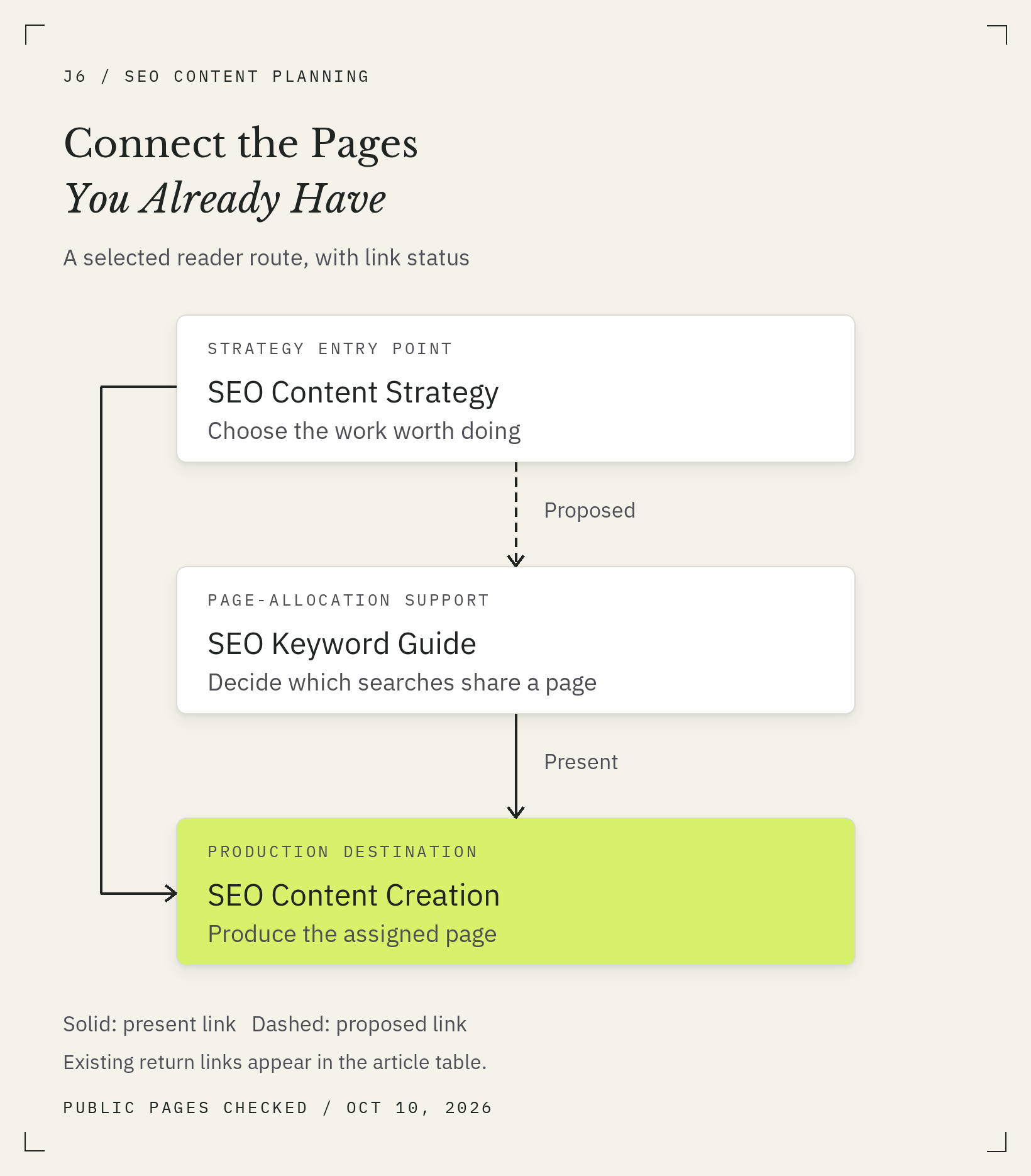
The map below assigns roles to three existing J6 pages, keeps one supporting question inside its current article, and postpones additions that need a stronger case. It is an editorial assessment of public content checked on October 10, 2026. The proposed structure and link additions have no measured traffic outcome attached to them.

Give Each Page a Role and a Clear Boundary
Start with the route a reader could use: decide which work matters, assign a focused page job, then produce that page. Someone who already has an approved assignment can enter at the creation guide. The map provides choices rather than requiring every visitor to follow a sequence.
| Existing Page | Role in This Map | What It Owns | Boundary and Decision |
|---|---|---|---|
| SEO content strategy | Strategy entry point | Which content deserves resources and how the work is prioritized | Reuse. Keep the investment and sequencing decisions here; do not expand it into every production task. |
| What is a keyword in SEO? | Page-allocation support | Keyword concepts, related searches, and a beginner’s page brief | Reuse. Retain starter grouping guidance; leave a complete research program outside its scope. |
| SEO content creation | Production destination | Moving an assigned page through research, drafting, review, and publication | Reuse. Its starting condition is a page worth producing with a defined job. |
| Primary keyword versus query set, within the keyword guide | Section inside the keyword guide | How a planning label relates to the searches a page can serve | Keep as a section. No additional beginner URL is needed for this map. |
Find the retained query-set explanation under “A Keyword, a Search Query, and a Page: How They Connect” in the keyword guide.
These are roles assigned for this example, based on the published content. They do not claim that J6 previously launched this exact cluster architecture.
The first three rows are page destinations. The fourth is deliberately a section. Recording both makes the section decision visible, so an unanswered spreadsheet row does not automatically become a new-article assignment.
The strategy guide can send someone directly to production when their page job is clear. The keyword guide is useful when that allocation remains unresolved.
A Proposed Split We Would Reject
Consider two possible assignments: explain SEO keywords and decide which searches belong on one page. Concept learning and editorial decision-making sound different enough to justify two articles.
Reading the current keyword guide gives us a reason to keep the beginner version together. It already includes the definition, grouping checks, a table of searches, boundaries for partial coverage, and a completed brief. The explanation leads into a concrete first decision: what this page should answer.
For the beginner task in this map, we have not identified a missing outcome that requires a second destination, so we would keep this journey together. Reconsider the split if readers need a substantial allocation workflow that the current guide cannot deliver without obscuring its introductory job; check that proposed workflow against the existing sections before commissioning it.
A larger task could justify a separate page. Building and maintaining a full keyword-research program involves collection, assessment, prioritization, and ongoing review. The current article explicitly stops short of that deliverable. A proposal for that job needs its own demand and existing-content check.
Which Gaps Need Action and Which Can Wait
The map leaves a question: where does a reader learn how these resources fit together? We found no explicit strategy-to-keyword-guide handoff in the strategy article’s body. That supports a focused link proposal; it does not establish the need for a new pillar page.
- Act on the handoff: propose a short explanation in the strategy guide that directs readers with unresolved page boundaries to the keyword guide. Its dependency is an approved edit to that existing page.
- Keep the section: retain primary keyword versus query set in the keyword guide. There is no new-page assignment for this supporting question.
- Defer a dedicated planning hub: review the proposed route using two starting points: a marketer who still needs to define the page’s job, and one ready to produce an agreed brief. Check whether the current pages and proposed handoff explain where each reader should go and why. If either route remains unclear, name the missing explanation and try a short routing section first. Propose a separate overview only when that orientation task needs more than the existing pages can usefully contain.
- Leave semantic editing outside this first route: the semantic SEO guide addresses a later editing need. Its shared SEO vocabulary does not make it a required destination in this planning map.
The immediate recommendation is therefore no new supporting article. Reuse the destinations and improve the missing handoff, subject to approval. Any edit to the example pages requires their owner’s approval.
Connect the Pages Around the Reader’s Next Question
Map a link by naming its source, the question that arises there, and the destination that answers it. Then place the link where that question becomes relevant. A shared topic makes a page worth considering; the reader’s next need gives you a reason to connect it at a particular point.
Map Each Link From Its Source to Its Destination
We checked the article bodies, rather than counting navigation menus or related-post cards. The table separates links we observed from the one we propose.
| Source | Reader’s Next Question | Destination | Body-Link Status |
|---|---|---|---|
| Strategy guide | My page job is clear. How do we produce it? | Content creation guide | Present at the end of the strategy article. |
| Strategy guide | Which related searches should this page answer? | Keyword guide | Proposed handoff; absent from the checked body. |
| Keyword guide | Which topics deserve the team’s time? | Strategy guide | Present in its grouping discussion. |
| Keyword guide | The page job is clear. What happens next? | Content creation guide | Present after the completed brief. |
| Creation guide | Have we chosen work worth producing? | Strategy guide | Present in the opening context. |
Each row has a direction. The keyword guide’s link to strategy does not automatically answer the strategy reader’s question about page allocation.
Add a creation-to-keyword link if a production passage leaves the reader needing allocation guidance.
Use Descriptive Anchors Where the Next Question Arises
The proposed strategy handoff could say: “Before briefing the article, decide which searches belong on one page.” The anchor names the destination’s answer and fits a point where a planner moves toward a brief.
For the onward production step, SEO content creation describes the workflow readers can expect. Surrounding text should explain when they are ready to use it.
Google recommends descriptive, reasonably concise anchor text that is relevant to both pages. It also advises contextual internal links and says every page you care about should receive a link from another page on your site. Use ordinary crawlable links with an HTML href; a visual connection on a diagram does not create that link.
Check Your Map Before You Commission More Content
Test whether a reader can enter at a relevant page, finish its task, and reach the next answer when needed. Check coverage and overlap in the actual content, then confirm the destinations and proposed changes. Use these checks to turn the map into a work proposal: each recommendation needs a reason, a status, and an owner.
Check Coverage, Overlap, and Missing Destinations
Use this final check before assigning another article:
- Coverage: can the reader complete each task the map promises?
- Overlap: do two pages repeat most of the same answer, or does each deliver a distinct result?
- Sections: have you checked whether a supporting question already has a suitable home?
- Destinations: do the links lead to published pages that provide the promised answer?
- Gaps: is each proposed addition tied to a missing reader task and a business reason?
- Status: can someone distinguish current content and links from proposed edits and deferred work?
Google’s people-first content guidance asks whether content serves an intended audience and helps people achieve their goal. It also rejects a supposed preferred word count. Use those considerations when a cluster plan starts accumulating articles to look complete.
Keep the Map Current as Pages Change
Update the relevant row when a page’s job, URL, or useful sections change. Recheck incoming handoffs when a destination is merged, redirected, or substantially rewritten. Record who will make each proposed edit so the map does not quietly become a list of changes nobody owns.
Once changes are live, verify the published content and links against the map. Search visibility and business results require separate measurement; the map records your editorial decisions and the structure readers can use.
Start with one subject and the existing pages that serve it. Record each page’s job and the sections worth keeping, then choose one handoff to improve. Add its source, destination, proposed status, and owner to your map. Your next cluster decision may be a better connection between pages you already have.