Choose the business location you are describing, gather its public facts, and use the most specific matching LocalBusiness type. Build the markup through your site’s existing setup, then check its vocabulary, Google’s requirements, and the facts on the live page. A valid snippet is one checkpoint in that process.
What Is Local Business Schema?
Local business schema is structured data that describes a particular physical business or branch using Schema.org’s LocalBusiness type or a more specific subtype. JSON-LD is a format for expressing that information in a script on a webpage. It gives properties such as the business name, address, and opening hours explicit labels machines can interpret.
The useful starting question is which business does this fact describe? A bookstore can have one closing time for the main store and another for its café. Both facts can be accurate. Putting the café’s closing time in the store’s record describes the wrong hours.
Google’s LocalBusiness documentation explains how markup can communicate hours, departments, and other business details. Following its requirements can make content eligible for supported search features; Google determines whether those features appear.
Your website’s markup and Google Business Profile are separate places to maintain business information. Schema does not replace the wider work of local SEO for a small business.
Choose the Location, Type, and Page
Start with the physical location represented by the page, then choose the most specific accurate subtype. A bookstore can use BookStore; a restaurant can use Restaurant. Each belongs to the broader LocalBusiness vocabulary. Choose a type because it describes the operation, rather than because its search appearance looks attractive.
Google recommends the most specific applicable subtype. Its documentation also permits an @type array when several types apply. Google does not support additionalType for that purpose. A business offering several services does not need to invent a new combined type.
Choose a page where a customer can confirm the location’s details. For one location, that may be the homepage or contact page. For several branches, a useful approach is a page for each branch with its own facts. Google allows LocalBusiness markup on any page and suggests a business-information page; we recommend separate location pages for clarity where they are useful.
Before adapting any example, identify what your site already outputs and which plugin or template produces it. Your next task may be correcting existing fields. The installation section below explains how to make that decision without adding conflicting records.
What If Your Business Has No Public Address?
Do not publish a private home address merely to fill a schema template. Google Business Profile tells service-area businesses that do not serve customers at their address to remove that address from their profile. Google’s separate LocalBusiness structured-data requirements include a physical address.
areaServed describes the geography a business or service covers. It is not a documented substitute for that required address. If you have no publishable address, keep the privacy decision intact and review your site’s Organization or Service description with the implementer. Do not assume an address-free object qualifies for Google’s LocalBusiness features.
Know Which Fields Google Requires
Google’s general LocalBusiness table requires name and address. It recommends additional details, including the location URL, telephone number, hours, coordinates, and price range. A field can be valid Schema.org vocabulary without appearing in that Google feature’s table.
Use the distinction to decide what you can supply accurately:
| Field | Google’s General LocalBusiness Guidance | What to Check Before Including It |
|---|---|---|
name |
Required | The name identifies this business or branch. |
address |
Required | The physical address is accurate and suitable for public display. Include the accurate address components available. |
url |
Recommended | The working URL represents this location. |
telephone |
Recommended | The customer contact number is current and includes the country and area code. |
openingHoursSpecification |
Recommended | The schedule belongs to this location; different departments are distinguished. |
geo |
Recommended | The coordinates identify the business location, rather than an arbitrary map center. |
priceRange |
Recommended | The description reflects the business’s relative price range and has a factual basis. |
This is a working selection from Google’s property reference. Its separate, limited-access restaurant-carousel requirements should not be applied as a universal checklist for every business.
An unknown optional value can wait. An incorrect optional value needs correction. Neither a generator’s empty field nor a test recommendation is a reason to invent a fact.
Worked Example: Powell’s City of Books
Powell’s City of Books provides a useful public example because its location page lists several schedules. The task is to describe the main bookstore accurately while keeping other opening hours separate. On October 10, 2026, we accessed an October 8 snapshot of the official location page and used it to build the proposed code below.
We created this educational proposal from public information. It does not reproduce Powell’s existing markup, and Powell’s has not deployed or endorsed it as part of this exercise. Recheck current facts before reuse, and substitute your own business’s details when adapting the method.
Match Each Field to a Public Fact
The page identifies the location as Powell’s City of Books, at 1005 W Burnside St., Portland, OR 97209. It lists the phone number 800-878-7323 and regular store hours of 10 a.m. to 9 p.m. daily.
| Public Fact | Proposed Field | Reason for the Choice |
|---|---|---|
| A bookstore | @type: BookStore |
BookStore is the specific vocabulary type for this operation. |
| Powell’s City of Books | name |
Preserves the named location. |
| Burnside Street address | address |
Splits the published address into street, city, region, and postal code. |
| 800-878-7323 | telephone |
Uses +18008787323 for the US number. The source does not establish a unique direct-store line. |
| Daily, 10 a.m. to 9 p.m. | openingHoursSpecification |
Uses all seven days and 24-hour opening/closing times. |
| The official location-page URL | url |
Points to the page describing this store. |
The other schedules change the mapping decision:
- Rare book room: daily, 10 a.m. to 5 p.m.
- Used-book-buying counter: Friday through Tuesday, 10 a.m. to 5:30 p.m.
- Café: daily, 10 a.m. to 8 p.m.
Using 5 p.m. as the bookstore’s closing time would misrepresent the main store even though that time appears on the same official page. The object’s identity determines which schedule belongs in it. This example describes only the main store; it does not attempt to model the subareas’ identities or ownership.
Build the Proposed JSON-LD
The script translates those selected facts into one BookStore object. The repeated days share the same schedule, so one OpeningHoursSpecification object covers them. If your days have different hours, separate the schedules using the patterns in Google’s business-hours examples.
<script type="application/ld+json">
{
  "@context": "https://schema.org",
  "@type": "BookStore",
  "name": "Powell's City of Books",
  "url": "https://www.powells.com/bookstore/powells-city-of-books",
  "telephone": "+18008787323",
  "address": {
    "@type": "PostalAddress",
    "streetAddress": "1005 W Burnside St.",
    "addressLocality": "Portland",
    "addressRegion": "OR",
    "postalCode": "97209"
  },
  "openingHoursSpecification": {
    "@type": "OpeningHoursSpecification",
    "dayOfWeek": [
      "https://schema.org/Monday",
      "https://schema.org/Tuesday",
      "https://schema.org/Wednesday",
      "https://schema.org/Thursday",
      "https://schema.org/Friday",
      "https://schema.org/Saturday",
      "https://schema.org/Sunday"
    ],
    "opens": "10:00:00",
    "closes": "21:00:00"
  }
}
</script>
On October 10, 2026, we submitted this snippet to Schema Markup Validator, which returned one BookStore item with zero errors and zero warnings. Google’s Rich Results Test detected one valid item under Local businesses, with two noncritical recommendations: missing priceRange and image. It also recognized the object under Organization.
Both were single-run code-input checks; Google’s smartphone user agent was selected. We did not deploy the script on Powell’s site or inspect it through a verified Search Console property. The results show how the tools interpreted this snippet; the source review is what supports the business facts.
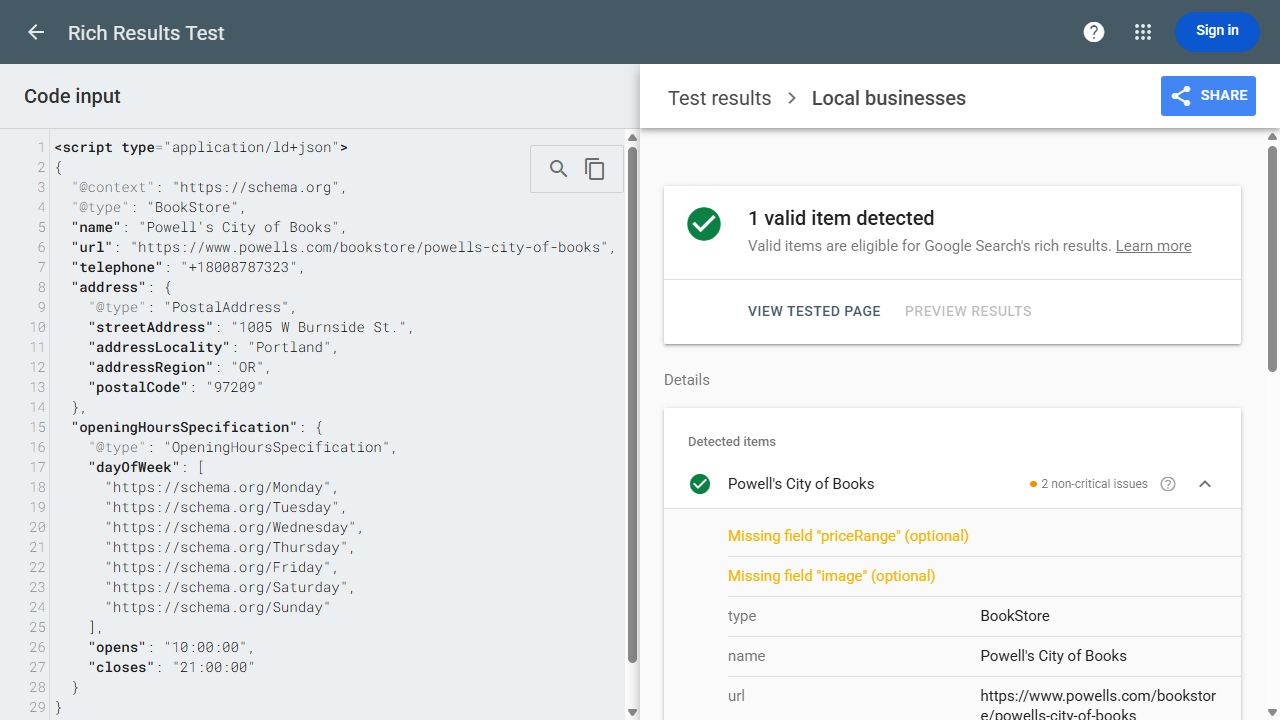
Local businesses: one valid item. Two noncritical issues: optional priceRange and image are missing. This is a snippet test, with no live deployment verified. Open the Full-Size Test Screenshot.
Explain What You Leave Out
The example is deliberately small. Each omitted property has a different reason:
- Coordinates and price range: we did not establish reliable values. A book’s price is insufficient evidence for a business-wide price band. Record the omission; research an optional value further when it would help describe the business.
- Image and identity links: we did not select and verify assets or profiles for this proposed object. An implementer can add accurate, suitable references after checking them.
- Holiday hours: the captured regular schedule does not establish holiday exceptions. Confirm the dates and hours before describing them.
- Other room and counter schedules: these describe different parts of the operation. They cannot replace the main-store schedule.
Review stars need a separate policy decision. Google excludes reviews controlled by the business being reviewed from its LocalBusiness/Organization star-review feature, including reviews embedded through a third-party widget. That self-serving-review restriction does not ban testimonials on a website. It means adding your own review score is not a route to those Google stars.
Keep Branch and Department Details Separate
Give each physical branch its own business facts. A department within a store can have distinct hours or a phone number; Google supports describing those differences through the department property. A branch in another location should not inherit the first branch’s address or schedule.
For multiple locations, a practical brief pairs each location with its page, name, address, contact number, and hours. Avoid applying headquarters details to every branch through a shared template. An existing generator may use stable @id values to reference entities; keep its identity scheme consistent with the implementer rather than creating competing identifiers casually.
For departments, Google’s example keeps the department’s differing properties in its own nested object. Its naming guidance includes the store name unless the department has an explicit independent brand. Confirm that the entity is a department before modeling it that way; a schedule alone does not settle the relationship.

Add the Markup Through Your Existing Setup
Use the source that already generates the location’s markup when it can express the correct facts. A plugin, CMS template, or developer-maintained script can be the implementation route. The important handoff identifies who changes that source and which page will publish the result.
- 1Inspect the target page. Run its URL through a validator and review the detected business objects. Identify the plugin or template behind them with the site owner.
- 2Compare the local fields. Check the name, address, phone, and schedules against the visible page. Multiple schema objects are not automatically a fault; contradictory descriptions of the same location need investigation.
- 3Choose the change point. Update existing local-business settings or the maintained template where possible. If no suitable output exists, have the implementer add the location-specific script through the CMS’s supported code route.
- 4Publish and retest that page. A correct saved setting is insufficient if an older or conflicting value still appears in the output.
Google supports JSON-LD in a page’s head or body. Pasting a script into a normal paragraph editor may display or strip it; follow the CMS’s supported insertion method. Google’s structured-data introduction explains the supported formats and placement. For broader questions about retaining or replacing existing markup, use our schema-markup decision guide.
Check the Code, Eligibility, and Live Facts
Check vocabulary, Google’s feature requirements, and the published facts separately. Each answers a different question. A parser can accept an accurately spelled property containing the wrong closing time, so a successful automated test cannot replace comparison with the business’s real schedule.
| Check | What the Result Tells You | What to Do Next |
|---|---|---|
| Schema Markup Validator | How the markup parses against Schema.org vocabulary. | Correct syntax and vocabulary problems. Check the extracted values against your brief. |
| Google Rich Results Test | Whether supported Google features are detected and what issues the tool identifies. | Fix critical errors. Evaluate optional recommendations against relevance and available evidence. |
| Live page and Search Console URL Inspection | What the website publishes and, with property access, how Google can access and render the page. | Confirm current business facts, correct location, and crawl/indexing access. Recheck after implementation changes. |
Test the published URL after any snippet test. Confirm that the expected script survives the CMS and that the page’s visible hours and contact details agree with the extracted fields. With Search Console access, use URL Inspection to check the live page; investigate robots restrictions, noindex, or login barriers. If access is blocked, follow a broader SEO audit process to identify the cause.
Google’s structured-data policies require representative, current information and explain that automated tools cannot assess every quality issue. An optional warning is a recommendation to investigate. Incorrect facts, critical errors, and access problems require action.
Record implementation success as accurate published data with the relevant checks completed. A visible search feature is Google’s decision. Ranking changes, calls, and bookings require their own measurement; a validation pass does not establish that markup caused any of them.
Keep the Location Record Current
Update the source of the markup when the business changes its address, contact number, opening hours, or location URL. Recheck the rendered output after a plugin or template change. An accurate launch can become a misleading record if the website’s text changes while the generated data stays behind.
Use this suggested handoff brief to keep the decisions together:
- Location and page: the business or branch described, its page URL, and chosen subtype.
- Facts and sources: approved values, where each came from, and when each was checked.
- Omissions: values awaiting evidence, inapplicable fields, and feature-policy restrictions recorded separately.
- Implementation: existing generator, person responsible, and chosen insertion or update route; unresolved decisions named.
- Acceptance: snippet checks, published-URL checks, and comparison with visible facts, with results and remaining issues.
- Maintenance: who updates the facts and which business or site changes require another check.
Start with one location page and its main opening hours. If you can trace each value to the right business and explain every omission, you have a usable brief for the person implementing it. Keep that brief alongside the published result so the next change has a clear starting point.