A Claude SEO tool combines Claude with instructions, software, or data access for an SEO task. Choose the setup by the evidence your task needs: page text for a content review, inspectable page markup for a technical check, and search-performance data for traffic analysis. Before changing your site, check the finding and the reason given for its priority.
If you searched for a project named Claude SEO, start with AgriciDaniel’s Claude SEO repository or its product site. Claude SEO Skill is a separate third-party project. Their names do not make them the same product or an Anthropic SEO service.
The useful buying question is whether the setup can produce an output you can inspect and act on. An impressive audit score leaves that question open until you can trace its recommendations to evidence.
Research scope: We reviewed public documentation on October 11, 2026. The worked example below is a published February 9 audit excerpt. We have not installed these projects, run their audits, or measured their effect on rankings.
What Is a Claude SEO Tool?
“Claude SEO tool” can refer to a third-party audit project, an SEO skill used with Claude, or a connection that gives Claude access to SEO data. Identify which of those you need before comparing feature lists.
Claude Chat, Claude Code, and Third-Party SEO Projects
Claude is Anthropic’s AI assistant. Claude Code is its agentic development environment, available through several interfaces. Third-party projects add their own workflows and software to that environment. Anthropic’s Claude Code overview explains the supported interfaces and account requirements.
AgriciDaniel’s Claude SEO documents page and site audits, schema checks, and other SEO workflows through Claude Code. The separately named Claude SEO Skill advertises downloadable audit reports. SE Ranking’s SEO skills are another route, pairing workflows with the vendor’s data connection.
These are examples of documented approaches. We have not ranked their accuracy or tested which is best. Start at the actual project documentation when you need installation details, supported features, or its current requirements.
Skills Guide the Work; Connections Supply Data
A skill supplies reusable instructions and supporting resources. A connection supplies access to the tools or data that connection supports. Installing instructions alone does not give Claude a keyword database, your Search Console history, or permission to inspect every part of a website. See Anthropic’s skills documentation and MCP documentation.
This distinction matters when the question changes. Claude can review supplied copy for clarity and coverage. Explaining why a page lost organic clicks requires performance evidence. A crawler’s report, a keyword provider’s estimates, and Search Console observations each answer different questions; ask the setup to identify which source it used.
Choose a Setup for the Task You Need Done
Choose the route that can inspect the evidence needed for your decision. A content review can begin with supplied material. A technical diagnosis needs the relevant page or code. A performance analysis needs comparable data with dates and filters. Our suggested routing table keeps those requirements visible.
| Your Task | Required Input | Suitable Starting Route | Output You Can Inspect |
|---|---|---|---|
| Review one page’s explanation | Page text, intended reader, and the job the page should complete | Claude with supplied material and a bounded review request | Quoted passages, missing explanations, and proposed edits tied to the reader’s task |
| Check one public page’s technical elements | URL plus the relevant fetched or rendered page and markup | A documented page-audit workflow, such as a Claude Code SEO project | The affected element, observed value, source location, and validation step |
| Investigate search-performance changes | Appropriate page/query exports or a supported connection, date ranges, and filters | Claude working with those records | A comparison you can reproduce in the original data, with unresolved causes identified |
For the second route, confirm what the tool inspected. Supplied HTML, a fetched response, a browser-rendered page, and Google’s indexed version are different records. A report based on one should name it. If a page needs JavaScript to expose the relevant content, a plain fetch may leave the review incomplete.
For the third route, keep the page’s purpose in view. Growing impressions on unrelated queries may tell you little about buyer interest. Review the actual searches, the matching page, and comparable periods before accepting a proposed rewrite.
If you are still deciding which SEO task would benefit from AI, use our guide to choosing a first useful AI SEO task. This page focuses on the Claude setup and the quality of its recommendation.
Start With One Page and One Checkable Output
Give your first run a narrow question and a clear completion condition. One page lets you compare a finding with its source before commissioning a site-wide audit. Choose an output you can verify, such as a cited content gap or a markup observation with a validation method.
Follow the Plugin’s Documented Starting Route
AgriciDaniel’s repository lists Claude Code CLI and Python 3.10 or later among its requirements, with Python 3.11 or later recommended for new installations. Its plugin instructions document this sequence inside Claude Code:
- 1Add the marketplace:
/plugin marketplace add AgriciDaniel/claude-seo. - 2Install the plugin:
/plugin install claude-seo@agricidaniel-claude-seo. - 3Run
/seo setup. The documentation says this creates an isolated Python environment and installs Playwright Chromium. - 4Check the environment with
/seo doctor. - 5Start a single-page review with
/seo pagefollowed by your public page URL.
This sequence comes from the project’s documentation; we have not executed it. Read the current installation section before following it, including what the setup installs. Optional data integrations have their own prerequisites and accounts.
A failed setup check is an environment problem to resolve before evaluating SEO output. A successful setup check establishes that the environment is ready according to that check; the findings still need review.
Give the Review a Clear Finish Line
Ask for one finding that contains:
- Location: the URL and affected passage, element, or data record.
- Observation: what was found, with enough detail to reproduce it.
- Consequence: why it matters for this page and its intended outcome.
- Action: the proposed edit or investigation.
- Validation: how you will check that the action addressed the issue.
For a content review, keep the existing page purpose and neighboring page ownership in the input. Otherwise a suggestion to add more coverage can create overlap with a page that already answers that job.
For a technical finding, require the exact inspected version. Check that a generated schema suggestion accurately reflects the organization and visible content before implementing it.
A Public Audit Example: Check the Finding and Its Urgency
An audit can report a plausible omission while giving too little support for its priority. Check the reported condition and its urgency separately.
What the Published Sample Says
AgriciDaniel’s published sample output presents an excerpt of a schema audit dated February 9, 2026, for rankenstein.pro/about. The Organization finding reports one founder in the markup while the page describes two co-founders. It labels the omission a Critical Issue and says the mismatch can confuse search engines.
We inspected that excerpt in October. We did not inspect the historical page or verify whether the same condition exists today. The sample predates the project’s current release, so it cannot serve as a benchmark of current product accuracy. The repository’s present methodology itself calls for evidence and checks that could falsify a recommendation.
The excerpt raises two questions: is the reported mismatch still present, and what establishes critical urgency? Answering the first does not automatically answer the second.
What Google and Schema.org Establish
Google’s Organization structured-data guidance says that this type has no required properties and advises adding properties relevant to the organization. Schema.org defines founder as a valid property. A verified second founder can therefore be a legitimate completeness improvement.
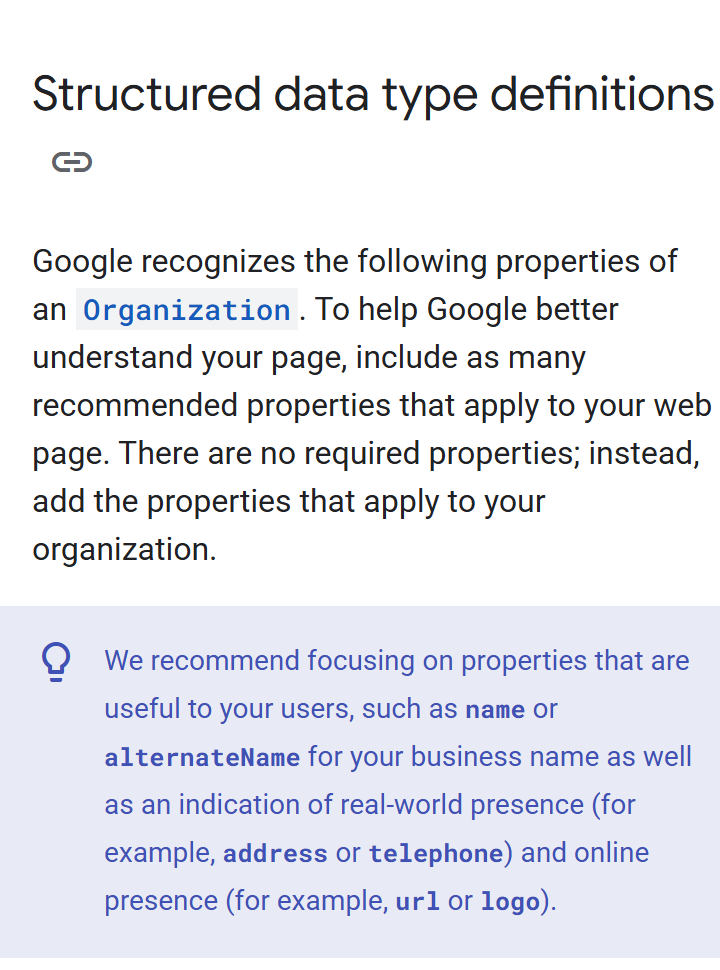
Source: Google Search Central, captured October 11, 2026. The passage concerns Organization; other types and features can have their own required fields.
These sources narrow one possible justification for urgency: the omission does not, by itself, establish a missing Google-required Organization property. The sample also does not explicitly claim such a failure, lost rich-result eligibility, or ranking loss. We should not attribute those claims to it.
Our assessment is narrower: the excerpt does not establish why the reported omission deserves critical priority. There may be additional context outside the excerpt. Confirm the present observation and its consequence before scheduling urgent work.
Turn the Finding Into a Verifiable Action
Our suggested replacement ticket turns the excerpt into a task to verify. We have not implemented it.
Suggested Review Ticket
Check: Compare the current page’s co-founder information with its Organization JSON-LD.
Conditional edit: If the page still identifies two verified co-founders and the markup lists one, consider adding the second supported founder.
Priority: Treat this as a completeness improvement pending verification. Seek additional consequence evidence before assigning critical urgency.
Validation: Check that the revised markup accurately reflects the page, then validate the code using appropriate structured-data tools. Record the actual validation result.
The next action is to verify the mismatch and its consequence before assigning urgent work. The excerpt alone establishes neither a live defect nor a likely ranking gain.
Ask for Evidence Before Accepting an SEO Recommendation
Ask Claude to expose the support behind each consequential recommendation. A severity score is useful only when the report explains the observed condition and its consequence. You can use the following review request with a finding from an audit or a proposed page edit.
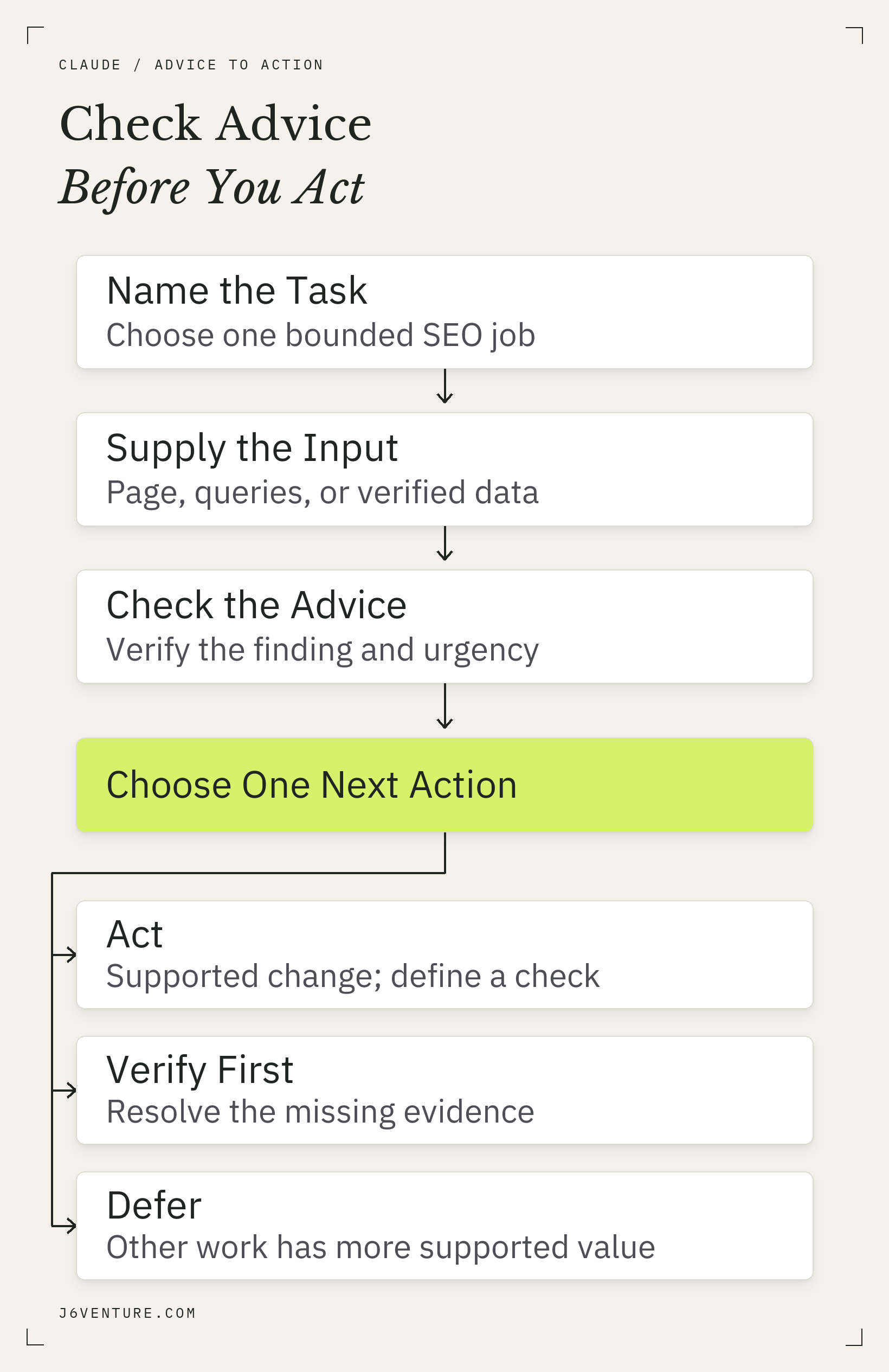
Our suggested workflow: check both the observation and the proposed priority before turning Claude’s advice into work.
Suggested Review Request
Review this recommendation using the supplied evidence. Identify the affected page or record, quote the observation, and separate observed facts from inferred consequences. Name any applicable requirement and link its original source. Explain what supports the priority, what remains unverified, the smallest useful action, and how to validate it. If necessary evidence is missing, specify what to obtain before acting. Do not invent missing data or a ranking outcome.
Use the resulting evidence to decide:
- Implement: the issue is verified, the consequence matters, and the proposed action fits it.
- Verify first: the observation, requirement, or priority depends on missing evidence.
- Defer: the finding may be valid, but its supported value is low relative to other work.
Urgent work does not always need a measured ranking loss. A verified technical blockage or materially inaccurate business information can warrant action on its own consequences. The test is whether the urgency has support appropriate to the issue.
The same distinction applies when checking an AI-generated search answer. Our AI Overview source check demonstrates how a source can support a narrower conclusion than the answer built around it.
When a recommendation concerns AI Overviews, check it against Google’s actual AI-search requirements and a worked page example. A proposed summary format or markup addition still needs a reason grounded in the page and official guidance.
Budget for Usage, Data, and Review Time
Free plugin code does not cover every cost of using the workflow. Budget for Claude access, optional data services, and the time required to configure and inspect the output. Compare those costs with the task you need completed before treating a free download as a saving.
AgriciDaniel’s project publishes its core under the MIT license. Anthropic’s Claude Code cost guidance distinguishes token-billed API usage from subscription usage subject to plan limits. Optional providers can add separate charges.
A useful cost record includes setup time, usage for the bounded task, paid data calls where applicable, and review time. We have not measured those costs for this plugin. A report that takes longer to verify than your existing method may be a poor fit even when the code costs nothing.
Check Access Before Connecting Site Data
Grant the access needed for the chosen task and inspect what the connection can read or change. A public-page review may need no private analytics. A performance diagnosis can use appropriately scoped exports or a supported read-only connection. Choose the input with the required detail and acceptable access.
Check the site/property, date range, filters, and permissions before handing over data. Avoid giving a review workflow publishing or editing access merely because the connector supports it. Inspect third-party tool instructions and authentication requirements before connecting accounts.
Local execution also needs a precise interpretation. Anthropic’s data-usage documentation explains that local Claude Code sends data over the network to interact with the model, including prompts and outputs. Local files do not establish that all processing stays on the laptop. Data treatment depends on the account, provider, and settings.
Decide Whether to Keep Using the Setup
Keep using the setup when it completes your chosen task with traceable findings at an acceptable cost. Review a bounded output before extending the workflow to more pages. Our suggested acceptance test is whether you can locate the evidence, understand the consequence, and validate the resulting action.
If data is unavailable, repair the input or connection before asking for a stronger diagnosis. If recommendations have unsupported priorities, review them before widening the audit. If the workflow repeatedly answers a different question, change the task or setup.
Choose one page you own, name the decision you need to make, and request one checkable finding. The first useful result is a decision you can defend and carry through to validation.