SaaS keyword research identifies the searches your product can help someone act on, then assigns those searches to a suitable page. Start with buyer language, check product fit and search intent, and decide whether to build, improve, hold, or reject. The output is a page decision with evidence behind it.
A keyword list can grow indefinitely. Your publishing capacity cannot. SaaS keyword research decides which buyer task your product can serve, which page should own it, and whether that page deserves work.
Keep one working map as you go: candidate search → reader job → supporting evidence → existing page → decision → next check. Public Qwilr pages show how similar product searches can lead to different reader jobs.
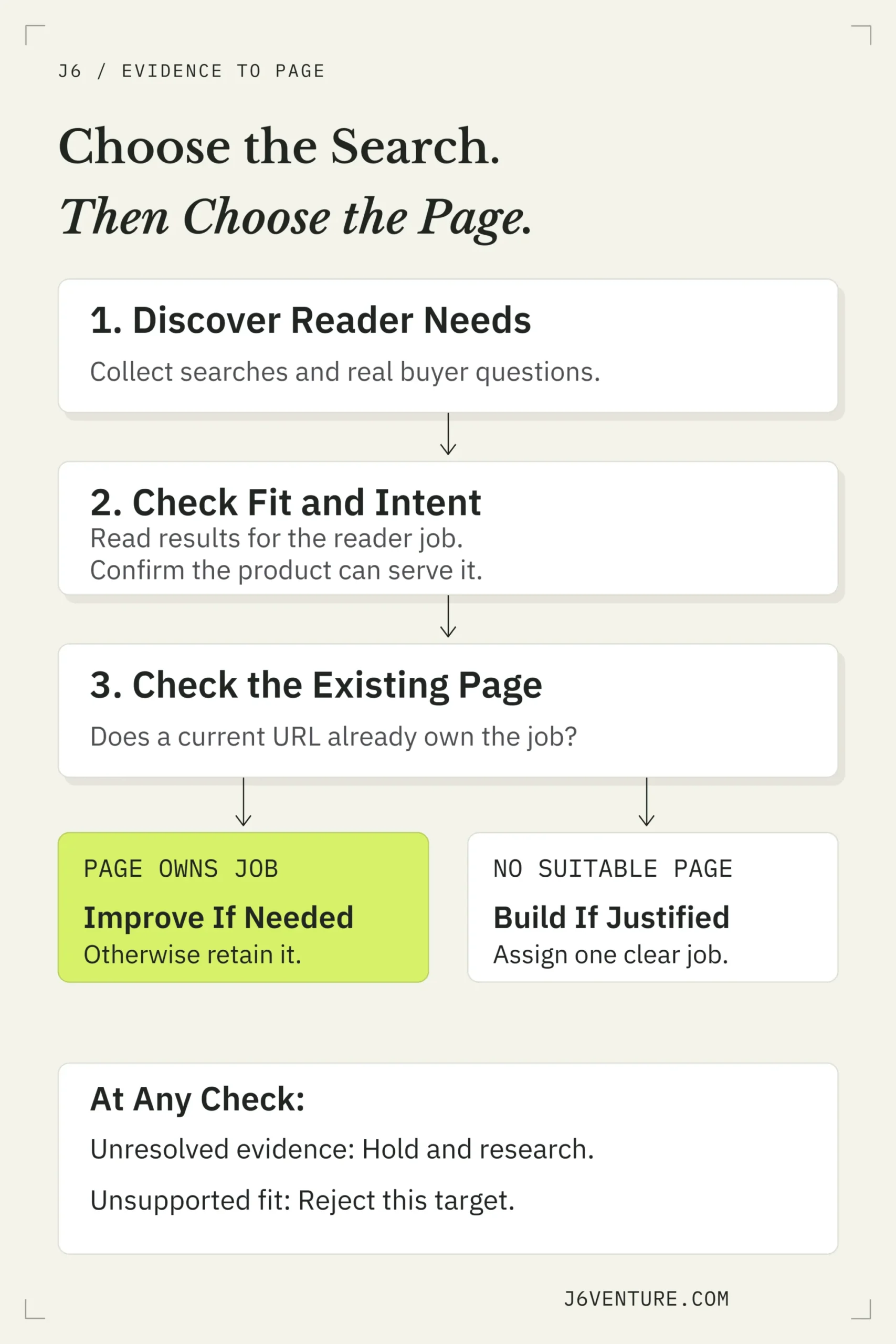
Check the reader job, product fit, and existing page before committing to work. Hold unresolved candidates; reject unsupported targets.
What Is SaaS Keyword Research?
For a SaaS business, a relevant search connects a person’s question or task to something the software supports. That connection might involve a problem, a workflow, an integration, a comparison, or a buying requirement.
“Proposal software for HubSpot” and “connect Qwilr to HubSpot” suggest different tasks: choosing a product and configuring one. Check the search results before assigning either task to a page.
Your primary keyword names the page’s main opportunity. Related queries can belong to that page when they need substantially the same answer. You do not need a separate URL for every wording variation. Our explanation of keywords in SEO covers that foundation in more detail.
A completed research map answers three questions:
- Which searches involve an audience and job the product can serve?
- Which page should own that job?
- What evidence justifies working on that page now?
Start With the Buyer and the Product Promise
Begin with the part of the market your product can serve today. A broad category such as “project management software” hides important differences between a freelancer organizing tasks and an enterprise team handling permissions, procurement, and several departments.
Write a short starting statement: We help [specific audience] complete [job] under [important conditions]. Treat each part as something to support with product documentation and customer evidence.
Then collect the vocabulary around that job. Product language tells you what the software does. Buyer language helps you discover how people describe the need before they know your product’s terminology.
Separate Buyer Language From Your Own Assumptions
Use sources with different purposes:
- Sales and customer conversations: questions, objections, workarounds, and situations that prompted a search.
- Support requests and help documentation: tasks users need to complete and recurring implementation difficulties.
- Public reviews and relevant communities: descriptions of problems, alternatives, and requirements to investigate.
- Product pages: capabilities, limitations, integrations, and the claims a page can responsibly make.
- Search Console: queries through which your existing pages have appeared in Google.
Record the source beside the phrase. A customer’s exact wording, a paraphrase of a public review, and a phrase suggested by your team have different evidential status. Keep that distinction visible without turning the worksheet into a transcript archive.
For example, an AI-generated phrase such as “proposal automation for enterprise sales” is a candidate. Before prioritizing it, you still need to establish who needs that workflow, what enterprise requirements matter, and whether the product meets them.
Search Console helps with discovery, but its query table is incomplete. Google omits anonymized queries and can truncate other rows. A missing phrase therefore tells you little about total market demand. Google’s data guidance
Use Buying Requirements to Make Searches More Specific
Buying requirements make a search more useful when they reveal a condition the product must meet. A small team might need an integration; an enterprise buyer might need permissions or procurement support. Ask what the buyer must verify:
- Can the required people access the workflow with appropriate permissions?
- Does it work with the team’s existing systems?
- Are there security, procurement, or regional requirements?
- Does the plan, contract, or rollout support the intended use?
These questions can produce more specific candidate searches, such as a software category plus an integration or permission requirement. They also expose promises your page cannot yet support.
A longer phrase deserves attention when it expresses a clearer job. Its length alone says little about ease of ranking or likelihood of conversion.
Build a Focused Keyword Universe
Expand the starting task into candidate families. Keep variations that reveal a different answer or buying condition.
Expand Across Problems, Products, Integrations, and Buying Questions
Use these prompts to broaden the research:
- Problem: What is the person trying to fix or avoid?
- Product category: What type of software might they look for?
- Use case: What specific workflow do they want to complete?
- Feature or requirement: What must the solution do?
- Integration: What other system must it work with?
- Alternative or comparison: What existing choice are they evaluating?
- Buying question: What do they need to understand about cost, access, or suitability?
For the proposal-software example, these are editorial candidate phrases to investigate:
- Problem: “how to create sales proposals faster.”
- Integration: “proposal software for HubSpot.”
- Comparison: “Qwilr alternatives.”
- Buying question: “Qwilr pricing.”
Compare the answers these candidates need: workflow guidance, integration evaluation, an alternatives assessment, or pricing. That difference helps you choose the destination.
Keep candidates that reveal useful opportunities, then narrow them to the audience and capabilities your product supports.
Keep Branded and Generic Searches Distinct
A branded query includes a product or company name. A generic query describes a category, problem, or requirement without naming that product. This distinction helps you inspect what the person may already know.
Someone searching for a product’s setup instructions may already be a customer. Someone searching for a software category may still be exploring options. Branded searches can also involve comparisons, complaints, or pricing, so the name alone does not establish the task.
Track the groups separately when assessing acquisition. An increase in branded clicks could reflect awareness created elsewhere. It should not automatically become evidence that a new generic page introduced the product to new buyers.
Research With Free Sources, Tools, and AI
Start with the sources you already have:
- 1Read your product and support pages to establish capabilities and existing destinations.
- 2Gather relevant buyer language from available conversations and public sources.
- 3Search the candidate phrases and inspect the results yourself.
- 4Check your own Search Console for related queries and pages, when available.
- 5Record what remains unknown before selecting the work.
Paid tools speed up expansion and comparison through related terms, competitor-page reports, and estimates. Check the resulting candidates against your product and search intent.
AI can propose alternate wording, organize candidates, or suggest questions you may have missed. Ask it to keep generated suggestions separate from observed customer language. Verify any product, demand, or competitor claim independently.
An AI answer can reveal subtopics to consider. It does not establish search volume, prove that a comparison query converts, or decide which page should own the answer.
Check Search Intent and the Pages You Compete With
Search the candidate in the market you intend to serve. Record the date and relevant settings, then inspect several leading results. Your business competitors and your search competitors may differ: a publisher, directory, help center, or community can compete for the same query.
Inspect the Reader Task and the Result Format
Look beyond the title. Read enough of each page to understand what it helps someone do:
- Evaluate software or compare options.
- Learn a method or understand a problem.
- Complete a setup task.
- Check a price, requirement, or limitation.
Then inspect the format. Does the result provide a product page, a comparison, documentation, a tutorial, or a broad explanation? What evidence makes it useful: screenshots, specifications, examples, or an actual procedure?
Mixed results require judgment. A query can support more than one plausible interpretation. Write down the interpretation your proposed page would serve and what you would need to verify before committing.
Compare related searches as well. Substantial result overlap can support grouping, especially when the pages answer the same question. Different results can suggest different jobs. Read the answers before using overlap as a page-splitting rule. Our intent-mapping guide develops the distinction between search wording and the decision a page should support.
Treat Competitor Gaps as Candidates
A competitor report can show searches associated with pages your site lacks. It cannot tell you whether those searches fit your product, whether the competing page is profitable, or whether your team can create a better answer.
For each promising gap, check:
- Is the audience one you want to serve?
- Can the product support the task and important conditions?
- Does an existing page already answer it?
- Can you contribute evidence or clarify the decision?
- What would creating and maintaining the answer require?
Discard an irrelevant gap even when its metrics look attractive. Hold a plausible opportunity when a required product or intent check is unfinished.
Read Search Volume and Difficulty Without Letting Them Decide
Search demand concerns the searches people make. Buyer demand concerns suitable prospects needing a solution your product can provide. A volume estimate helps assess the first; product and customer evidence help assess the second. Keep the tool, market, and measurement period beside every figure.
| Metric | Useful Question | Important Limit |
|---|---|---|
| Search volume | How much recorded or estimated search activity surrounds this wording? | It is not a count of qualified buyers or guaranteed visits. |
| Keyword difficulty | What competitive signal does this tool summarize? | It is vendor-specific and does not fully assess your ability to answer the task. |
| CPC or Ads competition | What paid-search activity exists around the term? | Advertiser activity does not establish organic ranking difficulty or your product’s economics. |
| Traffic potential | How broadly does a currently ranking page attract related searches? | Another page’s estimated traffic is not a forecast for yours. |
Google Ads’ average monthly searches includes the keyword and close variants under the selected date, location, and network settings. Its Competition metric concerns advertisers. Avoid adding close-variant volumes as independent audiences. Google Keyword Planner guidance
Ahrefs describes its Keyword Difficulty as a backlink-based measure. It also recommends examining search results and your resources. A low score can still accompany a task your product cannot serve. Ahrefs’ difficulty explanation
Ahrefs’ Traffic Potential looks across the related searches a top-ranking page receives. Use it to investigate the opportunity’s breadth, then assess your own proposed answer. Ahrefs’ keyword research guide
A small or unreported volume estimate can justify further investigation when the buyer job is relevant. Keep the uncertainty visible; do not turn a plausible niche into an invented demand figure.
Give Each Reader Job a Page Owner
Group searches when they need substantially the same answer. Separate them when the reader needs a different decision or action. The page’s purpose should stay coherent even when it can answer several related queries.
Keyword research chooses the destination type: a product page, integration page, help article, comparison, or educational resource. Create a blog post when that format serves the task.
Improve an Existing Page or Build a New One?
Read the existing candidate page before commissioning another URL. If it already serves the job, identify the missing answer, evidence, or clarity. Improve that page when the proposed work belongs within its purpose.
Consider a new page when the job is materially different and the existing page would become unfocused by absorbing it. Before splitting, compare the proposed answers: if most of the explanation would repeat, reconsider the boundary.
Two URLs receiving impressions for a similar query deserve inspection. That observation alone does not establish harmful competition. Compare their jobs, the queries involved, and which page best serves the intended search.
Public Example: Qwilr’s HubSpot Integration, Setup, and Pricing
Qwilr provides three public destinations for evaluating its HubSpot integration, configuring it, and checking pricing. The phrases below began as editorial candidates. We checked “proposal software for HubSpot” against Google results on October 12, 2026; the other two remain illustrative mappings. We have no measured demand or conversion data for these phrases.
| Proposed Search | Reader Job to Check | Existing Public Destination |
|---|---|---|
| Proposal software for HubSpot | Evaluate whether the integration supports a proposal workflow. | Qwilr’s HubSpot integration page |
| Connect Qwilr to HubSpot | Set up the integration and create pages using it. | HubSpot V2 setup and create guide |
| Qwilr pricing | Understand the product’s pricing options and conditions. | Qwilr’s pricing page |
The integration page describes personalized proposals using CRM data. The setup guide explains connecting the systems and creating pages; it also identifies administrative access and user-seat requirements. The pricing page addresses cost and plans.
Our US-English desktop Google result sample for “proposal software for HubSpot” was mixed. It included HubSpot Community discussions seeking proposal tools, Proposify’s CRM-integration guidance, product and comparison pages, and PandaDoc’s HubSpot services proposal template. Reading the pages matters: that template proposes HubSpot services to a client; it does not by itself demonstrate a proposal-software integration.
For the evaluation task, Qwilr’s integration page is a suitable existing owner: it shows proposal creation from CRM records, document activity tracking, and a route to setup guidance. The mixed results give us a reason to serve that task clearly, while keeping setup and pricing at their own destinations. They do not establish a single intent for every searcher.
The page also exposes a specific improvement: its FAQ names Business and Enterprise plans, while the current pricing page names Starter, Growth, and Scale. Our editorial recommendation is to keep the integration page as the evaluation owner and reconcile its plan guidance after Qwilr confirms the current entitlement. No new blog post is justified by this candidate alone. This is a public assessment; we have not changed Qwilr’s pages or measured an outcome.
Prioritize Keywords With Product Fit and Evidence
Decide whether a candidate is eligible for work before comparing it with other opportunities. A high numerical score should never conceal a missing capability or an unfinished intent check.
Choose Build, Improve, Hold, or Reject
Use four plain decisions:
- Build: a supported reader job needs a suitable page and none exists.
- Improve: an existing page owns the job and has a specific, evidenced gap to fix.
- Hold: the opportunity is plausible, but a necessary check is unfinished.
- Reject: the proposed target requires an audience, capability, or promise the business cannot responsibly serve.
A page that already answers the job well may need no work. Keep it as the owner without manufacturing an improvement task.
Before checking search results, put this candidate on Hold. Our October 12 check supports a page decision, with one product detail still awaiting confirmation:
| Decision Field | Recorded Evidence or Next Action |
|---|---|
| Candidate and origin | “Proposal software for HubSpot”: editorial wording derived from the public integration use case. |
| Product fit | The integration page shows proposals using HubSpot CRM data. Its plan names conflict with the current pricing page; confirm entitlement before revising that claim. |
| Search intent | US-English desktop Google sample, October 12, 2026: tool-selection discussions, integration guidance, product/comparison pages, and a services template. Evaluation is a supported task within these mixed results. |
| Existing owner | Keep the HubSpot integration page as the owner for evaluating Qwilr’s supported workflow. Setup and pricing retain separate destinations. |
| Decision | Improve the existing integration page’s conflicting plan guidance. Hold the entitlement wording until Qwilr confirms it; preserve the page’s evaluation purpose. |
| Release condition | Confirm the current integration entitlement with Qwilr, reconcile the FAQ with pricing, and check that the revised answer helps buyers assess access. No ranking or conversion improvement is claimed. |
Decide Which Supported Opportunity Goes First
Compare supported opportunities by value and effort:
- 1Which serves the audience and problem the business most wants to own?
- 2Where can you provide a useful answer with evidence available now?
- 3What existing content or product assets reduce the work?
- 4What does the competitive result require you to produce?
- 5What maintenance will the answer need?
An opportunity with a verified gap can proceed while another awaits evidence.
Compare two possible tasks for Qwilr: reconcile plan guidance on the integration page, or commission a “Qwilr alternatives” comparison. This is our public editorial assessment.
The plan-name conflict is documented. Confirming current access with the product owner is a bounded research task before correcting the FAQ. An alternatives comparison needs a different evidence package: verified capabilities and limitations for the products being compared.
If entitlement can be confirmed and comparison testing is unfinished, the FAQ correction can proceed first. If the comparison’s evidence is ready and it serves the more valuable buyer task, it may take priority. Choose by value, available proof, and effort.
Record the reason: “Conflicting plan guidance verified; entitlement confirmation required before the FAQ correction.” Numerical scores can support discussion when the underlying reasons remain visible.
Write the Brief for Your First Page
Turn the selected map row into a short writing brief. Preserve its query set, reader job, evidence, owner, and decision; add only what the writer needs to deliver the answer:
- Required answer: what the reader should understand, decide, or do by the end.
- Proof: documentation, a public example, a tested procedure, or another appropriate source.
- Boundaries: adjacent jobs the page will link to or leave outside its scope.
- Completion condition: what a reviewer must confirm before publication.
For the Qwilr FAQ correction, the brief is: confirm HubSpot integration access with the product owner, reconcile the FAQ with pricing, and keep the page focused on evaluation. The product owner checks entitlement wording before publication; setup instructions stay in the help guide.
Keep the brief proportionate to the work. A targeted correction needs the exact gap and supporting evidence. A new page needs a fuller answer plan. For the broader publishing roadmap, see our SEO content strategy guide.
Measure the Searches and Outcomes the Page Should Serve
Assign the review date when the work goes live. Record the implementation date so the review measures the implemented change.
Review the page against its intended job:
- Search relevance: are the reported queries connected to the audience and task you selected?
- Useful visits: are relevant searches bringing readers to the right destination?
- Reader action: can people complete the intended next step, such as evaluating a workflow or following setup guidance?
- Business outcome: where acquisition is the purpose, inspect qualified inquiries, signups, or another suitable outcome alongside traffic.
A setup guide and an acquisition page serve different purposes. Judge each against the work it was meant to do. Keep branded and generic query groups distinguishable, and account for incomplete query reporting when interpreting the results.
Revisit the map when the product changes, an important requirement changes, or search results reveal a different task. If performance is weak, investigate relevance, the answer, the destination, and the next step before creating another page for similar wording.
Put Your First Page Decision to Work
Choose one candidate and complete its map row. Establish the buyer job, verify the product promise, inspect the search results, and identify the existing owner. Then make the smallest justified decision: build, improve, hold, reject, or retain a page that already works.
If you choose Hold, name the missing check, who will resolve it, and what evidence releases the decision. If you commission work, assign the review date at publication and keep the reason for the choice with the brief.
That puts SaaS keyword strategy into practice: you can explain which search deserves attention, which page should serve it, and why this piece of work comes next.