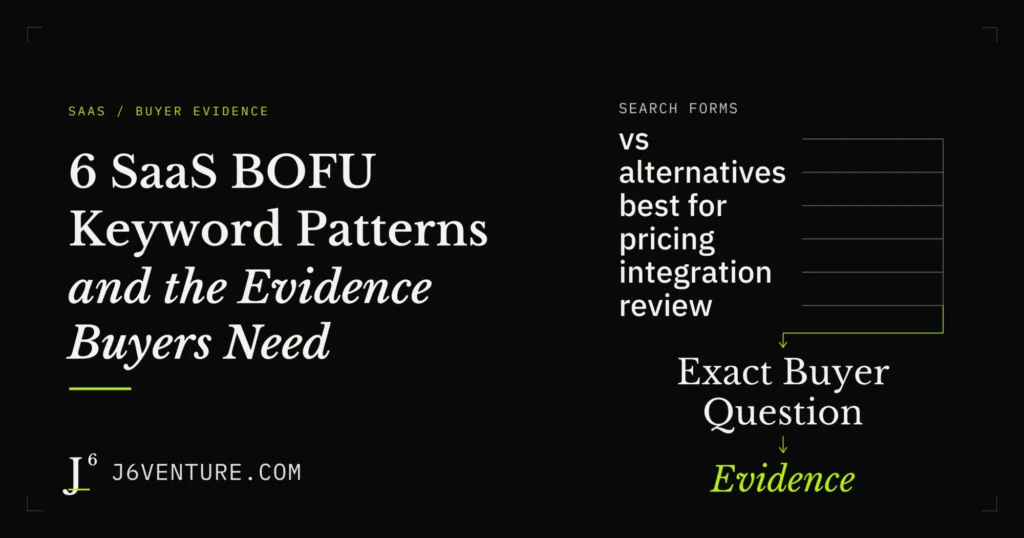
SaaS BOFU keywords are searches associated with evaluating a software purchase, such as comparisons, alternatives, pricing, integrations, and reviews. BOFU means bottom of the funnel. A useful answer connects the buyer’s question to credible evidence, the conditions that affect fit, and a relevant next step.
A product page can say it has a CRM integration while leaving the buyer’s real question unanswered: will the required workflow work in their plan and environment? The content has to establish what the buyer can rely on before choosing, replacing, or paying for software.
What Are SaaS BOFU Keywords?
SaaS BOFU keywords concern questions someone may ask while evaluating software: which option fits, what it costs, whether it meets a requirement, and whose experience is credible. Interpret a candidate search through the decision behind it and the pages Google currently returns.
The funnel language provides a rough orientation. Awareness content introduces a problem; consideration content helps someone explore approaches; buying-stage content helps evaluate a solution. A search can cross those boundaries. Someone researching a requirement early may need the same product detail as a person close to purchasing.
Branded searches, such as a product name followed by “pricing,” can concern a known option. A generic phrase, such as “best team chat software for external partners,” can concern a category. Both need an answer appropriate to the job.
An existing customer checking a bill could search for pricing. An administrator could search for an integration while configuring software already purchased. A commercial modifier is a clue to investigate. It does not identify the searcher’s stage or prove purchase readiness. Search results, page purpose, and questions from your own audience help interpret the phrase. J6’s intent-mapping explanation goes deeper into that distinction.
Where to Find the Buying Questions Behind Your Keywords
Find candidate BOFU keywords in questions your audience asks about choosing software, relevant queries already reaching your site, and public discussions or documents about product evaluation. Keep the underlying question alongside the phrase so a modifier list does not erase the requirement.
Start with these three sources:
- Sales and support conversations: look for questions about fit, pricing, replacing another tool, or implementing a needed workflow. Separate existing-customer troubleshooting from buying questions.
- Visible Search Console queries: inspect the phrases and pages already getting relevant impressions. Treat the available rows as observations about your site, without assuming they represent every search or a qualified prospect.
- Public results, reviews, and help pages: examine the questions a comparison, review, or setup document addresses. These can reveal requirements to investigate; they do not establish demand for every phrase you construct.
For example, “Can our sales team work with Salesforce records in Slack?” suggests a candidate such as “Slack Salesforce integration.” Preserve the workflow and environment in the content brief, then inspect the results for that phrase. A broad integration explainer and an administrator’s connection instructions serve different immediate jobs.
Start with a question relevant to an audience and problem your product can serve. The broader discovery and page-ownership process belongs in SaaS keyword research.
Six BOFU Keyword Patterns and What Each Answer Needs
Comparison, alternatives, category or use-case, pricing, integration, and review searches are six BOFU patterns. They can overlap: a comparison may need pricing and integration evidence. Match the answer to the particular buying question within the pattern.
The following phrases are illustrative candidates, constructed to explain the patterns. They are not a measured keyword list or evidence that the people searching them are ready to buy.
| Pattern | Illustrative Search | What the Answer Must Establish | Next Step |
|---|---|---|---|
| Comparison | Slack vs Microsoft Teams | Fit for the same named workflow, using comparable criteria and plan limits for that workflow | Check the criterion that could decide the choice |
| Alternatives | Slack alternatives for external collaboration | Candidate fit and, when replacing a tool, the switching requirements | Check candidate fit; assess switching requirements when replacing a tool |
| Category or use case | Best team chat software for external partners | Which products meet the stated requirement and the basis for inclusion | Inspect or test the qualifying capability |
| Pricing | Slack cost for a 30-person team | Required plan, billable seats, billing term, and applicable extra costs | Resolve missing pricing inputs or request a quote for the required capability |
| Integration | Slack Salesforce integration | Exact workflow, access, prerequisites, and environment limits | Check the required connection or capability with the right admin |
| Review | Slack review for customer-facing teams | Experience of the named workflow, provenance, product context, and limits | Investigate the drawback that matters to this team |
Comparisons That Help Buyers Choose Between Products
A comparison answer should help a buyer choose between options using criteria that matter to the same task. For “Slack vs Microsoft Teams,” define the workflow before deciding which features to compare. An external-collaboration question may require evidence about who can participate, permissions, and plan requirements.
Give each product equivalent scrutiny:
- Establish the required capability from its own documentation.
- Identify the plan, account, or setup conditions affecting that capability.
- Explain the consequence for the stated workflow, including a documented limitation.
An entry saying “supports collaboration” leaves those decisions open. A comparison should explain whether each product meets the stated criteria and which conditions could change the choice. If one requirement remains unverified, name the gap without awarding that product a capability or a failure.
Keep the criteria transparent, disclose commercial relationships that could influence the comparison, and date the product evidence. No product winner follows from the example phrase above: a defensible verdict requires evidence for both products and the buyer’s actual requirement.
Alternatives That Explain Product Fit and Switching Costs
An alternatives answer should establish how a candidate serves the requirement that prompted the search. “Slack alternatives for external collaboration” could come from a team replacing Slack or a first-time buyer widening a shortlist. The word “alternatives” does not establish dissatisfaction.
For a replacement project, clarify the reason to switch. A documented capability gap, an unaffordable required plan, or an unsuitable environment creates a different evaluation from a general preference for another interface. If the incumbent’s fit is still unknown, investigate it before presenting a mismatch as fact.
For a replacement, check:
- Whether the candidate supports the required external-collaboration workflow.
- Which existing records, conversations, or settings need to move, and what transfer evidence is available.
- What access changes, training, parallel operation, or contract costs the move would involve.
Those switching checks apply where a replacement is happening. A team choosing its first tool needs fit and implementation information without an invented migration burden. The next action should address the unresolved requirement that could change the shortlist.
Category and Use-Case Searches With Specific Requirements
A category or use-case answer should make its selection criteria inspectable. “Best team chat software for external partners” requires an explanation of what qualifies a product for that workflow. A list of recognizable brands leaves the meaning of “best” undefined.
State the requirement before the recommendations. For this illustrative search, questions could concern external participants, access control, conversation ownership, and the eligible plan. Choose criteria because they affect the named workflow; a long list of unrelated features adds little.
Each included product needs evidence that it meets those criteria, with material limits beside the recommendation. If the evidence covers internal team messaging, do not silently extend it to every external-partner arrangement. A missing public detail should remain an open question.
An answer can give a buyer a shortlist without claiming a universal best product. Explain the inclusion basis, who an option appears to fit under the documented conditions, and which capability to inspect or test next.
Pricing Searches That Need the Full Cost Conditions
A pricing answer should connect the buyer’s required capability to the plan and billing inputs that determine cost. “Slack cost for a 30-person team” does not supply enough information for a reliable total: the team’s required features and billable-seat rules still matter.
Before calculating, check:
- The plan that includes the required feature and any access conditions.
- The billing term, currency, and basis for counting billable users.
- Applicable usage charges, add-ons, or implementation costs.
- Whether a promotion or negotiated quote applies, and what it excludes.
Separate confirmed terms from unresolved inputs. If a needed capability requires sales approval, say what needs quoting or confirming; do not fill the gap with a price from another plan. State the date and assumptions beside any calculation.
In the public Slack example below, the pricing matrix distinguishes bringing Salesforce records into channels from native CRM lead-and-deal tracking. Finding the right feature row precedes the cost calculation. The appropriate next step could be checking billable seats or confirming access to that exact capability.
Integration Searches That Need an Exact Capability Check
An integration answer should explain whether the required task can work with the buyer’s systems and access. “Slack Salesforce integration” is broad: connecting accounts, viewing records, and running a particular workflow are different requirements. The existence of a connection leaves task-level conditions to check.
Bind the evidence to the task:
- What data or action must move between the products?
- Which plans, accounts, roles, and approvals are required?
- What environment or configuration limits affect the workflow?
- Which details remain unverified for this buyer?
A setup document can provide valuable evidence about implementation effort or a restriction. It can also serve an administrator who has already purchased. Use facts bearing on the evaluated workflow in the answer without assuming every visitor needs a tutorial or a sales call.
When the source supports a connection but leaves a required action unclear, preserve that distinction. Ask the admin or vendor responsible for the connection whether that action is supported in the named environment. A general “yes, it integrates” cannot settle every task-level question.
Review Searches That Need Credible Experience
A review answer should explain what the reviewer experienced, in which product context, and how that experience bears on the buyer’s task. “Slack review for customer-facing teams” calls for evidence about that workflow, including drawbacks and limitations.
Evaluate the review’s provenance:
- Who wrote the review, and what relationship or incentive should be disclosed?
- Which plan, version, team context, and date does it concern?
- What was used or tested, and what observation supports the verdict?
Vendor documentation can establish a described feature or plan condition. It cannot establish an independent reviewer’s satisfaction or your own hands-on experience. If that experience is unavailable, answer the documented capability questions and make the experience gap visible.
A single complaint can identify a risk worth investigating without establishing how often it happens. The next step is to test or clarify the drawback material to the buyer’s workflow, using evidence about the requirement they are investigating.
A Public Slack Example Shows Why the Exact Requirement Matters
Match a buying question to the exact capability, then check the conditions before writing the answer. Slack’s public documents illustrate why the task matters: Salesforce connection availability, native CRM access, and environment feasibility have distinct evidence. Each can change what the buyer-facing answer should say.
Record the requirement, the source’s support, its material restriction or unknown, the resulting answer, and the next check. Support, restrictions, and unresolved details can coexist within one requirement.
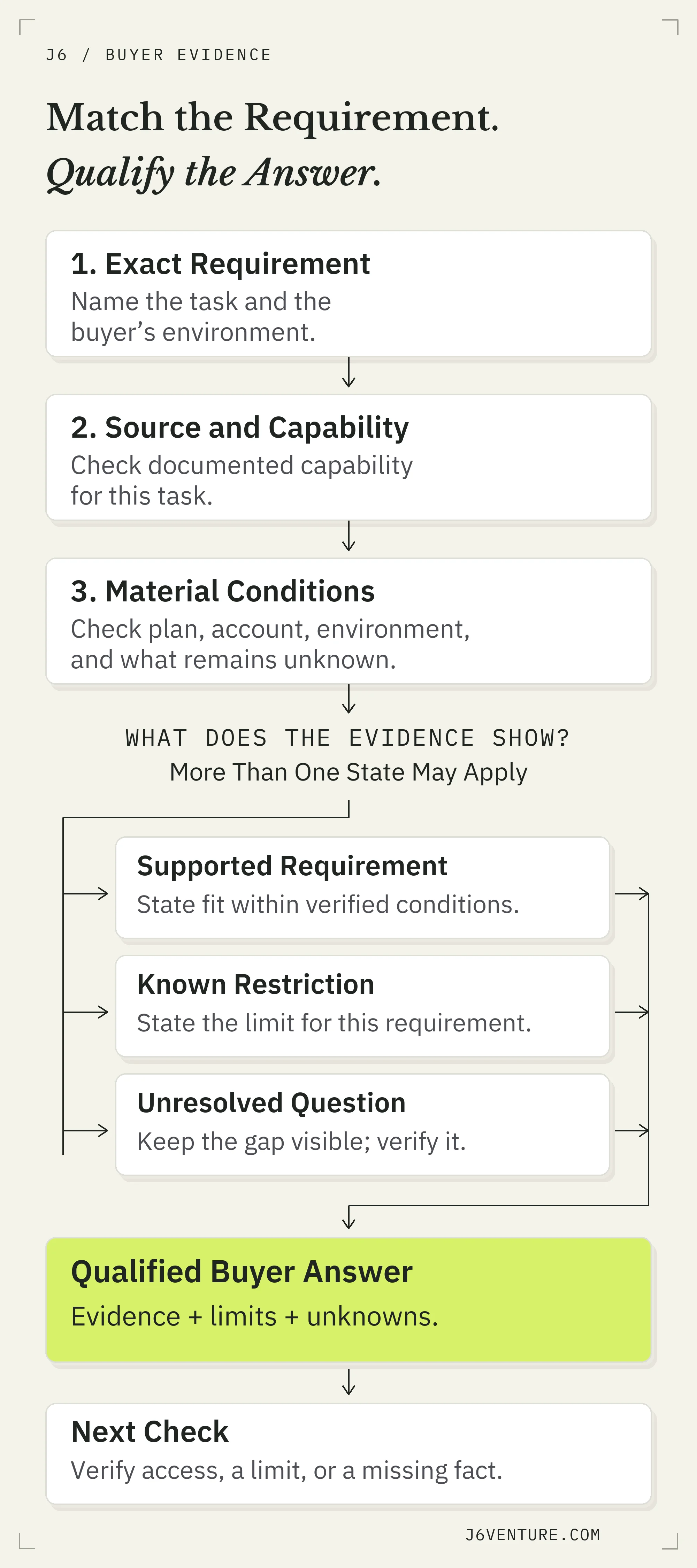
Match evidence to the exact requirement, preserve limits and unknowns in the answer, and choose the next check. This is an editorial model for building an evaluation answer.
These are constructed buyer scenarios using public sources checked on October 13, 2026. They show documentation-based reasoning, without claiming a customer result or a hands-on product test.
Bringing Salesforce Records Into Slack
Consider this requirement: “We want Salesforce records available in Slack channels, and our Salesforce organization uses Government Cloud.”
Two public sources initially look encouraging. Slack’s Salesforce connection documentation lists the connection as available on all plans. Its pricing feature matrix lists bringing Salesforce data into Slack channels across the four displayed plans and specifies a Salesforce-account requirement.
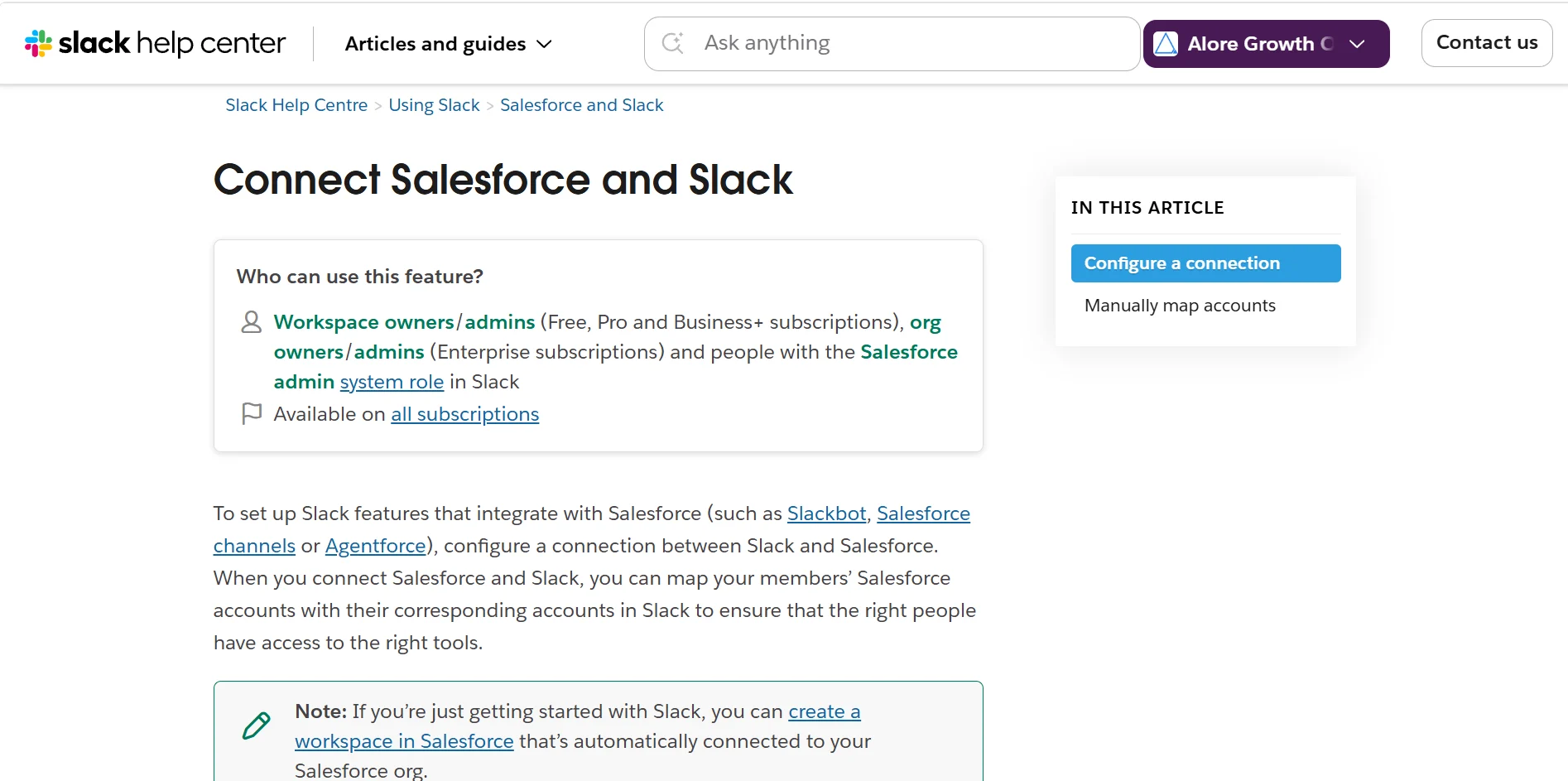
Slack’s connection documentation lists administrator roles and availability on all subscriptions. Owner-supplied screenshot, October 13, 2026. Open the full-size screenshot.
The same connection document states that Slack cannot connect to Salesforce Government Cloud organizations. It also describes the administrative request, Salesforce approval, and Slack activation steps. The named environment changes the answer, even though the general connection and record feature are listed.
For this scenario, a buying answer should state that the documented connection route does not meet the Government Cloud requirement. That is a supported restriction on a named route. It does not establish whether every other possible approach is unavailable.
The next check is concrete: ask the Salesforce admin to confirm the organization type and, if necessary, identify whether a separately documented approach can meet the requirement. Keep that alternative unresolved until evidence supports it. The source also flags potential effects from Salesforce IP restrictions; assess feasibility with the security team without recommending weaker protections.
Managing Leads and Deals With Slack CRM
Change the requirement: “Our small sales team wants to track leads and deals inside Slack. Which plan gives us that capability?”
Slack’s CRM product page describes native CRM work for small businesses alongside Salesforce-connected workflows. In the pricing matrix, the row for tracking leads and deals shows inclusion under Business+ and “Upon Request” under Enterprise+. The Free and Pro cells do not list inclusion for that row.
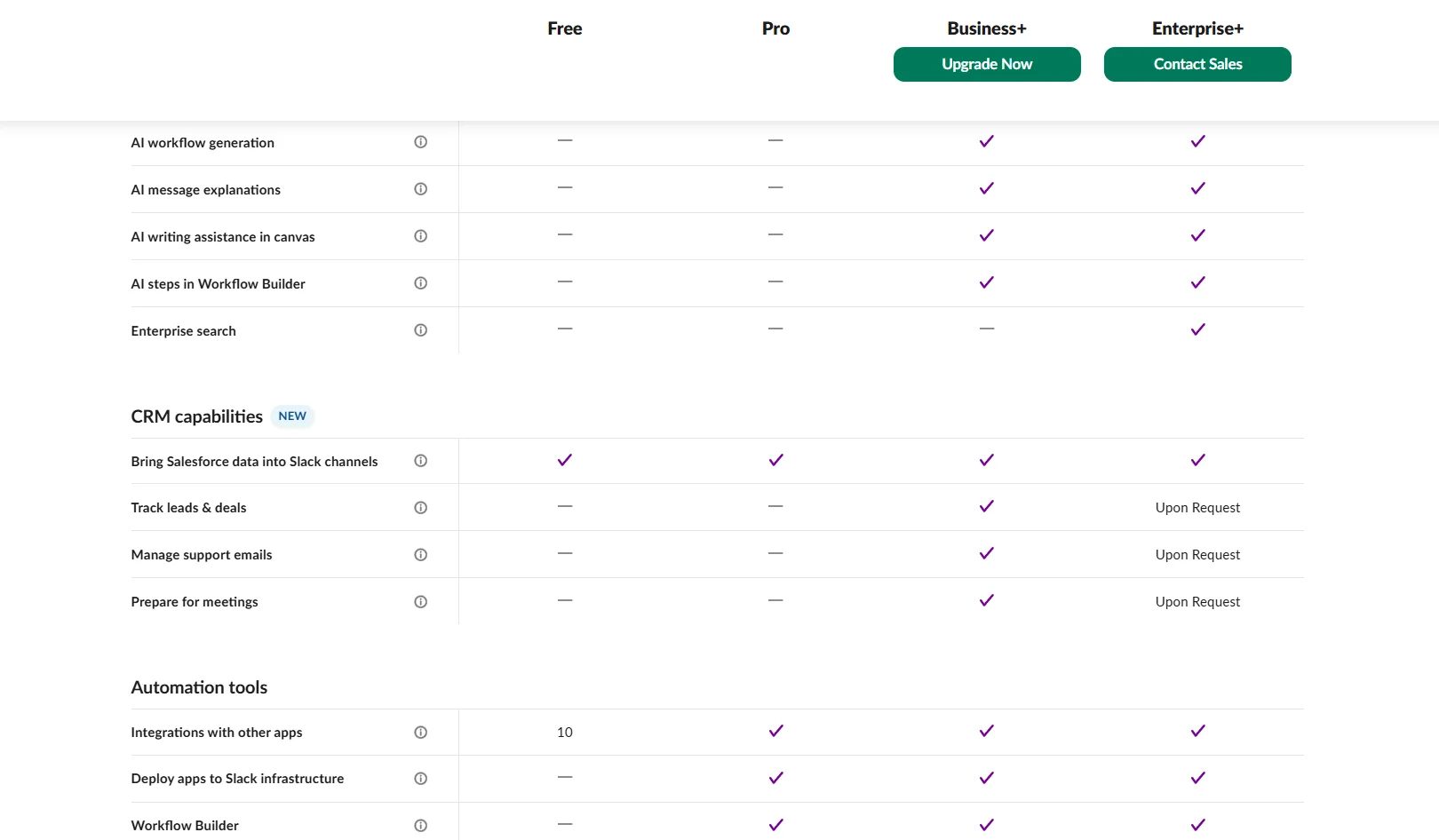
Slack’s plan comparison lists Salesforce data in channels across all four plans. Lead-and-deal tracking is included in Business+ and marked “Upon Request” for Enterprise+. Owner-supplied screenshot, October 13, 2026. Open the full-size screenshot.
The Salesforce-record row and the lead-and-deal row answer different questions. A connection’s availability cannot establish native CRM entitlement. The Salesforce-account requirement attached to the record row also cannot establish a universal prerequisite for every native CRM use.
The answer identifies Business+’s listed inclusion and Enterprise+’s request condition, then separates that plan evidence from access in the buyer’s workspace. The next check is to confirm the exact lead-and-deal capability’s availability and requirements for that workspace, particularly when requesting Enterprise+ access. The table’s request label should remain visible in the recommendation.
| Buyer Requirement | What the Public Evidence Establishes | Resulting Answer and Next Check |
|---|---|---|
| Salesforce records in channels, using a Government Cloud organization | General record availability plus a restriction on the documented Government Cloud connection | Explain that this documented route fails the environment requirement; confirm the org type and obtain evidence for any proposed alternative |
| Native lead-and-deal tracking in Slack | A distinct feature row with Business+ inclusion and Enterprise+ access upon request | Explain the listed plan condition; confirm that exact feature’s access and requirements for the workspace |
The lesson applies when writing a buyer answer: state the workflow, attach the evidence that supports it, and preserve the condition that could change the decision.
Turn a Buying Question Into an Evidence-Backed Answer
Build one buyer-facing answer by pairing the required task with the strongest source for that task, material limits, unresolved detail, and next action. Start with an existing evaluation passage when it already serves the job; related searches can belong to the same coherent page.
The first Slack scenario gives a concise application card. It corrects the overbroad sentence “Slack’s Salesforce integration works for any organization.”
A Populated Buyer-Answer Card
Requirement: Salesforce records in Slack channels for a Government Cloud organization.
Answer: Slack’s documented Salesforce connection excludes Government Cloud organizations, so that route does not meet this requirement.
Support: The restriction in Slack’s connection documentation.
Unknown: Whether a separate, documented approach would satisfy this organization’s requirements.
Next Check: Confirm the organization type with the Salesforce admin and obtain evidence for any proposed alternative before recommending it.
Use the same editing discipline on the phrase you intend to target:
- Preserve a restriction beside the claim it qualifies.
- Mark an unanswered capability question as unresolved.
- Match the next action to what still needs establishing.
- Record the source date and update the answer when the plan, feature, or documentation supporting the claim changes.
A commercial question can fit within an existing comparison, pricing, product, or integration page. Choose the destination through the existing page-ownership plan; this evidence check does not require a new URL for each phrase. Prioritize an answer your business can substantiate for an audience it can serve.
Check Whether Your BOFU Content Helps Qualified Buyers
Assess BOFU content using the relevance of its search queries, actions appropriate to its buying question, and the quality of resulting inquiries. A rise in impressions can reveal visibility while leaving commercial fit unanswered. Inspect which buying questions the page answers.
Choose a review signal tied to the page’s task:
- Query relevance: are visible searches about the requirements the answer serves, or mainly setup and support?
- Qualified actions: do visitors take a relevant next step, such as an access clarification, a suitable trial, or a quote request with the needed details?
- Inquiry quality: do those conversations concern a problem the product can address, with a plausible fit between audience, requirement, and offer?
Where your reporting supports it, connect page activity to qualified conversations. Attribution records a connection or assigned credit; it does not establish that the content caused an additional purchase. Some readers may have bought anyway.
Assign a review date at publication and name what you expect to inspect. If traffic from the intended buying queries arrives but questions remain unanswered, review the claim, evidence, conditions, and next step before blaming the keyword alone. A template cannot supply a universal conversion target or waiting period.
Choose one buying question your product can credibly answer. Locate the passage that should serve it, find the missing evidence, and write the condition that could change the buyer’s choice. That gives your next BOFU content improvement a clear job.