A zero-search-volume keyword is a query for which a keyword tool reports zero estimated monthly searches in the selected market and period. To find zero-volume keywords for SaaS, collect relevant questions, check their wording and measurement state, then decide whether the evidence supports an existing-page improvement, a small test, or no further work.
Keep a short candidate record as you research: the original question, proposed search wording, source, tool result and settings, existing page, and next check. That record lets you separate a customer problem from an assumption about how people search for it.
What Does Zero Search Volume Mean?
Zero search volume describes an estimate returned by a tool. It leaves the investment question open: whether a relevant audience searches for the task, whether your product can help, and whether creating the answer is worth the work.
The tool and measurement settings matter. Google Keyword Planner defines average monthly searches using a keyword and its close variants, the selected month range, location, and Search Network. Its default average covers 12 months, and its statistics are rounded. Google’s explanation of Keyword Planner statistics
Other tools use their own estimates. Semrush describes its volume as an estimate for a selected location, based on a rolling 12-month average. Preserve the market and date when comparing results from different sources. Semrush’s volume explanation
Ahrefs describes combining Keyword Planner, Google Trends, and third-party data to refine its estimates. How Ahrefs estimates search volume
Tools estimate volume from their own data and settings; Search Console records when your site appears for a search. Those observations can differ. A relevant impression alongside a tool’s zero estimate merits investigation. It establishes neither hidden monthly demand nor why that tool returned zero. Google’s Search performance report
Zero Volume, Low Volume, and Missing Data
Record the state the tool displays before interpreting it.
| Displayed State | What You Can Record | What Needs Checking |
|---|---|---|
| 0 | The tool returned a zero estimate under those settings. | Whether other evidence supports relevant search activity or a useful answer. |
| A small positive number | The tool estimated some searches. | Audience fit, competition, and value relative to effort. |
| N/A, blank, or no result | The estimate is unavailable in that output. | The tool’s explanation, coverage, and whether another source can resolve the question. |
A narrow SaaS question can receive any of these states. Phrase length alone does not establish volume, difficulty, or buying intent. Treat a zero estimate as a reason to investigate a promising candidate, with an effort limit agreed before you start.
How to Find Zero-Volume Keywords for SaaS
Find candidates in the language people use to describe a task, then check those phrases in a keyword tool. This works with existing search data or with public questions when a site has little history. The result is a shortlist with evidence attached.
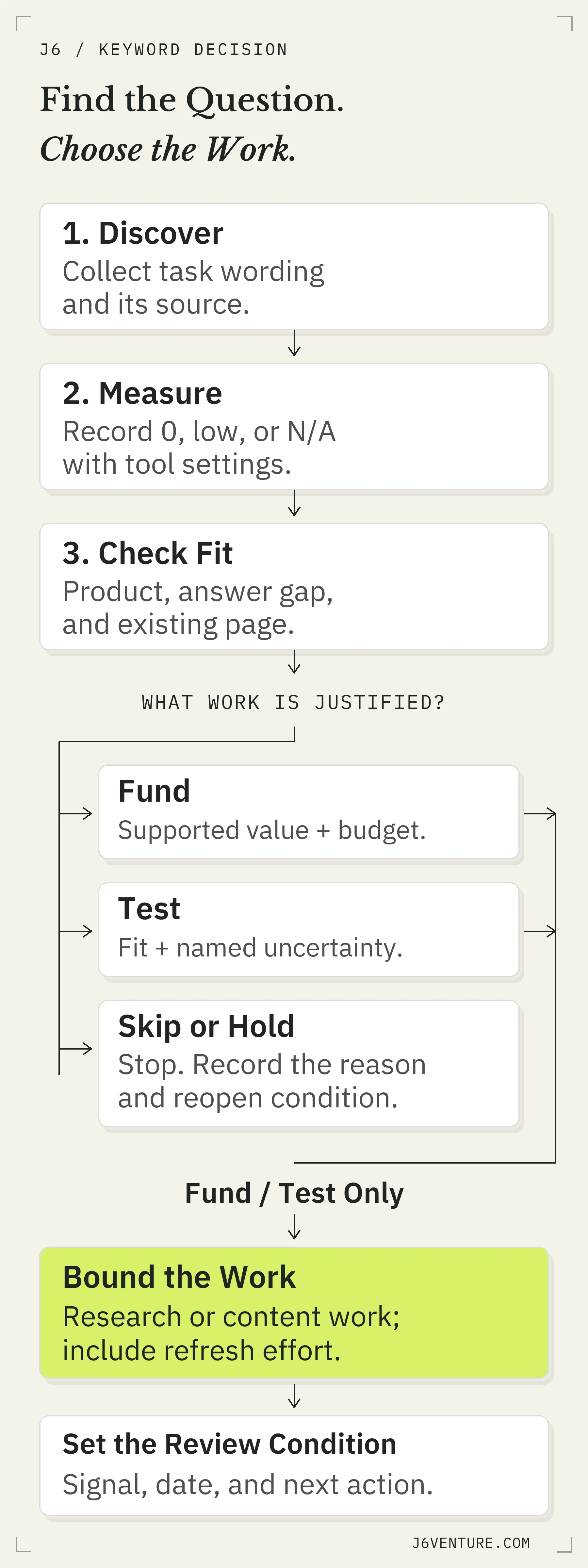
Collect the question, preserve the measurement state, and authorize work according to fit, evidence, and effort. Skip or hold ends expansion until its reopening condition is met. Open at Full Size.
Start With Customer Questions and Public Discussions
Look for a question your product can answer under the conditions the person describes. Start with:
- Sales conversations: the problem that prompted someone to look for software, their constraints, and what they searched before reaching you.
- Support and onboarding: questions about completing a task, eligibility, setup, or a limitation.
- Public documentation and discussions: precise questions, wording, and conditions that you can inspect without private customer data.
Keep the person’s wording and your proposed search phrase in separate fields. A customer saying something in a call establishes that person’s problem; it does not establish the number of people searching that phrase on Google.
Public SaaS documentation can supply concrete starting questions. Slack’s import FAQ asks whether channels can be merged into existing destination channels and explains a restriction on merging into existing private channels. A researcher could investigate that task and wording. The FAQ establishes a documented question and answer; its presence does not establish search volume or a need for another page. Slack’s workspace import FAQ
This route is available to a new site without Search Console history. Start with a small set of tasks whose product conditions you can support. Leave the broader keyword universe to your SaaS keyword research plan.
Find Relevant Queries in Search Console
Use Search Console to inspect the queries for which your site already appears. Start with a relevant page and a recorded date range, then inspect its queries and the intended market. Copy the candidate wording, page, impressions, clicks, and settings into your record before looking up the same phrase in a volume tool.
A relevant query with an impression supplies evidence that your site appeared for that search. It can merit further investigation even when a separate tool returns 0. Inspect whether the page answers the task and whether the audience is one you can serve. Google’s Search performance report
An absent query is less informative. Google omits some rare queries for privacy, and the report table has row limits. Your site may also lack visibility for a search that other sites receive. Keep those possibilities separate from a conclusion that demand is absent. Search Console data limitations
Expand the Wording With Autocomplete and People Also Ask
Use search suggestions and related questions to collect alternative wording and conditions you might have missed. Read the associated answers and result pages to understand the task behind a suggestion.
Google says autocomplete predictions depend on factors including real searches, language, location, trending interest, and search history. It also says word and phrase predictions can incorporate patterns found across the web. A suggestion supplies wording to investigate; it does not supply a numeric volume or prove that the searcher is evaluating software. How Google autocomplete works
For each suggestion you shortlist, ask what the person needs to do. A setup question from an existing customer may belong in documentation. A question about a required capability may help a prospective buyer evaluate fit. Keep that distinction when you add the phrase to your shortlist.
Check Candidate Phrases in a Keyword Tool
Check the wording you collected, then compare natural variants that express the same task. Record:
- 1The phrase and tool. Keep the source question separate from any wording you drafted.
- 2Market, period, and lookup date. A global estimate and a US estimate answer different measurement questions.
- 3The returned state. Preserve 0, a positive estimate, N/A, and no result distinctly.
- 4The supporting observations. Attach relevant search appearances, public questions, and product conditions.
For a database route, Semrush’s Keyword Magic Tool documents entering a seed, selecting a country database, using the Questions filter, and narrowing results with minimum or maximum volume filters. Start with a task your product supports, then inspect the returned wording and volume states. Keep unavailable estimates separate from rows displaying 0. Semrush’s Keyword Magic Tool instructions
You can also look up your collected phrases individually. Sorting for low volume or low difficulty does not establish that a phrase has zero estimated volume.
Semrush’s public checker describes a direct lookup: enter a phrase, select the target location, and check its volume. That supplies a possible measurement step without requiring a long tool comparison. Follow the tool’s current instructions and retain the output you receive. Keyword volume checker
Check What the Evidence Supports
Different observations answer different questions. Your shortlist should preserve the observation, the conclusion it supports, and the next unresolved check. This prevents a customer question, a suggestion, or a tool estimate from carrying the entire investment decision.
Separate a Customer Problem From Search Demand
Use this evidence check before commissioning content:
| Observation | Supported Conclusion | Next Check |
|---|---|---|
| A customer asks how to complete a task. | That person needs an answer. | Do suitable prospects search for it, or is the main purpose support? |
| A public help page explains the task. | A documented answer and its conditions exist. | Is there a useful gap your page can fill for its intended reader? |
| Your page receives a relevant query impression. | Your site appeared for that search in the recorded period. | Does the answer fit the task and lead to an appropriate next action? |
| A tool returns 0 or an unavailable estimate. | The output has that measurement state. | What other observations justify further work within your effort limit? |
Relevant search evidence strengthens the case for an acquisition page. An answer may also earn its place by helping onboarding or sales conversations, if you have evidence of that use. Assign the purpose before judging the page on leads or traffic.
Look at the Query Family and the Competing Answers
Search the candidate phrase and natural alternatives. Read the answers, the page types, and the conditions they address. Similar wording can describe different tasks; different wording can need substantially the same answer.
Ahrefs’ historical analysis explains how a low-volume phrase can be one way of asking about a more popular topic. A page’s overall traffic can come from many related queries. Its small study also warns against assuming low- or zero-volume estimates conceal large demand. Ahrefs on zero-volume keywords
Compare what an answer must establish. If the same explanation already satisfies the variants, improve one owning page. If a candidate needs a different decision or procedure, assess whether it merits a distinct answer. Neither a zero estimate nor a few weak results guarantees an easy ranking.
Check Product Fit and Existing Page Ownership
A candidate deserves work when the reader’s task fits the business and you can deliver a useful answer at a proportionate cost. Check the existing page before proposing a new URL. A targeted addition may resolve the question with less work and less repetition.
For each candidate, establish:
- Audience: who needs the answer, and whether they are a prospect, existing user, or another audience.
- Product fit: the capability you can support today, including important limitations.
- Answer gap: what the current owning page or competing answers leave unresolved.
- Next action: what the reader should be able to decide or do after reading.
- Work required: research, writing, implementation, and expected maintenance.
Buying-stage wording requires its own checks. A named product, an integration, or a comparison can suggest an evaluation task, but the full question determines the answer. Use our SaaS BOFU keyword patterns for that adjacent decision.
If an existing page already completes the job, retain it. If it has a bounded gap, improve that passage. Reserve a new page for a distinct job with an answer you can substantiate.
Work Through a Public SaaS Keyword Example
A public SaaS example shows why the measurement state needs checking before the story becomes an investment rule. In our October 13, 2026 source inspection, an image for the phrase “hubspot justreachout” displayed N/A for search volume. It did not display a zero estimate.
The source article describes a JustReachOut page aimed at HubSpot users and calls the branded phrase a keyword with no search volume. Its published screenshot shows unavailable volume and insufficient trend data. The original measurement’s country, date, and averaging period are not visible. Public SaaS example and source discussion
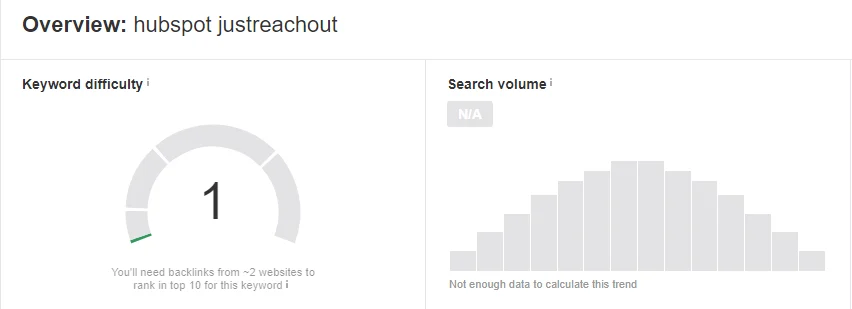
The source screenshot shows N/A search volume and insufficient trend data. Its original measurement date, market, and averaging period are not visible. Open the original image.
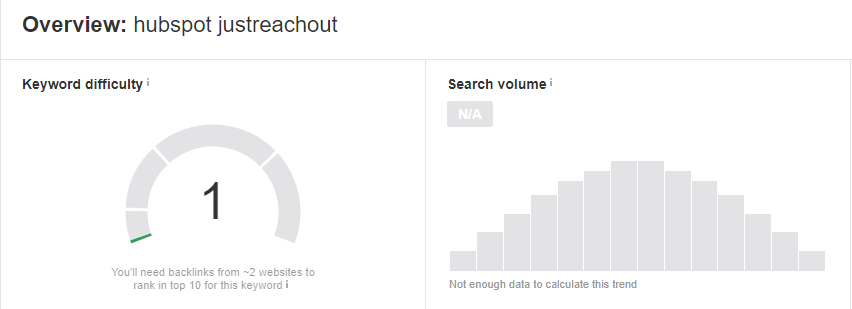
The same source reports page visitors and customers and discusses other branded rankings. Those observations concern the page. They do not isolate this phrase as the source of those customers. The image also supplies no current evidence of either product’s integration capability.
The supported next decision is a limited research check. Establish the candidate’s current measurement state, the reader’s job, and whether an existing answer needs improvement before committing to production.
| Record Field | What the Public Evidence Supports |
|---|---|
| Candidate | The literal branded wording “hubspot justreachout”. |
| Measurement | Historical N/A; original market, date, and period unknown. |
| Reader job | A question involving two products; the role and task need checking. |
| Existing answer | A historical page is described; its current status and gap are unverified. |
| Outcome evidence | Source-reported page results, with no isolated exact-phrase acquisition result. |
| Next action | Research the unresolved metric, task, and owning-page questions within a chosen effort limit. |
An unavailable estimate leaves a measurement question to resolve. It supplies neither a hidden-demand forecast nor a reason to produce a new page automatically.
Decide What to Fund, Test, or Skip
Fund an answer when its purpose and supporting evidence justify the cost. Choose a bounded test when the task and product fit are credible but a material uncertainty remains. Skip further content work when the audience, capability, or answer gap does not support it.
| Decision | Evidence Needed | Work to Authorize |
|---|---|---|
| Fund | Supported product and reader fit; a useful gap; evidence of relevant search activity or another stated business use; proportionate effort. | Improve the owning answer or build the distinct page, with a production and maintenance budget. |
| Test | Credible task and fit, plus a named uncertainty that limited work can investigate. | The smallest useful research check or content change, with an effort ceiling and review condition. |
| Skip or Hold | Unsuitable audience, unsupported capability, no useful gap, or essential evidence unavailable within the budget. | Stop expansion. Record the reason and the condition that would reopen the decision. |
A zero estimate can appear in any row. It does not provide the product fit, evidence, or cost judgment by itself.
A credible customer task with uncertain search wording may justify research before writing. A documented recurring support question may justify improving a help page for support. State the purpose so that later reporting tests the decision you made.
Set an Effort Limit and Review Condition for Your Test
Define the test’s uncertainty, allowed work, observable result, and resulting decision. Assign its limit before starting. A research check and a published-page test need different review conditions because they produce different evidence.
For the public example above, our suggestion for a teaching exercise is one research session capped at 60 minutes. It is neither a reported company cost nor a universal benchmark. Choose your own ceiling from available capacity and the importance of the decision.
During that session, seek a dated tool result with settings, read the answers for that phrase and its natural variants, and identify the owning page or an unresolved ownership question. End the session at its limit even if a tool is unavailable.
A Bounded Research Decision
Question: What does the candidate’s measurement state and reader task justify doing next?
Work allowed: A configured lookup, answer comparison, and existing-page check. No new URL or draft is commissioned during this research session.
Output: Recorded observations and a justified fund, test, skip, or hold decision, with any remaining uncertainty named.
Stop: Fit fails, no useful gap is found, or the session ends with essential evidence unresolved.
Extend: Fit and a useful gap are supported, and the next change fits a separately chosen production and maintenance budget.
If you proceed with a content test, record its query family, page or passage, purpose, change, implementation date, review date, expected signal, and stop or continue condition. Start the page’s observation period when the change is implemented; include research, writing, and implementation in its effort budget. A recommendation awaiting delivery has not started the page’s observation period.
Include expected refresh work in the budget. A product-specific answer can need another check when the capability, plan, or procedure changes. Start with one bounded task when capacity is limited; no universal keyword quota determines the right batch size.
Review Search Progress and Business Use Separately
Evaluate whether the page is available to Google, whether it reaches relevant searches, and whether it serves its assigned business purpose. These are separate observations. A useful support answer can earn its place while its contribution to new-customer acquisition remains unmeasured.
Use the review condition you recorded:
- A processing or indexing blockage: investigate that issue before interpreting the absence of visibility as a content verdict.
- Relevant query-family appearances or clicks: check the answer and next action, then decide whether continued work fits the remaining budget.
- An audience or task mismatch: revise the page’s purpose or stop expanding it.
- Evidence of support or sales use: evaluate that utility under its stated purpose; keep the search acquisition result separate.
A missing query row does not establish absent demand. Whole-page traffic does not establish success for one phrase, and a visit does not establish a qualified prospect. For timeline diagnosis, use the distinct wait, fix, or change decision rather than a universal number of months.
At each review, state what changed, what remains unresolved, and what work you are authorizing next. Low traffic alone is insufficient grounds to delete a page that serves another supported purpose. Reassess the content budget on that date before authorizing further work.
Choose One Candidate and Record Its Next Step
Choose one relevant question, preserve its source wording, and check a natural search phrase in your intended market. Record whether the tool returned 0, a positive estimate, or an unavailable result. Attach the other observations that matter to its reader task and product fit.
Identify the page that should own the answer, or name the check needed to decide. Choose fund, test, or skip with the evidence visible. If you choose a test, give it an effort limit, an observable result, and a review condition before starting.
Your next step is a completed candidate record with a justified action.