
A falling CTR can look like a problem even while a page gains search clicks. More people may be finding it through searches where fewer people tend to click, while the searches that already brought visitors continue performing as before.
Before rewriting a search result’s title, find out which searches produced the number and whether the comparison is fair. The same check applies to its snippet, the descriptive text beneath the title. You can then choose a specific improvement, investigate a different problem, or leave the page unchanged with a clear reason.
What Does CTR Mean on a Search Results Page?
CTR means click-through rate. On a search engine results page, or SERP, organic CTR measures clicks from unpaid search results relative to their recorded impressions. It helps answer: when this result had an opportunity to attract a click, how often did that happen?
It does not tell you whether the person found the answer, requested a demo, or became a customer. Those outcomes require evidence from the visit and what followed. An accurate result that attracts suitable visitors serves a different purpose from a tempting promise the page cannot fulfill.
Keep the Clicks and Impressions Together
If Search Console records 40 clicks and 1,000 impressions for a page under your chosen filters, its CTR is 40 ÷ 1,000 × 100 = 4%.
Impressions are recorded appearances, not a count of unique people who carefully read your listing. Google's counting rules vary by result type.
A standard result can receive an impression on a loaded results page without being scrolled into view; a link inside an expanding or independently scrolling feature may need to become visible. Google's metric definitions explain those distinctions.
Keep both counts beside the percentage. One click from ten impressions produces 10%; 100 clicks from 1,000 also produces 10%. The first rate can move sharply with another click. Neither rate alone establishes a stable opportunity or a business result.
Check Which Metric You Are Reading
Several numbers can be described as a click rate or an organic opportunity. They answer different questions.
| Number | What It Measures | Useful For |
|---|---|---|
| Your organic CTR | Site clicks divided by the corresponding search impressions | Comparing a defined page or set of searches over time |
| A position-level CTR benchmark | Clicks and impressions grouped by ranking position within a study's population | Forming a contextual expectation after checking the method |
| A keyword tool's Organic CTR estimate | A tool-specific estimate of click opportunity; Moz estimates clicks available to traditional organic links | Assessing the search layout before choosing a keyword |
| A share of clicks | One destination or result type's clicks divided by the study's chosen total clicks | Understanding how that study distributes clicks, not judging your page's CTR |
| A zero-click rate | Searches ending without the study’s counted result click divided by searches observed | Describing behavior in that sample; it is not 100% minus your page’s CTR |
A searcher can skip your page and click another site. Your page receives no click, but that search is not zero-click under an any-result-click definition. Check which clicks a study counts.
For example, Moz's Organic CTR metric estimates opportunity affected by SERP features. A low score is not a measurement showing that your page's title performed badly. Read the metric definition before comparing it with your own 4%.
Check Your CTR in Google Search Console
Use the Performance report to make the comparison explicit. Documentation checked October 25, 2026; no private account was tested. Whoever maintains your reporting process should recheck the controls at the next review or after an interface change.
- Define the question. Choose the page or search group you want to investigate. Start with Web search and record the country, device, and date windows. For a US mobile concern, keep those filters throughout the comparison. Choose comparable completed periods, accounting for weekday patterns or seasonality that matter to the business.
- Read the four measures together. Keep clicks, impressions, CTR, and average position visible. A rising impression count changes the meaning of a falling rate; a position change gives you another explanation to inspect.
- Look inside the average. A query is the words someone searched for. Use page and query filters to compare the same URL and, where available, the same searches. A query filter is a rule matching text, not proof of the searcher's intention. Include relevant brand variants when separating brand-related searches.
- Check what changed, then inspect the result. Compare the affected searches on the relevant device and location. Save the date, displayed title and snippet, page content, and important surrounding features. Today's manual result is one observation, not a reconstruction of every past impression.
Google's filtering guidance also explains reporting limits. Some query data is omitted for privacy or truncated, so query rows may not sum to chart totals. Website-wide and page-level reports can count impressions differently. Keep those reporting levels separate; do not pool their totals to create a rate.
If an expected URL appears to have little data, check the canonical URL receiving credit, meaning the version Google treats as representative. Most performance data is assigned there. A missing row alone does not establish that nobody found the page.
What Is a Good Organic Search CTR?
A good CTR is one that compares favorably under relevant conditions and brings visitors the page can help. There is no single percentage that settles this for every page.
Someone searching for your exact company name has a different choice to make from someone exploring an unfamiliar problem. A first-position result on a mostly text-based page also faces a different layout from one surrounded by ads, a map, shopping results, or an AI answer. A rate that looks weak against an unrelated chart may be reasonable for its actual searches.
Choose a Comparison You Can Actually Use
Start with your own page's comparable history. Then use an outside study to add context, where its population fits.
Advanced Web Ranking's organic CTR study provides a practical reference for Google US, with month, device, intent, and SERP-feature views. The version reviewed for this article showed September 2026. Its methodology distinguishes measured data from modeled feature-combination curves, which estimate the rate for a particular combination. Read the selected view and its method before using a value as a planning assumption.
Before accepting any benchmark, check:
- Measure: Does it divide clicks by impressions, or report a share of clicks?
- Searches studied: Does it cover your country, device, brand-related searches, and type of question?
- Period and layout: When was the data collected, and which features were present?
- Method: Is the value directly measured, modeled, or a summary of another source?
A current article date does not make an old chart current. Two different figures also do not establish a trend unless their methods and populations are comparable. Use a curve to identify a question worth checking; the curve cannot diagnose your page.
Treat Average Position as a Clue
Search Console's average position is an average of the topmost position recorded for the website being reported, called a property, or for one page across impressions. It is not a promise that every searcher saw the same numbered blue link. Multiple links in an AI Overview, for example, share the feature's position. Google explains position counting here.
An average position of four can hide a mix of stronger and weaker appearances. Comparing that blended rate directly with a chart's position-four value can therefore mislead. Narrow the searches and conditions before deciding there is a snippet problem.
Worked Example: CTR Falls While Clicks Rise
Suppose you are checking one page in two comparable periods. The following invented, simplified figures isolate a possible change in search mix. They are not J6 client results, a forecast, or evidence about any actual ranking.
For fictional company ExampleCo, A contains available searches with “ExampleCo” or “Example Co”; B contains all other available searches. Apply that same text rule in both periods. It separates the groups, but does not prove intent. Omitted queries remain outside this illustration. Each group's CTR stays the same, but B gains impressions.
| Search Group | Period 1 Clicks / Impressions | Period 1 CTR | Period 2 Clicks / Impressions | Period 2 CTR |
|---|---|---|---|---|
| A: Brand Text | 100 / 1,000 | 10% | 100 / 1,000 | 10% |
| B: Other Available Searches | 20 / 1,000 | 2% | 180 / 9,000 | 2% |
| Available-Query Total | 120 / 2,000 | 6% | 280 / 10,000 | 2.8% |
Recalculate the Total
Add compatible clicks and impressions first, then divide:
- Period 1: 120 ÷ 2,000 × 100 = 6%.
- Period 2: 280 ÷ 10,000 × 100 = 2.8%.
The rate for these available searches falls by 3.2 percentage points, while clicks rise from 120 to 280: 160 more clicks.
Group B's lower rate now carries more weight because it accounts for more impressions. Taking the simple average of 10% and 2% would give 6% in both periods and hide that change.
Decide What the Example Supports
Following the checks above, the immediate decision is to investigate the added exposure before rewriting the page. The figures show a mix effect in this illustration; they supply no evidence that either group's CTR deteriorated.
For a real page, inspect the searches entering group B, their relevance, device, country, and ranking patterns. Broad groups can hide changes within them. The table does not establish stable rankings or explain why impressions grew.
If the added searches fit the page and matched searches remain healthy, leaving the snippet unchanged can be a supported decision. If new searches expose a different need, check whether the page answers it. That may lead to a content decision, while an actual rank decline requires its own investigation. Our SEO traffic guide develops the wider traffic question.
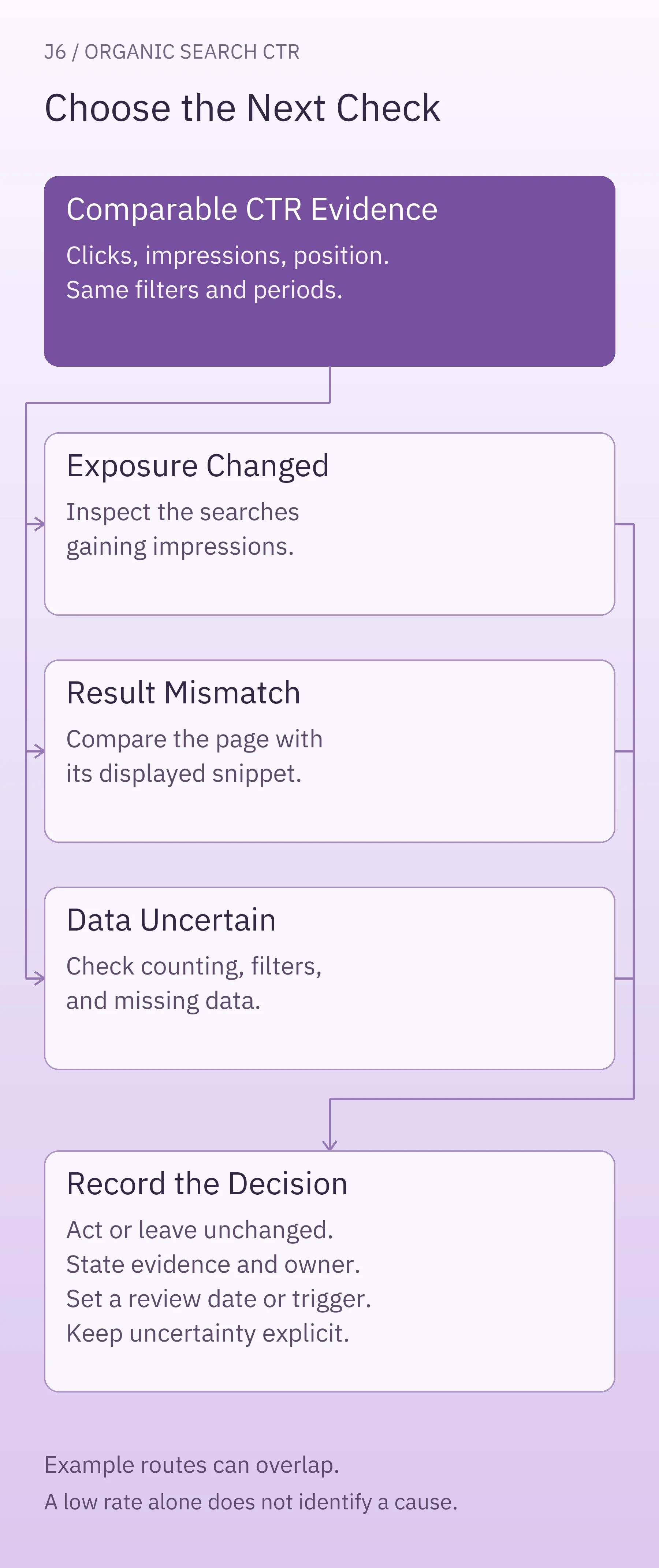
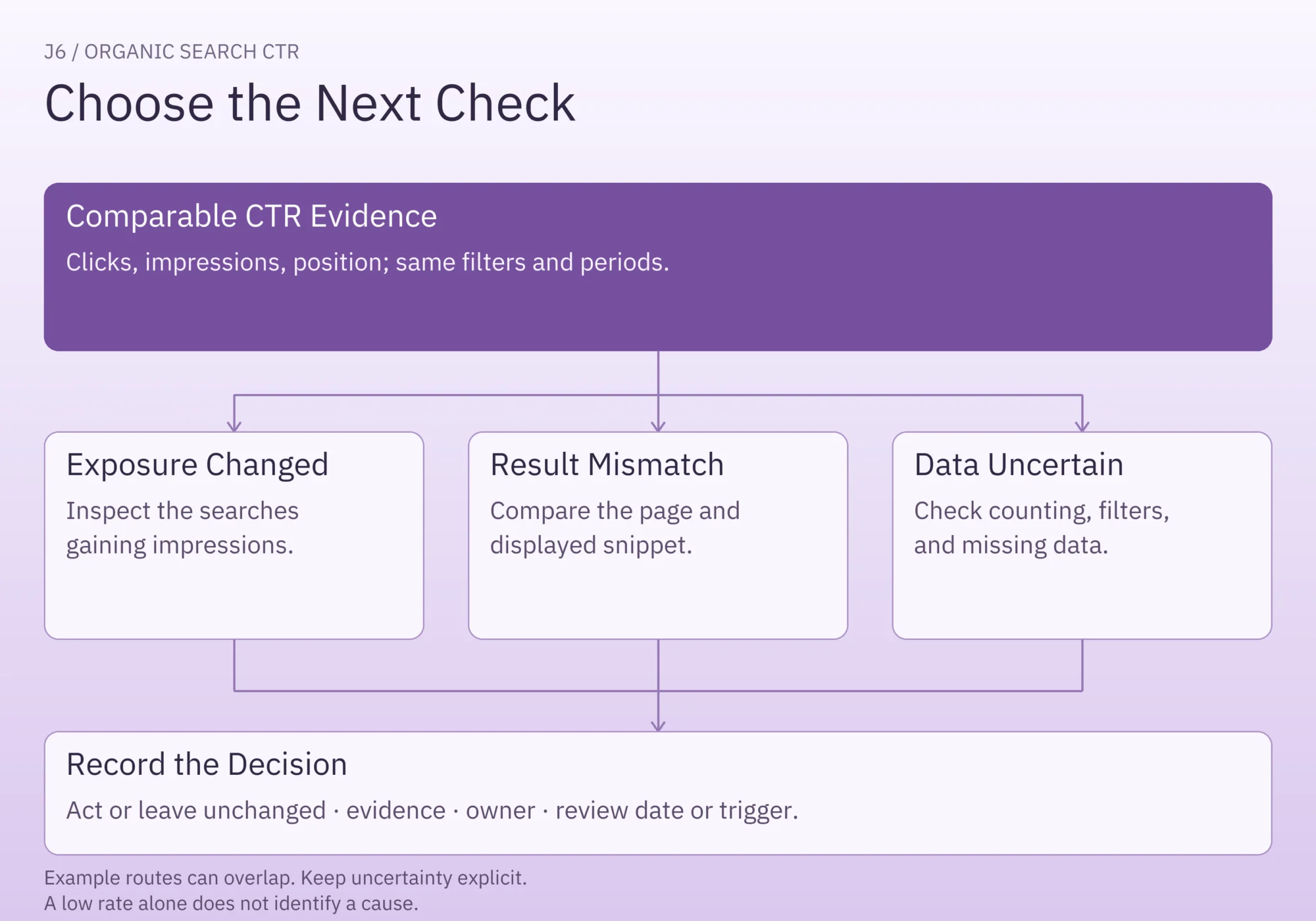
Choose Your Next Check Before Editing the Page
Use the specific observation to choose work. More than one explanation can remain open.
| What You Observe | Check Before Choosing Work | Supported Next Action |
|---|---|---|
| CTR falls as impressions expand; matched groups look steady | Which searches gained exposure, and do they fit the page? | Investigate the added searches. Leave copy unchanged if no supported copy problem emerges. |
| CTR falls and the average-position number rises, such as 4 to 8, for a comparable group | Did the ranking distribution or competing results change? | Investigate the ranking change; record any separate snippet issue you observe. |
| A comparable group has weak CTR and the displayed title misrepresents the page | Does the page answer the question, and does the authored title match it? | Correct the inaccurate title; record the intended change and subsequent displayed result. |
| The result describes the page accurately, but the page misses the searcher's task | What answer or capability is missing? | Revise the page's usefulness before making a stronger promise in its snippet. |
| Counts are sparse, missing, or inconsistent across views | Are the reporting level, filters, canonical URL, and periods compatible? | Resolve the measurement question or retain uncertainty; do not label the cause settled. |
Read AI and SERP Feature Evidence Carefully
An AI answer or another prominent feature may change the choices around your result. Its presence alone does not establish how many clicks your page lost. Your result might also appear inside that feature, where counting rules differ from a separate blue link.
Google includes AI Overviews and AI Mode activity in Web performance reporting. Its dedicated Generative AI performance report documents AI impressions as well. Those AI impressions measure visibility; dividing total-Web clicks by dedicated AI impressions would combine different populations and create a misleading “AI CTR.”
Use the relevant dated result observation and compatible report evidence to refine a question. An outside study's AI-versus-no-AI curve can supply context, with its population and measured or modeled method attached. It cannot establish the cause of your page's change. Broader planning belongs in what to change when moving from SEO to GEO.
Make a Snippet Change You Can Evaluate
When the evidence points to an inaccurate or unclear result, make the improvement specific. Google's title-link guidance recommends descriptive, concise titles. Its snippet guidance explains that snippets usually come from page content and may use the meta description. Google chooses the displayed text, and truncation depends on available width.
For an illustrative onboarding checklist page, a vague title such as “Resources for Growing Teams” might become “Employee Onboarding Checklist for a New Hire's First Week,” if the page supplies that checklist. The improvement is a clearer, accurate promise. It has no guaranteed click-rate gain.
Before saving the change, record the page, hypothesis, old and new text, date, comparable query group, and outcome you will inspect. Change one defined element where practical. Check after recrawling and reprocessing whether the relevant result uses the intended wording; the displayed result may vary by query.
At the planned review, compare clicks, impressions, CTR, and position under the same filters. Check whether query mix, seasonality, rankings, or the search layout changed. Treat a simple before-and-after result as observational. If the new title misleads, correct it. If evidence is too thin or display has not changed, record that limit and choose whether further observation is worth the effort.
Keep the business check alongside the click rate: did suitable visitors complete the page's intended task? Search Console clicks and analytics sessions are different measures, so use your analytics or sales evidence with its own definitions. A CTR increase does not by itself establish more qualified leads or revenue.
Record One Supported Decision
Close the investigation with a short note someone else can act on:
- Scope and Periods: [Page and defined searches], during [comparable periods].
- Observation: [Clicks, impressions, CTR, and position].
- Decision and Reason: [Specific action or leave unchanged], because [evidence].
- Owner, Review, and Uncertainty: [Owner] will check [completion evidence] at [date or trigger]. [Remaining uncertainty] would change that decision.
Filled Illustrative Note
- Scope and Periods: This example page’s available searches, Period 1 and Period 2.
- Observation: Period 1: 120 clicks / 2,000 impressions (6%). Period 2: 280 / 10,000 (2.8%). Position was not supplied.
- Decision and Reason: Leave the snippet unchanged pending investigation; both group rates are steady.
- Owner, Review, and Uncertainty: The SEO analyst will inspect B’s added searches at the next weekly review. A specific mismatch between a relevant search and the page or result would reopen the edit decision. If comparable evidence remains unavailable, record that uncertainty.
The useful result is a decision your evidence can support. Sometimes that means a better title. Sometimes it means protecting a sound page while you investigate the searches behind its new average.