A paid SEO subscription can leave you with exactly the same unfinished work you had before you bought it. You may gain another report while the page change, research decision, or technical fix still waits for someone to act.
Start with the work that is stuck. Perhaps you need to understand a decline in Google clicks, crawl pages your current setup cannot inspect, or investigate competing websites. Those questions require different evidence. A large feature list can make the distinction harder to see.
This guide helps you decide whether to make your first paid SEO tool purchase and which category deserves a closer look. The named examples use public product documentation checked on October 25, 2026. We have not run a comparative product trial for this guide. You will get a task test you can use yourself, including a worked decision to defer payment.
An SEO tool helps you collect, inspect, or use information for search work. Some observe your website's search performance, some crawl pages, and others estimate the wider market. A CMS plugin can help implement page settings. These functions can complement one another, and the missing function determines your next purchase.
| Work You Need to Finish | Documented Tool Example | Useful Output to Inspect | Decision It Can Support |
|---|---|---|---|
| Understand how your site appears in Google Search | Google Search Console | Queries, pages, clicks, impressions, and indexing information available for your property | Which page or search question needs investigation? |
| Inspect technical patterns across site pages | Screaming Frog SEO Spider | Crawl records such as status codes, titles, directives, canonicals, and internal links | Which affected URLs need checking and an implementation owner? |
| Research a wider search market and monitor chosen keywords | Ahrefs and Semrush | Documented research reports and rank tracking, subject to the selected package | Which opportunities deserve validation, and what should you monitor? |
These are examples of different jobs, not a product ranking or an exhaustive market list. Within a category, compare candidates against the same task. A crawler and a competitor keyword database should not receive a shared score for work they were never meant to do.
Search Console Shows Your Own Google Search Performance
Google Search Console is a free service for understanding your site's presence in Google Search. It can help you examine search traffic and indexing information, then investigate particular pages.
For example, if a page's clicks have fallen, establish which queries, dates, and pages are involved before buying another reporting tool. A ranking estimate from an outside platform answers a different question from the clicks Google reports for your property.
You need access to the property. An owner can verify it or grant you access; Google's property guidance explains the available methods. Missing access is an access problem to resolve, not evidence that you need a paid replacement.
A Crawler Finds Site Issues You Can Investigate
Screaming Frog SEO Spider crawls websites and reports technical observations, including broken links, redirects, page titles, and directives. You can use the affected URLs and their linking context to prepare a concrete repair task.
Its free version allows up to 500 URLs per crawl. Paid features include saving and reopening crawls and JavaScript rendering, which loads content generated by page scripts. Those requirements can matter even when your site has fewer than 500 URLs. Removing a license cap does not remove the practical limits of your computer and crawl configuration.
A crawl finding still needs interpretation. An intentional redirect and an accidental broken internal link call for different responses. The tool supplies observations; someone must decide what is appropriate and implement the change.
SEO Suites Add Market Research and Tracking
Ahrefs documents tools for investigating websites, researching keywords, auditing sites, and tracking rankings. Semrush documents competitor research, keyword research, backlink analysis, site auditing, and position tracking.
This category becomes relevant when your recurring task needs information about the wider market that your own property's reports cannot supply. For example, you might want to investigate the queries competing sites appear for and decide which are relevant to your offer.
Treat third-party estimates as research inputs. They are not a competitor's private analytics, proof that a query will convert, or an instruction to reproduce a competitor's page. Check the search results and the buyer need behind an opportunity before assigning work.
The two suites are direct candidates for some research tasks, but their packages, limits, and outputs need checking for your exact task. This guide does not designate either as the preferred purchase.
Check What You Can Already Do for Free
Write down the output you already have before looking at subscription prices. Search Console may supply the query and page evidence you need. A free crawl may expose the small group of URLs you need to investigate. Your CMS may already let you implement the relevant title or redirect setting.
Free offers also have boundaries. Ahrefs Free provides limited Site Explorer and Site Audit access for verified websites; it should not be described as unrestricted competitor research. The current Semrush pricing page advertises a free option with a demo project and ten reports a day across specified tools. That description alone does not establish that your exact own-site or competitor task is available.
Separate three situations:
- You already have the necessary evidence. Assign the action and complete it before buying more reports about the same problem.
- You lack access or usable history. Resolve the permission or data limitation and see what remains unanswered.
- You repeatedly need a specific unavailable output. Identify the tool category that could supply it, then check the candidate's actual access and limits.
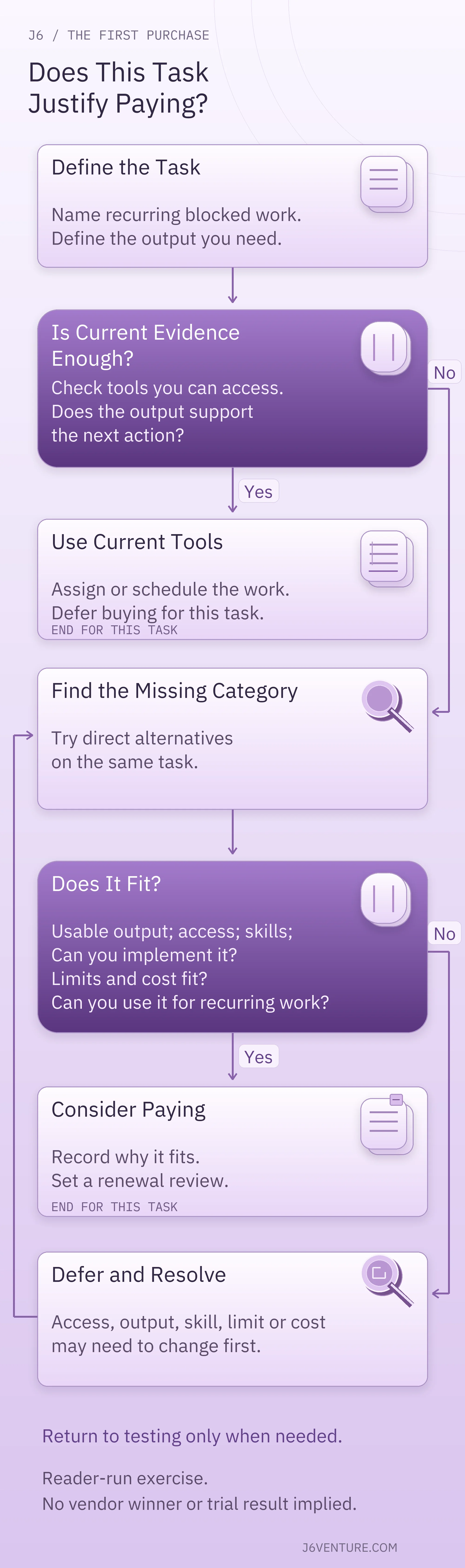
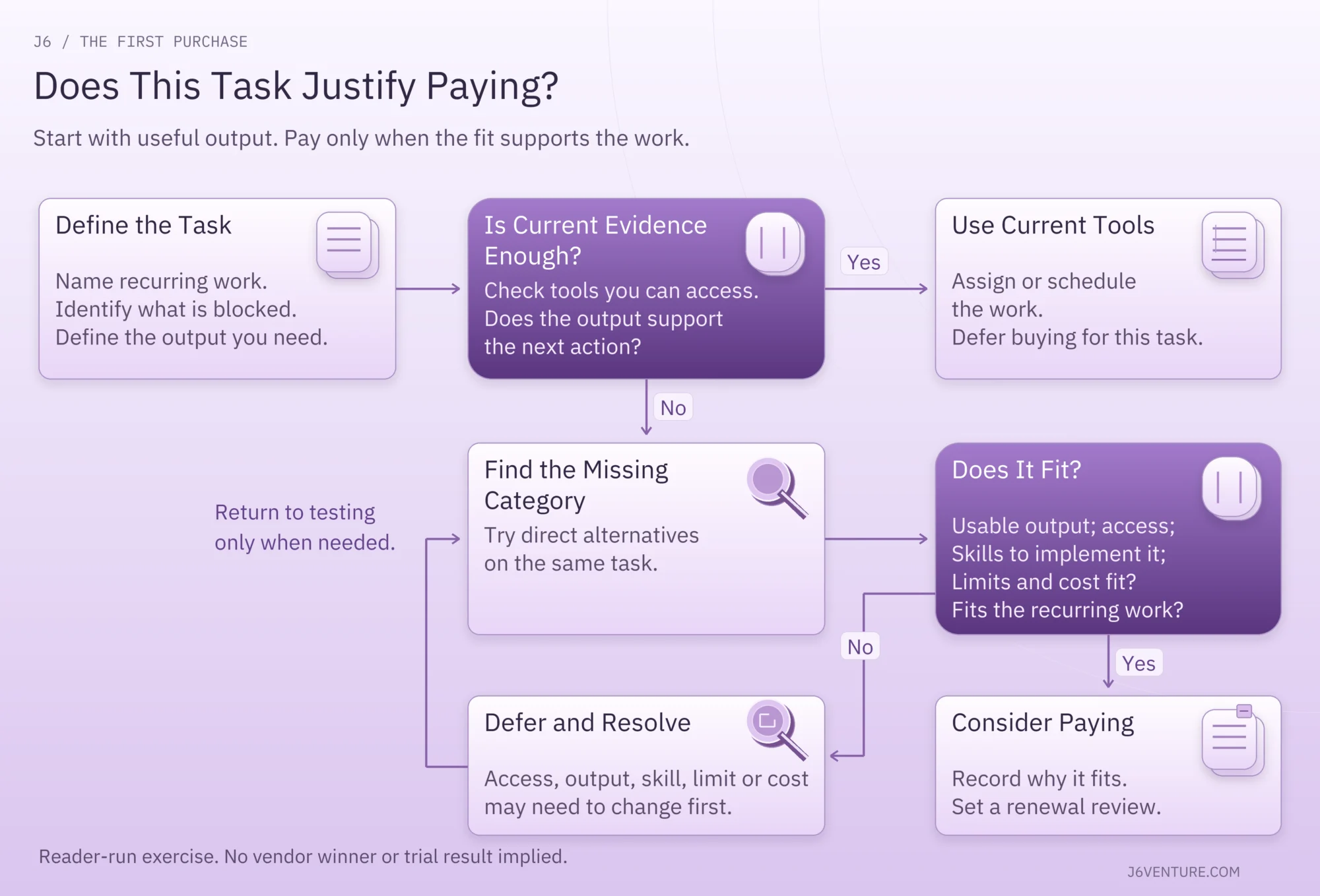
A paid account can be useful. The reason to buy it should name the recurring work it enables.
Define One Recurring Task Before You Compare Plans
A comparison becomes easier when every candidate has a concrete assignment. Write a short task brief with the question, inputs, required output, frequency, and person who will use it.
For a market-research task, an illustrative brief could read:
Each month, examine our website and three relevant competitors in the US search market. Produce a reviewable set of candidate queries, with the source URLs and metrics needed to assess relevance. The content lead must be able to inspect the evidence and select a small number for manual search-result checks. Separately, monitor 100 chosen keywords if that is part of the recurring requirement.
That is an assignment, not a claim that any named plan completes it. It also distinguishes finding candidate queries from deciding to target them. Set the number tracked from your actual work; 100 is only the example workload.
For a crawl task, replace the competitor inputs with your site, approximate crawl size, any JavaScript requirement, and the records the person fixing the problem needs. If you need to save a crawl for a later comparison, say so before evaluating a free version.
Keep the assignment narrow enough to finish. A task such as “improve SEO” cannot tell you whether the tool passed.
Run the Same Task With Each Direct Alternative
Use your task brief to compare alternatives in the same category. Keep the website, market, inputs, and acceptance conditions consistent. Record when you ran the task because databases and website content can change.
Run it only where the candidate grants the necessary access. A free signup, demo, or trial button does not establish that the required report is included. If you cannot access it, mark the result unresolved and ask for a demonstration of that exact task or defer the purchase. Reading a feature description is not a completed trial.
Check Whether You Can Use the Output
Inspect the report or export you would actually work from. Can you identify the affected URL, query, or record? Can you inspect its source and context? Does it contain enough detail for the next person to act?
For the market-research brief, several useful checks are possible without inventing an accuracy score:
- Open a candidate query and inspect the relevant pages and search results.
- Explain why the query relates to an audience you can serve.
- Identify what remains estimated or unknown.
- Turn the evidence into one proposed page decision with a named owner.
For a crawl, inspect a flagged URL and the linking page, then write a repair instruction that preserves any intentional behavior. If the output only produces a score you cannot explain, the task is unfinished.
The purchase test concerns useful evidence and executable work. It does not establish future rankings or prove one database more accurate overall.
Check Access, Learning Time, and Implementation
Note who can run the task, who can inspect or export the results, and who can make the resulting change. A report that depends on permissions you cannot obtain will not solve the immediate problem.
During an accessible trial, record the actual time spent learning, running, interpreting, and handing off the work. Compare that effort with the task's frequency and your available capacity. Do not accept a vendor's general time-saving claim as your own measured result.
If the main obstacle is interpretation, you may need training. If an accepted repair is waiting for development, you need implementation capacity. Another subscription may leave either obstacle in place.
Read the Plan Limits and Billing Terms
A starting price is only part of the commitment. Your purchase needs to cover the reports, volume, refresh frequency, exports, and people required by the task. A lower entry price may refer to a different workload.
What the Current Product Pages Establish
These observations come from public documentation checked on October 25, 2026, rather than a completed US checkout:
Screaming Frog
- Displayed price and term: The public license page shows a USD option at $279 per user per year for 1 to 4 licenses. The homepage separately displays £199 per year. These are distinct displayed currency prices, not an exchange-rate calculation.
- Relevant features: The annual license enables paid features such as saving/reopening crawls and JavaScript rendering.
- Confirm before buying: Your checkout currency, taxes, and final total. License page and FAQ
Ahrefs
- Displayed price and term: The pricing page displays Lite at $129 per month.
- Relevant capacity: Dedicated Starter help documents 50 tracked keywords for Starter and 750 for Lite. Starter therefore does not cover the illustrative 100-keyword tracking workload.
- Confirm before buying: The exact competitor-gap report access and limits needed for the full research task. Tracking capacity alone does not establish access to that report. Pricing and Starter help
Semrush
- Displayed price and term: The current pricing page displays the entry SEO package at $139 monthly, or $117.33 per month billed annually.
- Relevant capacity: Five websites and 500 keywords tracked daily are listed for that package.
- Confirm before buying: The required Keyword Gap report access and quotas. Its help uses Pro SEO, Guru SEO, and Business SEO names, which differ from the current pricing page. We cannot safely assign those report quotas to the current SEO offer. Current pricing and Keyword Gap help
The retrieved Ahrefs and Semrush pages displayed dollar signs without an independently confirmed ISO currency designation or tax-inclusive US total. Confirm the currency at checkout. An annual monthly equivalent is not monthly billing, and multiplying a rounded equivalent does not establish the exact annual invoice.
These figures explain why numerical capacity and access to the required report need separate checks. They are not a cheapest-plan verdict or a promise that a particular trial grants the example workload.
What You Still Need to Confirm
Ask questions tied to the task you wrote:
- Does this exact plan include the named report, export, and refresh schedule I need?
- How do websites, keyword locations or devices, crawl volume, credits, and users consume its limits?
- What happens at the limit: a pause, reduced output, an upgrade requirement, or an extra charge?
- What is the amount charged now, in which currency, for which billing term, with which taxes and required add-ons?
- If I use a trial, when does billing begin, what requires cancellation, and which terms govern renewal?
Keep an unresolved answer beside the purchase decision. Missing public detail is not proof a feature is absent. It is a reason to obtain the evidence that could change your decision before committing.
Work Through a First-Purchase Decision
Consider this illustrative situation, not a J6 client result or a product trial: a marketing manager at a US services company has access to Search Console, an existing crawl export, and an agreed list of website fixes. A developer has accepted the fixes, but the work has not been scheduled. The manager is considering a paid SEO subscription because progress has stalled.
Its completed decision record would read:
- Recurring task and frequency: No new recurring information task is established. The immediate job is implementing the accepted page and technical fixes.
- Website, search market, and inputs: A US services website; accessible Search Console reports, an existing crawl export, and the agreed repair list.
- Output the current tools cannot provide: None is missing for the immediate implementation work under these assumptions.
- Action and implementation owner: The developer can make the accepted changes, but the work needs a scheduled slot. The manager owns agreeing that date and keeping the evidence attached to each repair.
- Candidate category and direct alternatives: No new tool comparison is needed to release the current backlog.
- Trial, additional volume, and purchase terms: Not needed for this defer decision. No product test or price comparison has been completed.
- Decision and why: Defer buying. Implementation time is the present constraint.
- Review trigger: After deployment and checking the changes, revisit a purchase if recurring technical checks require saved, JavaScript-rendered crawls that the current setup cannot provide. Test that category, inspect usable output, and check the terms before deciding whether to pay.
Saving and reopening JavaScript-rendered crawls are documented paid capabilities of the crawler example above. In that changed situation, the manager has a category to evaluate. A usable task result and acceptable terms would still be required before a purchase.
Use This Purchase Test for Your Own Website
Copy this record and fill it with your own task and evidence. Leave unknowns visible. The blank fields are prompts, not completed checks.
My First Paid SEO Tool Decision
- Recurring task and frequency:
- Website, search market, and inputs:
- Output my current tools cannot provide:
- Candidate category and direct alternatives:
- Required site access, reports included in the exact plan, and users:
- Output that would pass, with a link to the inspected example:
- Action the output supports, and who can implement it:
- Observed learning and task time, if tested:
- Required volume, refresh, export, and other limits:
- Amount charged now, currency, billing term, taxes, and required extras:
- Unresolved answer that could change my decision:
- Decision: buy, defer, or evaluate another category, and why:
- Next action, owner, and review trigger or renewal review date:
Save the inspected output with the record. If you have only documentation, label that evidence accordingly and leave the actual task result untested.
Make the Purchase or Set a Clear Reason to Wait
You are ready to commit when you can connect a recurring gap to an accessible, useful output, a feasible action, and acceptable terms. Assign the next action and set a review date before renewal. At that review, check whether you still use the output and can act on it.
If you defer, name what must change: property access, an implementation slot, confirmed access to the required report, or a recurring task your current tools cannot finish. That gives the decision a useful next step.
For a specialist decision, continue with the relevant comparison: SaaS keyword research tools, AI search tools, or enterprise SEO tools. Each starts from a more specific job than this first purchase decision.
Choose the next tool when you can explain what work it enables, who will use its output, and why that work is worth funding now.