
A working link can still lead to a page that answers the wrong question. Two pages may cover the same subject while helping readers do different things.
That makes internal linking an editorial decision as well as an implementation task. Before adding another link, identify what it lets the reader understand or do at that moment. Then check whether the destination delivers. This guide teaches that sequence, applies it to real Google documentation links, and shows how to maintain the connection after publication.
An internal link connects pages within your website. Its source is the page containing the link; its destination, or target, is the page it opens. The anchor text is the clickable wording that introduces that destination.
A strategy gives those connections a purpose. A product overview might link to instructions when someone is ready to set it up. A guide might link to a detailed explanation where a prerequisite needs more space. Several existing pages might help people discover a useful new resource, provided their passages create a reason to visit it.
An external link leads to another website. Both kinds can provide useful evidence or help, but internal linking gives your team direct responsibility for both ends of the connection.
Google's link guidance explains how links help people and Google find pages and understand content. Its ranking systems guide also describes link-analysis systems, including PageRank, as part of understanding relationships between pages. This does not give an editor a visible PageRank balance or a predictable ranking gain from adding a link.
Contextual Links and Navigation Serve Different Moments
Navigation links provide recurring routes: menus, category pages, breadcrumbs, and other site-wide paths. They help people understand where they are and find major sections.
Contextual links appear where a passage makes another resource useful. Their wording and surrounding sentence can explain why that destination matters now. A sentence about writing image descriptions can offer detailed guidance at the point the reader needs it.
Use each for its job. A menu can make a setup guide accessible across a site; a product page can introduce the relevant instructions beside its setup explanation. Neither placement guarantees that people will follow it.
The number of incoming links is another distinct question. A page may contain many outgoing links while having no useful route leading into it. Google's guidance calls for an internal link from another page to each page you care about. Prioritize resources that should be discoverable; do not turn this into an instruction to expose every duplicate, private, or deliberately excluded URL.
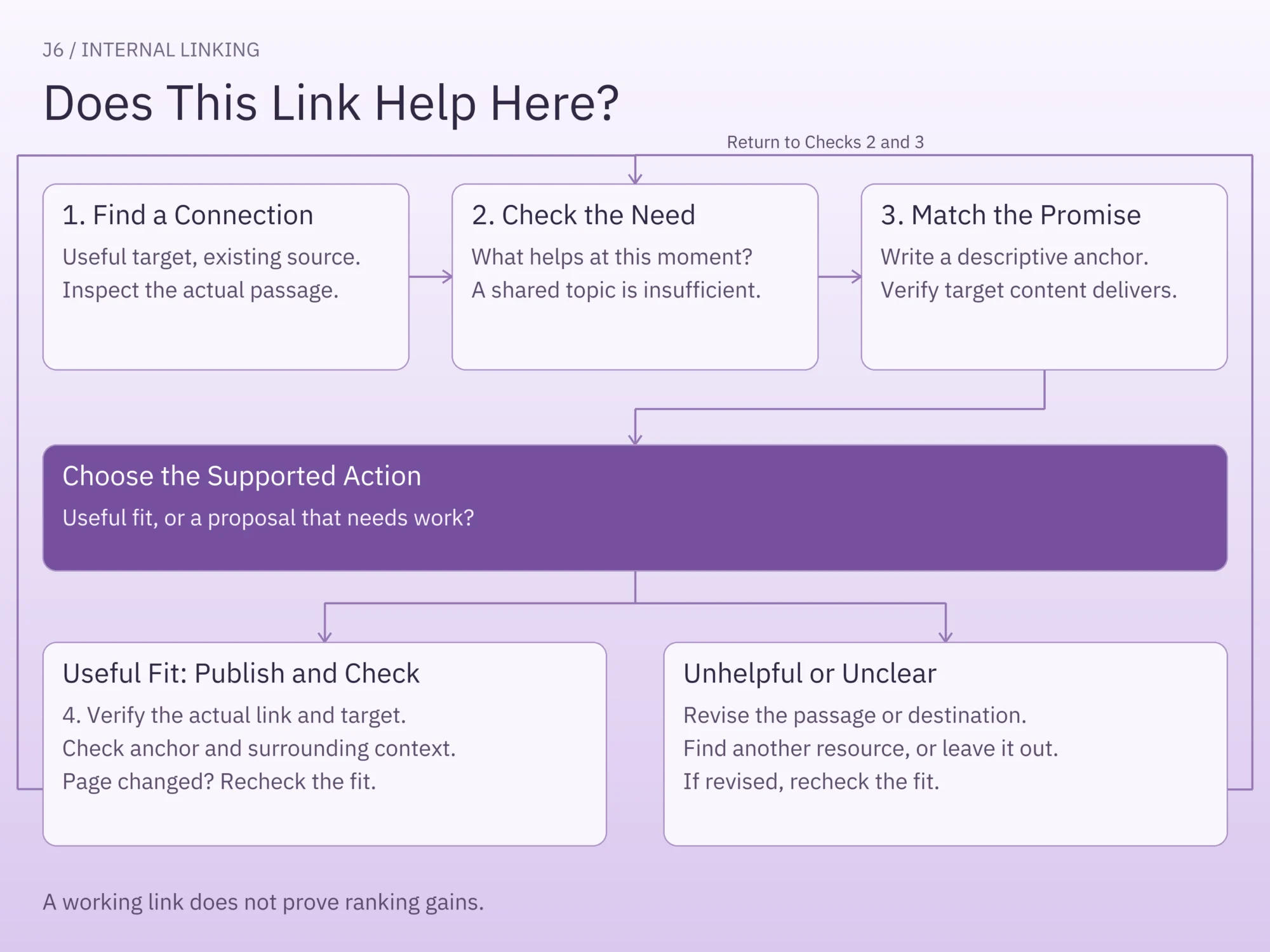
Choose Internal Links in Four Steps
Start with an existing page inventory and the audience tasks your site serves. A complete search intent map can help establish which destination owns a task. This linking process then decides where a connection to that destination would help.
Step 1: Choose a Useful Destination and Find Possible Source Pages
Pick a destination whose discovery matters: perhaps a new guide, important product information, or a resource that answers a recurring support question. State the job it completes before searching for places to link to it.
Find candidates in your CMS inventory, through a search of your own site, or in a site crawl. Search for the question, problem, and related wording, then open the candidate pages. A matching phrase identifies a place to inspect; it does not establish that a link belongs there.
For a useful page with few incoming links, compare the crawl with the inventory. A crawl following existing links can miss a page that has no route leading to it. A low link count is a reason to investigate discovery, not proof that every suggested source should link.
If many destinations compete for attention, begin with the one serving an important audience task and offering a clear improvement you can implement. Relevant source passages and a ready destination make that improvement actionable. Traffic and third-party authority scores can help prioritize inspection, but they cannot make an unrelated passage useful.
Step 2: Check the Reader's Need at the Source Passage
Read the paragraph around the proposed link. Write a short answer to this question: What would the reader gain by following it here?
Useful connections might explain an unfamiliar concept, supply detailed instructions, show evidence, compare options, or support the next action. If the passage already completes the task, another link may add little. If the link would interrupt the explanation with an unrelated offer, look for a more suitable context or leave it out.
Also consider what the destination requires. A beginner's explanation can introduce an advanced guide, but the sentence should make that next step clear. A setup page with product or permission conditions should not be introduced as instructions that apply to everyone.
A shared category is an incomplete test. Pages in different documentation branches can help with the same immediate question. Pages in one category can answer different questions. Judge the source passage and target together before deciding that a connection belongs.
Step 3: Match the Anchor and Destination to That Need
Describe the help the destination actually supplies. Specific wording such as “write descriptive image alt text” sets a clearer expectation than “click here.” Keep it natural in the sentence and open the destination to verify the promised explanation, instructions, or evidence.
There is no five-word limit in the Google guidance cited here; one of its recommended anchor examples contains eight words. Concise means enough wording to explain the destination without forcing extra keywords into it. It does not mean cutting a useful description to meet an invented quota.
The same principle applies to quantity. That guide gives no fixed ideal links-per-page number. Assess the usefulness of each connection and the readability of the passage. Several adjacent links with little explanation can make their different purposes hard to distinguish.
Choose among three actions:
- Accept when the destination delivers the help the source passage promises.
- Revise or investigate when the idea is useful but the wording, destination, access conditions, or supporting content needs checking.
- Leave it out when the connection adds no useful help at that point.
If the required resource is missing, record that gap for the content owner. A proposed new page needs its own scope decision. Do not publish an inaccurate link merely to finish a linking list.
Step 4: Check the Link You Actually Publish
Implementation is a separate check. Google generally recommends an HTML anchor with an href containing a usable web address. A simple illustrative link looks like this:
<a href="/guides/setup/">Follow the setup guide</a>
This is a fictional site's example, not code copied from Google. An event handler or an anchor without an href is not the recommended substitute. Links inserted with JavaScript can still use proper anchors; detailed rendering diagnosis belongs to a separate technical check.
After saving your own change, verify that:
- The expected link appears in the intended source passage with accurate wording.
- It opens the intended current destination and the relevant help is available there.
- Any section link lands at a meaningful section, and important access or product conditions remain clear.
- The published HTML contains the usable link, rather than only an editor preview or non-link interaction.
A browser helps check the actual reader route. Inspecting the published link or a rendered-page crawl can help check implementation. A successful CMS save alone does not establish either result. If a template or script prevents the intended link from appearing, give the implementation problem to the responsible developer and retain the check as pending.
A Worked Example of Accepting and Rejecting a Link
The following exercise uses Google documentation inspected on October 25, 2026. The source links and relevant destination sections were retrieved through Firecrawl and read. We did not test browser fragment scrolling or measure what those links achieved.
The existing links are observations. The proposed sentences, alternative choice, roles, and review rules below are illustrative editorial work. They do not describe Google's internal planning or recommend changing its documentation.
Both observed examples are internal because their source and destinations are on developers.google.com. Linking from your own website to these Google pages would be an external connection. When applying the method to your site, use your own relevant source and destination URLs; these public examples are for studying the decisions.
A Link That Helps Someone Write Image Alt Text
1. Find the connection. Google's link guide explains that an image's alt text can act as anchor text when the image is a link. At that point, it links to the descriptive-alt-text section of Google's image guidance.
2. Check the need. The immediate question is how to write an informative image description that can also label the link. A reader may need examples to turn that instruction into usable text.
3. Match the promise. The target section explains useful descriptions in context. It contrasts missing or stuffed alt text with generic and descriptive examples, and discusses linked-image alt text. That delivers the source passage's promised help.
4. Record the decision. Keep the proposed change and its pending implementation checks together:
Recorded Decision
- Source and need: The linked-image paragraph in Google’s link guide; help the reader write useful linked-image alt text.
- Destination and evidence: Descriptive-alt-text guidance, checked October 25, 2026; its explanation and contrasting examples deliver that task.
- Anchor and placement: In that explanation, propose: “For a linked image, write descriptive image alt text that gives the link an informative label.” Link “write descriptive image alt text.” This proposed wording has not been published or click-tested.
- Decision and reason: Accept this illustrative connection because the destination explains the requested task with examples. Reject the policy substitution discussed next because it does not supply that immediate image-description method and its examples.
- Owner and action: The illustrative content editor owns approval, publication, and the Step 4 check for an authorized source-page change. A developer handles required template or script changes before the editor verifies the result. No change to Google’s documentation is proposed.
- Complete when: The intended sentence, anchor, destination, and section route pass the published-link checks in Step 4. Those implementation checks remain pending for the proposal.
- Recheck when: The source explanation, intended destination, or relevant image guidance changes.
A Policy Link That Fits a Different Question
The source guide later warns against forcing keywords into anchor text. Its contextual link to Google's keyword-stuffing policy answers the question raised at that moment: what behavior is the warning referring to?
The policy defines the prohibited practice and gives examples of unnatural lists and repetition. That explanation delivers the warning’s promised help.
Now test a tempting substitution: send the earlier reader asking how to write image alt text straight to this policy, while still promising descriptive-image help. The policy explains a prohibited practice; it does not itself supply the image-description method and examples verified in the image guide. Reject that substitution for this immediate question.
The policy is still relevant to image writing when the discussion reaches stuffed alt text. The image guide itself links to the policy in that later context. The difference is where the question arises and what the link promises, not whether the pages fit one rigid topic silo.
Recorded Decision
- Source and need: The natural-anchor warning in Google’s link guide; explain the prohibited keyword practice.
- Destination and evidence: The stuffing-policy section, checked October 25, 2026; its definition and examples explain the warning.
- Anchor and placement: Beside that warning, propose: “Read the keyword-stuffing policy before treating repeated target phrases as an anchor-writing requirement.” Link “keyword-stuffing policy.” The alternative considered is placing this policy at the earlier image-description help moment.
- Decision and reason: Accept beside the warning about keyword stuffing. Reject the proposed replacement for the earlier image-description promise, which needs practical image guidance.
- Owner and action: The illustrative content editor owns approval, publication, and Step 4 verification of an accepted change; the rejected substitution needs no publication. No change to Google’s pages is proposed.
- Complete when: Any accepted proposal passes Step 4 after implementation. The rejected substitution needs no link implementation; record why it was declined.
- Recheck when: The paragraph's question or the destination's scope changes. A different context requires a fresh fit judgment.
Record the Decision Before You Add the Link
For your own site, keep these fields together. A spreadsheet row or short editorial note is enough:
| Field | What to Record |
|---|---|
| Source and reader need | Source URL, exact passage, and the question the link helps answer |
| Destination and evidence | Actual target URL/section, checked date, delivered help, and relevant conditions |
| Anchor and placement | Exact proposed wording and surrounding sentence; distinguish proposed from already published |
| Decision and reason | Accept, revise/investigate, or omit; plausible alternative considered and why it fits less well |
| Owner and completion | Person responsible for approval/implementation/check; pending dependency and what closes it |
| Review trigger | Change or scheduled review that should reopen the decision |
For an uncertain destination, record what remains unknown and who will check it. A required spreadsheet cell should not turn a proposal into a completed link.
Keep Links Useful as Pages Change
Maintenance starts when you publish or change content. Review the links entering a changed page as well as the links leaving it: an older anchor can keep promising help the rewritten destination no longer provides.
| Trigger | Responsible Role and Action | Completion Check |
|---|---|---|
| Useful new page published | Content editor finds existing passages where the new resource answers a relevant question. Add only supported connections. | Selected links appear in the actual source pages, open the new destination, and accurately introduce its help. |
| Source or destination materially rewritten | Editor checks the affected passages, incoming anchors, target scope, and conditions. Keep, revise, replace, or remove links according to their current purpose. | Each reviewed connection still delivers its promise, or the record explains the replacement/removal and any pending check. |
| Destination moved, redirected, or unavailable | Editor and site owner establish the intended current resource; developer fixes a route/template problem where needed. Update the link when the correct destination is known. | The actual reader route reaches the intended resource. If no useful replacement exists, remove the misleading connection or record the unresolved dependency. |
| Scheduled review or issue reported | SEO/content owner checks the relevant link inventory, crawl findings, and reader reports. Set the review frequency to the site's change rate and responsibilities. | Findings have specific decisions and owners; repairs are checked after saving, and open investigations retain a next check. |
An intentional redirect can still lead to the right resource. A broken route may need repair, while an obsolete reference may need a different link or removal. Establish what should happen before applying the same fix to every flagged URL. A wider URL change needs its own planning; internal-link maintenance is not a reason to redesign working paths.
For large sites, assign review work by page group or template so a shared problem has an owner. Keep the content decision and implementation dependency visible. A recurring calendar reminder cannot establish that a link still helps.
Check Implementation Before Claiming Results
First record what changed: source passage, anchor, target, publication date, and completed checks. Confirming that a link exists and works establishes implementation. It does not establish that people used it or that rankings improved.
If you have suitable measurement, inspect whether readers followed the intended route and what they did at the destination. Define the action and period being counted.
Search observations can show how visibility or visits changed, but comparisons also need the surrounding context: other content edits, navigation changes, seasonality, and shifts in demand may matter.
An increase after a link edit is an observation to investigate. It does not isolate the link as the cause. If the question is simply whether a broken reader route was repaired, verify that route directly; a ranking report is not the completion test for that repair.
Make Your Next Link Decision
Choose one important destination and one plausible source passage. Name the question that would make the link useful, open the target, and write the exact sentence that introduces it. Accept the connection only when the destination delivers that help; otherwise revise the idea or leave it out.
Give the accepted change an implementation owner, a published-link check, and a review trigger. That produces a usable next step for the reader and a decision your team can maintain when the content changes.