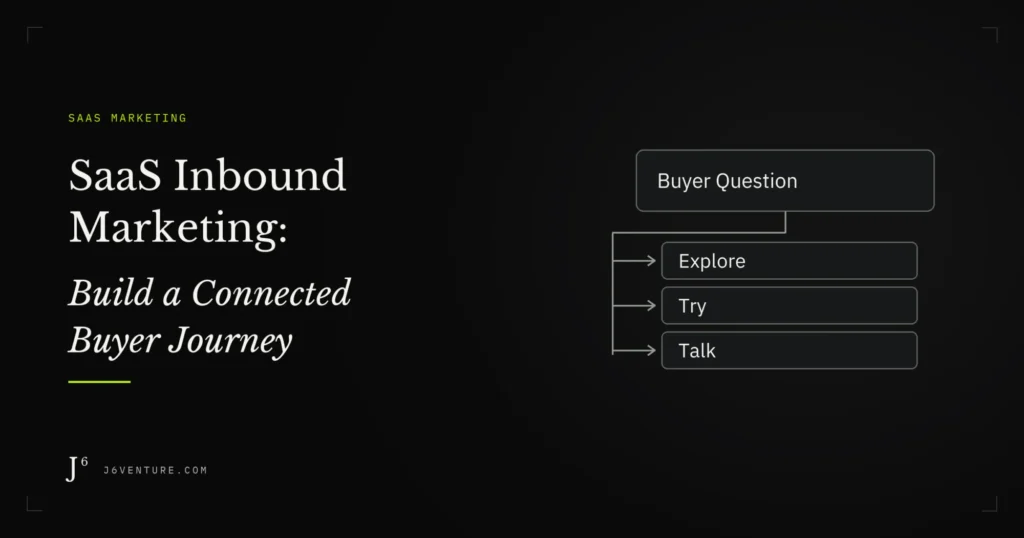
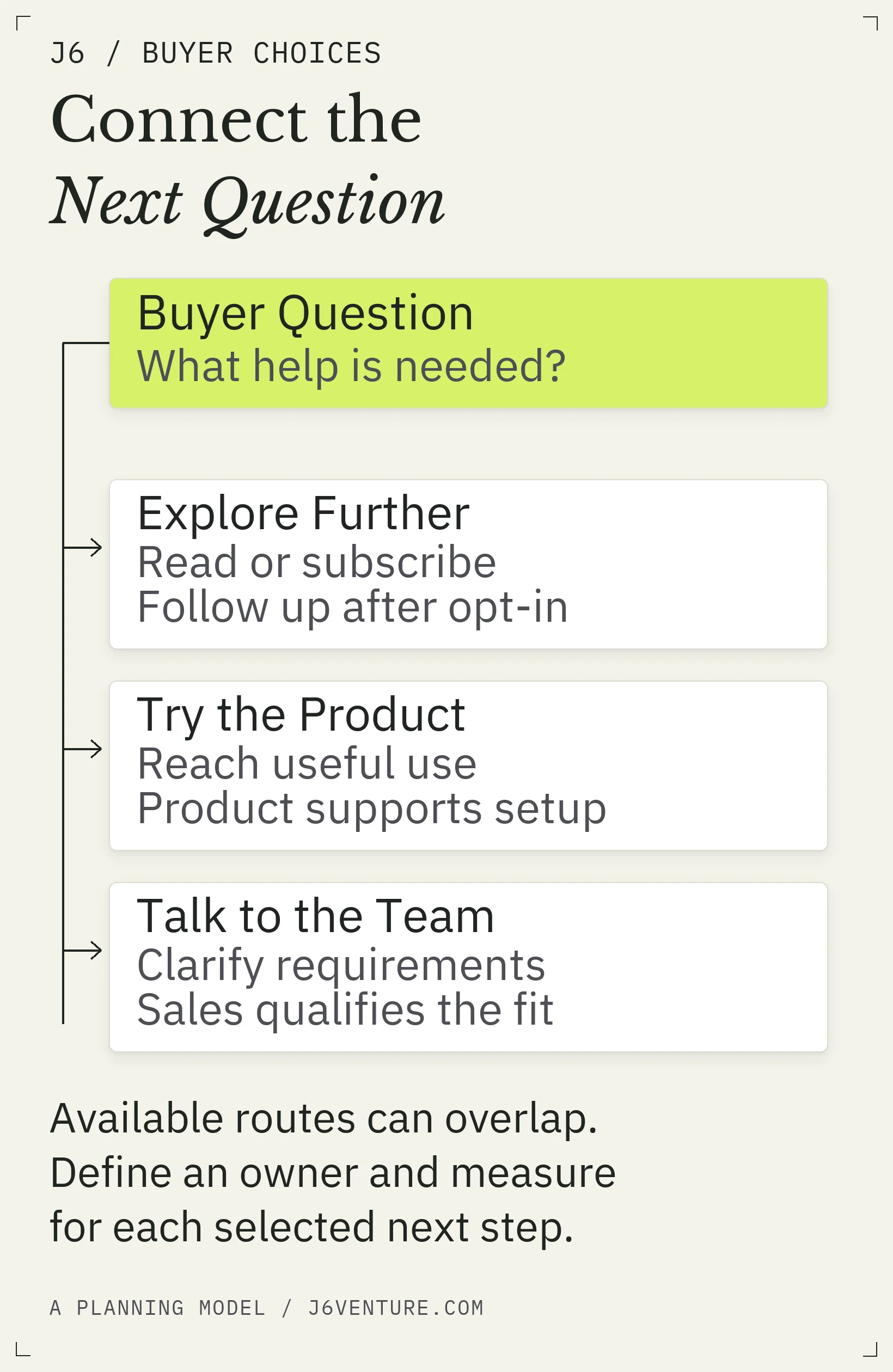
SaaS inbound marketing should connect each buyer question to useful content and a suitable evaluation step, with a clear owner for what happens next. Build one connected route first, then measure where people progress and where they need help.
For a SaaS company, that next step might be seeing the product, testing a workflow, comparing plans, or discussing an implementation constraint. A single form can leave those needs unresolved when it offers no suitable way to evaluate the product.
What Is SaaS Inbound Marketing?
Inbound marketing gives people with a problem you can address a reason to seek out your company. Searchable guides, product demonstrations, templates, community contributions, and subscribed emails can help them understand a problem and evaluate a solution.
Outbound outreach starts with the company initiating contact. The approaches can work together: a salesperson can share a guide that addresses a prospect’s question, and paid distribution can help an inbound asset reach its intended audience. The distinction describes how the conversation starts; it does not determine the quality of the content.
For SaaS, the work continues beyond explaining a feature. A prospective customer may need to assess usability, integration, rollout effort, and whether colleagues will use the product. A self-service signup also creates an onboarding responsibility. New users still need to complete the task that brought them to the product.
SEO supports discovery within inbound marketing. This program also connects discovery to evaluation and follow-up.
Inbound has costs: research, production, distribution, maintenance, software, and staff time responding to interest. Whether it earns investment depends on reaching an audience you can serve and helping that audience take a commercially useful step.
Start With One Buyer Problem and Buying Route
Choose a problem your product addresses well enough to demonstrate. Use existing customer questions, sales conversations, support requests, and search evidence to describe it in the buyer’s language.
Write a short planning statement:
Help [a defined team] evaluate [a problem our product addresses], using [an existing or proposed asset], with [an appropriate next step].
Keep three decisions together:
- Who needs help? Identify the person doing the work, who approves the purchase, and who could block implementation.
- What must they establish? Name the unresolved question, such as whether a workflow fits their team or an integration meets a requirement.
- How can they evaluate the product? Choose self-service, assisted evaluation, or both according to what buyers can reasonably assess and what your team can support.
A product requiring a substantial setup may need an assisted route. A product people can evaluate independently may offer a signup alongside optional help. These are planning choices to validate against your own customers and operating capacity.
A funnel measures progression between defined stages; a route maps buyer choices and team handoffs. Use both. Someone may arrive at pricing, return to a guide, and share a demo with a colleague, so allow for different entry points and return visits.
Use your broader SEO content strategy to decide which problems the business should own. For this first route, choose one problem and inventory what already answers it.
Map Content to the Questions Buyers Need Answered
Select a format because it resolves a question. A comparison table, short video, or implementation checklist may do that job more directly than another long article.
| Buyer Question | Possible Asset | Possible Next Step |
|---|---|---|
| What is causing this problem? | Diagnostic guide or practical checklist | Explore an approach that fits the problem |
| Could this product handle our work? | Demonstration, workflow example, or relevant template | Try the workflow or ask about a requirement |
| Which option fits our constraints? | Clear pricing, plan comparison, or implementation information | Choose a plan or request assisted evaluation |
| Can we get useful work done with it? | Onboarding guidance tied to a product task | Complete the task or get help with the obstacle |
These suggested pairings leave room for formats to serve several stages. A returning customer and a first-time visitor can use the same demonstration for different questions.
Give the asset a realistic discovery route:
- Search can connect an existing question to a relevant answer.
- Community and social participation can introduce an answer in conversations where it belongs.
- Email can continue the conversation someone agreed to receive.
- Paid distribution can extend reach when targeting, budget, and the destination fit the purpose.
Start with a channel your team can maintain and measure. A larger channel list creates more work before you know whether the destination helps the right people.
For each asset, write the question it answers and the question it leaves open. The link or call to action should help with that remaining question.
A Public Example: Asana’s Buyer Routes
Asana’s public pages offer several ways to evaluate its product. We checked the linked choices on October 12, 2026. We did not track visitors, submit forms, test video playback, or inspect internal follow-up. We verified the available choices; conversion performance and qualification remain unmeasured.
The project-management software buyer guide discusses team challenges, capabilities, implementation, pricing, and testing. It links to a product demonstration, pricing, and account creation.
| Public Page | Observed Choice | What a Reader Can Investigate |
|---|---|---|
| Buyer guide | Product demo, pricing, or account creation | Product use, plan fit, or getting started |
| Demo page | Get Started and Contact Sales | Self-service access or an assisted conversation |
| Pricing page | Sign-up routes for Personal, Starter, and Advanced; Contact Sales for Enterprise | A route associated with the plan under consideration |
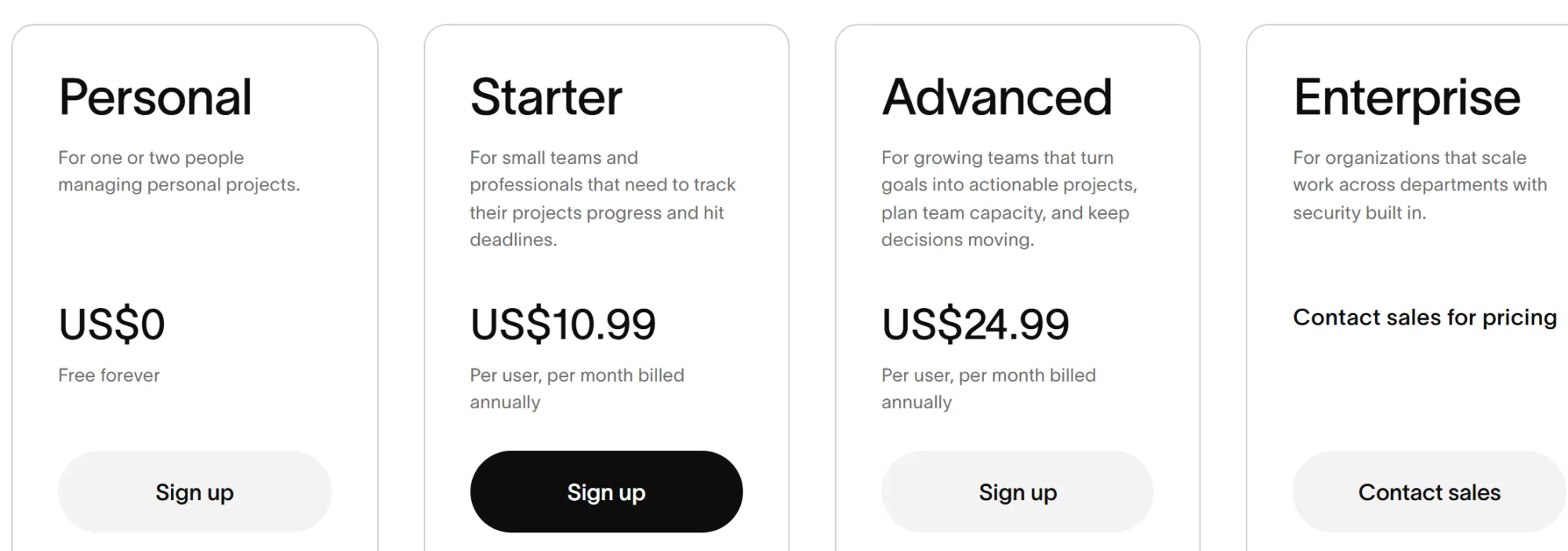
The guide lets readers choose a destination around their remaining question: product use, plan fit, or access.
Apply the pattern to your site by checking an existing educational page:
- 1List its current next steps, including ordinary links in the text.
- 2Match each one to a buyer question the page leaves open.
- 3Test that the destination answers that question and explains what happens next.
- 4Identify a missing choice only where it serves a genuine need your team can support.
If a guide offers only a sales form, check whether readers first need a demonstration or implementation detail. Evaluate any added choice against that need.
Carry one question through to a team decision. Asana’s pricing page provides an Enterprise contact-sales route when public pricing alone cannot settle the evaluation. For your own SaaS program, use the same question, “Which plan fits our requirements?” to define the handoff:
- Required evidence: ask which requirement remains unresolved after the plan comparison.
- Receiving team and action: sales checks the requirement with a product specialist when needed, then answers it or agrees on an evaluation step.
- Return or close condition: request missing detail; explain an unsupported requirement before advancing the deal.
- Measure: track whether those inquiries received the promised answer, then separately track acceptance for qualification.
These are our recommended operating choices. The public Asana page establishes the destination; it does not reveal the company’s internal handoff.
Choose the Next Step: Read, Subscribe, Try, or Talk
Match the requested commitment to the help being offered.
Read or watch more when the person still needs information to assess relevance. Keep the explanation readily accessible where collecting details adds no value to that task.
Subscribe when you can describe the future help you will send. Explain what the person will receive. A generic invitation to receive updates is a weaker planning brief than a defined series addressing an unresolved question.
Try or sign up when product access can help the person evaluate fit. Explain the immediate experience and any important setup requirement. Preserve the distinction between a free account, a time-limited trial, and a paid purchase wherever your product makes it relevant.
Talk to someone when the buyer needs assistance with requirements, procurement, implementation, or another decision your public material cannot settle. Request the information the receiving team needs to respond usefully.
Gating deserves a decision of its own. Ask whether the requested details support delivery or relevant follow-up, and whether the resource offers enough value to justify that exchange. A completed download form records interest in that resource. Sales readiness requires additional evidence.
Offer choices where they solve different needs, while keeping the page’s principal action clear. Four equal buttons on every page can make the decision harder.
Define Follow-Up and Team Handoffs
Each next step needs a receiving owner and an acceptance rule. Otherwise, marketing can celebrate a conversion while the person waits for help.
Marketing follow-up delivers the educational continuation someone agreed to receive. Sales follow-up responds to an expressed evaluation or commercial need. Subscribing alone does not establish that need.
For subscribers, connect the question they expressed to the promised follow-up and a voluntary next action. Assign marketing ownership for delivery and for honoring change or stop requests. Reassess qualification when the buyer supplies new evidence, such as a stated requirement or meaningful product use; time spent in an email sequence is not enough.
Qualification labels help only when teams agree what they mean. HubSpot’s lifecycle documentation distinguishes subscribers, marketing-qualified leads, sales-qualified leads, and opportunities. Its opportunity stage refers to a contact or company associated with a deal, and stages can be customized. Your own definitions should make the required evidence and next owner explicit.
Self-Service: From Signup to a Completed Product Task
Acquisition brings someone into the product or conversation; activation shows whether they completed a meaningful product task. A signup records registration. Check successful access and task completion separately.
For your product, choose an activation event based on evidence that customers completed a task that matters to them. Treat an initial choice as provisional until customer research and product data support it. Counting any login as activation would hide whether the person accomplished anything relevant.
Amplitude’s explanation of product-qualified leads connects qualification to meaningful product engagement and intent toward paying. It does not make every trial registration sales-ready.
Assign product or growth ownership for first-use obstacles, with a clear route to support when help is needed. Commercial outreach needs its own fit and intent criteria; a product event can inform that decision without settling it alone.
Sales-Assisted: From Inquiry to Qualification
Separate three events: receiving and answering an inquiry, accepting it for sales qualification, and creating an opportunity under your team’s criteria. A legitimate question deserves an answer even if it never becomes an opportunity.
The following is our suggested handoff record for your own program. It describes actions to define; it does not describe Asana’s operations.
| Handoff Field | Recommended Record for an Assisted Inquiry |
|---|---|
| Signal and evidence | Buyer requests help evaluating a stated requirement; retain that requirement and the source page |
| Receiving owner | Named sales owner or assigned queue, with a response commitment the team can meet |
| Accepted next action | Confirm whether the product can address the requirement and arrange the agreed evaluation step |
| Return or close reason | Missing detail: ask a focused question. Later timing: agree whether to reconnect. Unsupported need: explain the limitation and close appropriately |
| Review | Check whether the promised response and next action happened by the agreed time |
An opportunity then needs the additional conditions your business uses to recognize an active deal. Record those separately. If the problem is an unsupported integration, publishing more explanatory content will not supply that capability.
Measure Progress Along the Route
Give each measure a defined event, population, and observation period. Compare groups entering through similar routes, allowing each group enough time to take the next step.
| Question | Suggested Measure | Keep This Boundary Clear |
|---|---|---|
| Do relevant readers explore the next step? | Visitors taking the selected action divided by visitors to that asset, within a defined period | Assess fit separately from the recorded click |
| Do signups complete the activation task? | Signups completing the defined activation event within a chosen window divided by signups with that full window available | Exclude recent signups that have not had time to complete the window |
| Are assisted inquiries suitable for qualification? | Inquiries accepted for qualification divided by inquiries in a defined intake cohort | Acceptance does not itself mean an opportunity exists |
| Does qualification progress? | Accepted inquiries becoming opportunities within a chosen window divided by accepted inquiries with that full window available | Use the team’s opportunity definition consistently |
Keep self-service and assisted routes separate before combining reporting. Check customer fit and lead quality alongside counts. A rise in form submissions can create more work without producing suitable evaluations.
Include content production, expected refresh work, distribution, tools, and staff time per assisted evaluation in cost reviews. More demo requests can be commercially unhelpful when the team cannot respond, inquiries fit poorly, or costs per evaluation exceed its expected commercial value after allowing for the likelihood of becoming a customer.
Attribution answers a different question: which recorded interactions receive credit for a selected outcome? Google’s attribution paths report shows paths for users who complete selected key events and excludes those who do not. Use it alongside progression measures; it cannot show where every non-converter stalled.
Attributed revenue also differs from incremental revenue: a recorded sale does not establish that the inbound activity caused a sale that would otherwise never have happened. Treat attribution as one input to investment decisions, with that limit visible.
Use the observed gap to choose the first investigation:
- Relevant people are not reaching the asset: marketing checks the audience, discovery channel, and page’s relevance before commissioning more content.
- Readers arrive but few take the intended next step: inspect whether the question is answered, the offer fits, and the link or form works. Some readers may finish their task without another action.
- Signups stall before completing the activation task: product or onboarding checks setup friction and the promised workflow.
- Inquiries go unanswered: the receiving sales team checks routing, capacity, and the response commitment.
- Evaluations end on the same unsupported requirement: review product fit and targeting before expanding acquisition.
These observations identify where to look. Confirm the cause through the relevant page, conversation, or product evidence before choosing a fix.
Build Your First Connected Journey
Start with one route that your team can operate from discovery through follow-up. Reuse sound assets before adding production work.
- 1Name the buyer problem and commercial fit. Record whose question you will answer and why serving that audience matters to the business.
- 2Choose the entry asset and discovery channel. Identify what exists, what needs repair, and how the intended audience will reach it.
- 3Connect the next question to a destination. Test the links, forms, and product or sales route yourself.
- 4Assign the handoff. Name the receiving owner, required evidence, promised response, and return or close reason.
- 5Set the review. Record the events, observation window, capacity limit, and decision you will make from the evidence.
Choose a review window that accommodates your evaluation and buying cycle. Until enough people have had that time, distinguish incomplete observation from poor performance.
Expand when suitable people progress, follow-up works, and the cost and workload fit the business. Repair when the evidence points to a specific breakdown you can address. Pause or stop when the audience’s needs consistently fall outside product fit, or the effort exceeds your agreed limit without a credible improvement to test.
The next investment should follow the unfinished buyer question and the evidence from your current route. That gives every new asset a job and every handoff an owner.
J6’s content marketing work can help connect those buyer questions to a focused content plan. Bring one existing route, its unanswered questions, and whatever progression evidence you have.