Prioritize SaaS SEO mistakes by their impact on the page’s job, the evidence supporting the cause, and the effort required. Repair a confirmed access or submission blocker on the affected page; when the cause is unclear, check audience and query fit, buyer evidence, and the conversion path before choosing a correction.
A disappointing SEO report leaves a practical question: what should change next? More articles, a rewrite, and a technical audit can each be useful. Their value depends on the problem the evidence supports.
Start with one important page and the result it was meant to improve. A product page may help suitable buyers evaluate your software. A guide may explain a problem. A help article may let existing customers complete a task. Those pages need different evidence of success.
Start With the Page’s Job and the Missing Result
An SEO mistake is a decision or implementation that works against the page’s intended job. Low traffic or few demos are observations you need to explain. They do not identify the mistake on their own.
Write a short page brief: who it serves, what question it answers, what the product can help with, and what a useful next action looks like. For acquisition pages, qualified demand means interest from people whose needs, market, and requirements your product can serve. A signup alone does not establish that fit.
Use the missing result to choose a starting check:
| What You Observe | What to Establish | First Action |
|---|---|---|
| An important page has little search visibility | Whether Google can access it, and what the indexed report says | Inspect the URL and the content Google received |
| The visible query sample suggests an audience mismatch | Whether the search task fits your product and intended audience | Review the query sample alongside the page brief |
| Relevant search visits produce few useful actions | Whether proof, the action path, tracking, or buying lag explains the gap | Test the next step and review qualified inquiries |
| A decline follows a release | What changed on affected pages compared with unaffected ones | Compare deployment changes and page-level evidence |
These are investigation routes. Several problems can coexist, and a site-wide change may explain what initially looks like a single-page failure.
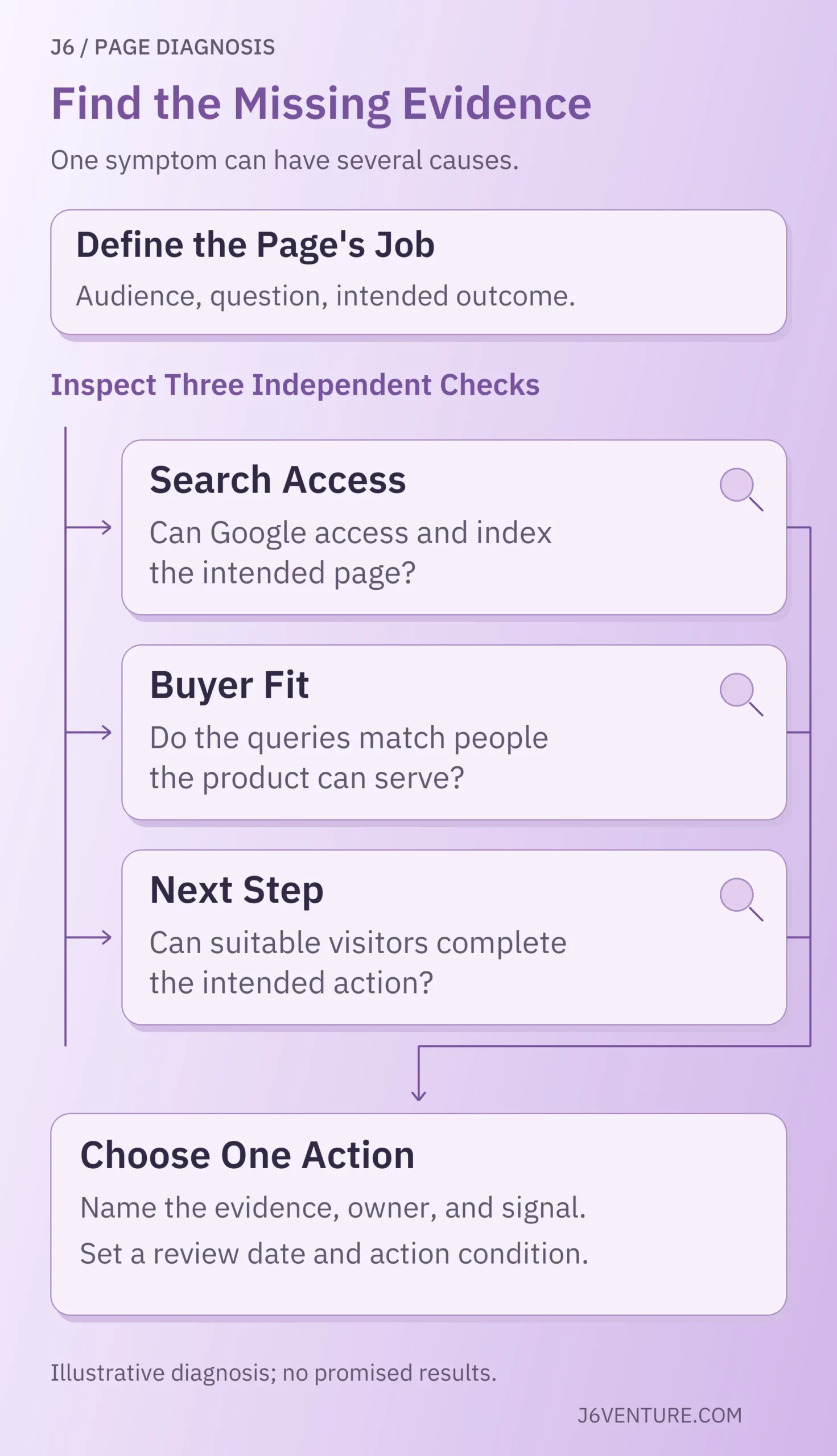
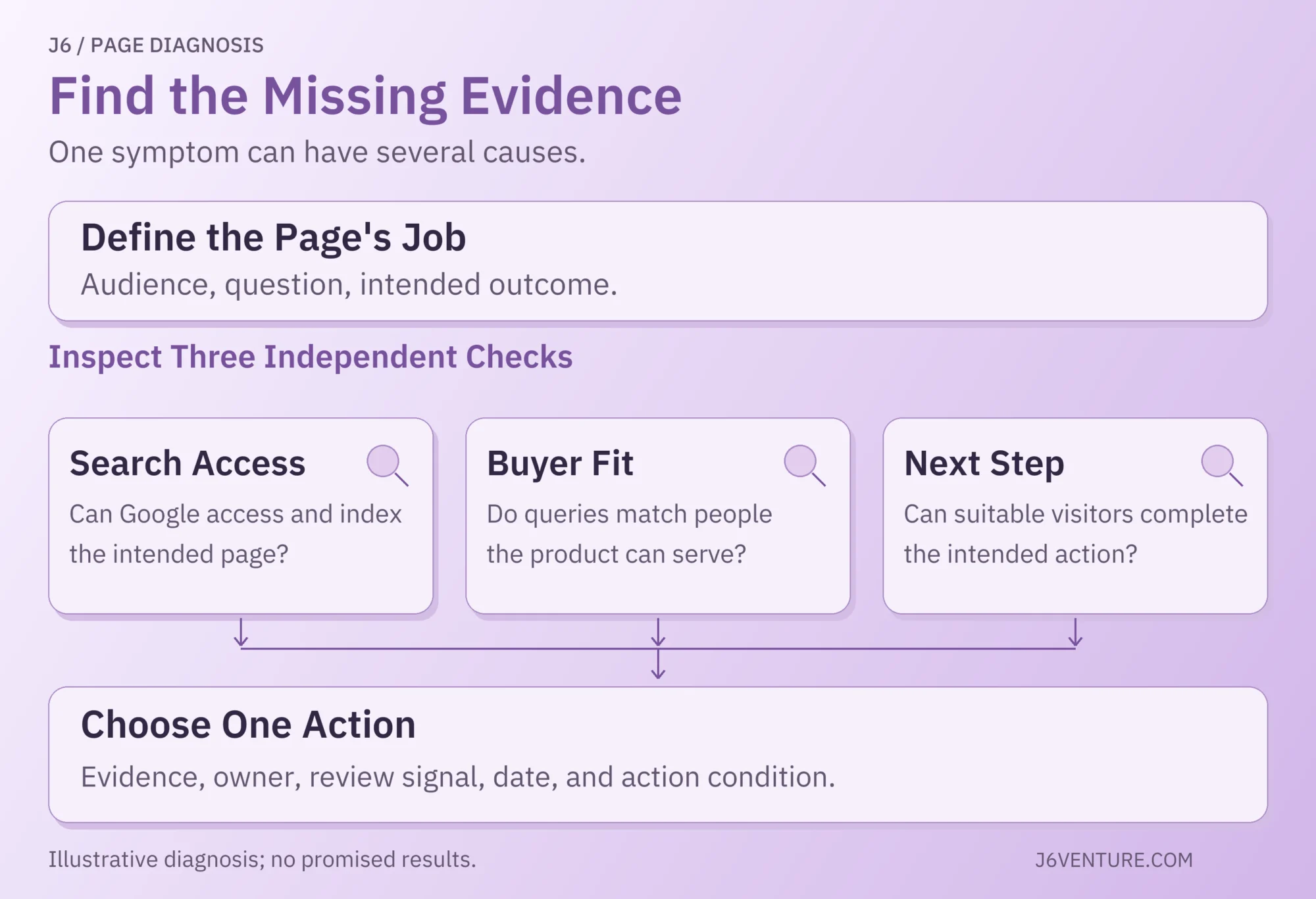
Check search access, buyer fit, and the next step as separate questions. Compare their evidence before selecting the correction.
8 SaaS SEO Mistakes to Investigate
Choose the mistakes relevant to your observations; their order is not a severity ranking.
1. Choosing Keywords Without Checking Product and Buyer Fit
For an acquisition page, keyword selection goes wrong when the searcher’s need falls outside what your SaaS product can serve. Search volume and difficulty estimates help describe an opportunity, but neither establishes customer fit.
Consider scheduling software built for multi-location sales teams. A broad phrase such as “weekly schedule template” could involve students, personal planning, or business operations. “Appointment routing software for multiple locations” describes a narrower task. It still needs a results-page and product-fit check; the wording does not prove a purchase will follow.
Before funding a page, confirm:
- Audience: whose problem the page will answer.
- Capability: whether the product supports that problem, including material limitations.
- Search task: whether people want a template, instructions, a comparison, or software.
- Commercial route: how a suitable reader could move toward evaluation, if acquisition is the page’s job.
Educational content can be worthwhile without immediate demos. Help content can serve existing customers. The mistake is funding or measuring those pages as though they all serve the same acquisition task.
For the full discovery and page-selection process, use J6’s SaaS keyword research workflow.
2. Answering an Evaluation Question With the Wrong Page
A page misses search intent when it fails to help readers complete the task behind the query. Someone comparing integration options needs evidence about compatibility, setup, limits, and workflow fit. A general article about the benefits of integration leaves that decision unfinished.
Match the question to the answer the page provides:
- A comparison needs consistent criteria, supported differences, and conditions that change the choice.
- A use-case page needs a concrete workflow, the product’s role, and where it falls short.
- An integration page needs supported systems, prerequisites, responsibilities, and material restrictions.
- A pricing question needs the applicable plan, billing basis, and costs or conditions that affect budget fit.
Inspect relevant competing pages for the tasks they answer and the proof they provide. Their rankings are useful context; ranking above you does not establish which feature caused that position. Verify product details at the original source before adapting a comparison.
A feature becomes meaningful when the reader can connect it to a task. “Routing rules” is a feature label. An explanation of how rules assign an appointment to an available location helps the reader evaluate it. Avoid promising a workflow your product cannot support.
J6’s SaaS BOFU keyword patterns connect evaluation searches to the evidence buyers need.
3. Rewriting Content Before Checking Search Access
When a page has little visibility, establish whether Google can access and index the intended content before rewriting it. A crawl or indexing block calls for a different correction from a weak answer to the searcher’s question.
Google’s minimum technical requirements include crawler access, an HTTP 200 response, and indexable content. Meeting those requirements makes a page eligible; it does not establish that Google will index it or rank it competitively.
A page can open normally in your browser and return HTTP 200 while carrying a noindex directive. Google’s noindex documentation explains that the rule can be in a meta tag or response header. Google must crawl the page to see it. Blocking the URL in robots.txt prevents that inspection, so these controls need to be assessed separately.
Use URL Inspection to distinguish:
- Indexed information: what Google reports about the version it has processed, including its selected canonical.
- The live test: whether the current page might be indexable and what the inspection tool can retrieve now.
- Implementation evidence: the deployed response, directives, rendered content, and release date.
A successful live test does not mean the new version is indexed, and it cannot predict Google’s canonical selection. If the issue affects a template, check other affected URLs before treating it as an isolated page problem.
Keep private application screens private. Diagnose the public marketing, integration, or documentation page intended for discovery; exposing customer data is not an SEO repair.
4. Creating Competing Pages or Leaving Important Ones Isolated
Page ownership becomes unclear when several URLs answer the same task without a useful distinction. Discovery becomes difficult when an important page has no relevant internal path. Check both before adding another article.
List the pages appearing for the question, their purposes, and the internal links leading to them. An introductory guide and a product evaluation page can share vocabulary while serving different needs. Shared keywords alone are insufficient grounds for merging them.
For suspected overlap, inspect whether the pages repeat the same answer, whether each has a distinct audience or task, and which page should receive the relevant internal links. Decide whether to clarify, combine, or retain them from that evidence. Plan redirects if a URL is removed, preserving useful content and existing references.
Google recommends crawlable links with descriptive anchor text. It also advises linking important pages from another page on your site. Add the link where the reader needs the destination: a routing guide might lead to a supported routing workflow, and an integration comparison might lead to setup requirements.
Check the linked page itself. A descriptive anchor leading to an unrelated landing page creates a poor handoff even when the link technically works.
5. Publishing More Content Without Adding Useful Evidence
Increasing output becomes a mistake when new pages repeat existing explanations without helping readers understand or decide more. The same quality problem can occur in human-written, AI-assisted, or programmatic content.
Google’s scaled content abuse policy concerns producing many pages primarily to manipulate rankings without helping users, regardless of how they were created. Using AI does not, by itself, establish a violation or explain a traffic decline.
Ask what the reader gains from the proposed page:
- A worked workflow with inputs and limitations.
- A supported comparison that changes a choice.
- A genuine product demonstration or documented example.
- An original observation with a clear method and scope.
- An explanation that resolves a question the existing pages leave open.
For templated integration pages, changing a product name is insufficient evidence of a useful difference. Each page needs supported information about that integration and the task it enables. Choose the pages you can substantiate.
Maintenance should follow a reason to review: a product or plan change, an obsolete screenshot, new customer questions, a broken action path, or a change in comparable page performance. Google’s people-first content guidance warns against changing dates merely to appear fresh and says it has no preferred word count.
Improve the answer that needs updating. A longer article or a newer date is not evidence that the problem has been fixed.
6. Losing Readers Between the Answer and the Next Step
Relevant traffic can arrive at a useful page and still encounter a broken or unsuitable next action. Inspect what the reader needs to establish before progressing, then test the path with the devices and conditions that matter.
A sales-led evaluation page may need clear scope, implementation expectations, and a demo request. A self-service product may offer a trial, while explaining what can be evaluated during it. A help article may need steps the customer can complete without contacting sales.
Check the handoff in practice:
- 1Follow the page’s promised next step on mobile and desktop.
- 2Confirm that the destination continues the same task.
- 3Test required fields, validation, confirmation, and error states.
- 4Check that the intended event is recorded and the inquiry reaches the receiving system.
- 5Review whether the action produces suitable inquiries or product use, using your team’s agreed definition.
A recorded button click is different from a successful submission. A submission is different from a qualified inquiry. If clicks rise while submissions stall, locate the failure before rewriting the article’s targeting.
Proof also matters. A buyer who needs a supported integration, regional availability, or a particular plan should be able to establish that condition before booking. More prominent buttons cannot resolve an unanswered eligibility question.
7. Buying Authority or Chasing Unsupported AI Shortcuts
Evaluate link practices against Google’s policies and AI tactics against the requirements of the named search product. A package of links or a new optimization label does not establish that the work is useful or appropriate.
Google’s link spam policy addresses links created to manipulate rankings, including specified paid-link and exchange practices. Inspect how links were obtained and qualified. For advertising or sponsorship links, Google permits appropriate marking with rel="sponsored" or rel="nofollow". These are HTML attributes on the link that identify its relationship; they are distinct from qualifying a sales inquiry. A third-party risk score alone does not establish the cause of a decline or justify a cleanup campaign.
Give relevant publishers or communities a reason to reference your resource. For example, an appointment-routing comparison could answer an existing question in a sales-operations newsletter or customer community. Share it with the context that makes it helpful. Publication, links, and rankings remain uncertain; record the actual response rather than treating outreach volume as authority earned.
For Google AI Overviews and AI Mode, Google’s AI features guidance states that there are no additional technical requirements. A supporting page must be indexed and eligible to appear with a snippet. Google also says specific optimization is not required for AI Overviews and AI Mode. This is Google-specific guidance, not a rule for every AI service.
Evaluate a proposed tactic by its deliverable and evidence. If a public product page cannot be accessed or fails to answer the buyer’s question, those confirmed problems deserve attention before an unsupported visibility promise.
8. Reporting Growth Without Checking Qualification or Timing
SEO reporting misleads when growth in one metric is presented as success in another. Impressions, clicks, trials, qualified inquiries, and revenue describe different stages and need their own definitions.
Google’s Search performance report measures search exposure and clicks. Review queries and pages for the relevant country, device, and period. A site-wide average can hide the difference between a help article gaining visibility and an evaluation page losing suitable traffic.
Pair that search evidence with analytics, product, or CRM records where available. Define a qualified inquiry, activation, and opportunity for your team. Compare visitors with similar intent, market, offer, and time to progress. Avoid applying a company-wide conversion rate to a page serving a different task.
Separate three records:
- Delivery: what changed and when it went live.
- Search progress: what happened to the relevant page and query sample.
- Commercial progress: what suitable visitors did and whether they advanced.
A recommendation sitting in a document has no implementation date. A page can improve in search before its visitors complete a longer buying process. Agree on how long comparable visitors need to reach the outcome you are reviewing. Use that period when assessing the lead count.
Attribution records credit under a chosen model. Incrementality asks what changed because of the work. An organic-attributed sale may also involve existing brand demand, another channel, or an established customer relationship. Keep that distinction when reporting a result.
For timing and reassessment, use the evidence behind waiting, fixing, or changing course.
The Same Symptom Can Require Different Fixes
“Organic visitors arrive, but qualified demo requests are scarce” can describe audience mismatch, a broken action path, insufficient proof, tracking gaps, or buying lag. The observation becomes actionable when a check distinguishes those explanations.
The following cases are fictional illustrations, not J6 client results or tests we conducted. Both concern scheduling software that supports appointment routing and CRM handoffs for multi-location sales teams. Neither provides a conversion benchmark.
A Query Sample Suggests an Audience Mismatch
Suppose a spreadsheet guide attracts searches such as “free student timetable” and “printable weekly planner.” Its funding brief expected acquisition from sales-operations teams. A controlled form test succeeds on both devices, and the visible query sample contains little business-evaluation language.
The query sample supports investigating audience fit. It cannot identify every visitor or establish that all the traffic is unsuitable. Review representative inquiries and the guide’s actual purpose before changing it.
Correction: if the acquisition brief lacks support, stop expanding the guide as an acquisition investment. Retain it if it serves a justified educational task, assigning that task appropriate measures. Develop an evaluation resource only after checking the business question, search results, product capability, and existing page ownership.
Alternative explanation to check: tracking could miss suitable inquiries, or a small relevant audience could need proof the guide lacks. Test those possibilities before declaring the page commercially useless.
Review signal: after implementation and an agreed observation period, inspect whether the evaluation resource reaches relevant queries and produces suitable inquiries. If that fit remains weak, revisit the target task or reduce the investment. A rising total traffic count would not settle the question.
A Mobile Test Reveals a Broken Submission Path
Suppose an integration evaluation page appears for relevant CRM-routing questions and explains supported setup conditions. In this fictional case, a controlled mobile test reproduces an error that prevents demo submission; desktop submission works.
The reproduced error supports a specific action-path repair. Relevant query language is encouraging, but it does not establish that every visitor is a suitable buyer or that the form explains the entire gap.
Correction: repair the mobile submission path. Retest validation, successful submission, confirmation, event recording, and CRM receipt. Preserve the supported setup information while addressing the demonstrated failure.
Alternative explanation to check: unanswered plan limitations or buying lag may still suppress progression after the path works. Review inquiry quality and the information buyers need alongside the repair.
Review signal: first confirm successful delivery through the repaired path. Then compare mobile submissions and qualified inquiries over comparable periods, recording other changes. If submissions resume but fit remains poor, examine the audience and offer. That is a different next action from another form repair.
Choose One Action and Set Its Review Signal
Prioritize work by confirmed impact on an important page, the evidence supporting the cause, and the effort needed to repair or investigate it. A reproducible submission failure or accidental indexing block deserves a clear owner. When the cause is uncertain, identify the check that would distinguish it from another explanation before commissioning a large rewrite.
Record other plausible problems without bundling every improvement into the same change. Where urgent confirmed faults require simultaneous repairs, document them separately so the next report can explain what went live.
Where to Start With Limited Data
With limited search history, use customer questions, product capabilities, public search results, access checks, and manual action-path tests. You can identify an unsupported page promise or a broken form before accumulating a large analytics dataset.
With established traffic, inspect page, query, device, and market segments and compare them with qualified inquiries or product events where available. Use your existing baseline and allow comparable visitors time to progress. More data enables finer checks; company stage alone does not decide which mistake exists.
A Page-Level Correction Record
Use this suggested record to capture the evidence, next action, and review date for one page.
| Record | What to Write |
|---|---|
| Page and intended job | URL, audience, question, and useful outcome |
| Observation | Missing result, period, market, device, and source |
| Explanation to test | Leading hypothesis, plausible alternative, and evidence for each |
| Missing check | The observation that would distinguish the explanations |
| Next action and owner | Repair, revise, or gather that evidence; name who implements and who checks |
| Implementation and verification | Actual deployment date and the test confirming the change works |
| Reassessment | A calendar date, signal sought, and result that means continue, change, or reduce work |
If the evidence is inconclusive, make the next action the missing check. Name its scope and review date. Waiting becomes useful when the team knows what signal it is waiting for and what it will do if that signal does not appear.
Illustrative Filled Record: Continue the fictional mobile-form case. The dates below are invented to demonstrate the record; they are operational checkpoints, not SEO timelines or conversion benchmarks.
- Page Job: Help a suitable sales-operations buyer evaluate the supported CRM-routing integration.
- Observation and Alternative: A mobile test reproduces a submission failure. Plan fit and buying lag may explain part of the remaining gap.
- Action and Owner: Engineering repairs the form; the QA owner checks validation, confirmation, event recording, and CRM receipt.
- Implementation and Verification: Assume deployment on October 15, 2026. A successful mobile test submission reaching the CRM completes the immediate repair check.
- Review and Decision: Assume an operational review on October 22. Reopen the repair if submission still fails.
If delivery works but comparable inquiry evidence is insufficient, record what is missing and assign another review date based on the team’s baseline and buying lag.
If evidence is still insufficient at that review, decide whether further measurement is worth its cost or reduce the investment. If inquiry fit is weak, investigate targeting or offer conditions.
Choose one important page, write its job, and complete this record. The next SEO investment should follow the evidence you collect about what is preventing that page from doing its work.