To optimize content for AI Overviews, make your page eligible for Google Search’s AI features and improve the answer it gives readers. Start with a useful existing page, check its claims against current evidence, and write the missing explanation. The example below shows proposed changes to a public guide; we have not measured their effect on Google’s source selection.
A page can appear in an AI answer while still containing advice that needs updating. That makes citation a poor substitute for reading the source carefully. The example here shows proposed edits to a public guide, including the passages to replace, the detail to add, and the related answers to reconcile.
What Does Optimizing Content for AI Overviews Involve?
AI Overviews are Google’s generated summaries in Search, with links to supporting web pages. Content optimization combines normal search eligibility with a useful, reliable answer. Google’s current optimization guide emphasizes valuable material that adds something readers would find worthwhile.
Separate Page Eligibility From Selection
Google requires a page to be indexed and eligible to appear in Search with a snippet. The site’s effective Search generative AI inclusion setting also matters. Meeting these conditions makes a page eligible; Google still chooses which sources to show for a response.
The guide describes query fan-out, where related searches help address a request. It also warns against producing pages for every possible variation primarily to manipulate visibility. A useful answer can address related meanings without repeating every wording.
Make the Page More Useful to Its Reader
Look for a decision the current explanation leaves unresolved: an applicable condition, a missing comparison, an outdated instruction, or evidence for a claim. Clear writing helps readers use that information. Google specifies no special schema, mandatory tiny chunks, or ideal page length for its generative features.
Preserve useful SEO work and appropriate structured data. A formatting change needs a reader benefit or a supported search purpose behind it.
Choose an Existing Page and a Reader Question
Choose an existing page where a prospective customer still lacks information needed to make a decision. Write down the URL, the reader’s question, and the passage that leaves it unanswered. If you cannot identify a missing answer, outdated claim, or access problem, do not force a rewrite because the page is absent from an AI Overview.
Start With a Question That Matters to Your Business
Write the reader’s decision in one sentence. For a product comparison, that could concern which plan supports a required capability. For a process guide, it could concern when a step applies.
Check whether an existing URL already owns that job. Related searches needing substantially the same answer can often belong together. J6’s keyword-to-page guidance explains that ownership decision in more detail.
Find the Evidence the Answer Needs
Use sources capable of supporting the proposed addition:
- Product or plan claims: current product documentation and terms.
- Operating instructions: the actual process and its applicable conditions.
- Customer results: the real result, measurement method, and limitations.
An AI answer can reveal a question worth checking. Confirm its relevance with the reader’s task and the underlying sources before adding it to your page.
Check the Page Before Changing the Content
Content edits and access problems need separate checks. Check the page’s indexing, snippet eligibility, and effective inclusion setting, then assess the explanation itself. A publicly readable URL alone cannot tell you everything about its indexed version or owner-controlled settings.
Confirm Indexing, Snippet Eligibility, and Inclusion Settings
For your own page, use Search Console to inspect indexing and review controls that affect snippets. Check the property’s effective Search generative AI setting, including any inherited parent setting. Do not change an intentional exclusion without understanding why it exists.
We have not inspected the example publisher’s private Search Console settings. A wider technical problem belongs in a site SEO audit.
Keep Important Information Accessible and Easy to Find
Keep essential explanations in visible text, link relevant pages internally, and check the mobile reading experience. Add an image or demonstration when it helps someone understand the answer. These are usability and discovery improvements; each needs a purpose beyond making the page look optimized.
Work Through a Public Page Example
A useful refresh shows which copy changes and why. We reviewed Semrush’s public AI Overviews guide against Google’s documentation on October 10, 2026. The following is an independent editorial proposal. We have not changed Semrush’s page or measured any search effect.
The guide also appeared as a linked source in our retained Google AI Overview for “optimize content for AI Overviews.” The search used US and English parameters; Google reported that the results were not personalized and could not determine the location. That single observation establishes neither typical visibility nor why Google selected the page.
Identify What Needs Updating and What Should Stay
The page gives practical advice on crawlability, quality, and tool use. Its quality checklist includes accuracy, originality, expertise, and reader usefulness. Those points remain useful.
Two reader questions warrant a closer look: which control excludes content from Google’s generative features, and what the available reporting measures. These questions can change a publisher’s next action. The proposed refresh therefore has a limited scope:
| Page Area | Proposed Treatment | Reader Benefit |
|---|---|---|
| Main control explanation | Replace the outdated opening and broad-control instructions | Choose a control with the intended scope |
| Visibility-check section | Add the current report explanation and evidence table | Distinguish impressions from clicks and inquiries |
| Keyword-discovery section | Add the short page-choice bridge | Decide whether to edit an existing page or create a separate page |
| Related FAQs | Reconcile both answers with the revised sections | Get consistent guidance wherever reading starts |
| Quality-content recommendations | Retain | Keep advice that still serves the reader |
| Vendor tool walkthroughs | Leave outside this demonstration | Avoid claiming account-level UI verification we did not perform |
This review covers only the sections identified above.
Rewrite an Outdated Answer Using Current Sources
The control section states:
“AI Overviews are a feature of Google search results, which means websites cannot directly opt out of them.”
Google’s Search generative AI control documentation now describes an inclusion choice covering AI Overviews, AI Mode, and listed generative features in Discover. It also distinguishes that choice from exclusion from Search as a whole.
Replace the section’s opening and broad-control bullets with copy that preserves those distinctions:
Proposed Section Replacement
Google provides a Search generative AI control under Settings in Search Console. It covers AI Overviews, AI Mode, and the listed generative features in Discover together. Check the property’s effective choice, including any inherited parent setting.
Choose a control according to what you want to exclude:
- Listed generative Search features: consult the Search generative AI control. Google says this choice does not affect ranking or inclusion in other parts of Search.
- Google Search entirely: consult Google’s noindex documentation. This serves a broader objective.
- Training the models used in Search generative features: consult Google’s Google-Extended documentation. The Search generative AI control does not govern that training.
Changes take time to propagate. The control also does not override separate participation choices for services such as Merchant Center and Google Ads. Read Google’s current control documentation before changing a setting.
The replacement gives the reader a choice grounded in purpose and scope. It does not add an AI-Overviews-only switch: the documented control covers several features together. The linked documentation explains each control’s scope before you change a setting.
The subject here happens to be AI Overviews. Updating these facts improves this guide’s answer; it does not demonstrate a special technique for earning a citation.
Add a Table That Shows What the Evidence Can Establish
The guide’s visibility section describes a vendor tool. Add the following explanation before that workflow to distinguish Google’s report from a tool’s observations:
Proposed Report Explanation
Google’s Generative AI performance report in Search Console shows link impressions across AI Overviews and AI Mode. Use it to examine which pages receive those impressions and how they vary by date, country, or device. This differs from measuring AI-Overview-only clicks or leads. Google says a site may not see the report when impressions are insufficient; exclusion from the features is another possible reason. Keep report data separate from captured citations and from visits or inquiries in your analytics.
The official report documentation supports the feature scope, dimensions, and report-availability explanation. The table below turns those distinctions into an editorial decision aid.
| Evidence Available | What You Can Assess | What It Does Not Establish |
|---|---|---|
| Generative AI report page impressions | Exposure across the included features | AI-Overview-only clicks, leads, or the reason exposure changed |
| A saved answer linking to the page | The source shown in that observed response | Typical visibility across users or the effect of an edit |
| Aggregate Search Console clicks; separately recorded inquiries | Search traffic and recorded business outcomes under their respective measurement methods | Whether those inquiries came from those clicks or that AI answer |
Suppose you are deciding what a rise in reported impressions lets you say. The first row supports a statement about exposure across the included features. Connecting that exposure to inquiries requires additional attribution evidence.
Keep the table beside the reporting instructions so readers can check what each metric supports before reporting a result.
Update Related Answers So the Page Stays Consistent
The guide’s opt-out FAQ uses wording about excluding AI Overviews specifically. A control covering multiple features does not refute that qualification. The answer still needs to explain the available broader choice and its effect on other Search inclusion.
Proposed Opt-Out FAQ Answer
Google offers an exclusion control for AI Overviews, AI Mode, and the listed generative Discover features together. It is not an AI-Overviews-only choice. Google says using it does not affect inclusion or ranking in other parts of Search. Review your property’s effective setting and Google’s current documentation before making a change.
The clicks FAQ needs a different treatment. The existence of an impressions report does not prove that a separate click report exists. Keep that metric distinction, and replace the unverified statement about Google’s future announcements with a source-scoped answer:
Proposed Click-Data FAQ Answer
Look in Search Console’s Performance report with the Web search type. Google includes traffic from AI Overviews and AI Mode in those overall Search totals.
The Generative AI performance report described here measures impressions across AI Overviews and AI Mode. It does not establish a separate AI-Overview-only click count. Keep Search Console click data, a tool’s captured citations, and separately recorded website inquiries distinct; none of these records alone connects a particular AI answer to a lead.
One short addition can also connect the guide’s keyword-discovery instructions to an editing decision. Place it after discovery and before the quality-content advice:
Proposed Bridge to a Page Update
Review each useful query against the page you already have. If the reader needs the same answer, improve that page with the missing evidence or explanation. Consider a separate page when it serves a distinct task that deserves its own treatment. A word-count filter helps explore queries; it does not decide how many pages to publish. Google says its AI systems understand related meanings, so covering every phrasing variation is unnecessary.
The page-choice recommendation is our editorial judgment. Google’s guidance on related meanings and query variations supports the final explanation. The original guide’s word-count filter is a discovery technique; we are not claiming it presents that filter as a Google eligibility requirement.
Apply the Editing Method to Your Own Page
Turn the example into one assignable edit. Record these six details for your page:
- Page and reader decision: The URL and what the reader needs to decide.
- Current gap: The missing answer or the exact passage that is outdated or unclear.
- Supported replacement: The proposed copy, source, and source-check date.
- Conditions to preserve: Who the answer applies to and any exception that changes it.
- Owner and related answers: Who will make the edit and which summaries or FAQs must also change.
- Completion check: What the live page must show before the edit is complete.
An editor can own wording and related answers; a subject expert can verify business evidence; the site owner or developer can resolve access issues. Assign only the relevant work to each person.
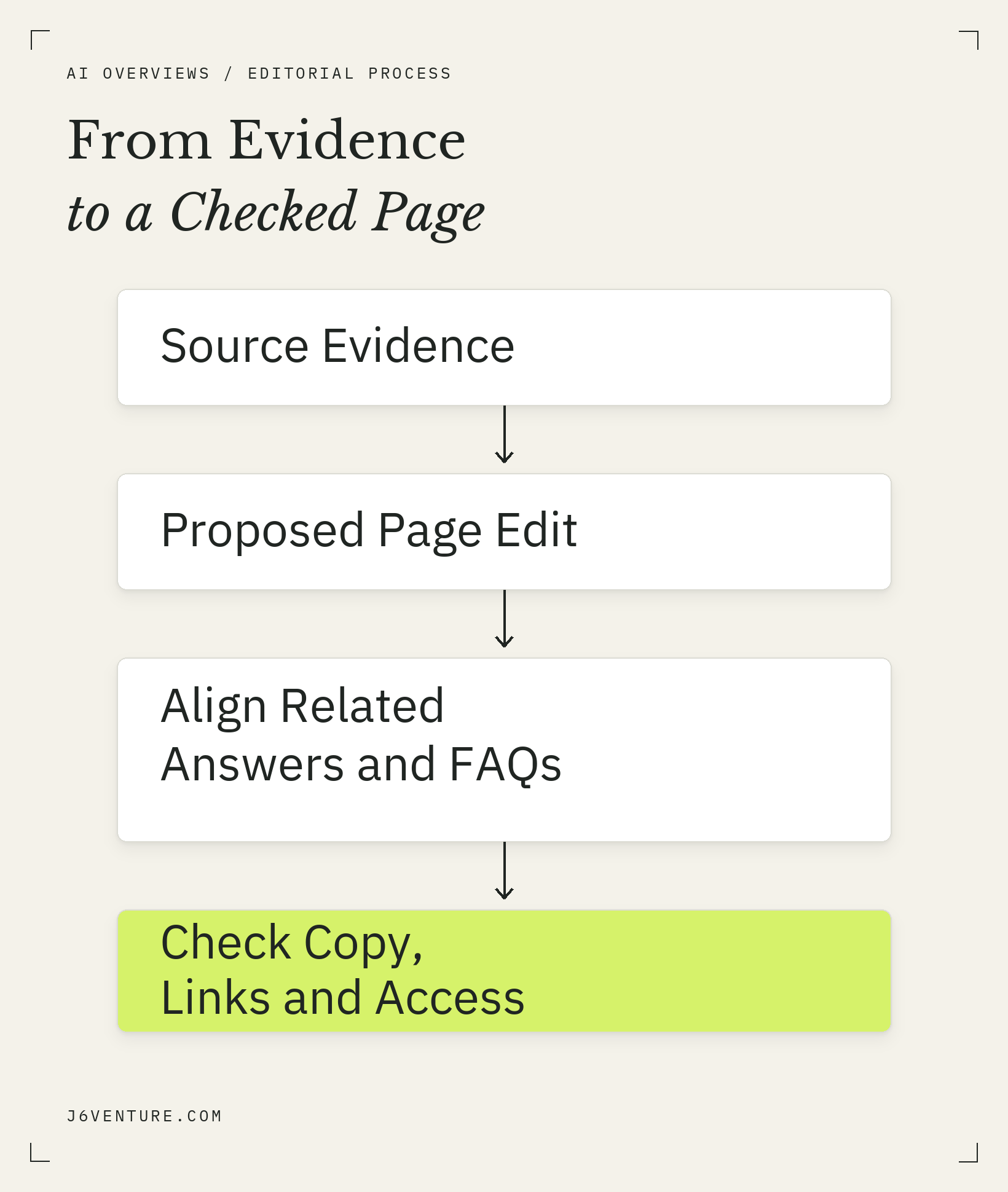
For your own refresh, carry source evidence through the proposed edit and related answers, then check the copy, links, and page access.
Preserve Conditions That Change the Answer
Keep a qualification beside the statement it limits. In the replacement control passage, the list of covered features prevents someone from reading it as an AIO-only switch. In the reporting passage, naming impressions prevents someone from reading it as a click count.
Ask whether a reader copying one paragraph would still understand:
- What the statement applies to.
- Which condition or exception changes the decision.
- What source supports it.
If those details live elsewhere, bring the necessary qualification into the answer. Do not remove it merely to shorten the passage.
Use Headings, Lists, and Media Where They Help
Choose the format around the task. A paragraph explains the reason for a choice. Bullets separate options. A table makes comparable evidence easier to inspect. A screenshot can show an interface detail that prose cannot locate clearly.
The example uses a table because the reader needs to distinguish evidence types. It uses bullets because the exclusion goals differ. Neither decision depends on a prescribed chunk size. Google’s guidance explicitly says there is no requirement to split content into tiny pieces for its generative search systems.
Keep explanations readable on a phone, including any text inside images. Use meaningful link text so readers can follow the supporting evidence.
Check Every Added Claim Against Its Source
Read the strongest sentence in the proposed passage beside the source. Check the metric, feature, date, and applicable condition. A source about impressions cannot establish clicks; a multi-feature control cannot establish an AIO-only option.
Watch the conclusion as closely as the citation. In this example, the revised explanation reflects Google’s documented controls and reporting limits. No evidence here measures its effect on Google selection.
For broader decisions about which brand-information issue deserves attention, use J6’s AI brand visibility guide. Keep this editing pass focused on the page and claim you have chosen.
Verify the Refresh and Review What Happens Next
Verify the work you control first: the implemented copy, its related answers, the supporting links, and relevant access conditions. Then review search observations and business results as separate evidence. A completed edit and a later visibility change answer different questions.
Check the Published Copy, Links, and Page Access
After an authorized update to your own page:
- 1Read the live replacement and confirm that important qualifications survived publishing.
- 2Check every related answer for contradictions, including FAQs and summaries.
- 3Open the supporting links and inspect tables and images on mobile.
- 4Review indexing, snippet eligibility, and effective inclusion settings where relevant through your own authorized access.
Record the URL, what changed, the source-check date, and what remains unresolved. For the third-party example above, completion stops at the proposed copy; we have not implemented it or inspected private account state.
Separate Completed Edits From Search and Business Results
A later citation shows what that response linked to. Reported impressions show exposure within the report’s documented scope. Website inquiries require their own attribution and quality assessment. Keep those observations distinct when reporting the refresh.
Choose a review date appropriate to the change and the evidence available. Name the question that review should answer, such as whether Google has processed the updated page or whether relevant exposure has changed. A before-and-after comparison alone cannot isolate why a result moved.
Start with one reader question and one existing page. Write the supported change, reconcile its related answers, and verify the implementation. That gives you a documented change to assess against the reader’s question, while its effect on AI Overviews remains uncertain.