Enterprise local SEO helps people find and use the right branch of a multi-location business through accurate listings, useful location pages, and relevant local information. Keep the facts tied to each branch, give local and central teams clear responsibilities, and check that a submitted change appears correctly where customers need it.
Your website says a branch is open until 6 p.m. Google says 5 p.m. The location manager says the new schedule starts next week. Which version should a customer trust?
Adding more locations makes that question harder to answer consistently. A shared template or listings platform can distribute information, but someone still needs to establish what is true, when it takes effect, and whether each destination reflects it.
A maintainable local SEO program connects those decisions. Start with the branch record, connect it to the right profile and page, and follow one change through to a checked result. Then use local feedback and performance evidence to decide what needs attention next.
What Is Enterprise Local SEO?
Enterprise local SEO is the work of improving local search visibility across a business with multiple locations while coordinating the people, data, profiles, and pages involved. The enterprise challenge is keeping shared standards useful when branches have different hours, services, access arrangements, and local customers.
A national auto-service chain might offer tire installation at every branch but vehicle inspections at only some. Its local pages and Google Business Profiles, the business listings shown in Google Search and Maps, should help someone find a location that actually performs the service. Copying the full national service list into every branch record would make the information less useful.
Google describes local ranking through relevance, distance, and prominence. Relevance concerns the match to the search; distance depends on where the customer is; prominence concerns how well-known the business is, including links and reviews. Accurate information supports that match, but a centralized program cannot guarantee a nearby ranking for every branch.
This guide concentrates on maintaining that local operation. Decisions about the wider enterprise SEO strategy and whether local SEO is worth the investment for a small business belong to different planning tasks.
Step 1: Establish Which Facts Belong to Each Branch
Create a shared location record that operations and marketing can both use. It can begin as a spreadsheet; the important part is knowing which branch a value describes and who can confirm it. Before anyone changes a profile, establish that they are authorized to manage it.
Confirm the Location and Its Profile Eligibility
Give each branch an internal reference, then connect that reference to its website URL and existing profile. Keep the evidence behind consequential facts, such as an approved schedule, current signage, or confirmation from the manager responsible for that location. Record when a future change takes effect.
An internal branch reference helps your organization reconcile records. Google’s bulk-upload business code is a separate identifier with its own rules. Its spreadsheet guidance requires unique codes and says to replace the old code when a business moves. Do not assume a code copied from an old export always identifies the current location correctly.
Check eligibility before creating another profile. Google’s business guidelines distinguish storefronts, service-area businesses, departments, and practitioners. A virtual mailing address does not establish an eligible branch. A service business with separately staffed locations and separate service areas may qualify for a profile at each location; a list of target cities does not create those locations.
For a service-area business that does not receive customers at its address, follow Google’s address-hiding rules. The team still needs the correct private operating record without publishing a customer-visit address that misleads people.
Keep Central Standards and Local Exceptions Together
Central teams can maintain naming rules, access arrangements, page templates, and the update route. Local staff should confirm the details they know directly: which services are available, the entrance customers use, temporary disruption, or changes in customer-facing hours.
Consistency means representing the business accurately. Google’s chain guidance calls for consistent names and categories, while recognizing genuine real-world naming differences and different types of locations. Keep legitimate exceptions in the record so the next central update preserves them.
Use a compact record like this, adapting it to the business:
| Record | What It Needs to Explain | Who Confirms It |
|---|---|---|
| Branch identity and destinations | Internal reference, profile, location page, and important directory records | Central location-data owner |
| Customer-facing facts | Address or service area, contact route, relevant hours, and available services | Responsible local manager |
| Planned change | New value, effective date, supporting evidence, and affected destinations | Operations owner for that change |
| Update and follow-up | Authorized editor, submission state, visible result, and next check if unresolved | Editor and named checker |
The record should make a correction easier to complete. Avoid asking local staff to maintain a second, conflicting spreadsheet alongside the system that actually publishes the information.
Step 2: Connect Each Profile to a Useful Location Page
Give a customer a destination that answers the question behind their local search. Check the profile’s website link and the site’s store locator, which is the page or tool people use to find branches. They should lead to the appropriate location information.
Give Customers the Details They Need for That Visit
A useful location page explains where the branch is, how to contact it, what it offers, and which next action is available. Depending on the business, that might include directions, parking, accessibility information, appointments, pickup instructions, or a local service menu. Publish confirmed details that help the customer complete the task.
The REI Seattle Flagship page, retrieved October 23, 2026, separates store hours from curbside pickup hours. It also links to branch-specific bike-shop services and rentals. Someone using curbside pickup needs a different schedule from someone shopping inside. Keeping those schedules separate explains more than changing a city name in a shared paragraph.
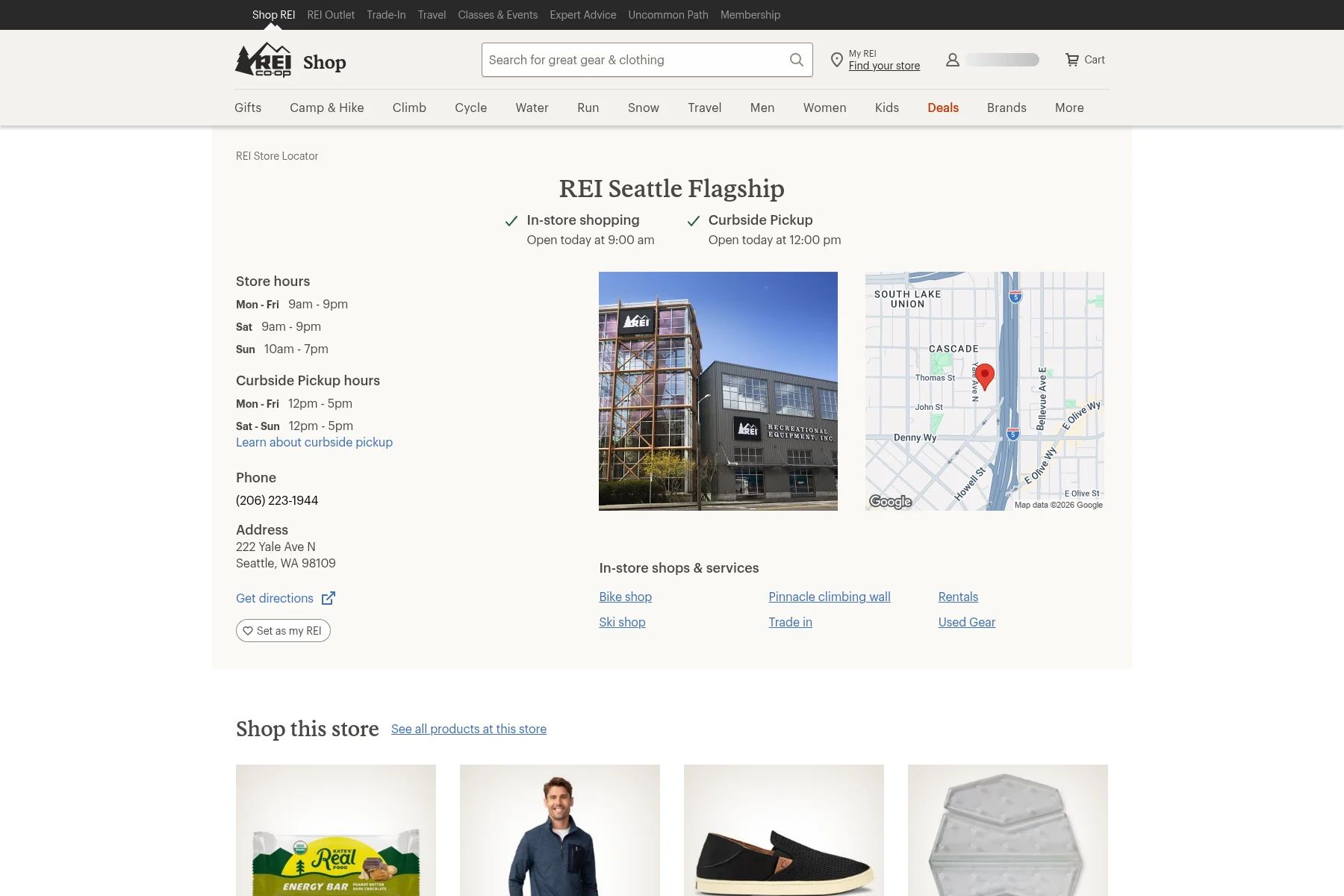
This is an observation of the public page, not a test of REI’s profiles, rankings, or commercial results. The practical lesson is to preserve distinctions that change what a customer can do at that branch.
Use a shared page template where it helps, with local fields and useful service information. Google describes doorway abuse as pages made to rank for similar queries that funnel visitors through less useful intermediaries. A repeated header or layout does not make a genuine branch page a doorway. Avoid generating city pages that leave visitors with no useful local answer.
Make location links discoverable through the site, and check that branch contact or booking links reach the intended destination. Structured data supplies machine-readable business details to search engines. Keep it aligned with the same facts; use our local business schema guide for the markup implementation and validation.
Separate Profile Access From Bulk Verification
Profile access determines who can manage a listing. Verification is Google’s process for confirming that you can represent the business; bulk verification provides a route for eligible sets of locations.
Organize access around who should manage which branches. Google says a business group’s owners and managers can access its current and future profiles. Different brands or regional responsibilities may justify separate groups. Each business group requires a separate spreadsheet import, so plan the publishing work around the groups that control access.
Bulk verification has separate conditions. Google’s current guidance includes at least ten qualifying profiles of the same business. Duplicate, suspended, or disabled profiles do not count toward that minimum; service-area businesses are excluded from this bulk-verification route. Other conditions include submitting all managed profiles, resolving account errors, and checking whether a verified account already exists.
Uploading a spreadsheet does not submit a verification request. If a profile is already owned by someone else, request access to that existing profile before treating the branch as a new listing. The ten-profile threshold describes a Google verification route; it does not define when a business needs coordinated local SEO.
Step 3: Follow a Change Through Its Destinations
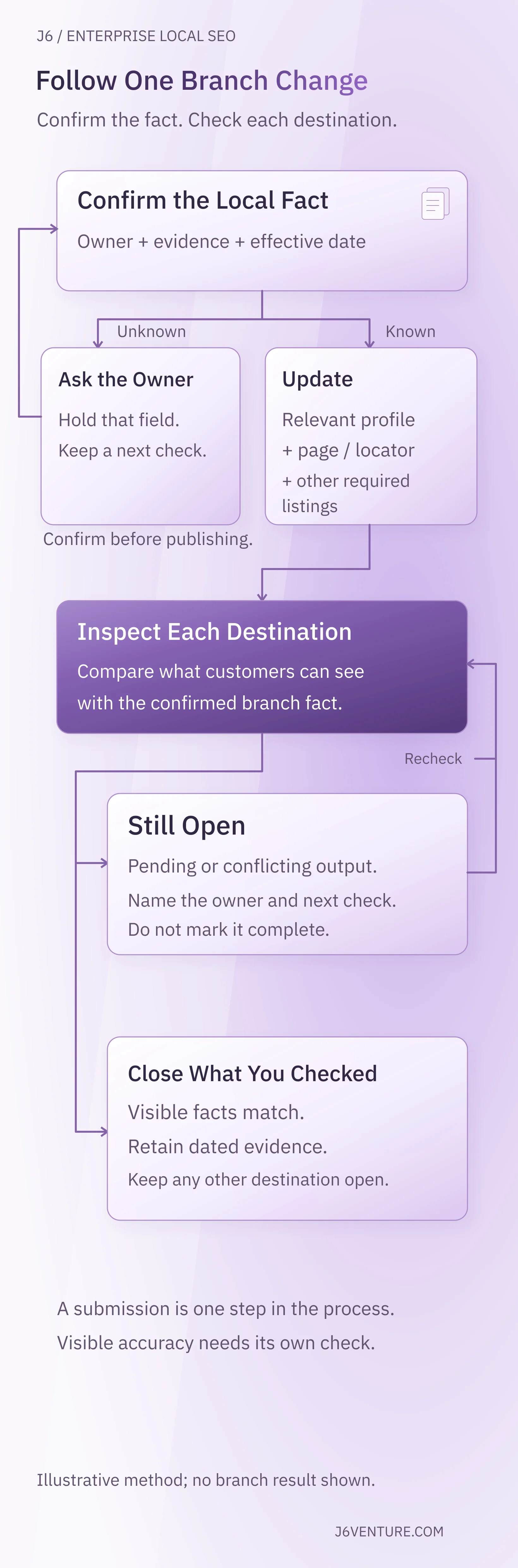
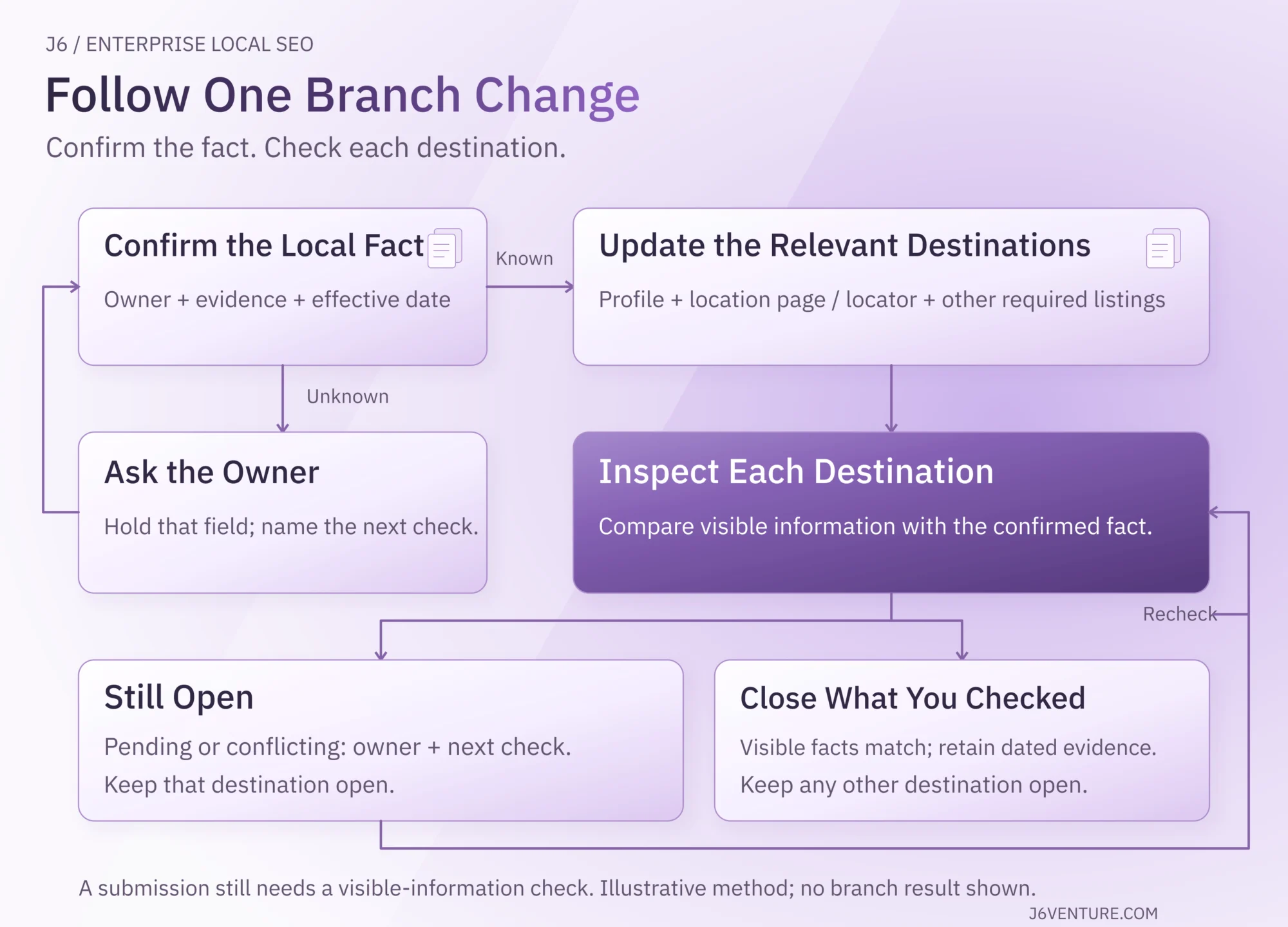
For each change, establish the fact, update the relevant destinations through authorized editors, and inspect the information customers can see. Keep an uncertain fact with the person who can resolve it. Keep a submitted but unconfirmed destination open for follow-up.
Confirm the Fact Before Updating the Feed
Check whether the request changes regular hours, a particular holiday, a service schedule, or the branch’s operating status. Those are different facts. Use Google’s special-hours guidance for temporary date-specific changes, and confirm the appropriate hours treatment for the business type.
The source for an update could be an operations system, a manager’s approved request, or another controlled record. A feed is the file or connection that distributes that information. Correcting only the destination while leaving the publishing source wrong can leave the next scheduled update ready to restore the error.
Inspect the actual import rules before sending a replacement spreadsheet. Google’s bulk-upload guidance says you can remove unneeded columns when changing selected fields for existing businesses, while retaining the required business code. It also warns that included column headings with empty values can delete existing information. A blank cell should never be a casual stand-in for “leave unchanged.”
Check the Published Information and Resolve Exceptions
Google also updates profiles using other sources. Its guidance explains a specific interaction with spreadsheet uploads: a field unchanged from the previous upload is ignored; a changed field accepts the new value; a blank field may receive an automatic update. This description concerns Google updates and does not cancel the separate warning about empty columns in imports.
Check the notification or edit status and compare the destination with the approved fact. Re-uploading an unchanged value is not evidence that a conflicting Google update has been accepted or discarded. Have the authorized profile owner review and manage the Google update using the available controls; do not change a correct value simply to make it look new. Google notes that not all updates can be managed through the profile. Keep that destination check assigned if it remains unresolved.
For suggested edits that require review, Google currently describes a four-day response window after notification. It may apply some policy-related edits without prior review. Give notifications a responsible person and backup; a monthly data export alone may miss a time-sensitive request.
Keep three states separate: the approved source fact, the submitted edit, and the observed public information. A confirmation from one destination closes that destination’s check. Another directory may still be pending, inaccessible, or wrong.
The Google documentation in this guide was retrieved October 23, 2026. These are documented rules, not an authenticated account walkthrough. The person maintaining the program should recheck the linked guidance when an upload or notification behaves differently.
A Worked Example: One Branch Changes Its Hours
Suppose an auto-service chain’s branch A17 currently serves customers from 8 a.m. to 6 p.m. on weekdays. Its operations manager approves a permanent change to 8 a.m. to 5 p.m., effective next Monday. Its branch page and Google profile still show the old schedule.
These inputs and the actions below are illustrative. No update has been submitted or observed for a real chain.
Send the Confirmed Change to the Right Places
The local manager confirms the customer-facing schedule and effective date. The location-data owner records the approved change against A17 and its actual profile and page. The web editor checks whether the locator repeats the hours or takes them from the same source as the page.
Plan the work by destination:
| Destination | Proposed Action | What Would Complete That Check |
|---|---|---|
| Publishing source | Replace the old weekday closing time with the approved value, using the effective date | Source record contains the correct schedule and its approval |
| Google profile | Submit the appropriate hours edit through the authorized route, with timing planned around the effective date | Customer-visible weekday hours agree with the schedule now in force; any review or conflict remains assigned |
| Branch page and locator | Update each display, or the shared source that generates them | Both customer-facing views show the applicable hours and contact route |
| Other important listings | Update the records customers use, through their actual management routes | Each checked destination matches; unresolved ones retain an owner and next check |
Before Monday, the team should avoid presenting the new schedule as already in force. If a publishing route cannot schedule the change, assign an editor for the effective date. Retain the old and new values so the checker knows which schedule applies when inspecting the result.
After submission, record the state that exists. “Submitted, awaiting display check” is a useful result when that is all the team knows. Once the effective date arrives, inspect the branch page, locator, and profile separately. Close the checks that match and pursue the ones that do not. Neither an upload receipt nor a closed update task proves a ranking or booking increase.
Hold an Uncertain Change for Local Confirmation
Now suppose branch B08 has a Google suggestion that it closes at 5 p.m., while the latest approved record says 6 p.m. The local manager has not confirmed whether the schedule changed.
Leave the proposed source change unresolved and ask the manager for the current customer-facing schedule and any effective date. Review the profile notification within its applicable window. Record what is currently visible, then compare it with the schedule once a reliable source confirms it. Until then, keep both the source decision and destination check unresolved, with a named owner and next check.
For a spreadsheet route, Google’s unchanged-field rule means sending the same 6 p.m. value again cannot be assumed to resolve the Google update. An empty field is also unsafe as a generic reset. The missing evidence is the branch’s actual schedule; varying the file until an upload succeeds would not supply it.
If the manager confirms 5 p.m., correct the source and affected destinations. If the manager confirms 6 p.m., retain that evidence and have the authorized profile owner review and manage the conflicting Google update. If the fact remains unknown, name a follow-up owner and next check, and keep the issue open.
Step 4: Keep Reviews, Local Details, and Measurement Useful
Maintenance also includes what customers need to choose and use the branch: current service information, genuine feedback, and evidence that helps the team investigate problems. Give local staff a manageable way to contribute without making every location invent its own publishing process.
Give Local Teams a Clear Review and Escalation Role
Ask for reviews from genuine customers through an appropriate, consistent request process. Google’s review guidance prohibits incentives for posting, changing, or removing reviews. Avoid filtering requests so only satisfied customers are invited to share feedback.
Let an authorized responder answer straightforward local questions, such as where to collect an order. Escalate allegations, safety issues, or sensitive disputes to the responsible team. Public replies should protect private details; a complaint about service may also require an operational correction beyond the reply.
Assign local staff to flag obsolete photos, changed services, or misleading access instructions. Where the business participates in a local association, event, or partnership, check that relevant public information links to the appropriate branch. This can help customers understand the location’s role locally.
Read Branch Results Without Turning Clicks Into Customers
Keep an operational view of missing facts, access problems, incorrect displays, and unresolved updates alongside performance measures. It tells the team which information problems remain even when aggregate visibility looks healthy.
Google’s profile-performance documentation says the data includes organic search and Google Ads, and only applicable metrics appear. Call counts measure call-button clicks. Direction requests do not establish completed visits, and website clicks do not establish bookings. Use booking, call-handling, or sales records for the next part of the customer journey.
Suppose A17’s call-button clicks fall after the hours change. First compare the same branch and consistent reporting periods, noting operating days, seasonality, promotions, and paid activity. Then inspect the public schedule, whether calls were answered, and the branch’s actual service availability. A decline could justify investigating demand or customer access; timing alone cannot show that the hours edit caused it.
When comparing locations, group branches with relevant similarities, such as service mix, maturity, and market conditions. Record missing data as unknown. Use the enterprise SEO reporting guide to build a wider business-unit report; keep this local view focused on the next branch-level action.
Start With One Branch Change You Can Close
Choose one confirmed change that affects a customer’s visit, call, or booking. Identify the branch, the person who approves the fact, and every destination that needs the update. Then give an authorized editor and checker a bounded job.
Keep this short completion record:
- Fact: old and new values, source evidence, and effective date.
- Responsibility: fact owner, authorized updater, and checker.
- Destinations: profile, location page, locator, and relevant other listings.
- Observed result: dated checks of the applicable public information.
- Unresolved work: unknown facts or pending destinations, with an owner, next action, and check date.
Close only what the evidence supports. Use the same route for the next change, preserving genuine local differences as the program grows. If facts, access, and publishing are split across teams, talk with J6 about identifying where that handoff breaks down.