SEO traffic is the visits your website receives from unpaid search results. Use Search Console to understand visibility and clicks on Google, and GA4 to examine recorded visits and on-site actions. Locate where the pattern changed before choosing the fix. Start with comparable audiences and periods, then trace the change from search exposure to clicks, recorded visits, and useful actions.
What Is SEO Traffic?
SEO traffic, also called organic search traffic, comes from people following unpaid search results to your website. It can come from Google, Bing, and other search engines. The traffic label describes how a visit arrived; it does not establish which SEO activity caused it.
A useful action is the next meaningful behavior for that page: using an explanatory resource, submitting a suitable inquiry, or completing a purchase. Choose the action that serves the page’s purpose before judging its traffic.
Search visibility creates an opportunity for a visit. Someone still has to choose your result, reach the page, and find a useful answer. Improving how search engines discover and understand your content can support that journey, alongside content that meets the searcher’s need. Our organic SEO guide explains how to choose a starting point for that work.
How Organic Search Differs From Paid, Direct, and Referral Traffic
Keep these channels separate when reading a report:
- Organic Search: visits attributed to unpaid search results.
- Paid Search: visits attributed to search advertising.
- Referral: visits attributed to links on other websites under the analytics tool’s channel rules.
- Direct: visits for which Analytics has no clear referral source. This can include typed addresses and bookmarks, as well as visits with missing source information.
Email and social have their own channel categories. Unpaid traffic from those sources is not automatically organic search. These distinctions follow Google Analytics’ channel definitions.
A local search can also lead to a phone call or directions request without a website visit. Business Profile reports these interactions separately. Keep them separate from website traffic so a search interaction is not mistaken for a missing visit.
Where to Check Your SEO Traffic
Search Console measures Google Search visibility and clicks. GA4 measures recorded activity on your site. Use a third-party traffic checker for estimates about other websites. Choose the source that answers your question before comparing totals.
Search Console: Your Visibility and Clicks on Google
In the correct Search Console property, open Performance for search results and select a date range. Filter by page, then inspect its queries, clicks, and impressions. Country and device breakdowns help locate a change. Google’s Performance report guide explains the controls.
Start with two questions: which pages received clicks, and which searches produced them?
Google includes appearances and traffic from AI Overviews and AI Mode in Search Console’s Web search reporting. A change in the Web total alone cannot identify how much came from those features. Google’s AI features guidance
GA4: Your Organic Search Visits and On-Site Actions
In GA4, open Reports → Acquisition → Traffic acquisition. With Session default channel group selected, find Organic Search. To examine Google specifically, use Session source / medium and find google / organic. Report navigation can vary when an administrator has customized it. Google’s Traffic acquisition instructions
For a page-level check, keep Session source / medium as the primary dimension and add Landing page + query string as a secondary dimension. Find the page under google / organic to review its sessions. Google’s landing-page instructions explain this view.
GA4’s current channel definitions also include AI Assistant for sources such as ChatGPT, excluding Google’s AI Overviews and AI Mode. Check the channel and source recorded in your property before combining assistant visits with organic search.
Review sessions alongside the actions that matter for your site. A configured key event might record a completed inquiry or purchase. Check what the event measures before treating its count as a business result: a button click and a successfully submitted form represent different stages.
Use session-based dimensions for this task. First user source describes how a user was first acquired, which answers a different question from the source of the visit you are reviewing. Google explains these dimension scopes.
If GA4 was missing or collecting incorrectly, retain Search Console’s search evidence and mark the missing on-site evidence as unknown. Adding measurement now will not reconstruct those uncollected visits.
Traffic Checkers: Estimates for Other Websites
Tools such as Ahrefs’ traffic checker use their own data and models to estimate competitors’ traffic. Use them to explore visible topics and relative scale, keeping the provider, country database, and period consistent.
Use your first-party reports for decisions about your own performance. A checker’s estimate differing from GA4 is no diagnosis of a collection fault.
What Impressions, Clicks, CTR, Sessions, and Users Tell You
Impressions describe search exposure, clicks describe selections of your result, and sessions describe recorded periods of activity on your site. Users describe the audience counted by Analytics. Read these as related signals with different counting rules; adding them together or substituting one for another obscures what changed.
| Metric | What It Measures | Useful Question |
|---|---|---|
| Impressions | Recorded appearances of your result, under Google’s counting rules | Are relevant searches exposing this page? |
| Clicks | Clicks from Google results to your property | Which searches bring people toward the site? |
| CTR | Clicks divided by impressions | How often is this result selected within a comparable segment? |
| Sessions | Periods of interaction recorded by Analytics | How many visits does this report attribute to organic search? |
| Users | Distinct users counted by the selected GA4 user metric; this is not an exact headcount of people | Is the measured audience changing? |
Search Console’s metric definitions and GA4’s session documentation provide the counting details. For users, keep the selected metric, such as active or total users, consistent across periods. Consult Google’s reporting-identity guide when investigating how cross-device activity is connected.
One person can generate several sessions. A rise in impressions can include new searches where your page ranks too low to attract many clicks. Neither pattern is inherently a failure.
There is no useful universal traffic quota for every business. Judge the volume against the page’s intended audience and job. Inspect absolute organic sessions alongside their share of total traffic: the share can fall because another channel grew, even if organic visits held steady.
Why Search Console Clicks and GA4 Sessions Differ
Search Console counts activity in Google results, while GA4 depends on activity measured on your site. Their totals can differ because of counting rules, source coverage, reporting dates, URL handling, and data collection. Investigate a discrepancy before treating it as lost visitors.
Match the Source, Dates, and Pages Before Comparing
Use this order before investigating a measurement problem:
- 1Match the source. Compare Google search clicks with Google organic sessions. An all-engine Organic Search total has broader coverage. Keep the Search Console search type consistent: its Web, Image, and other breakdowns do not map directly to GA4’s channel categories.
- 2Match the scope. Use the same site, intended landing pages, country, and device segment. Search Console generally attributes performance to the canonical URL; Analytics may record the visited URL.
- 3Match the period. Use dates available in both tools. Check data freshness and timezone differences before interpreting a daily mismatch.
- 4Check collection. If the gap is new or concentrated in particular pages, investigate their Analytics tag and recent measurement changes. Consent choices can also affect what Analytics observes.
These controls make the comparison more useful, although the totals can still differ. Google’s guide to combining Search Console and Analytics explains why differences remain.
Compare similar weekdays, account for seasonality, and save the filters so the next review uses the same comparison.
A Public Example From Google’s Reporting Guide
Google’s published comparison dashboard applies two conditions to its Analytics data: Session source equals google and Session medium equals organic. Both conditions apply together.
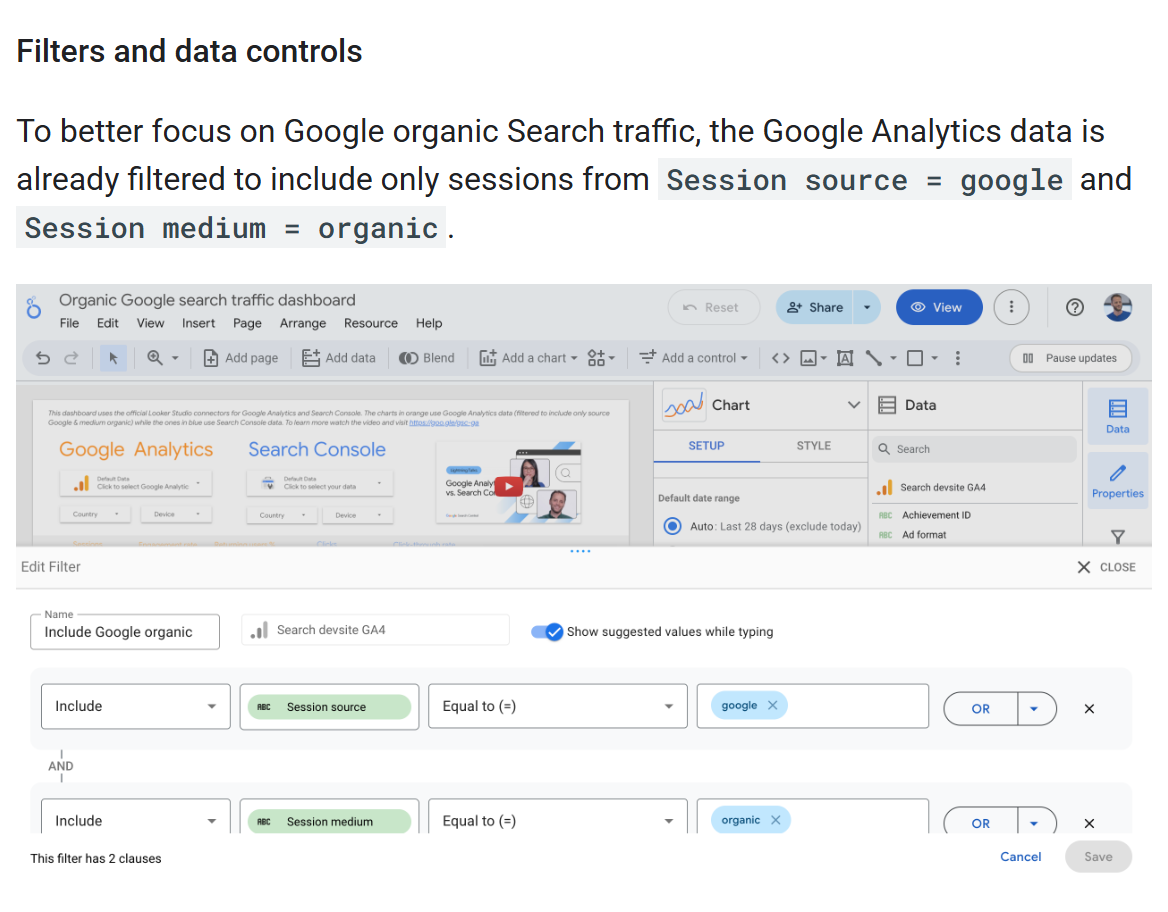
Google Search Central’s public source-filter example, captured October 10, 2026. The filter narrows the Analytics side of the comparison to Google organic sessions. Source.
The two conditions remove the all-engine mismatch, bringing the Analytics comparison closer to Search Console’s Google data. A remaining gap calls for the other scope, counting, and collection checks above.
You can apply the same source filters inside GA4 without building a dashboard.
What to Check When Your Traffic Numbers Change
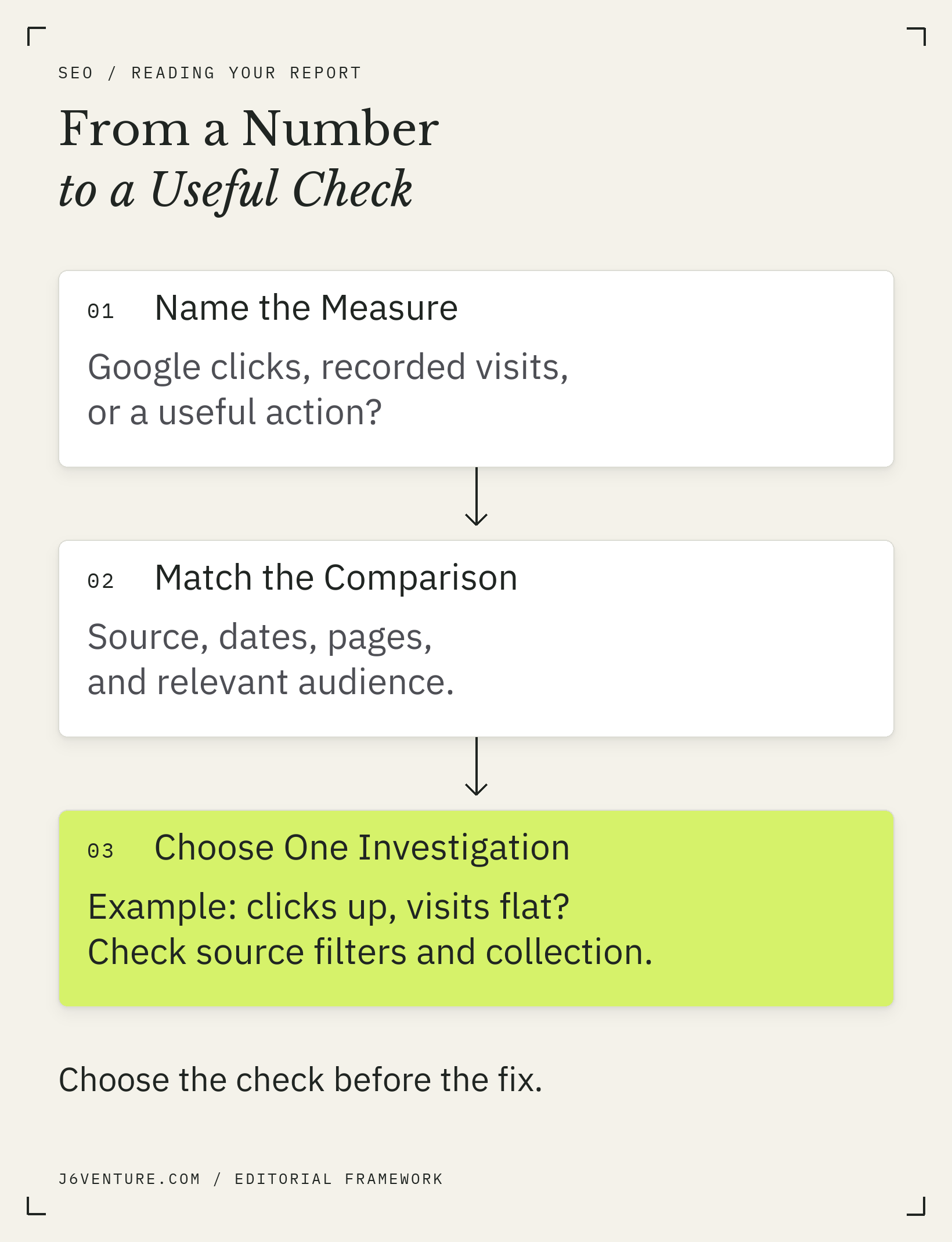
Use the changed measure to choose an investigation. Rising impressions call for a different check from rising visits with no useful actions. The table connects each pattern to the evidence needed before choosing a repair.
| What Changed | Evidence to Inspect and Why | Next Useful Check |
|---|---|---|
| Impressions rise; clicks stay flat | Queries and positions show whether the extra visibility is comparable; the total alone does not explain flat clicks | Compare CTR within relevant query and page segments before editing titles |
| Google clicks rise; sessions stay flat | Source filters and collection changes help distinguish a reporting gap from a change in visits; the cause remains unconfirmed | Reconcile scope, then test measurement on affected landing pages |
| Visits rise; useful actions stay flat | Event health, page purpose, and audience fit help establish whether the gap concerns measurement, relevance, or the action path | Test the intended action, then inspect the visitor’s path and fit |
| Traffic falls | Affected pages and segments locate the change; its cause still needs investigation | Investigate the concentrated pattern before commissioning a broad rewrite |
Impressions Rise, but Clicks Do Not
Find which queries contributed the extra impressions. If the page is appearing for additional searches at weak positions, its overall CTR may fall even while its established searches perform similarly. The new exposure and the old exposure have different click opportunities.
Compare the same query-page combinations, with country and device held consistent where the data allows. Then inspect the current results for the important searches. Ask whether the title and snippet communicate the page’s answer accurately, whether the result format fits the search, and whether positions changed.
Similar positions can still produce different CTR when competing result formats change what attracts attention. Google notes that more appealing rich results on other sites can contribute to falling clicks; inspect the live results before blaming your title.
Edit the title when that review identifies a clear mismatch. Improve the page when its answer falls short of the reader’s task. If the extra impressions come from irrelevant searches, pursue the intended query set rather than widening the article to satisfy every new term. Our keyword-to-page explanation helps define that boundary.
Google Clicks Rise, but Recorded Visits Do Not
First run the source, scope, date, and collection checks above. Then locate the gap: did it appear across the site, on one template, or on a few landing pages?
Give the measurement owner the affected URLs and the date the pattern began. Ask them to verify that the page loads correctly and that the expected Analytics events are collected under the site’s consent configuration. Verify whether a recent tag or consent change explains the gap before assigning it as the cause.
Keep the content stable while investigating the measurement gap. Rewriting a page does not repair a missing Analytics tag, and a reporting difference alone provides no basis for a rewrite.
Visits Rise, but Useful Actions Do Not
Verify that the intended action works and its event still records correctly. Then examine the landing pages receiving the increase and what those pages are meant to accomplish.
For a commercial page, inspect:
- Audience fit: do the visitors seek something you sell in a market you serve?
- Offer clarity: can they understand the service, suitability, and next step?
- Action path: does the relevant form, purchase, or booking flow work on their device?
- Timing: has enough of your actual buying cycle elapsed to assess later outcomes?
A guide may help a reader understand a problem without generating an immediate inquiry. Judge that page against its educational purpose while looking for a sensible route to related commercial information. If inquiries increase, review whether they meet your qualification criteria and progress toward business outcomes. Relevant traffic and qualified leads are separate checks.
Traffic Falls: Locate the Change Before Choosing a Fix
Separate a whole-site pattern from a decline concentrated in particular pages, queries, countries, or devices. Inspect clicks, impressions, and positions together, and compare an appropriate earlier period. Seasonal demand and changes in the search results can affect the pattern alongside problems on your site. Google’s traffic-drop guidance
A sharp change near a deployment deserves a technical check, particularly when affected pages share a template. A decline concentrated in one topic calls for closer inspection of that topic’s searches and competing results. Timing is a lead for investigation; retain the actual finding before assigning a cause.
When evidence points to accessibility, indexing, or broader site issues, use an SEO audit to prioritize the fixes. Avoid treating every decline as an instruction to publish more content.
Is Your SEO Traffic Reaching the Right People?
Useful SEO traffic reaches an audience you can help and supports the landing page’s intended job. Review search relevance, audience fit, and on-site behavior together. A larger total may conceal growth in an irrelevant segment, while a smaller page may attract visitors with a more appropriate need.
Check Queries, Landing Pages, and the Audience You Serve
Read the actual query list for each important page. Separate branded searches from searches about problems, products, or services. Brand demand can be useful, but its growth alone does not show that more people discovered you through category searches.
Check countries and devices to see where a change is concentrated. Then inspect whether the landing page serves those searches and audiences. A country filter locates the audience. Assess company size, purchasing authority, and commercial suitability through the inquiry and qualification process.
Search Console omits some queries for privacy, so the visible query rows are incomplete. Google explains this filtering. Describe the pattern in the available queries without claiming to know every visitor’s search.
Match Success to the Page’s Job
Choose a meaningful action before judging a page’s traffic:
- An explanatory article: relevant search visits and evidence that readers use its explanation or continue to a helpful next resource.
- A service page: appropriate visits, working inquiry paths, and qualified inquiries where they can be connected.
- A product page: relevant visits and progress toward purchase, including completed purchases where measured.
Choose engagement measures that help evaluate the page’s job. A scroll or a longer visit can prompt investigation; neither confirms that the reader found the answer. For a commercial page, follow relevant visits through to suitable inquiries and business outcomes wherever the evidence connects them.
Keep the conclusion proportional: the page can be attracting relevant visitors while its commercial contribution remains unresolved. That is a reason to improve the evidence, rather than declaring the traffic worthless or assigning it invented revenue.
How to Choose Your Next SEO Traffic Improvement
Choose one improvement that addresses the clearest supported problem. It might involve measurement, search relevance, the result’s presentation, technical accessibility, or the on-site path. Record what you expect to change and how you will check it so the next report tests the decision you made.
Use a short action note:
- 1Name the observation: the page, segment, metric, and comparable period.
- 2State the finding or unanswered question: distinguish a verified defect from an explanation still being tested.
- 3Assign one proportionate action: repair collection, improve an inadequate answer, clarify a misleading title, fix access, or repair the relevant user journey.
- 4Set the review condition: name the evidence needed and the review date, allowing for reporting availability and the change being assessed.
When the current evidence is too thin to choose an SEO change, collecting a sound baseline is a useful next action. When a defect is verified, give it an owner and check the repair.
Start with one important landing page: review its searches, compare the corresponding organic sessions, and test its intended next step. Find where the journey changed, check whether the audience still fits, and choose the action the evidence supports.