Show what is happening overall, which business units need attention, and what decision the evidence supports. Make the units and comparison clear, preserve important exceptions and missing information, and give each stakeholder a specific decision or question rather than an unexplained collection of charts.
A rising company total can leave leadership with the wrong next move. One business unit may be improving while another sees search traffic fall on pages that matter to its customers. The overall direction and the unit-level problem can both be real.
Your report needs to make that difference understandable. Leadership should see what the available evidence supports, which exception deserves attention, and who can make the next decision. Adding more charts will not settle those questions by itself.
What Does an Enterprise SEO Report Need to Explain?
Enterprise SEO reporting turns search evidence from several organizational units into a report for specific stakeholders and decisions. Agree on what each unit contains, compare compatible measures, and explain where local results change the overall interpretation.
A business unit might be a product line, division, or regional operation with its own responsibilities. A country filter, device category, or website directory does not automatically identify one. Establish the relationship with the people responsible for that part of the business.
A dashboard displays measures. A stakeholder report adds the question, interpretation, limits, and requested decision. You can deliver the report through a dashboard, document, or meeting; the format does not remove the need for those judgments.
For example, a search increase across the company may justify continuing a current program. A decline in one unit may justify investigating its affected pages. Neither observation alone explains the cause, establishes a revenue effect, or authorizes a particular technical repair.
The wider enterprise SEO strategy determines which initiatives deserve investment. This reporting method prepares the evidence and the question that the appropriate stakeholder needs to consider.
Step 1: Name the Audience and the Decision
Write the reporting question before choosing the charts. “How did SEO perform?” is too open to guide a useful selection. A more useful question is: “Does the overall search trend support our current plan, and which business-unit exception needs a decision this cycle?”
Identify who can answer that question and what authority they have. An executive may authorize investigation resources. A unit owner may decide which customer task or page deserves review. An analyst may need to resolve a measurement question before either can act. These are possible responsibilities, not mandatory job titles.
Choose measures that help those people make the decision:
| Reporting Question | Useful Input | Interpretation Limit |
|---|---|---|
| What changed in Google Search? | Search Console clicks, impressions, and relevant page or query views | Search activity does not establish on-site behavior or commercial value |
| What did recorded visitors do? | The appropriate Google Analytics 4 (GA4) acquisition view and configured actions | Collection, audience, and dimension scope determine what the view represents |
| What business outcome is associated with search? | Relevant analytics attribution and the organization’s verified business records | Recorded credit or an association does not establish incremental SEO impact |
| Is a known technical issue affecting the decision? | A supported diagnostic finding, its affected scope, and implementation status | A warning total or completed release alone does not establish a business result |
Use the SEO traffic guide for metric definitions and click-versus-session reconciliation. Record the exact definition and scope of a visibility score if you use one. Keep detailed audit-report interpretation out of the leadership summary.
You do not need a financial claim to make a report useful. When outcome evidence is unavailable, state the observed search change and the narrower decision it can support.
Step 2: Define the Units and What Can Be Compared
Agree on a small reporting specification before comparing units. It should let another reader understand what the values refer to and reproduce the relevant view.
| Record | What to Establish |
|---|---|
| Unit and membership | The responsible owner, included properties or URLs, exclusions, and shared or unassigned pages |
| Measure and source | What is counted, the source, filters, and whether results are grouped by property, page, or another dimension |
| Comparison | The actual reporting and comparison periods, time basis, and any change in membership or collection |
| Availability | When the data was extracted, which periods remain provisional, and what is missing or unresolved |
| Overall measure | Whether it is a source total or a calculation from compatible unit records |
Use the fields that affect your question. Keep the specification small enough to maintain while preserving the report’s meaning.
Establish Where the Overall Figure Comes From
An independently sourced overall total and unit views can answer related questions without being additive. A property is the website scope selected in Search Console. Google’s aggregation guidance explains a consequential counting difference: for impressions, property grouping counts the property’s appearance once even when several of its pages appear in the same search results. Page grouping counts the individual URL appearances.
Record whether your selected view uses property or page grouping before comparing unit exports. Adding page-grouped figures does not automatically recreate the property-level figure.
If you calculate a total from unit records, use compatible counting and make sure membership does not overlap within the inventory covered. Keep a shared page from appearing twice in that total. Use a documented, non-overlapping assignment only where the measurement supports it, or show shared pages separately and keep the unit views non-additive. Identify omitted or unassigned inventory. If those conditions fail, present the units as non-additive slices: useful separate views that should not be summed to recreate the overall number.
For a combined rate, use compatible totals for its numerator and denominator. Combined click-through rate (CTR), for instance, is total compatible clicks divided by total compatible impressions. An average of unit percentages gives the units equal weight even when their impression counts differ. Confirm that their counting and grouping are compatible before calculating either total.
If you have neither a valid calculation nor an independent overall measure, label the overall result unknown. Do not fill the gap with a convenient average.
Keep Scope and Missing Data Visible
Google’s Search Console grouping documentation identifies country as where the search originated. That is useful market evidence, but it does not establish the business division that owns a customer or its revenue. Google assigns most performance data to the canonical URL, the version it selects to represent duplicate or very similar pages. That may differ from the URL a person visited. Check Google’s selected canonical in URL Inspection before assigning the credited page to a unit. Some queries are also omitted for privacy or truncated from the report, so the visible query list is not the complete population.
Outcome views also need a consistent definition. In GA4, first-user, session, and event-scoped traffic dimensions describe different things. First-user dimensions describe how a person was initially acquired; session dimensions describe what brought a particular visit; event-scoped attribution assigns credit for an important action. An attribution model is the rule used to assign that credit.
These answer different reporting questions. First-user organic acquisition, organic sessions, and event-level attributed credit cannot silently substitute for one another. Label the selected scope and model where they affect the conclusion. Model-attributed revenue is not a measurement of how much additional revenue SEO caused.
Record collection changes and the extraction time. Google’s data-freshness guidance says processing can take 24 to 48 hours and recent attribution credit can change later. This is a reason to identify provisional evidence, not a universal instruction to delay every report by a fixed number of days.
Step 3: Show the Overall Result and the Unit Exceptions
Use the overall view to establish context, then identify exceptions that could change a stakeholder’s next decision. A material exception is a unit result, coverage gap, or other difference that matters to that decision. It is not every movement on the dashboard.
The following is a conditional reporting application. It contains no observed company results or invented performance figures; supply your own dated evidence before using its conclusions.
Suppose an independently sourced overall Google Search click total has increased over the agreed comparison period. Your defined Unit A and Unit B views use compatible periods and filters. Unit A’s clicks increased, while Unit B’s clicks declined on pages helping buyers check a product’s integration requirements. The unit views are diagnostic slices; do not assert that their sum equals the independently sourced overall measure.
Three statements now have different jobs:
- Overall observation: Google Search clicks increased within the stated overall scope. This is not a claim that every unit improved.
- Unit exception: Unit B’s decline is concentrated on the defined pages explaining product integration requirements. Its business importance comes from that task, not from the decline percentage alone.
- Unresolved explanation: The observations do not yet establish why Unit B declined or what happened to its recorded customer actions.
Keep the initial request proportionate. The evidence supports asking Unit B’s owner to review the affected task and the analyst to establish whether the change survives the agreed comparison checks. It does not yet support a global technical fix or a forecast of recovered revenue.
That request can change. A measurement change or altered unit membership may require correcting the comparison first. If further evidence confirms a meaningful decline under consistent measurement, the unit owner can request the appropriate content or technical investigation. If the decline concerns pages intentionally retired from the unit, the report needs that context before labeling it an unresolved performance problem.
Unequal coverage needs similar treatment. If Unit A has verified outcome tracking and Unit B does not, report the difference. Do not turn Unit B’s missing outcome evidence into zero conversions, compare the two as equivalent revenue measures, or hide the limitation beneath an overall traffic increase.
Keep the overall observation, the local exception, and the evidence needed for the next decision together in the report.

Read Google’s Public Search Console Chart Example
Google’s published Search Console bubble-chart guide provides a real source example for reading a report’s scope before interpreting a pattern. The image is an illustrative interface with a July 1 to 31, 2023 date range and a “Click to select your data” property placeholder. It is not a verified enterprise dataset or a current J6 result.
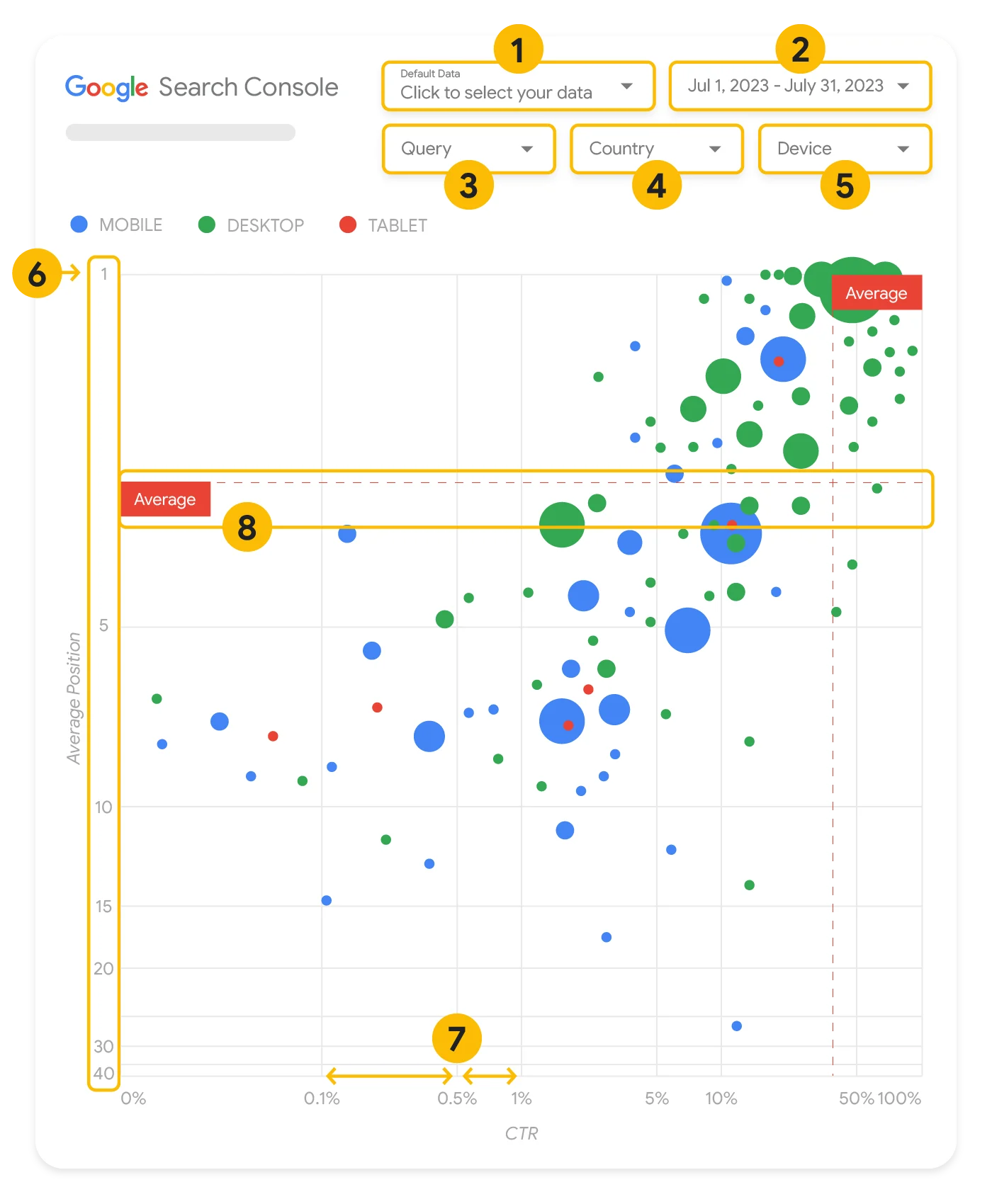
Start with the controls above the chart: property, dates, query, country, and device. The property identifies the selected website scope. A US country filter would narrow the view to searches originating in the United States; it would not select a business unit by itself.
The chart places click-through rate on the horizontal axis and average position on the vertical axis, with the better position at the top. Both axes use logarithmic scales, so equal distances do not represent equal numerical differences. Bubble size represents clicks; color represents device category. The reference lines show averages for the selected population, not fixed industry targets.
A query in the high-position, low-CTR area is a reason to investigate. It is not automatically evidence of a defective title or a lost sale. Google’s guide explains that people may find an address, opening hours, or a phone number directly in search results. The intended task changes what the pattern means.
For a query relevant to your reporting question, follow Google’s instruction to inspect its related URLs through Search Console or a pivot table. Then check the canonical URLs and your organization’s unit register. A query spanning several units needs shared ownership or further investigation; assigning its site-level clicks or revenue to one unit from URL ownership alone would invent an allocation.
Carry the qualified observation into the report. The chart can identify a question for a unit owner; the source and membership checks determine who should receive it and what it can support. The cross-unit reporting method above is our proposed application, not a process demonstrated by Google’s illustration. No live template was connected or tested for this article.
Step 4: Present the Decision and What Would Change It
Write the stakeholder version after establishing the evidence. Use the same facts in each view, with enough detail for that person’s decision. Shortening the report should not remove the exception that changes its meaning.
For the conditional Unit B application, the report could read:
| Audience | Report Wording and Requested Decision |
|---|---|
| Leadership | “Overall Google Search clicks increased in the stated period, but that does not describe every unit. Unit B has a decline on pages explaining product integration requirements. The cause and outcome effect remain unestablished. Authorize a scoped investigation if that task warrants attention; do not treat this as evidence for a company-wide repair.” |
| Unit B owner | “Confirm the affected customer task, page membership, and any intentional retirements. Decide which pages require investigation if the decline remains under a consistent comparison.” |
| Analyst or technical owner | “Retain the source views, dates, filters, collection changes, and known gaps. Resolve the specific comparison question and return the evidence that would support or change the unit owner’s request.” |
These are suggested responsibilities, not authority granted by the report. Name the actual decision owner in your organization. If the evidence cannot justify the requested action, ask for the missing evidence or record the deferral and what would reopen it.
Keep delivery status precise. “Implemented” describes a change delivered; it does not establish Google’s later processing or a commercial improvement. Link to the technical diagnosis guide when a reported problem needs a supported repair boundary, and to enterprise SEO project management once an agreed change needs delivery. The report supplies their evidence and question without repeating those workflows.
Finish the Reporting Cycle With a Clear Record
Before sharing, check that the intended audience can access the appropriate evidence. A filter is not a substitute for a permissions decision. Google’s Search Console reporting connector distinguishes owner and viewer credentials, which affect whose access is used. Choose the appropriate arrangement for the audience; do not assume a unit-filtered view protects the underlying data.
Check empty displays as well. Google’s GA4 comparison guidance notes that unsupported conditions can produce blank cards. Investigate a blank before reporting it as zero performance.
Finish one reporting cycle with this short record:
- Question and audience: what this report helps the named stakeholder decide.
- Overall and unit evidence: the overall source or calculation, the unit membership, and the material exception.
- Interpretation and limits: what the observations support, what remains unknown, and which comparisons are provisional or non-additive.
- Decision or evidence request: the authorized owner, the specific response needed, and what would change it.
- Next review: the date or trigger agreed when the report is issued, with annotations for later collection or membership changes.
Complete that record for one reporting question before expanding the dashboard. A useful enterprise report leaves leadership with a fair overall statement, the unit exception that deserves attention, and a clear next decision or evidence request.