Choose a search your business can serve, build or improve a page that fulfills the searcher’s task, and make it accessible, useful, and easy to discover. Compare the current results before committing the work: first-page visibility depends on the query and competition, and no checklist guarantees a place.
Getting onto Google’s first page starts before you write: choose a search worth serving, the page that should own it, and what that page will help readers do.
Use the five steps below to complete your First-Page Opportunity Brief: a short plan naming the audience, page, contribution, owner, and review conditions. It helps you decide whether to pursue, narrow, or defer the work.
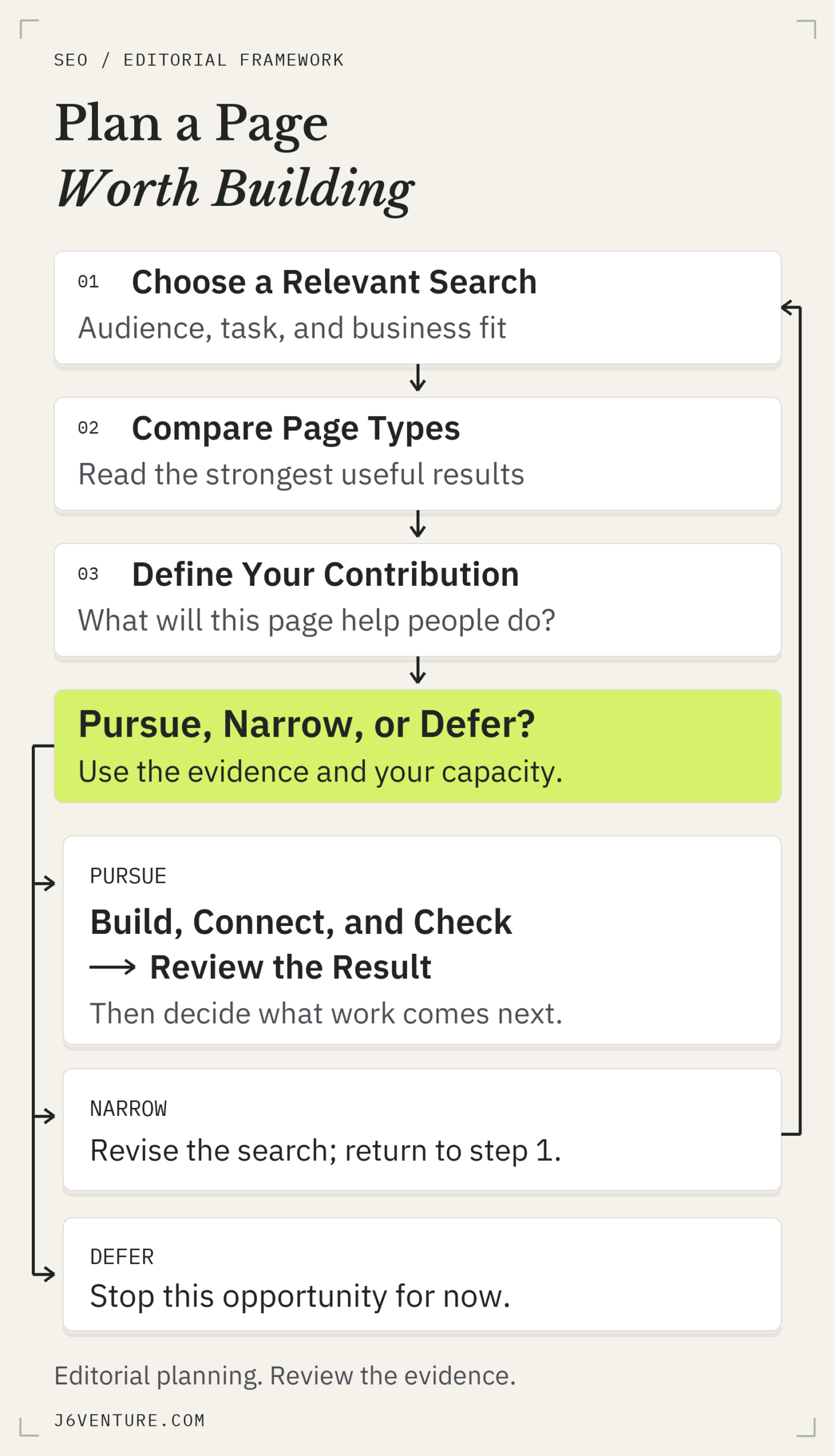
J6’s planning method. The branches organize editorial work; they do not predict rankings.
What Getting on Google’s First Page Requires
You compete with a particular page for particular searches. Your entire website does not acquire one universal Google ranking. Start by naming the query, the audience, and the page that should answer it; then assess whether you can deliver what that searcher needs.
Google’s results also contain different kinds of visibility:
- Organic results: unpaid website listings, the focus here.
- Sponsored results: advertising placements. Google’s ad auction determines whether an eligible ad appears and its placement. Paying does not secure a permanent top position.
- Local results: business and Maps listings. Use the separate local SEO guide when that is your goal.
- AI answers and other features: additional ways information appears. Being cited in an answer and earning a conventional organic listing are different objectives.
Google does not accept payment for a higher organic ranking. Inclusion itself is free; research, writing, development, promotion, and maintenance still cost time or money. Set a limit on that work before treating first-page visibility as a business commitment.
1. Choose a Search Your Business Can Serve
Choose a query because you can help the person searching and the audience matters to your business. Search volume can inform the choice, but it does not tell you whether the visitor is suitable, whether your page can satisfy the task, or whether the work will pay back.
Check the Reader’s Task and Business Fit
Write down what the person wants to do after searching. Do they need an explanation, a comparison, a product, or a provider? That answer determines the page’s job.
For this article, the query is “how to get your website on Google first page.” The reader needs a practical route into SEO work. An agency contact form alone would leave that task unfinished, even if it offered a service capable of helping.
Check three things before expanding your keyword list:
- Audience: Is this someone you can serve, now or through a relevant next step?
- Task: Can you explain what the searcher should understand, decide, or do on the page?
- Business connection: Why would helping this person matter? An educational page might build informed interest; a service page should help a suitable buyer assess the offer.
If you have Search Console data, relevant queries already associated with your pages can provide starting candidates. Without it, begin with real customer questions and inspect the results. A blank report supplies no search-demand evidence for this candidate; keep any evidence you have from other sources separate.
Rule Out Targets That Do Not Fit Your Business
Set aside searches aimed at an audience you cannot serve or requiring an asset you cannot provide. If the task requires a product catalog, a general article cannot substitute for the missing products. If maintaining accurate information would exceed your team’s capacity, account for that before commissioning it.
A more specific query may fit your capabilities better, but a longer phrase is not automatically easier to rank for. If you use keyword difficulty scores, use them to screen candidates; they cannot tell you the probability of success. Examine the actual results and the work needed to make a useful page.
This is an initial business-fit screen. The decision to pursue the page comes after the comparison below.
2. Match the Page to the Results People Need
Search the candidate query in the market and language you want to serve, separate ads from organic results, and open the relevant competing pages. Look at what people can accomplish on them. Their page types and answers help you judge what your own page should deliver.
Record the query, date, country or location setting, and device. A search is a snapshot, and settings affect the results. Do not treat one personalized screen as a permanent ranking table.
For each relevant result, note:
- Page type: guide, category, product, service, comparison, tool, or discussion.
- Completed task: the answer, choice, or action the page enables.
- Evidence and usability: examples, specifications, demonstrations, sources, or other details that help someone act.
- Remaining difficulty: what a reader still has to work out alone.
Mixed results can represent several intents. Choose the task your business can genuinely fulfill instead of copying the most common format mechanically. A prominent brand in the results is a reason to examine the standard closely; it does not establish that a smaller site has no opportunity.
Improve an Existing Page or Create a New One?
Improve an existing URL when it already serves the same reader task and has a demonstrated gap. Create a new page when the task is materially different and your site does not already answer it. Two keyword phrases do not automatically require two URLs.
Search your own site and read the likely matches before commissioning anything. Compare the tasks those pages complete. Our guide to keywords and page decisions explains how related searches can belong to one coherent page.
Keep a sound existing URL when improving it. For a new page, choose a short, descriptive URL that makes its subject clear. Changing the slug merely to insert a keyword creates migration work without establishing that the page will become a better answer.
3. Give the Page a Useful Reason to Compete
A competing page needs to complete the reader’s task well and give someone a useful reason to choose it. That contribution could be a clearer explanation, a more usable comparison, relevant proof, or a worked decision. It does not require a new theory or an unprecedented topic.
What to Learn From the Strongest Results
Use the strongest relevant pages to establish the standard. Preserve the accurate explanations readers need; then identify the part you can make more useful. A competitor’s extra heading is not automatically a missing section in your article.
For the first-page query, a helpful plan still needs query selection, page fit, access, useful content, search presentation, links, and a usable experience. Adding a complete advertising tutorial would expand into a different job.
The improvement should be specific enough to commission. “Write better content” leaves the writer guessing. “Show the competing page types, explain which one fits this search, and complete a page proposal that the reader can reuse” describes an output someone can inspect.
A Public Example: Planning This First-Page Guide
On October 10, 2026, we inspected Google results for “how to get your website on Google first page” and read the public pages below. The browser used US and English search parameters; it was signed in, and its physical location was not verified as the US. This is a recorded editorial comparison, with no claim about these sites’ traffic or ranking history.
| Public Page | What It Already Gives the Reader | What We Took From the Comparison |
|---|---|---|
| Google’s SEO Starter Guide | Fundamentals covering discovery, useful content, search appearance, links, and promotion, with important limits. | Technical correctness is the baseline. Another list of fundamentals would need a clearer practical purpose. |
| WordStream’s First-Page Guide | Query-specific targeting, page-level keyword examples, and practical presentation advice, alongside local listings. | Keep the connection between a search and a page. Help the reader decide which proposed page deserves effort. |
| Wix’s Google Visibility Guide | An ordered set of discovery, content, linking, and performance actions. | Explain how to turn those kinds of actions into a bounded production plan for a chosen opportunity. |
WordStream makes page-level targeting concrete with query examples including “MA tenant laws” and “how to plug a leaky roof.” They show why a website-wide ambition needs a specific search and answer. For J6, we then had to choose among improving an existing diagnosis guide, using a service page, and creating a distinct planning article.
Our own Organic SEO guide already helps readers diagnose an existing page. Repeating its investigation framework here would add little. That ownership check changed what we chose to build.
The comparison led to this opportunity brief:
- 1Audience, search, and useful outcome: Business owners exploring the first-page query should leave able to choose a target and specify a page. Its relevance to J6’s audience is our editorial judgment; revenue value is unmeasured.
- 2Page and evidence: The observed guides and discussions support an informational article. The existing Organic SEO page already owns diagnosis, so this article must focus on selecting and developing the opportunity.
- 3Essentials and contribution: Explain the necessary SEO basics, then show a completed target-to-page decision and give readers a brief they can reuse.
- 4Work, ownership, and limits: Our proposed editorial owner completes the comparison, verifies sources, coordinates writing and design, and maintains the example. The publishing owner checks the implemented page and links. Updates must recheck examples and material guidance changes. Production cost, conversion value, and the chance of a first-page result remain unmeasured.
- 5Decision and review: Pursue this distinct article. Complete the comparison and brief first; defer another generic diagnosis guide and avoid retargeting a service page at this informational query.
Before launch, check the promised content, mobile reading, links, access, and intended indexing settings. At publication, assign a review date based on the final implementation date and available traffic. Review whether this URL reaches the intended query group and supports its reader task. Reconsider its purpose if it duplicates the existing guide or attracts a different task; investigate thin evidence before rewriting. Revise the proposal if the promised contribution cannot be delivered or maintained.
The comparison supports this page choice; it does not establish why Google ranks any particular result.
Decide Whether the Page Is Worth Building
Use audience fit, page type, useful contribution, and delivery capacity to make the editorial decision below.
| Decision | When It Fits | Next Action |
|---|---|---|
| Pursue | You can serve the audience, supply a fitting page, and support the promised information. | Specify the reader’s outcome, the owner, production effort, and launch checks. Improve an existing suitable page where possible. |
| Narrow | The broad task exceeds your offer or evidence, but a specific audience or question may fit. | Inspect results for that actual narrower query before committing. Do not assume extra words make it easy. |
| Defer | The audience is unsuitable, the necessary asset or proof is unavailable, a current page already completes the job, or upkeep cannot be justified. | Record the missing condition. Reconsider when it changes; avoid publishing a generic substitute. |
Estimate the work by task: who supplies the evidence, who writes or implements it, who checks it, and who keeps it current. A proposal requiring a maintained calculator is a different commitment from a short explanation. Include updates as well as the first publication in your decision.
4. Build, Connect, and Check the Page
Turn the chosen contribution into a working page, then check access, clarity, discovery, and usability. These checks support the page you decided to build. A serious access or reading problem deserves attention immediately, even if it appears later in your content plan.
Confirm That the Intended Page Can Be Indexed
Google needs access to a working page with indexable content. Its technical requirements include allowing Googlebot access, returning a successful response, and supplying indexable content. Meeting these requirements makes a page eligible for indexing; Google explicitly says indexing remains unguaranteed. Whether the page gives readers a useful reason to choose it requires a separate assessment of its answer, evidence, and fit for the search.
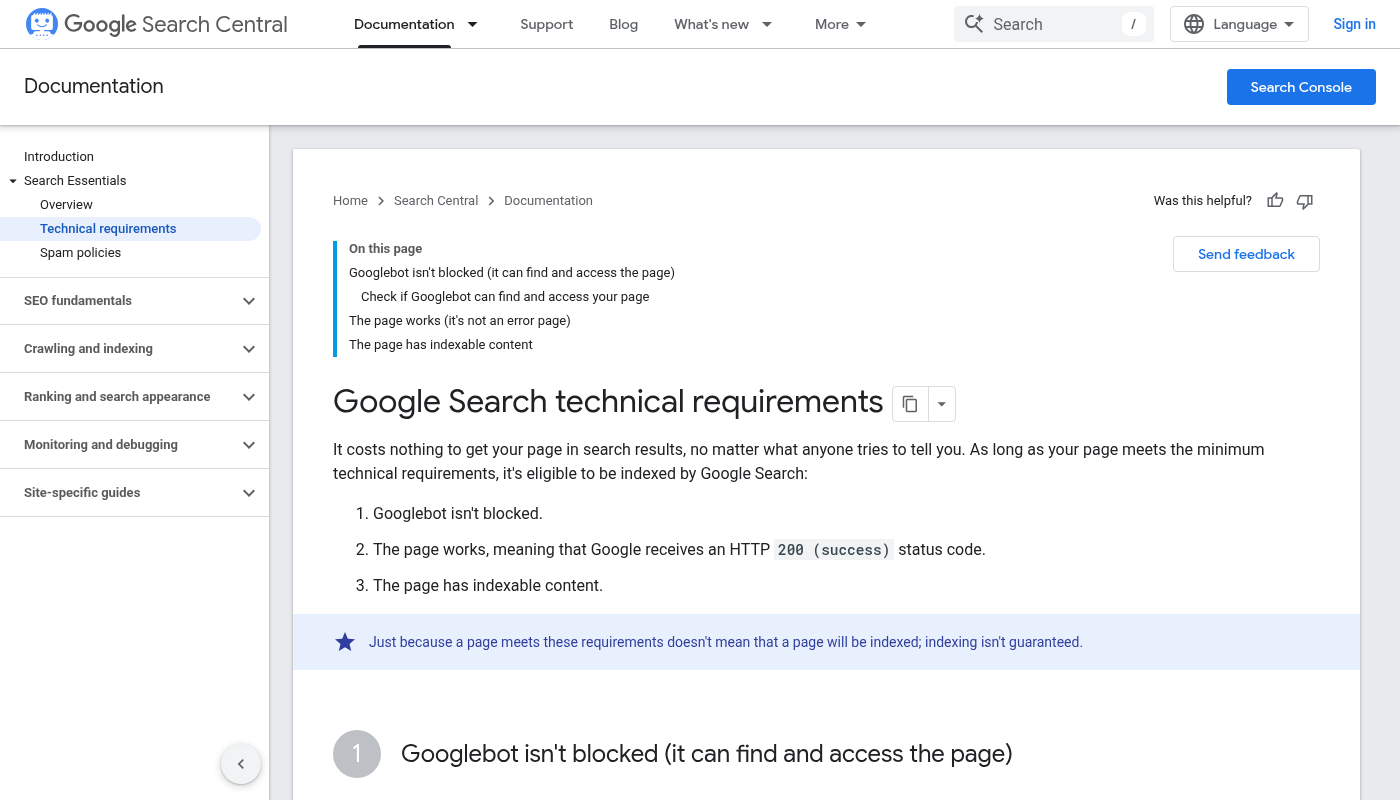
Open the full-size documentation screenshot
Source: Google Search Central, captured October 10, 2026. Open the full-size screenshot to read the documentation. The article text above summarizes the requirements and indexing qualification.
If you have access to your website in Google Search Console, use URL Inspection to inspect the intended page. Check whether Google reports it as indexed and which URL Google treats as the main version, called the canonical. A live test examines the current page; it does not predict which version Google will choose.
An intentionally excluded page or duplicate represented by the correct canonical may need no repair. If the intended public page is unexpectedly excluded, establish the reason before changing indexing settings. Use the SEO audit guide for that investigation.
For new or changed pages, a sitemap can help discovery, and eligible Search Console users can request a crawl. Repeated requests for the same URL do not make crawling faster.
Make the Content and Search Result Clear
Build the information promised in your brief: put the direct answer or offer near the top, explain the necessary details, and add evidence where the reader needs it. Use short paragraphs for reasoning and bullets or tables for items they need to compare.
When revising an existing article, preserve what already helps and add the missing material; the worked content optimization guide shows that deeper editing process.
Then check the page’s presentation:
- Title and main heading: Describe the actual task and payoff in natural language. Avoid repeating keyword variants merely to fit them in.
- Meta description: Summarize what the reader receives. This guide uses: “Work toward Google’s first page: choose a relevant search, compare current results, and build or improve a page using a practical plan and public examples.”
- Images: Use images that clarify the explanation, with meaningful alternative text where the image conveys information. Keep essential instructions in readable text too.
- Next step: Give the reader an appropriate action. Here, it is completing the opportunity brief; a service page may instead help someone assess fit and inquire.
Google can generate its title link from several page signals. It generally creates snippets from page content and may use a meta description when it fits. Check the page’s accuracy rather than assuming the search result will reproduce every word.
Add Relevant Links and Earn Attention
Connect the page from a relevant existing page so readers can find it in context. Use descriptive link text that tells them what they will get. Google recommends an internal link to each page you care about.
For this guide, we propose adding a link from a relevant passage in the Organic SEO article about choosing the next search opportunity.
Include the resource in a relevant newsletter, use it to answer a customer’s question, or share it in a community discussion where it directly helps and the community permits it. Other publishers decide whether it merits a link.
Avoid buying links to manipulate rankings or exchanging links on a large scale for that purpose. Google’s link-spam policy describes those practices. Evaluate a potential link by its relevance and usefulness to the reader; a link-count target alone cannot establish its value.
Check the Experience on Mobile
Open the actual page on a phone-sized screen and try to use it. Can you read the explanation, compare the table, enlarge a source screenshot, and complete the next step? Fix clipped content, intrusive overlays, broken controls, and material loading problems before promoting it.
Core Web Vitals measure aspects of loading, responsiveness, and visual stability. Google uses them in ranking systems, but says good scores do not guarantee top rankings. Improve the experience users encounter. Chasing a perfect tool score should not displace missing information or a broken inquiry path.
5. Review the Result Before Expanding the Work
First verify that the intended change is live and usable. Later, examine whether the chosen page appears for relevant searches and attracts suitable visits. Implementation, search visibility, and business value are separate results; record which one you are assessing.
Keep the comparison consistent: the same page and query group, comparable periods, and the same country and device filters where applicable. Our ranking-check guide explains the difference between Search Console averages and individual ranking snapshots.
Google’s SEO Starter Guide says effects can take hours to months, and some changes produce no noticeable effect. Choose a review date suited to the change and available traffic, and name the signal you will inspect.
If the intended page remains unexpectedly excluded, investigate that condition. If it appears for the wrong task, revisit query and page fit. If relevant visits arrive but the intended next step fails, inspect that experience. When evidence is too thin, record what is missing before commissioning another rewrite.
Assess first-page visibility against the relevant searches and readers it reaches, including useful opportunities you did not anticipate. Keep investing when the evidence and business case justify the next unit of work.
Your First-Page Opportunity Brief
Before commissioning a page, complete these five lines. They turn an abstract ranking ambition into a proposal someone can produce, check, and reassess.
- 1Audience, search, and useful outcome
Who is searching, what do they need, and why can we serve them? - 2Page and evidence
Which URL or page type fits, what do current results show, and does an existing page already do the job? - 3Essentials and contribution
What must the page deliver, and what useful explanation, proof, comparison, or action will it provide? - 4Work, ownership, and limits
Who will produce and maintain it, what effort is required, and what remains unknown? - 5Decision and review
Pursue, narrow, or defer? Name the first action, launch checks, review date, and observation that would change the decision.
Start with one search and a page you can justify. The completed brief should explain why that page deserves the work before the team starts adding more URLs.