Your most useful SEO task may be a small correction on an important page. It may also be finding out why a setting exists before someone removes it. A warning tells you where to look. The page's purpose and the evidence determine what to do.
What Makes Something an SEO Issue?
An SEO issue is a condition that interferes with a page's intended discovery, search presentation, usefulness, or accessibility. You need to know the intended behavior before deciding that the condition is a problem.
A public service page should help potential customers understand the service and take a suitable next step. A non-sensitive confirmation page might exist simply to acknowledge a completed request. Those pages can legitimately have different search settings and internal links.
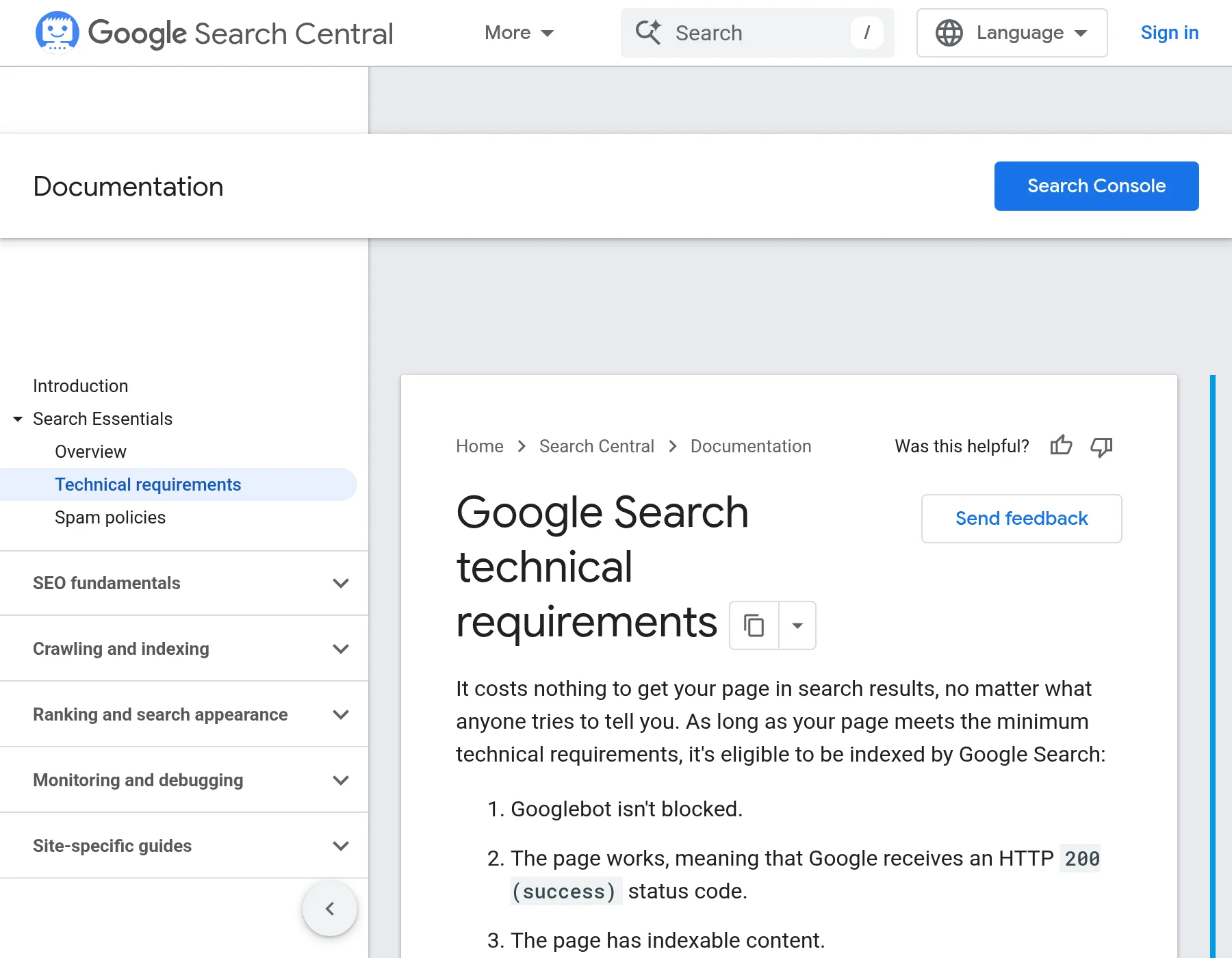
Technical eligibility also differs from competitive value. Google's minimum technical requirements concern crawl access, a working page, and indexable content. Meeting those requirements makes indexing possible. The page still needs useful content, and neither a technical pass nor an implemented improvement guarantees indexing, rankings, or customers.
Common SEO Issues and What to Check
The problems below affect different parts of a visitor's journey. Use the check that matches the finding; several can exist on the same page. The aim is to identify the unwanted condition precisely enough to choose an appropriate first action.
Pages Google Cannot Access or Index
A page meant for public search can have a setting that prevents the intended access or indexing. Examples include an accidental crawl block, a login requirement applied to a public resource, or a noindex instruction telling Google to exclude a page from Search.
Check the exact URL's response, crawl settings, and indexing instructions. A robots.txt crawl block restricts fetching the page; a noindex rule concerns including it in search. Google needs to crawl a page to see its noindex instruction. The instruction can appear in the page's HTML or in an HTTP response header: information the server sends with the page. Google's noindex guidance explains both locations.
If an exclusion conflicts with the approved public purpose, identify its source before changing it. Keep private content protected by access controls. Noindex does not prevent people from opening a URL or protect confidential information.
Check whether an expected HTTPS address opens without connection warnings. HTTPS is the secure connection indicated at the start of a web address.
If that connection fails or the browser warns about it, keep the exact URL and warning and ask the site's technical owner to investigate. Do not bypass a security warning as an SEO fix. Google includes secure delivery in its page-experience checks; this observation alone does not establish a ranking effect.
Broken URLs and Links
A broken link can interrupt the route to content someone needs. A not-found URL can also be the correct response for content that was deliberately removed.
Open the source link and check its actual destination. If the address contains a typo, correct the link. If a needed page was accidentally removed, investigate restoring it. When content permanently moves, an appropriate permanent redirect can direct visitors to its replacement.
For a retired page with no appropriate replacement, retaining a genuine not-found response can be reasonable. Google's HTTP status guidance explains how search handles these responses. Sending every missing URL to the homepage does not establish that visitors have reached a useful replacement.
Confirm the source, response, destination, and destination content. A single temporary failure does not establish a persistent outage.
Duplicate Versions and Wrong Canonical Choices
Several URLs can contain the same or very similar content. A canonical declaration expresses which version you prefer search engines to treat as the main one. A declaration pointing to an unrelated or unintended page deserves investigation.
Compare the actual pages and their purposes before choosing a remedy. A tracking-parameter version and its equivalent clean page may belong together. Two service pages that answer different customer questions can share vocabulary without being duplicates.
Google's canonical guidance treats redirects and canonical annotations as signals for duplicate or very similar pages. They are not interchangeable instructions to apply whenever two pages mention the same keyword.
Ask your developer whether the page declares a preferred canonical URL in its HTML or HTTP response header. If it does, check whether relevant internal links use that address. In Search Console's URL Inspection result, check Google's selected canonical: the version Google chose in its stored information. Correcting your declaration demonstrates a changed preference; it does not prove that Google has adopted it.
Important Pages With Few Useful Internal Links
An important page can be hard to discover when relevant pages do not lead to it. The number of links alone does not establish the problem. Ask where a reader would reasonably need the destination and whether that route exists.
Inspect the actual link element and destination. Google generally needs a crawlable link with a usable address; a control that only runs a script is not a dependable substitute. Descriptive link text should help readers anticipate the destination.
Add a useful connection from an accessible, related page when one is missing. Avoid scattering the same link through unrelated content merely to increase its count.
A sitemap is a file listing URLs for search engines to discover. It can help discovery, especially on larger or more complex sites. It does not replace crawl access or useful links, and not every site needs one. Its absence alone does not prove that a page cannot be indexed.
Titles and Descriptions That Misrepresent the Page
A title or description can create the wrong expectation even when the page works. A service page titled “Home” gives little context. A description advertising an offer that has ended sends readers toward something they cannot get.
Compare the HTML title, main heading, description, and actual page content. The HTML title is supplied in the page's code and often appears in the browser tab. The main heading is the prominent heading visitors read on the page. The meta description is a supplied page summary.
Write a specific, accurate title and a useful page-level description. Google builds title links from several sources and snippets mainly from page content, sometimes using the meta description. Your supplied wording is not guaranteed to appear verbatim.
A character-count warning needs a closer look. Google does not impose a fixed title or meta-description character maximum; displayed text can be truncated to fit the device. Check whether the wording is accurate and informative before treating length alone as a defect or predicting lost clicks.
Content That Misses the Question
A page can load correctly and still leave its intended reader unable to make a decision. The useful check is what the reader needs to understand or do, and which answer is missing.
For an illustrative service page, that might mean explaining who the service suits, what the work includes, or what happens after an inquiry. Adding another paragraph repeating the service keyword would not supply those answers.
Google's people-first content guidance asks whether the reader achieves their goal and explicitly rejects a preferred word count. A concise page can complete a simple task; a long page can still omit the consequential detail.
Compare the question with the actual answer, then improve the missing explanation, example, or evidence. Low traffic alone does not tell you which answer is missing or prove the content is inadequate. For the broader relationship between these activities, see SEO and content marketing.
Slow or Difficult Mobile Pages
Visitors can struggle when navigation is unusable, the main content is obscured, or a page takes too long to become useful. Check the page on a phone-sized display and try its main task, such as reading the service details or opening the inquiry form.
Use a relevant performance test to investigate the observed delay. Google's page-experience guidance identifies Lighthouse as one tool for finding improvements. A developer can then inspect the responsible assets or code before choosing a change.
Core Web Vitals measure loading, responsiveness, and visual stability. They are used by ranking systems, but good scores do not guarantee top rankings. Other usability improvements can help visitors without establishing a direct ranking benefit. Keep the repair tied to the observed difficulty, rather than assuming a perfect tool score is the goal.
Images That Slow or Obscure the Page
An image can create a specific problem: an important product detail does not load, a diagram is unreadable on mobile, or a large asset contributes to a measured delay. Check the actual file, its displayed size, and the job the image serves.
Google's image guidance recommends high-quality images while considering speed and describes responsive delivery. If the image is the verified cause of a problem, choose an appropriate size or delivery method and retest that condition.
Keep meaningful visual information understandable in nearby text and suitable alternative text. Do not add keywords indiscriminately or assume every image requires the same treatment. Changing image dimensions without checking the result can leave a chart too small to read even if its file is lighter.
How to Decide Whether a Finding Needs Action
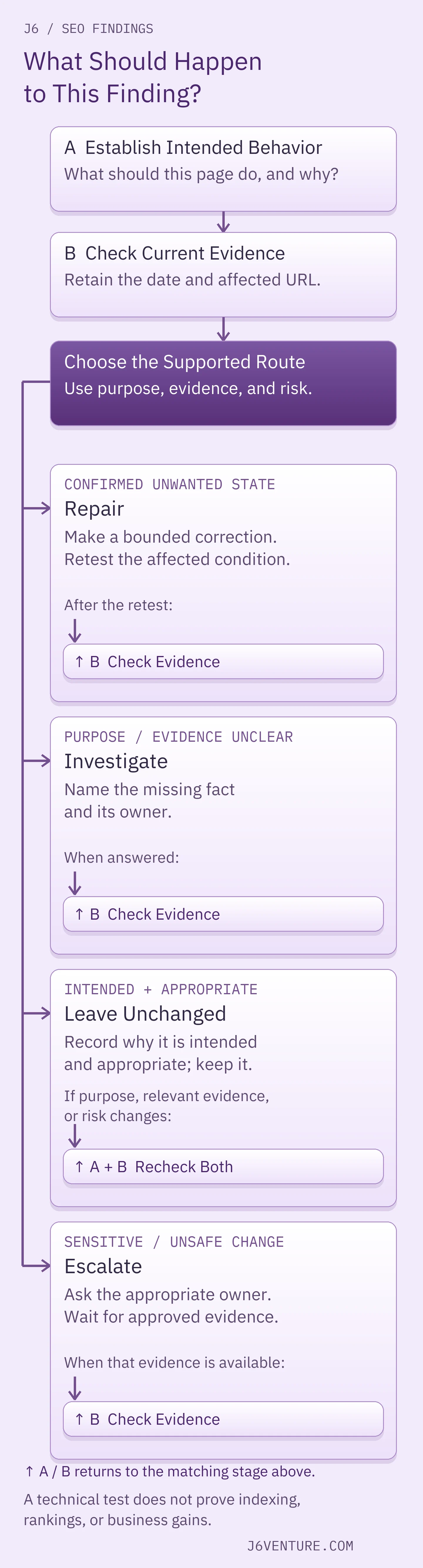
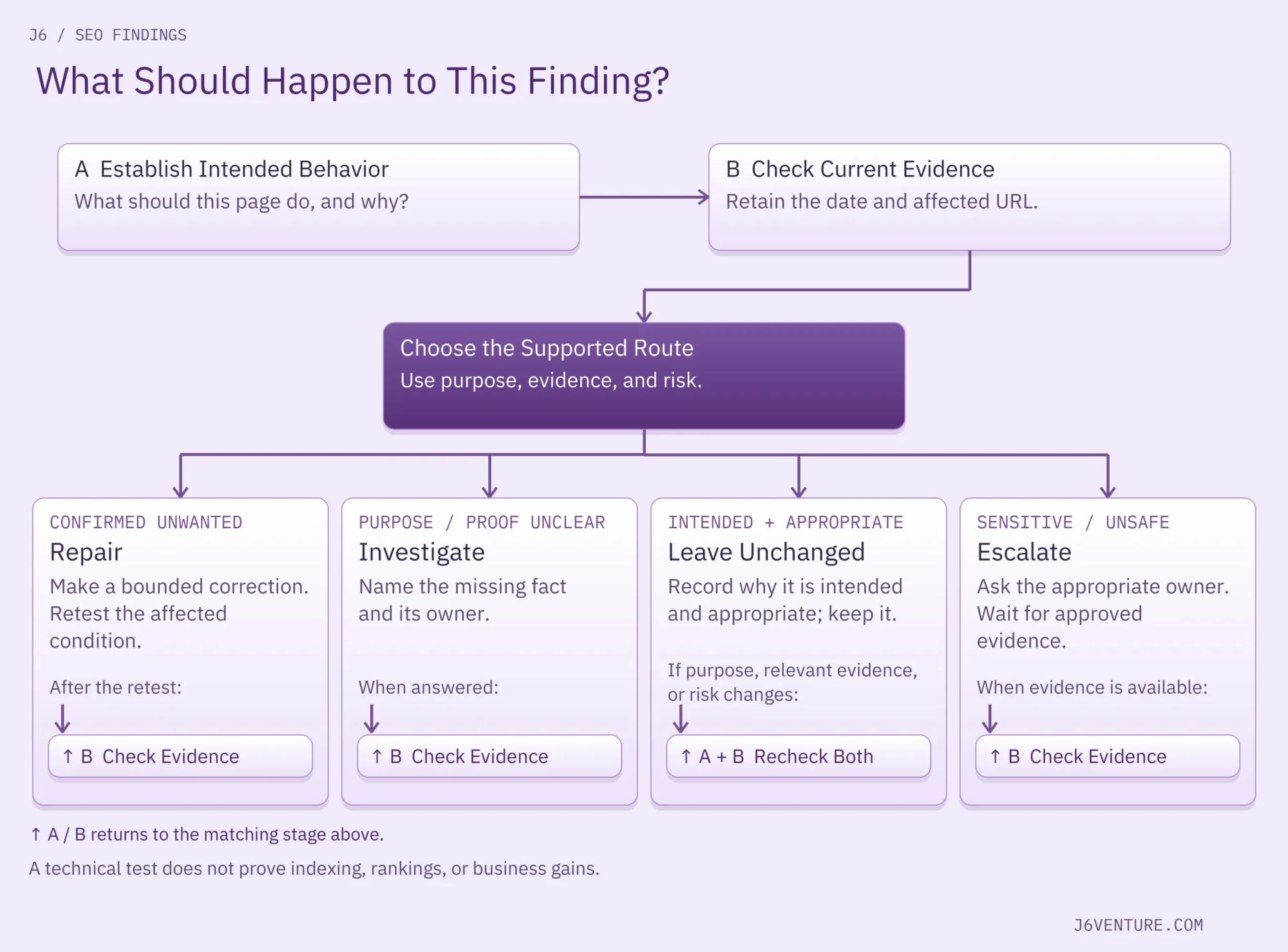
For a specific finding, we suggest establishing what the page should do, checking current evidence, and choosing a bounded next step. If you need to discover problems systematically across a site, use the fuller SEO audit workflow.
Establish What the Page Should Do
Write one plain sentence: “This public service page should appear in search and help visitors request a quote.” Identify the person who can confirm that purpose. For an older utility page, the purpose may be unclear; ask its owner before removing an exclusion.
Separate public search eligibility from privacy. If a finding exposes private information or a proposed fix changes access controls, involve the security or engineering owner. An SEO warning is not authority to publish protected content.
Check the Current Evidence
Keep the exact URL, observation, date, and test method together. A browser or HTTP check can show what the page returns now. If you have Search Console access, enter the exact URL in URL Inspection as a starting point. Search Console's initial URL Inspection result describes Google's indexed information; its live test checks the current page within that test's limits.
Those observations can differ after an edit. Check the crawl date before interpreting an old exclusion as proof that today's repair failed. For indexing instructions, inspect both the applicable HTML and HTTP header; viewing a page successfully does not establish that neither contains noindex.
If you cannot inspect code or server responses, ask your developer: “For this exact URL, please return the date checked, current response status, crawl access, and indexing instructions in both the HTML and HTTP header. Explain whether any rule is intentional and whether it comes from a shared template.” Those dated observations give you a concrete basis for deciding what to do.
If you are working from a delivered audit, our guide to reading an SEO audit report explains the reporting layer. Here, the immediate question is whether this finding conflicts with this page's purpose.
Choose a Bounded Next Step
Use the evidence to choose an action with an owner and a clear finish:
| Decision | When It Fits | What Completes the Next Step |
|---|---|---|
| Repair | A current, unwanted condition is confirmed and a suitable change is understood. | Make the scoped change and retest the affected condition. |
| Investigate | Purpose, current state, cause, or safe remedy is unclear. | Answer the assigned question with evidence, or record what remains unknown and the next owner action. |
| Leave Unchanged | The observed state is intentional and appropriate. | Record why it fits and what change would reopen the decision. |
| Escalate | Security, access, or implementation risk requires another owner's decision. | Obtain that owner's assessment before choosing a change. |
A finding is not resolved merely because it has been assigned. Keep the missing evidence or repair check visible until it has actually been supplied.
The Same Warning Can Lead to Different Decisions
Consider an illustrative pair of public pages: a service page and a non-sensitive request-confirmation page. A checker reports noindex on both. These are hypothetical inputs for learning the method, not findings from a J6 campaign or an executed repair.
When a Noindex Rule Needs Removal
The service owner confirms that the first page should be found in search. Assume a current check shows it returns useful content successfully, permits crawling, and includes an unintended noindex meta tag. The response header contains no additional noindex rule.
The exclusion conflicts with the stated purpose. Identify the setting or template that generated it, remove the unintended instruction within the approved scope, and check the resulting HTML and header again. If the source is shared, establish which other pages it affects before changing it.
That completes a specific repair check: the tested public page no longer carries that exclusion. Check the other affected URLs within the change scope too. A later Search Console URL Inspection result can show whether Google's stored information recognizes the change. Neither observation, by itself, demonstrates a ranking increase or new customers.
When to Leave It or Investigate
The confirmation page contains only a generic acknowledgment, with no personal or confidential details. Assume its owner confirms it is intentionally excluded from search. Keeping noindex fits that purpose. Record the decision and revisit it if the purpose, relevant evidence, or risk changes.
If nobody can confirm why a page is excluded, the next task is to establish its purpose and inspect the current configuration. Give that question to the relevant owner. Removing the rule immediately would substitute a guess for the missing decision.
The warning is similar in all three situations. The intended use and current evidence justify different actions.
Which Finding Should You Work on First?
Compare confirmed problems using the importance and reach of the affected pages, readiness of the repair, dependencies, effort, and implementation risk. These are our suggested decision criteria, not Google's ranking formula. Broad reach matters, but it does not make an unprepared shared-template edit safe.
Suppose a team has confirmed both findings below. Page purposes, observations, and effort estimates are explicitly assumed for this worked example; they are not measured results or promised completion times.
| Finding | Evidence and Scope | Repair Readiness |
|---|---|---|
| A Request a Quote link is broken on an important service page. | The link on the displayed page points to the wrong URL; the intended destination has been checked and works. One source link needs correction. | The editor can make and verify the source-only correction. Illustrative estimate: 10 minutes. |
| An unintended noindex rule affects 12 public service pages. | The owner confirms their public-search purpose; current checks establish the rule on all 12. The source is a shared template. | Engineering must confirm the change and how to undo it safely if needed, then implement and test its scope. Illustrative estimate: two hours once ready. |
With those inputs, correct and test the ready quote link while assigning the template repair to engineering with a specific next checkpoint. The small task is available now; the shared change still needs preparation. The template issue remains open with its own owner and completion checks.
The order can change. If a broad, unexpected indexing block can be reversed safely through an approved change, restoring the public pages' intended settings can take precedence. If the quote destination has not been verified, investigate it before changing the link. Neither page count nor estimated minutes settles the order on its own.
For the link, check that it points to the corrected address on the displayed page and opens the intended working destination, including whether the quote route is usable. For the template, check all 12 affected URLs and any other versions covered by the change. Confirm that each returns the expected page and no longer sends the unintended noindex instruction. One passing page does not establish that every page was corrected.
How to Confirm the Work Is Finished
Finish the task against the condition you set out to change. A corrected link should reach the right working page. An indexing-rule repair should remove the unintended rule from the affected responses. An investigation should answer its assigned question or explicitly retain what remains unknown.
Keep three observations separate:
- The change exists. Current checks show the intended configuration or behavior within the tested scope.
- Google has recognized the relevant change. Later indexed information can establish a new stored state after Google revisits; a live test cannot predict every indexing condition or Google's canonical selection.
- Search and business results changed. Rankings, relevant visits, and customer actions need their own evidence. Timing alone does not establish that the repair caused them.
Before closing your next finding, record the URL, intended behavior, dated evidence, decision and reason, owner, and completion check. Set a review date or a specific reopening trigger. For an intentional exclusion, that trigger might be a changed page purpose. For an unfinished investigation, name the missing fact and who will obtain it.
Choose one finding you can substantiate, make its next task clear, and check the result you actually changed. If the work crosses content, engineering, and search priorities, J6's SEO services can help you define the scope and the evidence needed to evaluate it.