A SaaS business needs buyers to find its public product pages and useful docs while customer workspaces stay private. Technical SEO checks whether those public pages can be discovered, crawled, rendered, and indexed across the marketing site, app, and documentation. Private data requires authentication and authorization; search exclusions do not protect it.
An audit can recommend opening a blocked URL. On your pricing page, that may be the right fix. On a customer's workspace, it could expose private information. Before assigning engineering work, establish what the page should do and whose access it should allow.
What Does Technical SEO for SaaS Cover?
Technical SEO for SaaS involves coordinating search access and public-page usability across a software company's marketing site, product app, and documentation. A marketer may own the pricing page, engineering the app's routes, and a support team the docs platform. Each can inherit different templates, publishing settings, and release processes. An instruction to change 'the site' needs a named surface and owner.
Discovery means finding a URL; crawling means fetching it. Rendering processes the page, including JavaScript where needed; indexing means a search engine includes its content in its searchable collection. Finding or fetching a page does not ensure indexing or useful search visibility.
Consider the difference between a pricing page and an account dashboard. A prospective buyer needs access to the pricing explanation without becoming a customer. The dashboard may contain data that only an authorized customer should see. Restricting the public pricing page can frustrate discovery. Relying on an indexing rule to protect the dashboard can leave private information accessible if authentication and authorization are missing.
Technical checks establish whether a page can be accessed and processed as intended. Relevance, useful evidence, competition, and the offer still affect whether people choose it and take the next step. Google’s documentation makes the boundary concrete: even a successful HTTP response allows further processing without ensuring that the content enters the index. Google’s HTTP status guidance
Step 1: Decide What the SaaS URL Should Do
Decide the intended audience and search purpose of each URL family before changing crawl or indexing controls. Public marketing and useful documentation may deserve search visibility. Customer records and internal environments need access restrictions. A login page can have a legitimate navigational role even though the workspace behind it is private.
Use this suggested starting policy, then adapt it to your product:
| Surface | Intended Job | Technical Treatment to Check |
|---|---|---|
| Pricing, features, use cases, and integrations | Help a prospective buyer evaluate the product | Public access, meaningful content, crawlable links, and appropriate index/canonical settings |
| Public documentation and help | Answer a setup, evaluation, or customer question | Keep useful answers accessible; connect docs to the product pages they explain; check the docs platform’s own settings |
| Older documentation versions | Support people using a specific version | Keep distinct, still-needed instructions usable; consolidate or redirect only when the destination serves the same task |
| Login, signup, and utility pages | Let someone reach or use the service | Decide page by page whether search visibility helps; exclude public utility pages where appropriate |
| Customer workspaces and account data | Serve authorized users | Enforce authentication and authorization; test access without a session |
| Staging and internal previews | Support development and review | Restrict access appropriately; check that production releases do not inherit staging exclusions |
Crawl control, indexing control, and access control do different jobs. Robots.txt tells compliant crawlers what they may fetch. A noindex instruction asks supporting search engines to exclude content after reading it. Authentication and authorization control who can obtain private information. Google explicitly warns that robots.txt is not a reliable way to keep a web page out of Search. Robots.txt guidance
An older documentation page may still serve active users of that version; age alone is not a reason to redirect it.
A public resource can be useful to visitors while intentionally excluded from search. Conversely, a public app-generated page, such as a shareable resource, may deserve indexing. The hostname or the word “app” does not settle the decision.
Step 2: Check the Evidence for a Barrier
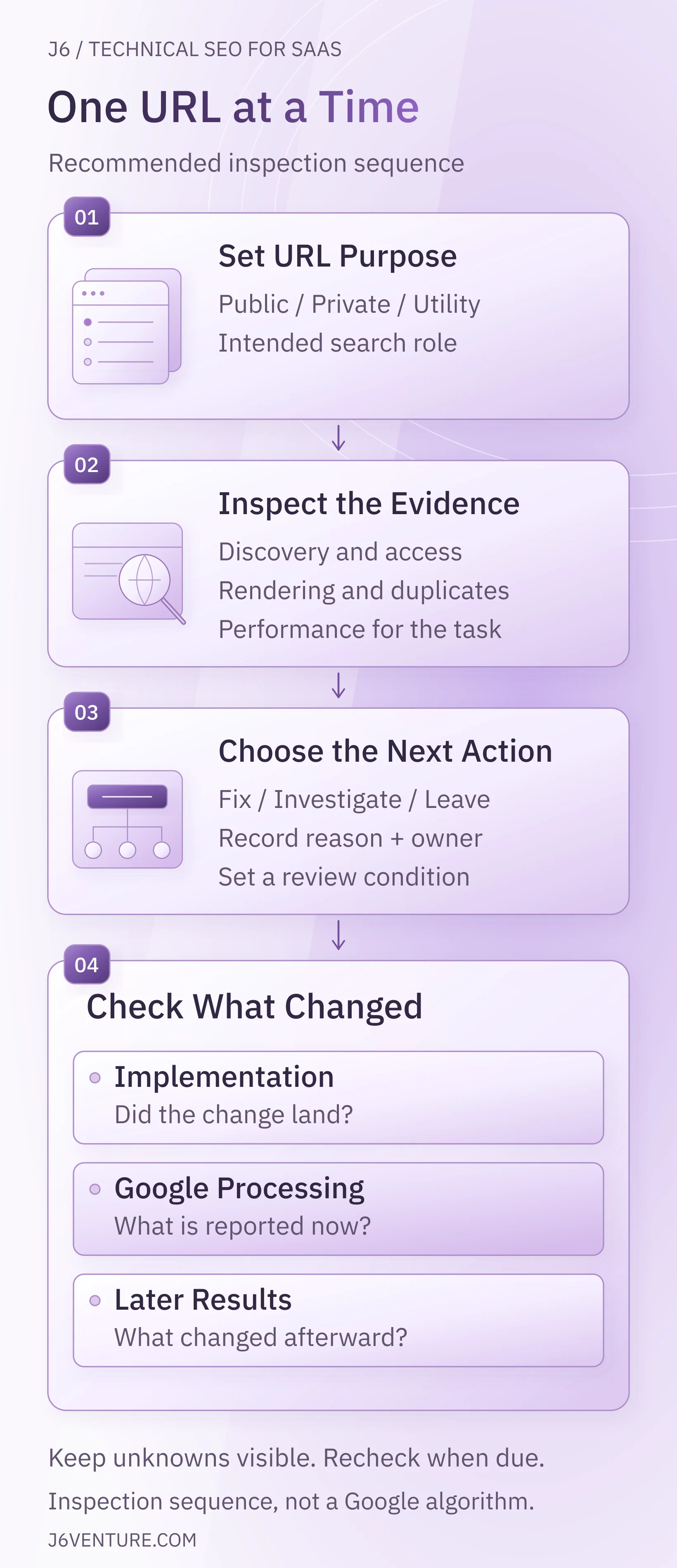
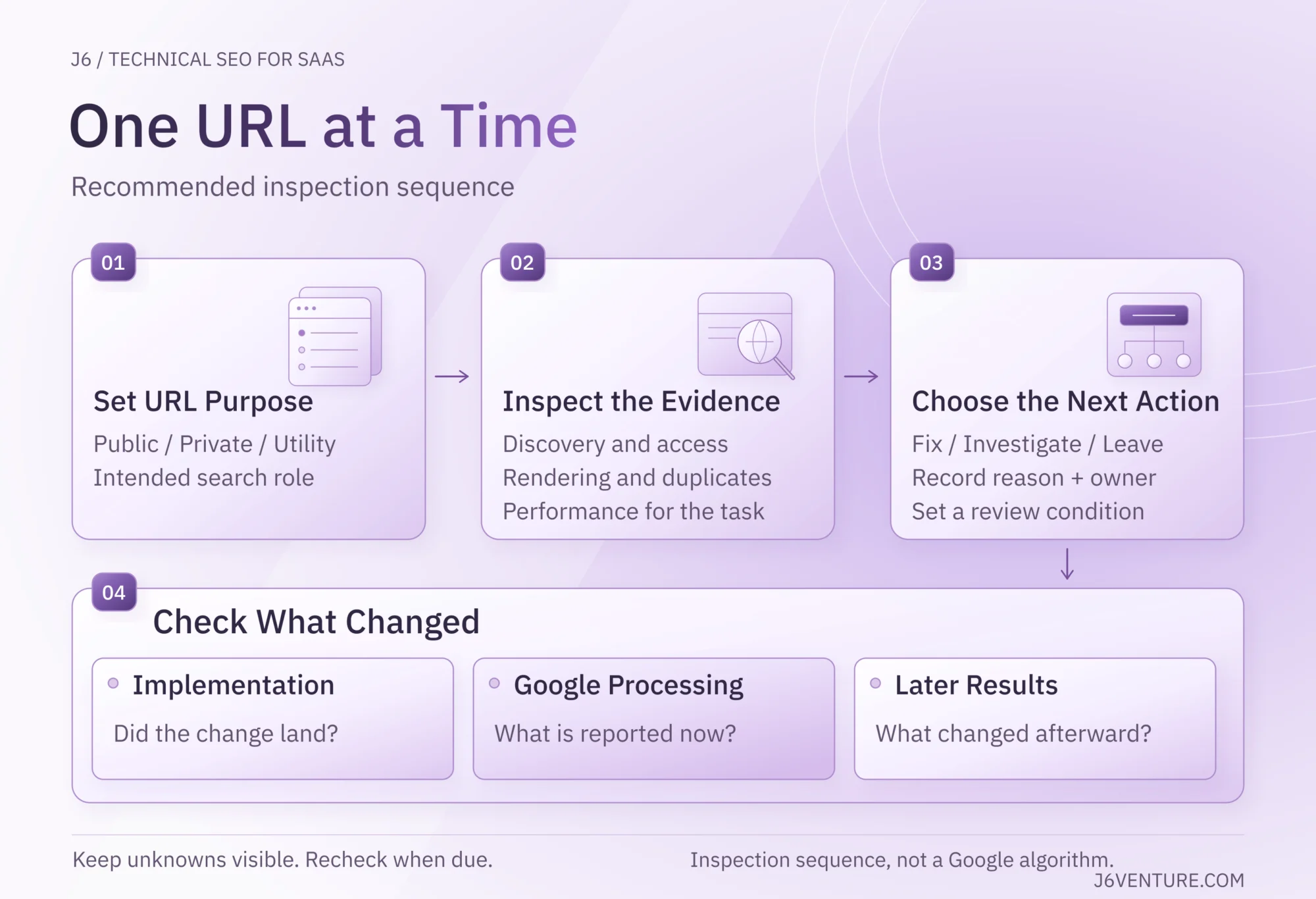
Investigate the exact URL against its intended behavior. Combine a current page check with crawl or Search Console evidence for that URL, and record the observation date. Different tools answer different questions; a crawler finding, a successful live test, and Google’s indexed version can describe different states.
Start with the URL’s purpose, access, and indexing controls, then follow the relevant rendering, duplicate-URL, or performance check. You do not need every diagnostic branch for every URL. Inspection order helps establish the barrier; it does not determine which repair deserves the next engineering slot.
Check Discovery, Access, and Indexing
For an important public URL, establish how it can be discovered, what it returns, whether crawling and indexing are permitted, and what Google last processed. Interpret an unindexed URL against its purpose.
Illustrative SaaS example: your public /pricing page should let a buyer read the plans and reach the demo or signup route without a customer session. Your /app/workspace route should require authorized access. The checks below explore separate hypothetical failures on these routes, then follow one confirmed access-rule problem through repair and verification. These are illustrations, not a tested site or J6 result.
Work through these checks:
- 1Find the discovery path. Check that a public page covering the related topic links to the URL. Inspect whether links resolve to the intended destination. A sitemap can help discovery, but inclusion does not ensure crawling or indexing. Google’s sitemap explanation
- 2Open the exact URL without a session. Check the HTTP response and returned content. A public error page returning
200can be treated as a soft 404. Keep private routes protected. In Chrome DevTools’ Network panel, record the page load and inspect the document request’s headers and response. This captures the current browser request, not Google’s stored version. - 3Inspect the controls. Check applicable robots.txt rules, robots meta tags,
X-Robots-Tagheaders, and the declared canonical. Identify which platform or template supplies each setting. - 4Inspect Google’s evidence. In Search Console’s URL Inspection, read the indexed result and crawl information. Use the live test to check the current page; review its rendered HTML and available resource information when investigating rendering or resource failures. Without verified-property access, assign this check to someone who has it and record Google's indexed state as unknown. Continue the browser checks; they cannot supply Google's stored state.
The indexed result describes Google's stored version; the live test examines current accessibility and potential indexability. The live test cannot predict Google's selected canonical. Record those states separately when they disagree. URL Inspection documentation
For /pricing, follow the link from a public product page, then open the destination logged out. You should see the pricing explanation and a working next step. If it redirects to login, identify the routing or access rule responsible before changing it. Test /app/workspace separately: a login requirement there can be the intended result. Retain each route's response and access behavior; check Google's stored pricing result and crawl date separately.
Check for public pages that need noindex but are blocked from crawling. Google needs access to read the indexing instruction. Fix that conflict only for content approved to remain public; keep private information protected.
Do not make crawl-budget optimization the automatic next project. Google’s advanced guide addresses large or rapidly changing sites and sites with many URLs reported as Discovered - currently not indexed. First establish an actual crawl constraint affecting important URLs. Crawl-budget guidance
For a broader investigation across the site, use the separate SEO audit guide.
Check What JavaScript Renders
Check whether the important public content and links are available after rendering before deciding that JavaScript needs replacing. Google can render JavaScript, but blocked resources or application behavior can prevent the expected output from being available. Content missing from the initial HTML is a reason to inspect rendering, not a diagnosis by itself.
Compare the initial response with Google’s rendered HTML where available. Look for the explanation, product details, and links the page needs. Chrome DevTools’ Elements panel lets you inspect the browser’s current DOM, including content added by scripts. Use it to investigate local behavior; it does not establish what Google rendered. A cached or authenticated browser session can conceal a problem a new visitor encounters.
- Open a deep URL directly as well as through the site’s navigation. Check that it returns the right content and handles missing routes meaningfully.
- Check important links for real
<a href>destinations. JavaScript-created links can work when the rendered result contains suitable anchors; a button’s click handler alone is a weaker discovery path. - Compare mobile and desktop content, important links, indexing controls, and the task itself. Confirm that a visitor can open the navigation and use the signup or demo route on mobile.
Return to /pricing: suppose a logged-out browser shows an empty shell where the plan explanation should be. Inspect the current DOM and failed requests, then compare Google's available rendered HTML for that URL. If both lack the explanation and a required public data request fails, engineering has a specific failure to reproduce. If the browser works but Google's evidence differs, investigate that difference before declaring the cause. A customer session that supplies cached plan data is not a valid public-page acceptance test.
Choose a rendering change after locating the failure. Fixing an inaccessible script or a routing error may be sufficient. Server-side rendering or static generation can make public content available more directly, but a framework migration needs a demonstrated reason. Google's JavaScript guidance, crawlable-link guidance
The JavaScript SEO article covers that implementation topic in greater depth.
Resolve Duplicate URLs and Canonicals
Compare what the URLs contain and whether each deserves a separate search presence. Canonicals help communicate a preferred version among duplicate or very similar pages. Redirects send users and crawlers to a new destination. Neither is a general repair for unrelated pages that happen to mention the same keyword.
Make the choice explicit:
- Both URLs serve distinct tasks: preserve their useful differences. Two integration guides or documentation versions may need separate answers.
- Equivalent versions must remain accessible: identify a preferred URL and align canonical annotations, internal links, and sitemap references with that choice.
- An old URL has been replaced: use a permanent redirect to a replacement that serves the same task and update links pointing to the old address.
- Filters generate many combinations: determine which combinations need search visibility, then investigate crawl expansion and an appropriate navigation/control design.
For example, /integrations/salesforce might explain whether an integration fits a buyer's workflow, while a documentation page explains how to install it. When the content serves those different tasks, preserve both answers. Sharing an integration name does not make the pages duplicates. By comparison, /pricing?utm_source=newsletter may duplicate /pricing; inspect the returned content before choosing the clean URL as preferred. A parameter that changes the actual plan or view needs its own assessment.
Google treats canonical annotations as signals and may select another URL. Use Search Console's URL Inspection indexed result to check the Google-selected version when available; record it beside the page's declared canonical. Google also advises against using noindex as the mechanism for selecting a canonical within one site. Canonical guidance
Do not apply a blanket parameter block without checking the product’s routes. A parameter might represent a disposable sort order, a meaningful view, or a route people need. Google’s faceted-navigation guidance distinguishes URLs that need indexing from combinations that only consume crawl resources. Faceted URL guidance
Improve Performance Where It Affects the Task
Prioritize performance problems on important public pages using the affected task and available measurements. Current Core Web Vitals cover loading performance through LCP, responsiveness through INP, and visual stability through CLS. A perfect score is not a guarantee of a top ranking. Google’s Core Web Vitals guidance, page-experience guidance
Use PageSpeed Insights to examine available real-user data and Lighthouse lab diagnostics. Field data describes observed visitor experience; lab testing helps reproduce a problem and assess a proposed change. Devices, networks, interactions, and test conditions can differ. Missing field data is not evidence of good performance, and a lab score is not proof that the visitor’s task works. web.dev’s measurement explanation
On the illustrative pricing page, suppose the plan selector freezes while a third-party widget initializes. Reproduce that interaction on mobile, identify the responsible work, and test whether deferring the widget restores responsiveness. Confirm that prices update correctly and the demo or signup handoff still works. If the widget supports that handoff, preserve its required behavior. Record the interaction and test conditions alongside the lab diagnostics; review available field evidence separately.
Step 3: Choose Fix, Investigate, or Leave
Choose an action using page importance, the observed barrier, affected scope, confidence, and change risk. Private-data exposure leaves the SEO backlog: escalate it immediately to security/engineering. For SEO work, prioritize a confirmed obstacle on an important intended-search page over an unexplained score deduction.
- Fix: the evidence confirms an unintended barrier and supports a correction.
- Investigate: name the missing check before selecting a repair.
- Leave: no technical change is justified by the available evidence; record why and what would reopen the decision.
This is our suggested decision aid, not Google’s prescribed repair order:
| Observation | Check Before Acting | First Action | Evidence to Retain |
|---|---|---|---|
| Private workspace content opens without required authorization | Intended access policy and the exact exposed routes | Escalate and contain through the security/engineering owner | Logged-out access test and checks that authorized users retain access |
An important public page carries an unintended noindex |
Page purpose, source of the rule, and other exclusions | Correct the narrow setting or template after confirming intent | Current response/rendered rule plus regression checks on pages meant to remain excluded |
| The expected public answer is missing after rendering | Exact route, failed resources, session dependence, and reproducibility | Investigate the failing resource or route before selecting a rendering change | Before/after content and link checks on representative routes |
| Duplicate variants produce inconsistent destinations | Whether content is equivalent and which URL should remain available | Align canonical/link signals or redirect a genuinely replaced URL | Correct destination/annotations now; selected indexed version later |
| A usable indexed page has weak visibility | Queries the page is intended to answer, page purpose, and the quality of competing answers | Reassess relevance and content evidence when technical checks reveal no defect | Query/page review and the reason a technical change is or is not justified |
Weak visibility alone is not a reason for another technical change. When checks reveal no technical defect, review the page’s target queries, relevance, evidence, and competing answers.
If two findings are confirmed, compare their affected URLs and reader tasks, supporting evidence, repair scope, and engineering’s effort and risk estimate. Agree which blocked task the business needs addressed first, then record why the other can wait. If scope or consequence remains unclear, assign a diagnostic task.
If the issue affects a shared template, inspect representative pages before estimating scope. An unconfirmed high-impact hypothesis can justify investigation; it does not establish that a large rebuild is necessary.
For /pricing, suppose inspection confirms that a release mistakenly applied a customer-login rule to this public route. Choose Fix for that confirmed barrier, using the record below. If you have only a report that 'pricing sometimes disappears,' choose Investigate and reproduce the logged-out failure first. Neither observation justifies opening every app route.
The SaaS SEO mistakes guide helps separate a technical barrier from a broader targeting, content, or conversion problem.
Step 4: Verify the Change and Set the Review
Before a repair ships, record the affected URL, intended behavior, acceptance check, and any sibling or protected routes that must keep working. After release, retain the observed result, implementation date, and owner. A changed setting alone does not show that the right public content or access behavior reached production.
Keep three statuses distinct: implemented and technically rechecked, observed in Google's processing, and later search/business outcome measured. Engineering, the SEO owner, and marketing can own those checks respectively. Closing the first status does not complete the other two.
Illustrative pricing decision record
- Purpose: let a logged-out buyer read
/pricingand reach the demo or signup route. - Supposed confirmed barrier: a release applied a customer-login rule to
/pricing, causing a logged-out redirect to login. - Decision, action, owner: Fix. The app-routing owner removes that requirement from confirmed affected public routes.
- Technical acceptance: a direct logged-out visit returns the plan explanation, meaningful links, and working handoff. Representative public siblings work;
/app/workspacestill requires authorization and rejects unauthorized accounts. Engineering records the release and recheck dates. - Later checks: the SEO owner checks current controls and Google's later stored pricing result against the release date. Marketing reviews search visibility and task outcomes separately. Assign review dates at release.
- Result: implementation, Google processing, and business outcomes are all not yet observed in this hypothetical record.
Give each check an owner, a review date, and the signal or result that would trigger further action. Search Console’s stored result can lag a release: compare its crawl date with implementation before deciding the change failed. Investigate and Leave also need an end point: specify the evidence gap to resolve or the condition that would reopen the decision. No implementation result should be recorded when no repair was made.
Apply the Four Steps to Notion’s Publishing Controls
Notion's public documentation provides a narrower, sourced example of publishing, indexing, and access controls. This helps when a team publishes a resource on a separate platform. It is not an audit of a SaaS company's marketing site, app, and docs, or evidence of a defect on Notion's own site. Use the pricing scenario above for that broader route-by-route application.
Separate What the Documentation Shows From What You Must Test
Notion documents publishing a Site, enabling search-engine indexing, and allowing access to anyone with a link as distinct settings. It also warns that unpublishing a Site can leave link access enabled. Publishing can include subpages, so checking only the parent page can miss what is available. Notion’s publishing documentation
The interface labels below come from Notion’s public documentation retrieved October 16, 2026. If the labels move, check the linked current guide before changing settings.
Apply the four steps:
- 1Set the purpose. Identify whether the actual page is a public answer people should find, a public link-only resource, or information restricted to authorized people. Include its subpages in the review.
- 2Inspect the evidence. On a published page in an authorized workspace, open
Share→Publish→Search engine indexingand inspectDiscoverable on the web. Separately inspect the page’s general access underShare, then test the actual URL without a session. Read Search Console evidence separately if you control the verified property. - 3Choose Fix, Investigate, or Leave. For intended public search content, investigate publishing and indexing settings. When public link access is unwanted, Notion documents opening the dropdown beside
Anyone on the web with linkand selectingRemove. Check publishing and subpage access too; unpublishing alone can leave link access enabled. For a deliberately public link-only resource, retain the intended access and review its search exclusion. - 4Verify the change and set the review. Verify the changed setting and logged-out behavior first. Follow Google processing only where search inclusion or exclusion is the goal. Measure subsequent discovery or task completion separately, and assign the next review date.
Enabling a documented indexing option is not proof that Google indexed the page. Turning off indexing does not make its content private. These differences explain why a generic instruction to “make the page crawlable” needs a confirmed page purpose before implementation.
Record the Next Action and Its Checks
Record what the evidence establishes and the next action it supports, including a legitimate decision to leave the site unchanged. For this public-source example, we have documentation rather than a supplied workspace audit. The next action is to collect the affected URL and workspace evidence.
| Record Field | What This Example Establishes |
|---|---|
| Source examined | Notion’s public page at https://www.notion.com/help/public-pages-and-web-publishing, retrieved October 16, 2026 |
| Established | The documentation distinguishes publishing, search indexing, link access, and subpage behavior |
| Not established | A customer’s affected URL, intended permissions, current settings, Google’s stored version, or a defect requiring correction |
| Next action and owner | The workspace/content owner identifies the real target URL and intended audience, then checks the settings and logged-out behavior |
| Technical repair decision | No site-specific change is justified by this documentation alone; choose a correction only after the intended and observed states are compared |
| Completion evidence | Retain the settings and public/access tests; for search changes, have the SEO owner inspect later Google processing; have marketing evaluate the page’s search visibility and task outcomes separately |
When your own evidence confirms an unintended exclusion, the change request becomes specific: name the affected URL and source setting, correct that setting, and verify the public page and any sibling pages that must remain private or excluded. Assign the implementation owner and a review date at release.
Keep the Fix Working Through Releases
Recheck the behavior affected by a release, including representative public pages and protected routes. Documentation platforms, shared templates, authentication changes, and migrations can alter the same controls you previously checked. Keep the checks close to the change that could break them.
For a release that changes these areas:
- Public content or templates: check the explanation, crawlable links, index controls, canonical, mobile task, and required scripts.
- Sharing or authentication: test public resources and private routes without a session, then confirm authorized access still works.
- Documentation URLs: map moved pages to replacements that serve the same tasks, update internal links and sitemaps, and test direct redirects. Preserve still-needed version-specific instructions. Google’s migration guidance
- Localized pages, if present: when URLs move, update existing language and region annotations to their new destinations. The international SEO strategy guide covers the wider market and language decisions.
- Structured data: keep the markup consistent with visible facts and check the requirements of the applicable Google-supported type. Markup validity alone does not establish eligibility for every search feature. Google’s structured-data introduction
Keep this guide’s tool instructions under review too. The content owner should recheck the linked Google and Notion documentation when the next article review is due, or sooner if a reader reports changed controls. Interface instructions need refreshing even when the underlying distinction between access, indexing, and processing stays useful.
Use This Checklist for One Important Page
Pick one important SaaS page and complete a decision record:
- Record the exact URL, SaaS surface, audience, intended visibility, and useful next action.
- Capture the observed behavior, date, and supporting evidence.
- Escalate any private-access concern to security/engineering.
- Select Fix, Investigate, or Leave, with the reason.
- Assign the owner and next action, or explain why no change is justified.
- Define completion evidence and, for a repair, relevant regression checks.
- Set the review date and the signal that would trigger action.
For Fix, check implementation, later Google processing where relevant, and outcomes separately. For Investigate, complete the named evidence check. For Leave, record what would reopen the decision. Expand to related URLs only when the evidence supports the same diagnosis.