Start with a useful page and a reason another publisher would recommend it. Then use the tools that help you complete each action. You can begin with a browser, a mailbox, and a spreadsheet.
The tool details below come from public documentation checked October 29, 2026; no comparative product test was performed.
How a Backlink Works
Link building means working to earn links from other websites to your pages. Suppose a publisher writes a guide to hiring contractors. Your website has a useful contractor-onboarding worksheet. If the publisher adds a link to that worksheet, its guide becomes the source page, your worksheet becomes the destination, and your website gains a backlink.
Why the Recommendation Matters
For your business, a relevant link gives the publisher's readers a route to discover and use your resource, including people who may need what you sell. Google also uses links to discover pages and as a signal of page relevance. A placement does not guarantee a ranking improvement.
The publisher needs a reason to make that recommendation. A worksheet that fills a practical gap could help. A request that only says “please give us a backlink” leaves the reader benefit unexplained.
Tools can uncover the publisher, help identify an appropriate editor, and keep the conversation organized. The editor decides whether the resource belongs on the page. Buying software cannot guarantee the editor's decision.
Internal links connect pages within your own website. This guide concentrates on external backlinks; planning an internal linking strategy is a separate task.
Follow the Link-Building Process
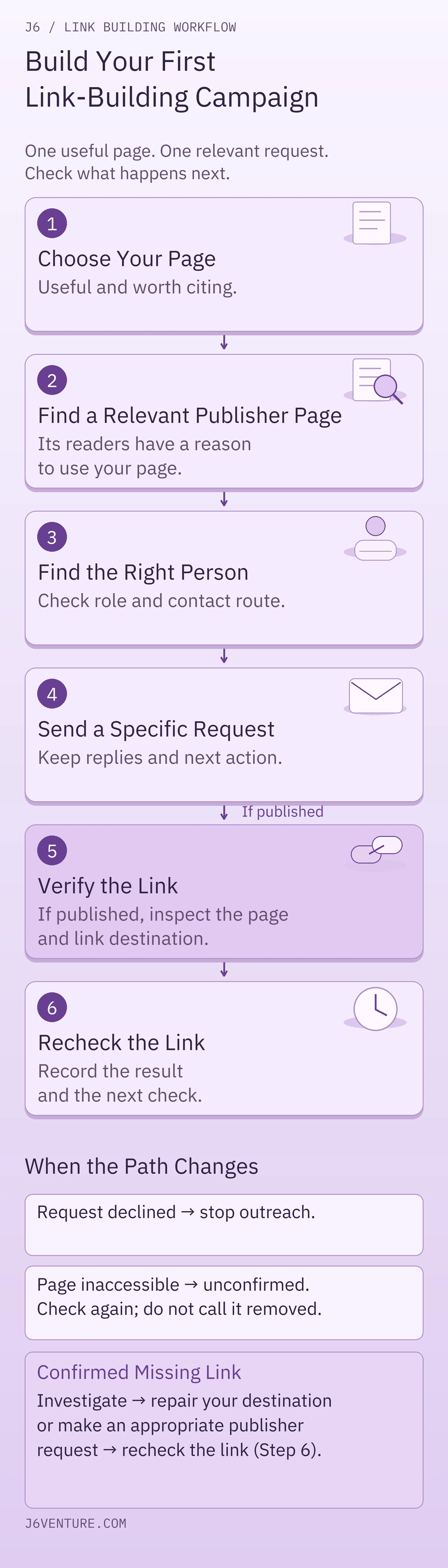
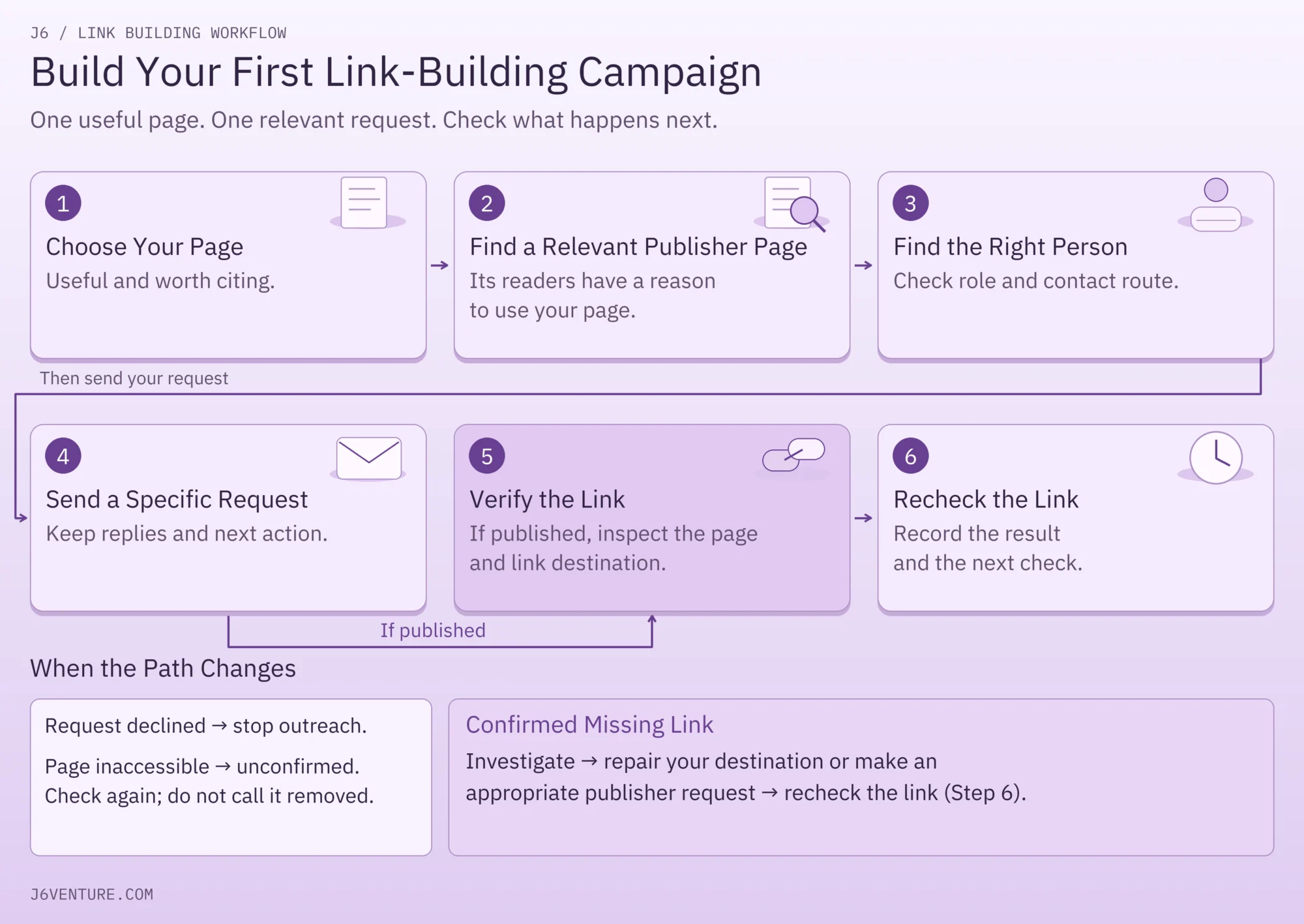
Work from the page you want to recommend toward the person who could reasonably recommend it. After a link appears, check what was published and keep a dated record.
Scroll sideways if columns are off-screen.
| Step | What You Do | Tools or Manual Route | What You Finish With |
|---|---|---|---|
| 1. Choose your page | Identify a useful contribution and check that the page works. | Content inventory, browser; Search Console for optional search context. | One URL and a specific reason to cite it. |
| 2. Find source pages | Locate relevant articles and inspect the fit. | Manual search; Ahrefs or Semrush backlink research. | A shortlist of page URLs with individual reasons. |
| 3. Find a person and route | Establish who handles the content and how to approach them. | Publisher's pages, LinkedIn; Hunter if an email lookup is needed. | A relevant role and an appropriate contact route. |
| 4. Make the request | Explain the benefit and keep replies and next actions together. | Mailbox and spreadsheet; Hunter or BuzzStream where useful. | A message thread with an owner and next action. |
| 5. Verify the link | If a link is published, inspect the source, link, and destination. | Browser; optional URL response check. | A dated initial placement check and any assigned unknown. |
| 6. Recheck the link | Schedule later checks and investigate confirmed changes. | Browser and calendar reminders; selected monitoring features. | A later observation, next check, and any recovery action. |
We will carry one fictional teaching example through those steps: a US software company promoting its contractor-onboarding worksheet. The people, domains, messages, replies, and later observations are invented to demonstrate the method. They are not J6 campaign results or tool-test outputs.
Step 1: Choose a Page Worth Promoting
Choose and Check Your Page
Start by listing a few pages that help the audience you want to reach. A practical template, useful original evidence, a substantial explanation, or a well-designed reference can give another writer something worth citing. Commercial pages can earn links too; the question is what the proposed publisher's readers gain from that particular page.
For each candidate, check three things:
- Audience and business fit: who would use it, and how does that audience relate to your business?
- A citable contribution: what can someone do or understand with this page that makes it worth mentioning?
- Readiness: does the URL load, does the promised resource work, and can a visitor understand its value without a sales conversation?
Write the citation reason in one sentence. “It has useful content” is too vague. “It gives hiring managers an editable first-week checklist they can use alongside this contractor-hiring guide” explains a possible use.
If the page is outdated, the download is broken, or the proposed benefit is missing, improve it before outreach. Promoting a weak destination creates work for both sides.
Use Search Data as Context
If you have access to Search Console:
- Open your website's property and the Performance or Search Results report.
- Choose a date range and open Pages to inspect candidate URLs.
- Apply a page filter for a candidate, then inspect Queries to see the searches associated with it.
Google's Performance report documentation explains clicks, search-result appearances (impressions), click-through rate, and average position.
Search data can help you understand an existing page's audience. Low clicks or a particular ranking range do not establish that backlinks are the missing ingredient. Relevance, presentation, indexing, competition, or other factors may need attention.
A new resource with no search history can still be worth citing. You can use the page assessment above without analytics access.
Example: Select the Onboarding Worksheet
Our example: choose software.example/resources/onboarding. Assume its editable checklist works and covers equipment, access, ownership, and the first week. Its intended readers are hiring managers, an audience the company serves.
Finish this step with: your destination URL, its intended reader, and one credible reason another page would cite it.
Step 2: Find Relevant Websites and Pages
Look for a place where your resource helps the reader of an existing article. A large domain score does not establish that fit. The particular page and its surrounding discussion matter.
Find Pages With Manual Search
Start with the problem your resource solves. For the worksheet, try searches such as contractor onboarding guide, hiring contractors resources, or contractor onboarding checklist. Open relevant results and read the sections where a practical worksheet might help.
For each possible source, ask:
- Does it serve the people our resource helps?
- Does our page add a useful explanation, reference, or resource at a specific point?
- Is the proposed addition appropriate for the page's format and editorial purpose?
Save the source-page URL and the exact reason to approach it. Skip a page that serves a different audience or already provides the same resource well. Existing coverage can also help you improve your own page before asking for attention.
You can do this without a backlink subscription. Manual search gives you inspectable pages; it will not reveal every site linking to a competing resource.
Find Sources Through Competitor Backlinks
First find a genuinely comparable resource through search: a page that addresses the same problem for similar readers. You do not need to start with a famous company or its entire domain.
Then use a backlink research route:
- Copy the comparable resource's complete URL.
- Enter it into Ahrefs Backlink Checker or Semrush's backlink checker. Select page-level scope where the tool offers it; a domain report answers a broader question.
- Inspect the returned referring-page records. Keep the source URL and the page it links to.
- Open a promising source and read the actual link in context. Decide whether your resource adds a distinct benefit there.
Avoid Mistaking a Prospect for a Placement
The output is a lead to inspect. A site linking to one worksheet has not agreed to link to yours.
- Ahrefs: the free checker gives a preview. Fuller reports and exports depend on paid access. Free tools for your own verified website do not provide unrestricted competitor research.
- Semrush: limited free backlink searches sit alongside fuller paid reports.
Neither product's public description establishes a universal accuracy winner.
Example: Qualify the Publisher Page
Our example: assume manual search finds publisher.example/guides/contractors. Its hiring guide explains how to choose contractors but provides no first-week planning worksheet. After reading it, Casey, the company's marketer, records: “The section on starting work would benefit from a usable onboarding checklist.”
That specific gap makes an approach plausible. For deeper qualification, use the separate guide to high-quality backlinks. You already have enough here to reject an unrelated page and explain why a relevant one belongs on your shortlist.
Step 3: Find the Right Person and Contact Route
Start With the Publisher’s Contact Information
Identify who handles the content before looking for an email address. Start with the article's author information, the publisher's editorial team, and its contact or contributor page. Follow any published submission instructions.
A named editor, responsible author, or editorial contact can be appropriate. A founder's title alone does not establish that they update the guide. Record the public source that connects the person or route to this task.
Use a suitable published route first. An editorial mailbox or submission form gives you an explicit route for the kind of request it accepts.
Use LinkedIn to Research the Role
If ownership is unclear, use ordinary LinkedIn people search:
- Search the publisher and a likely role, such as editor.
- Select People, then use All Filters to refine by Current company or Keywords where available.
- Open a profile and check the current role.
A matching job title still needs a connection to the content you want to discuss. Whether you can message someone on LinkedIn depends on your connection and their settings; finding a profile does not establish a direct messaging route.
Sales Navigator adds paid search filters such as function and seniority and advertises 50 monthly credits for InMail, LinkedIn's paid direct messages.
It can be useful for repeated role research, but you do not need it to use a publisher's public contact page. Paid access does not mean unlimited messaging or permission to ignore the publisher's preferred route.
Find and Check an Email With Hunter
When the role is established but an appropriate email address is unavailable, Hunter's Email Finder accepts a person's name and company domain. Retain its returned status with the address.
Hunter's verification guidance distinguishes valid, invalid, and accept-all results. An accept-all domain may accept mail for mailboxes that do not exist; that result leaves the individual address unconfirmed.
Do not turn an uncertain address into an assumed recipient. Use a suitable published route or leave the contact unresolved. A valid email result also does not establish editorial responsibility or guarantee a reply.
Example: Choose the Editorial Form
Our example: assume the publisher's editorial page identifies Riley Chen as the editor responsible for contractor resources and supplies an editorial request form. Casey records that page and chooses the form. No address lookup or paid LinkedIn account is needed for this prospect.
Finish with: the role or named person, its public source, the chosen channel, and any uncertainty that still prevents contact.
Step 4: Send a Useful Request and Manage Replies
Write a Specific Request
Write the request around the source page and the reader benefit you identified. Keep the proposed addition easy to evaluate: name the relevant section, explain what the resource adds, and provide the destination URL. The publisher should be able to assess the suggestion without booking a call.
Here is a fictional message Casey could adapt for the editorial form:
The message connects a specific section to the worksheet and makes Casey's affiliation clear.
Keep the Conversation History
A mailbox and spreadsheet can handle a small campaign. Keep its history usable:
- Save the request. For a form submission, keep a copy and any confirmation or reference number.
- Preserve the reply with that record. If the publisher replies by email, follow up in the existing thread.
- Assign an owner and next action so the conversation can continue without being restarted.
Choose Sending Tools for the Workload
Before adding another sending platform, establish what is missing: shared ownership, a reliable follow-up queue, or a history a teammate can use.
Hunter also offers outreach sequences; BuzzStream provides contact and outreach management. Their capabilities overlap. A paid platform is useful when it solves a concrete coordination problem, and its plan must support the users and functions involved.
For an optional sending route, use Hunter's free Email Sequences:
- Connect a supported Google or Microsoft mailbox.
- Add the selected recipient, then write and preview the message.
- Set the schedule before launching.
Be careful with the limits:
- Free access supports one mailbox and up to 500 recipients per sequence.
- That ceiling is separate from daily sending limits and free contact lookups. Mailbox-provider and account limits still apply.
For the published-form request in our example, none of this sending setup is necessary.
Handle Replies and Follow-Up
Use these next actions:
- No reply: as a suggested starting practice, review the request after about a week. Send one relevant follow-up if it is still appropriate, then close the attempt if there is no response.
- Question or revision request: answer it in the existing conversation and record who acts next.
- Declined or asked to stop: close outreach and preserve that instruction so another teammate does not restart it.
- Editor says the link was added: move to a placement check. The reply supplies a reason to inspect the page.
Use the record below for your own campaign with complete URLs, actual dates, and named owners in place of the example details.
Example conversation record, all hypothetical:
Scroll sideways if columns are off-screen.
| Field | Filled Record |
|---|---|
| Your Page / Source Page | software.example/resources/onboarding / publisher.example/guides/contractors |
| Reason | A first-week worksheet complements the guide's starting-work section. |
| Contact / Source / Channel | Riley Chen, contractor-resources editor; publisher.example/about/editorial-team; published editorial form. |
| Owner / History | Casey; request submitted on Example Day 1; thread reference “Worksheet suggestion.” |
| Reply / Status | Assume Riley replies on Day 4: the resource link has been added. Status: placement check due. |
| Next Action | Casey opens the source and checks the link on Day 4. |
Step 5: Verify the Published Link
Inspect the Published Link and Destination
Open the source-page URL, find the link, and follow it. Record the surrounding wording, linked words, destination, and check date. Check whether the destination actually supplies the resource you recommended.
If the link's HTML attributes matter to your assessment, inspect the link element or ask a technical teammate to record them. Attributes such as nofollow or sponsored describe qualifications attached to the link. Google's outbound-link guidance explains these distinctions.
Common mistake: treating a visible link as proof of its attributes or ranking value. Inspect and record the details you need.
Use Screaming Frog for URL Checks
For several destination URLs, Screaming Frog SEO Spider's List Mode checks whether the supplied URLs respond. Use Mode → List → Upload complete URLs, including https:// → Start.
Read the result, then check the destination and content:
- 200: the server successfully returned that URL.
- Redirect: the URL points elsewhere; inspect where it lands.
- 404: the URL was not found.
A successful destination response does not prove a publisher has linked to it. Default List Mode also does not automatically follow every outgoing link on the supplied pages.
If the Page Cannot Be Checked
If a source page will not open, record check inconclusive, including the attempted URL and date. Try again or assign the access issue. Do not label the backlink removed on that evidence.
Step 6: Monitor and Recover the Link
Set a Recheck Schedule
Put a reminder beside each verified placement. For a small first campaign, our suggested starting cadence is:
- First month: check weekly.
- After that: check monthly for links you continue to maintain.
Adjust this to the placement's importance and your workload. It is an operating suggestion, not a search-engine requirement.
At each reminder, open the recorded source page, find the expected link, follow it to your destination, and date the result in your record. Set the next check or assign any unresolved work.
Understand Monitoring Alerts
If you already use a monitoring feature in Ahrefs, Semrush, or an outreach platform, establish which pages it covers and how it reports changes.
BuzzStream's monitoring instructions say it checks added pages every two weeks and can notify you of link changes. The selected plan's allowance applies; this is neither instant notification nor observation of every page on the web.
A new/lost record in a database is an investigation prompt, not a current view of every source page. Inspect the page before treating an alert as confirmed removal.
Investigate a Reported Missing Link
When a tool reports a missing link:
- Open the recorded source. If access fails, the check remains inconclusive. If the page moved, follow the redirect or locate its replacement and inspect it.
- Find the expected link. It may still exist with changed anchor text or point to a different destination. Record what you can actually see.
- Check your destination. Repair your broken URL, download, or unintended redirect before asking the publisher to restore a recommendation.
- If removal is confirmed, assess the context. The guide may have changed or your resource may no longer fit. Use the existing editorial conversation to ask whether an updated resource would still be useful. Respect a decision to leave it out.
- Recheck any agreed correction. Close the task from an actual observation, or record the remaining unknown.
For example, after fixing your broken download, you might write: “The worksheet linked in your starting-work section stopped opening. We've repaired it at [URL]. If it still fits the guide, would you be comfortable restoring the reference?” Use this only when those facts are true; a lost-link alert alone does not establish them.
Keep the Check Record and Measure Results
Example placement record, all hypothetical:
Scroll sideways if columns are off-screen.
| Field | Filled Record |
|---|---|
| Source / Destination | publisher.example/guides/contractors / software.example/resources/onboarding |
| First Check | Example Day 4: assume Casey sees “onboarding worksheet,” follows it, and opens the working worksheet. |
| Attributes / Owner | Not inspected; technical teammate Morgan to inspect them by Day 5. No ranking treatment inferred. |
| Next Check | Casey, Day 11, using a calendar reminder and browser. |
| Later Observation | Assume Day 11 check finds the link and working worksheet still present. Next placement check: Casey, Day 18. |
| Open Attribute Task | Attributes remain uninspected; Morgan's Day 5 task is overdue. Casey asks Morgan to complete it and checks its status on Day 12. |
| Recovery Trigger | Confirmed removal or a broken destination opens the relevant investigation above. Neither is assumed here. |
If your campaign ends in a decline, no reply, or an inconclusive check, record that outcome.
Measure the different outcomes separately:
- Work completed: requests sent, replies, and inspected placements.
- Retention: dated rechecks showing whether the link is still present.
- Visitor actions: recorded referral visits and conversions, where analytics is configured.
- Search observations: trends in Search Console’s Performance report. Its Links report is sampled and historical and can include removed links.
None of these observations alone proves one backlink caused a ranking or revenue change.
Choose Tools for Your First Campaign
Choose the page and a small set of plausible source pages first. Then use the tools needed to complete the next action. Here are the access boundaries that affect that choice; public details were checked October 29, 2026.
Scroll sideways if columns are off-screen.
| Tool or Route | Useful Starting Action | Free Access or Paid Boundary |
|---|---|---|
| Browser, manual search, mailbox, and spreadsheet | Inspect pages, use published contacts, send an individual request, and keep the record. | No specialist backlink subscription required; you still need working account access for your chosen mailbox and sheet. |
| Search Console | Inspect page/query search context and your own site's reported links. | No paid backlink subscription; the relevant website property must be accessible to your account. It is not competitor research. |
| Ahrefs Backlink Checker | Inspect a limited preview of backlinks to a domain or URL. | Free preview. Ahrefs' 2023 guide describes the top 100 backlinks. Fuller reports require paid Site Explorer; free site-owner access is limited. |
| Semrush Backlink Checker | Inspect limited backlink research before choosing paid reporting. | Free account: up to 10 backlink queries per day and 10 results per report without the SEO Toolkit. This is ongoing limited access, not a paid trial; it does not promise a free bulk export. |
| Hunter | Look up an appropriate named contact and inspect verification status; use outreach features if they meet the task. | 50 shared credits/month: 1 per email found; 0.5 per separately verified email. Finder already verifies its results. Those credits are separate from Email Sequences sending allowances. |
| BuzzStream | Preserve shared prospect/contact conversations and use supported monitoring. | Paid plans. Terms describe a 14-day trial unless sign-up specifies otherwise; billing follows unless canceled. Check chosen users, contacts, and monitoring allowance. Public price displays conflict, so no reliable entry-price total is given. |
| Screaming Frog | Check responses for a supplied set of URLs. | Free version allows up to 500 URLs in a crawl with configuration, saving, and advanced-feature restrictions. It does not discover all backlinks. |
Official access sources: Ahrefs' free-method guide, Semrush free-account guide and report limits, Hunter, BuzzStream, and Screaming Frog. A displayed price is useful only with its billing period and the plan needed for the job.
For the fictional first prospect, a browser, published editorial form, spreadsheet, and reminder were enough. A backlink database would help broaden discovery; an email finder would help only if a suitable email route were missing; shared outreach software would help when the conversation record becomes hard to maintain.
Start by writing down your page and its citation reason. Find one relevant source, explain the addition its readers would gain, and identify the next action you can actually complete. You will have a practical basis for choosing software as the campaign grows.